
પરિચય
The RCA CC9370 AutoShot Digital MiniDV Camcorder is designed for recording high-quality digital video and capturing still images. Featuring a 680,000-pixel CCD for clear resolution, a swiveling 3-inch color LCD monitor for flexible operation, and a 10x optical/250x digital zoom lens, this camcorder is equipped for various recording scenarios. Built-in image stabilization helps maintain steady footage. This manual provides essential information for setting up, operating, maintaining, and troubleshooting your camcorder.
બૉક્સમાં શું છે
ખાતરી કરો કે બધી વસ્તુઓ પેકેજમાં હાજર છે:
- RCA CC9370 AutoShot Digital MiniDV Camcorder
- યુએસબી કેબલ
- વપરાશકર્તા માર્ગદર્શિકા (આ દસ્તાવેજ)
ઉત્પાદન ઓવરview

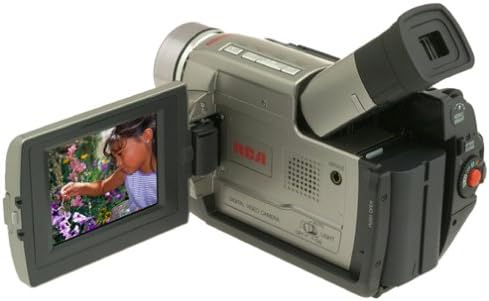
The RCA CC9370 camcorder shown with its 3-inch LCD screen open, displaying a vibrant image. This view highlights the camcorder's compact design and the flexibility of the swiveling screen.
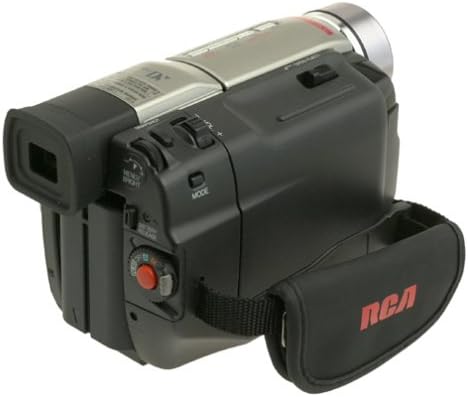
એક બાજુ view of the RCA CC9370 camcorder, illustrating the ergonomic hand strap for secure gripping and various control buttons for easy access during operation.
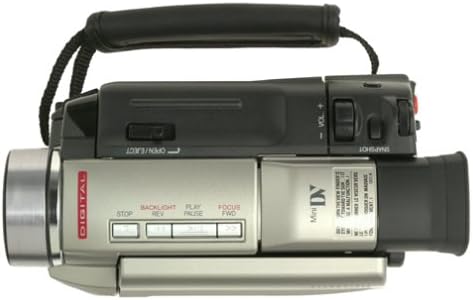
This image provides a top-down perspective of the camcorder, showcasing the lens barrel and the layout of the top-mounted controls, including zoom and recording buttons.
આગળની બાજુ view of the RCA CC9370 camcorder, focusing on the lens assembly and the front panel design, which includes the microphone and other indicators.
સેટઅપ
1. બેટરી ઇન્સ્ટોલેશન
- કેમકોર્ડર બંધ છે તેની ખાતરી કરો.
- કેમકોર્ડરના પાછળના ભાગમાં બેટરી કમ્પાર્ટમેન્ટ શોધો.
- બેટરીને ડબ્બામાં સ્લાઇડ કરો જ્યાં સુધી તે સુરક્ષિત રીતે જગ્યાએ ન આવે.
- To remove, press the battery release lever and slide the battery out.
2. MiniDV Tape Insertion
- Open the tape compartment door, typically located on the top or side of the camcorder.
- Insert a MiniDV cassette with the window facing outwards and the tape reel side oriented correctly.
- Gently push the cassette until it seats properly, then close the compartment door.
3. પ્રારંભિક પાવર ચાલુ
- Connect the AC adapter or ensure the battery is charged.
- Set the POWER switch to the 'ON' or 'CAMERA' position.
- Open the LCD monitor or pull out the viewડિસ્પ્લે સક્રિય કરવા માટે ફાઇન્ડર.
કેમકોર્ડરનું સંચાલન
રેકોર્ડિંગ વિડિઓ
- પાવર ચાલુ: Turn the camcorder on and select 'CAMERA' mode.
- ફ્રેમિંગ: Use the 3-inch swiveling LCD monitor or viewતમારા શોટને ફ્રેમ કરવા માટે શોધક.
- ઝૂમ: Use the zoom lever to adjust between 10x optical and 250x digital zoom.
- છબી સ્થિરીકરણ: The built-in image stabilization system helps reduce camera shake during recording.
- રેકોર્ડિંગ શરૂ/બંધ કરો: Press the RECORD button to begin and end recording.
Digital Still Camera Function
The camcorder can capture still images at 640 x 480 resolution. These images are stored directly onto the digital videotape. To transfer them to a PC, use the provided serial cable and compatible software.
Digital Effects and Scene Transitions
Enhance your recordings with various digital effects and scene transitions. Options may include classic film, strobe, slow shutter, and black and white. Refer to the on-screen menu for selection and application.
પ્લેબેક
- પ્લેબેક મોડ: Switch the camcorder to 'VCR' or 'PLAY' mode.
- નિયંત્રણો: Use the PLAY, STOP, REWIND, and FAST FORWARD buttons to navigate your recordings.
- Playback Zoom: Utilize the playback zoom feature for enhanced viewing of recorded footage.
- Random-Assemble Editing: This feature allows you to mark and recall up to eight favorite scenes for review or basic editing.
કમ્પ્યુટર અથવા ટીવી સાથે કનેક્ટ કરવું
કમ્પ્યુટરથી કનેક્ટ થઈ રહ્યું છે
- For Still Images: Use the provided serial cable to connect the camcorder to your PC. Install any necessary drivers or software for image transfer.
- વિડિઓ માટે: The camcorder includes an IEEE 1394 (FireWire) port and cable for digital video transfer to compatible computers and editing devices.
ટેલિવિઝન સાથે કનેક્ટ થઈ રહ્યું છે
Connect the camcorder to a television using either standard analog AV connectors (RCA composite) or an S-video connector for video playback on a larger screen.
જાળવણી
- લેન્સની સફાઈ: Use a soft, lint-free cloth specifically designed for optical lenses to gently clean the camcorder lens. Avoid harsh chemicals.
- શરીરની સફાઈ: Wipe the camcorder body with a soft, dry cloth. Do not use solvents or abrasive cleaners.
- બેટરી સંભાળ: Store batteries in a cool, dry place. Fully charge batteries before extended use and discharge them periodically if storing for long periods.
- ટેપ સંગ્રહ: Store MiniDV tapes in their cases, away from direct sunlight, high temperatures, and strong magnetic fields.
- સામાન્ય સંગ્રહ: When not in use, store the camcorder in a protective bag or case to prevent dust and damage.
મુશ્કેલીનિવારણ
| સમસ્યા | સંભવિત કારણ | ઉકેલ |
|---|---|---|
| કેમકોર્ડર ચાલુ થતો નથી. | Battery is discharged or not inserted correctly. AC adapter not connected. | Charge the battery or ensure it is properly seated. Connect the AC adapter. |
| LCD પર કોઈ છબી નથી/viewશોધક. | એલસીડી/viewfinder not open or activated. Power saving mode. | Open the LCD or pull out the viewfinder. Check power saving settings. |
| નબળી વિડિઓ ગુણવત્તા. | Lens is dirty. Insufficient lighting. Image stabilization off. | Clean the lens. Record in better lighting conditions. Ensure image stabilization is active. |
| Cannot transfer still images to PC. | Incorrect cable connection. Missing drivers/software. | Ensure serial cable is securely connected. Install necessary drivers and software. |
વિશિષ્ટતાઓ
| લક્ષણ | વિગત |
|---|---|
| બ્રાન્ડ | આરસીએ |
| મોડલ નંબર | સીસી9370 |
| ફોટો સેન્સર ટેકનોલોજી | CCD |
| વિડિઓ કેપ્ચર રિઝોલ્યુશન | 480p |
| સ્થિર છબી ઠરાવ | 640 x 480 (stored on videotape) |
| સ્ક્રીન માપ | 3 Inches (swiveling color LCD) |
| ઓપ્ટિકલ ઝૂમ | 10x |
| ડિજિટલ ઝૂમ | 250x |
| છબી સ્થિરીકરણ | ડિજિટલ |
| કનેક્ટિવિટી ટેકનોલોજી | RCA (Analog AV), S-Video, IEEE 1394 (FireWire), Serial (for still images) |
| બેટરી સરેરાશ જીવન | 1 કલાક |
| વસ્તુનું વજન | 3.18 પાઉન્ડ |
| રંગ | કાળો, ચાંદી |
વોરંટી માહિતી
This RCA CC9370 AutoShot Digital MiniDV Camcorder comes with a warranty covering 1 year for parts and 90 days for labor from the date of purchase. Please retain your proof of purchase for warranty claims. This warranty covers manufacturing defects and does not cover damage caused by misuse, accidents, or unauthorized modifications.
આધાર
For further assistance, technical support, or warranty service, please refer to the contact information provided with your product packaging or visit the official RCA support website. Ensure you have your model number (CC9370) and proof of purchase available when contacting support.


