
1. પરિચય
This manual provides essential information for the safe and efficient use of the Finder 80.01.0.240.0000 Multifunction Time Delay Relay. This device is designed for precise timing control in various applications, offering multiple functions and a wide time range. Please read this manual thoroughly before installation and operation.
2. સેટઅપ અને ઇન્સ્ટોલેશન
Proper installation is crucial for the reliable operation of the time delay relay. Ensure all power is disconnected before proceeding with installation.
2.1 ઉત્પાદન ઓવરview

આકૃતિ 1: ફ્રન્ટ view of the Finder 80.01.0.240.0000 Time Delay Relay, showing the time setting dial, function selector, and terminal markings.
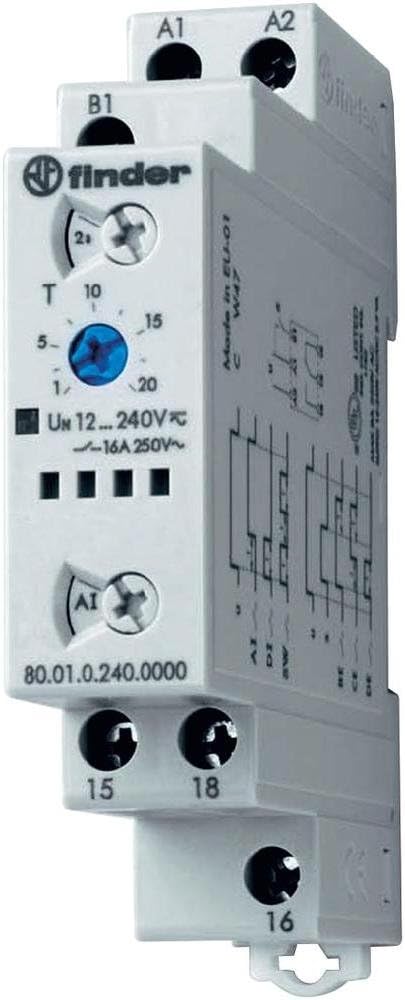
આકૃતિ 2: કોણીય view of the Finder 80.01.0.240.0000 Time Delay Relay, illustrating its compact design and DIN rail compatibility.
2.2 માઉન્ટ કરવાનું
The Finder 80.01.0.240.0000 relay is designed for DIN rail mounting. Securely attach the relay to a standard 35mm DIN rail in an appropriate enclosure, ensuring adequate ventilation.
2.3.૨.૨ વાયરિંગ
Refer to the wiring diagrams below for correct electrical connections. Ensure all connections are tight and conform to local electrical codes.

Figure 3: Wiring diagrams for the Finder 80.01.0.240.0000 Time Delay Relay. The left diagram shows basic connection for terminals A1, A2, 15, 16, 18. The right diagram includes an external control input 'S' at terminal B1.
- Power Supply (A1, A2): નિયંત્રણ વોલ્યુમ કનેક્ટ કરોtage (12-240V AC/DC) to terminals A1 and A2.
- Control Input (B1): For functions requiring an external control signal, connect the signal to terminal B1.
- Output Contacts (15, 16, 18): These are changeover contacts. Terminal 15 is the common, 16 is normally closed (NC), and 18 is normally open (NO). Connect your load circuit to these terminals.
2.4 પ્રારંભિક રૂપરેખાંકન
Before applying power, set the desired time range and function using the rotary selectors on the front of the unit. The time range can be set up to 24 hours. Consult the product datasheet for specific function definitions.
3. ઓપરેટિંગ સૂચનાઓ
Once installed and configured, the relay operates automatically based on the selected function and time settings.
3.1 કાર્ય પસંદગી
Rotate the function selector switch to choose the desired timing mode (e.g., ON-delay, OFF-delay, flasher). Refer to the product's technical specifications for a complete list of available functions and their descriptions.
3.2 સમય સેટિંગ
Use the time setting dial to adjust the delay period within the selected time range. The dial typically has markings for common time values. Fine-tuning may be required for precise applications.
3.3 સ્થિતિ સૂચકાંકો
The relay features an LED indicator. This LED typically blinks during the timing phase and illuminates steadily when the output relay is energized, providing visual feedback on the operational status.
4. જાળવણી
The Finder 80.01.0.240.0000 time delay relay is designed for long-term, maintenance-free operation. However, periodic checks can ensure optimal performance.
- સફાઈ: Keep the relay free from dust and debris. Use a dry, soft cloth for cleaning. Do not use solvents or abrasive cleaners.
- કનેક્શન તપાસો: વાયરિંગ કનેક્શન સુરક્ષિત અને કાટથી મુક્ત રહે તેની ખાતરી કરવા માટે સમયાંતરે તેનું નિરીક્ષણ કરો.
- પર્યાવરણીય પરિસ્થિતિઓ: અકાળ નિષ્ફળતા અટકાવવા માટે ખાતરી કરો કે કાર્યકારી વાતાવરણ નિર્દિષ્ટ તાપમાન અને ભેજની શ્રેણીમાં રહે.
5. મુશ્કેલીનિવારણ
If the relay does not operate as expected, perform the following basic checks:
- કોઈ શક્તિ નથી: Verify that the control voltage is correctly applied to terminals A1 and A2 and is within the specified range (12-240V AC/DC). Check fuses or circuit breakers.
- ખોટો સમય: Confirm that the time range and time setting dials are correctly configured for the desired delay.
- Output Not Switching: Check the load connections to terminals 15, 16, and 18. Ensure the load is within the relay's contact rating (16A 250V~). Verify the selected function is appropriate for the application.
- Control Signal Issue: If using an external control signal (B1), ensure it is correctly applied and within specifications.
- એલઇડી સૂચક: Observe the LED behavior. A continuously off LED may indicate no power, while an unexpected blinking pattern might suggest a fault or incorrect function selection.
If issues persist after these checks, consult a qualified electrician or contact Finder technical support.
6. ટેકનિકલ વિશિષ્ટતાઓ
The following table details the key technical specifications for the Finder 80.01.0.240.0000 Multifunction Time Delay Relay.
| લક્ષણ | સ્પષ્ટીકરણ |
|---|---|
| મોડલ નંબર | 80.01.0.240.0000 |
| બ્રાન્ડ | શોધક |
| પુરવઠો ભાગtage | 12-240V AC/DC |
| આઉટપુટ સંપર્ક રેટિંગ | 16A 250V~ |
| સમય શ્રેણી | Up to 24 hours (max) |
| સેટિંગ્સની સંખ્યા | 6 (Functions) |
| સામગ્રી | પોલીકાર્બોનેટ |
| રંગ | સફેદ |
| ઉત્પાદનના પરિમાણો (D x W x H) | ૧૧.૪૨" x ૩.૫૪" x ૨.૩૬" (૨૯૦ મીમી x ૯૦ મીમી x ૬૦ મીમી) |
| વસ્તુનું વજન | 4.54 ગ્રામ |
6.1 પરિમાણો

Figure 4: Dimensional drawing of the Finder 80.01.0.240.0000 Time Delay Relay, showing measurements in millimeters for installation planning.
7. વોરંટી અને સપોર્ટ
7.1 વોરંટી માહિતી
Finder products are manufactured to high standards and are typically covered by a manufacturer's warranty against defects in materials and workmanship. For specific warranty terms and duration, please refer to the documentation provided with your purchase or contact Finder directly.
7.2 ટેકનિકલ સપોર્ટ
For technical assistance, product inquiries, or support, please visit the official Finder website or contact their customer service department. Ensure you have your product model number (80.01.0.240.0000) available when seeking support.