
iGaging 35-128
iGaging Digital Electronic Indicator User Manual
મોડેલ: 35-128
પરિચય
The iGaging Digital Electronic Indicator is a precision measuring instrument designed for accurate dimensional measurements in various workshop and industrial applications. It provides highly precise readings in multiple units, making it an indispensable tool for tasks such as aligning machinery, checking runout, and setting tool heights.
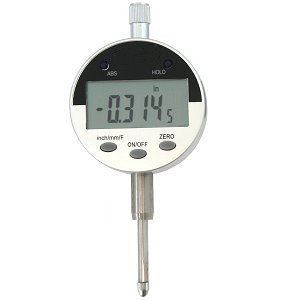
Figure 1: The iGaging Digital Electronic Indicator, displaying a measurement. This image illustrates the compact design and digital display of the device.
ઉત્પાદન લક્ષણો
- Versatile Reading Functions: Provides measurements in inches, metric (millimeters), and fractional increments for broad applicability.
- Power-Saving Auto/Off Feature: Automatically conserves battery life by powering down when not in use.
- ABS Hold Function: Allows for absolute and incremental measurements, enhancing flexibility in various measurement scenarios.
- Data Output Capability: Equipped with a port for connecting to a computer, enabling data logging and analysis.
- વિશાળ માપન શ્રેણી: Features a 1-inch range with a high resolution of 0.0005 inches.
- માનક માઉન્ટિંગ: Includes a 3/8 inch hole on the back mount for compatibility with standard alignment tools, height gauges, and magnetic base holders.
- રક્ષણાત્મક સંગ્રહ: Comes packaged in a padded, protective plastic case for safe transport and storage.
સેટઅપ
1. અનપેકિંગ
Carefully remove the Digital Electronic Indicator from its padded protective plastic case. Inspect the device for any signs of damage during transit. Retain the original packaging for future storage or transport.
2. બેટરી ઇન્સ્ટોલેશન
The indicator typically comes with a battery pre-installed. If the display does not illuminate or shows a low battery indicator, follow these steps to replace the battery:
- યુનિટની પાછળ બેટરી કમ્પાર્ટમેન્ટ કવર શોધો.
- Gently slide or unscrew the cover to open the compartment.
- Remove the old battery (if present) and insert a new CR2032 lithium coin cell battery, ensuring the positive (+) side faces upwards.
- બેટરી કમ્પાર્ટમેન્ટ કવર સુરક્ષિત રીતે બદલો.
3. Mounting the Indicator
The indicator is designed for use with various mounting accessories. It features a 3/8 inch hole on its back mount for compatibility.
- Attach the indicator to a suitable magnetic base, height gauge, or other alignment tool using the 3/8 inch mounting hole.
- Ensure the indicator is securely fastened to prevent movement during measurement.
ઓપરેટિંગ સૂચનાઓ
1. પાવર ચાલુ/બંધ
- To turn the indicator ON, દબાવો ચાલુ/બંધ બટન. ડિસ્પ્લે પ્રકાશિત થશે.
- To turn the indicator બંધ, દબાવો અને પકડી રાખો ચાલુ/બંધ button for a few seconds until the display turns off. The unit also features an automatic power-off function to save battery.
2. Unit Selection (Inch/Metric/Fractional)
દબાવો inch/mm/F button to cycle through the available measurement units:
- ઇંચ: Displays measurements in decimal inches.
- મીમી: Displays measurements in millimeters.
- F (Fractional): Displays measurements in fractional inches (e.g., 1/64, 1/32).
3. Zeroing the Display
To set the current position as the zero reference point:
- Position the indicator's probe at the desired starting point for your measurement.
- દબાવો શૂન્ય button. The display will reset to 0.0000 (or 0.00 in mm, or 0 in fractional) at this position. All subsequent movements will be measured relative to this zero point.
4. ABS/INC Mode (Absolute/Incremental)
The indicator supports both absolute and incremental measurement modes:
- દબાવો ABS button to toggle between Absolute (ABS) and Incremental (INC) modes.
- In ABS મોડ, the display shows the absolute distance from a factory-set or previously established absolute zero point.
- In INC mode, the display shows the distance from the last zeroed position (set using the શૂન્ય button). This is useful for measuring differences or relative movements.
5. માપન લેવું
Once the indicator is mounted and zeroed, gently move the probe to make contact with the surface or object to be measured. The digital display will show the precise measurement. Ensure smooth and consistent movement for accurate readings.
6. Data Output
The indicator features a data output port (often a Mini USB jack) for connecting to a computer or data acquisition system. This allows for real-time data logging and analysis. Refer to specific software or interface instructions for detailed data transfer procedures.
જાળવણી
1. સફાઈ
- Regularly wipe the indicator's body and probe with a clean, soft, lint-free cloth.
- હઠીલા ગંદકી માટે, થોડો ડીamp હળવા સાબુવાળા કપડાનો ઉપયોગ કરી શકાય છે, અને ત્યારબાદ તાત્કાલિક સૂકવી શકાય છે.
- Avoid using harsh chemicals, solvents, or abrasive materials, as these can damage the display or finish.
- Ensure no liquids enter the electronic components or the data output port.
2. બેટરી રિપ્લેસમેન્ટ
Replace the battery (CR2032) when the display becomes dim or a low battery indicator appears. Refer to the "Setup" section for detailed battery installation instructions.
3. સંગ્રહ
When not in use, store the Digital Electronic Indicator in its original padded, protective plastic case. This protects it from dust, moisture, and physical impact, ensuring its longevity and accuracy.
- Store in a dry environment, away from extreme temperatures and direct sunlight.
- Avoid storing near strong magnetic fields, which could affect the electronic components.
મુશ્કેલીનિવારણ
| સમસ્યા | સંભવિત કારણ | ઉકેલ |
|---|---|---|
| ડિસ્પ્લે ચાલુ થતું નથી. | ડેડ અથવા અયોગ્ય રીતે ઇન્સ્ટોલ કરેલી બેટરી. | Replace the battery (CR2032) and ensure it is inserted with correct polarity. |
| અચોક્કસ અથવા અસંગત વાંચન. | Dirt/debris on probe or measuring surface; loose mounting; extreme temperature changes. | Clean the probe and measuring surface. Ensure the indicator is securely mounted. Allow the unit to acclimate to ambient temperature. |
| Display flickering or blinking. | બેટરી ઓછી છે; આંતરિક ઇલેક્ટ્રોનિક સમસ્યા છે. | બેટરી બદલો. જો સમસ્યા ચાલુ રહે, તો ગ્રાહક સપોર્ટનો સંપર્ક કરો. |
| બટનો પ્રતિભાવવિહીન. | Unit frozen; low battery. | Remove and reinsert the battery to reset the unit. Replace battery if low. |
વિશિષ્ટતાઓ
| વિશેષતા | વિગત |
|---|---|
| મોડલ નંબર | 35-128 |
| માપન એકમો | Inch, Millimeter, Fractional Inch |
| શ્રેણી | 1 ઇંચ (25.4 મીમી) |
| ઠરાવ | 0.0005 ઇંચ |
| પાવર સ્ત્રોત | CR2032 Lithium Coin Cell Battery (included) |
| માઉન્ટિંગ હોલ વ્યાસ | 3/8 ઇંચ |
| પેકેજ પરિમાણો | 6 x 3.1 x 2.5 ઇંચ |
| વજન | Approximately 0.01 ounces (unit weight, excluding packaging) |
| ઉત્પાદક | આઇગેજિંગ |
વોરંટી માહિતી
Specific warranty details for the iGaging Digital Electronic Indicator (Model 35-128) are typically provided at the point of purchase or within the product packaging. Please refer to the documentation included with your product for comprehensive warranty terms and conditions. For general warranty inquiries, it is recommended to contact iGaging directly.
ગ્રાહક આધાર
For technical assistance, operational questions, or service inquiries regarding your iGaging Digital Electronic Indicator, please contact iGaging customer support. Contact information can usually be found on the manufacturer's official webસાઇટ પર અથવા ઉત્પાદન પેકેજિંગ પર.
When contacting support, please have your product model number (35-128) and any relevant purchase information readily available to facilitate a quicker resolution.
Ask a question about this manual
Ask about setup, troubleshooting, compatibility, parts, safety, or missing instructions. Manuals+ will review the question and use this page’s manual context to help answer it.