
પરિચય
This manual provides comprehensive instructions for the safe and effective use, installation, and maintenance of your MIPRO MB-70 Replacement Rechargeable 12V Battery. Please read this manual thoroughly before using the product to ensure optimal performance and longevity.
મહત્વપૂર્ણ સલામતી માહિતી
Always observe the following safety precautions to prevent injury or damage to the battery and connected equipment:
- ના કરો ટૂંકા સર્કિટ બેટરી ટર્મિનલ્સ.
- ના કરો expose the battery to extreme temperatures, direct sunlight, or fire.
- ના કરો immerse the battery in water or other liquids.
- ના કરો attempt to open, disassemble, or modify the battery.
- બેટરીને બાળકો અને પાળતુ પ્રાણીની પહોંચથી દૂર રાખો.
- સ્થાનિક નિયમો અનુસાર ખતમ થયેલી બેટરીનો નિકાલ કરો.
- Use only chargers specified for 12V lead-acid batteries.
ઉત્પાદન ઓવરview
The MIPRO MB-70 is a high-quality, rechargeable 12V lead-acid battery designed as a replacement for compatible MIPRO audio equipment and other devices requiring a 12V power source. It provides reliable and consistent power for extended operation.
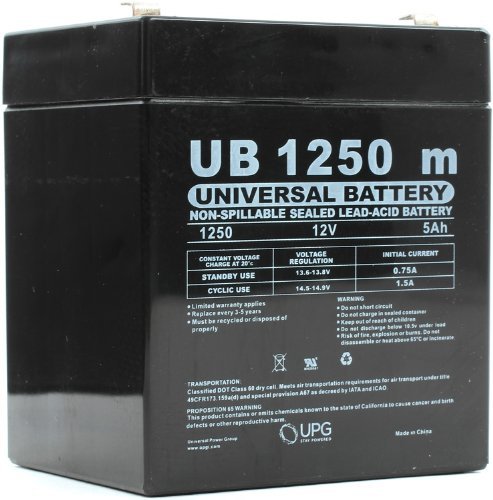
Image 1: The MIPRO MB-70 Replacement Rechargeable 12V Battery. This image shows the compact, rectangular form factor of the battery, typically black or dark gray, with visible terminals for connection.
ઇન્સ્ટોલેશન સૂચનાઓ
Follow these steps to safely install the MIPRO MB-70 battery into your compatible device:
- પાવર બંધ ઉપકરણ: Ensure the device requiring the battery replacement is completely powered off and disconnected from any power sources.
- બેટરી કમ્પાર્ટમેન્ટ શોધો: Identify and open the battery compartment on your device. Refer to your device's manual for specific instructions.
- જૂની બેટરી કાઢી નાખો: Carefully disconnect the old battery, noting the polarity (positive and negative terminals). Remove the old battery from the compartment.
- નવી બેટરી દાખલ કરો: Insert the MIPRO MB-70 battery into the compartment, ensuring the terminals align correctly with the device's connectors. Connect the positive (+) terminal first, then the negative (-) terminal.
- સુરક્ષિત કમ્પાર્ટમેન્ટ: બૅટરી કમ્પાર્ટમેન્ટ બંધ કરો અને સુરક્ષિત કરો.
- પ્રારંભિક ચાર્જ: It is recommended to fully charge the battery before its first use. Refer to the "Charging the Battery" section.
બેટરી ચાર્જ કરી રહી છે
To ensure optimal performance and battery life, follow these charging guidelines:
- Use a compatible 12V lead-acid battery charger. Using an incorrect charger can damage the battery or pose a safety risk.
- Connect the charger to the battery terminals, ensuring correct polarity (positive to positive, negative to negative).
- ચાર્જરને યોગ્ય પાવર આઉટલેટમાં પ્લગ કરો.
- Allow the battery to charge until the charger indicates a full charge (refer to your charger's instructions).
- Avoid overcharging, as this can reduce battery life. Disconnect the charger once the battery is fully charged.
- સારી રીતે વેન્ટિલેટેડ વિસ્તારમાં બેટરી ચાર્જ કરો.
Battery Maintenance and Storage
Proper maintenance and storage will extend the life of your MIPRO MB-70 battery:
- નિયમિત ચાર્જિંગ: If the battery is not used for extended periods, recharge it every 3-6 months to prevent deep discharge, which can permanently damage lead-acid batteries.
- સ્વચ્છ ટર્મિનલ્સ: Keep the battery terminals clean and free of corrosion. Use a dry cloth to wipe them if necessary.
- સ્ટોરેજ શરતો: Store the battery in a cool, dry place, away from direct sunlight and extreme temperatures. The ideal storage temperature is between 20°C and 25°C (68°F and 77°F).
- ડીપ ડિસ્ચાર્જ ટાળો: Do not allow the battery to completely discharge. Recharge it as soon as possible after use.
મુશ્કેલીનિવારણ
| સમસ્યા | સંભવિત કારણ | ઉકેલ |
|---|---|---|
| બેટરી ચાર્જ થતી નથી | Charger not connected properly; Faulty charger; Deeply discharged battery; Damaged battery. | Check charger connections; Try a different charger; Allow extended charging time for deeply discharged batteries (if applicable); Replace battery if damaged. |
| Short operating time after full charge | Battery capacity degradation; Incomplete charge; High power consumption by device. | Ensure full charge cycle; Consider battery replacement if capacity is significantly reduced; Check device for abnormal power draw. |
| બેટરી ટર્મિનલ્સ કાટખૂણે છે | ભેજનો સંપર્ક અથવા અયોગ્ય સંગ્રહ. | Clean terminals with a dry cloth or a soft brush. Ensure proper storage conditions. |
જો તમને અહીં સૂચિબદ્ધ ન હોય તેવી સમસ્યાઓનો સામનો કરવો પડે અથવા ઉકેલોથી સમસ્યાનો ઉકેલ ન આવે, તો કૃપા કરીને ગ્રાહક સપોર્ટનો સંપર્ક કરો.
વિશિષ્ટતાઓ
| બ્રાન્ડ | મીપ્રો |
| મોડલ નંબર | D5741 (MB-70) |
| ભાગtage | 12 વોલ્ટ |
| બેટરી સેલ કમ્પોઝિશન | લીડ એસિડ |
| બેટરી ક્ષમતા | 4.5 Amp કલાક |
| વસ્તુનું વજન | ૦.૬૬ પાઉન્ડ (આશરે ૦.૩૨ કિગ્રા) |
| યુપીસી | 806593457418 |
| પ્રથમ ઉપલબ્ધ તારીખ | નવેમ્બર 14, 2012 |
વોરંટી અને આધાર
For warranty information and technical support, please refer to the documentation provided with your original MIPRO product or visit the official MIPRO webસાઇટ. વોરંટી દાવાઓ માટે ખરીદીના પુરાવા તરીકે તમારી ખરીદી રસીદ રાખો.
For further assistance, you may contact the seller directly via the platform where the purchase was made.
ઉત્પાદન વિડિઓઝ
No official product videos are available for embedding at this time.