
પરિચય
This manual provides comprehensive instructions for the safe and effective operation, maintenance, and troubleshooting of your iGaging Premium IP54 0-4" EZ CAL Fractional Digital Caliper. Designed for precision measurement, this tool offers versatility and durability for various applications.

The iGaging Premium IP54 0-4" EZ CAL Fractional Digital Caliper, showcasing its main features and display.
ઉત્પાદન લક્ષણો
- Large, Easy to Read Display: The extra-large LCD screen ensures effortless reading with three measuring modes: Metric, Inch (decimal), and Fractional Inch.
- IP54 રેટેડ: Provides protection against splashwater, oil, and dust, making it suitable for various working environments.
- Thumbwheel for Smooth Adjustment: Features a convenient thumbwheel for precise and quick adjustments of the measuring jaws.
- લોકીંગ નોબ: એક કે.એનurled knob allows you to lock the caliper jaws in place after taking a measurement, ensuring accuracy when transferring readings.
- No Jaw Gaps: Engineered to ensure accurate internal and external measurements without gaps.
- સ્વત બંધ લક્ષણ: Helps conserve battery life by automatically powering down when not in use.
- Smooth Sliding Mechanism: Designed to minimize wear and tear, extending the lifespan of the caliper.
- શ્રેષ્ઠ બિલ્ડ ગુણવત્તા: Constructed from stainless steel for repetitive and reliable use.

The large LCD display clearly shows measurements in metric, decimal inches, and fractional inches.

The IP54 rating ensures durability and reliability in challenging conditions.
બૉક્સમાં શું છે
Your iGaging Premium IP54 EZ CAL Fractional Digital Caliper package includes:
- 1 x EZ CAL Digital Caliper
- 1 x Fitted Protective Case
- 1 x Comprehensive Instructions Manual
- 1 x 3V CR2032 Battery (additional spare battery may be included)
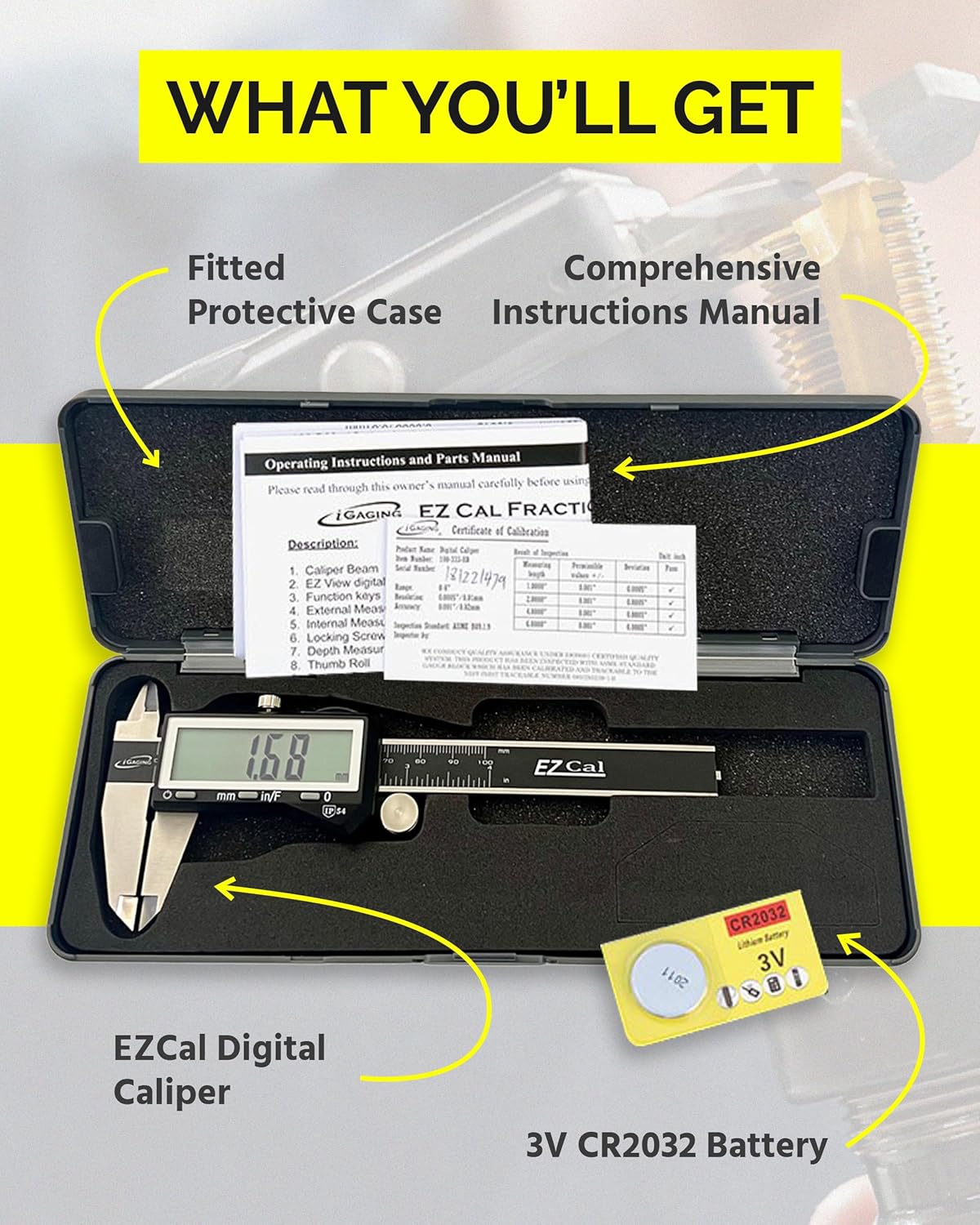
The complete package, including the caliper, protective case, manual, and battery.
સેટઅપ
- બેટરી ઇન્સ્ટોલેશન:
Locate the battery compartment on the digital display unit. Open the compartment cover and insert the CR2032 battery with the positive (+) side facing up. Close the cover securely.
- પ્રારંભિક સફાઈ:
Before first use, gently wipe the display screen and measuring surfaces with a clean, dry cloth to remove any manufacturing residue. Avoid using liquids on the display.
ઓપરેટિંગ સૂચનાઓ
- પાવર ચાલુ/બંધ:
Press the "ON/OFF" button to turn the caliper on. The display will show "0.000" or a previous reading. To turn off, press and hold the "ON/OFF" button, or the caliper will automatically power off after a period of inactivity.
- કેલિપરને શૂન્ય કરવું:
Close the measuring jaws completely and firmly. Press the "ZERO" button. The display should now read "0.000". This sets the reference point for your measurements.
- એકમો પસંદ કરી રહ્યા છીએ:
Press the "mm/in/F" button to cycle through the measurement units: millimeters (mm), decimal inches (in), and fractional inches (in/F).
- માપન લેવું:
- બાહ્ય માપન: Place the object between the outside jaws. Use the thumbwheel to gently close the jaws until they make firm contact with the object. Read the measurement on the display.
- આંતરિક માપન: Place the inside jaws into the opening of the object. Open the jaws until they make firm contact with the inner surfaces. Read the measurement on the display.
- ઊંડાઈ માપન: Place the end of the main beam on the top surface of the object. Extend the depth rod into the hole or recess until it touches the bottom. Read the measurement on the display.
- પગલું માપન: Use the step measuring face at the end of the sliding jaw to measure the height of a step or shoulder on an object.

Demonstration of using the caliper for precise measurements.
- Locking a Measurement:
After taking a measurement, tighten the knurled locking knob to secure the jaws in position. This allows you to transfer the measurement or read it more conveniently.
જાળવણી
- સફાઈ: Regularly clean the measuring surfaces and the main beam with a clean, dry, lint-free cloth. Avoid using solvents or harsh chemicals, as they may damage the display or the caliper's finish. Do not immerse the caliper in any liquid.
- સંગ્રહ: When not in use, store the caliper in its protective case to prevent damage from dust, debris, and impacts. It is recommended to close the jaws and lock the slider firmly but not overtighten when storing for extended periods.
- બેટરી રિપ્લેસમેન્ટ: Replace the CR2032 battery when the display becomes dim or erratic. Always use a fresh, high-quality battery.
મુશ્કેલીનિવારણ
| સમસ્યા | સંભવિત કારણ | ઉકેલ |
|---|---|---|
| ડિસ્પ્લે ખાલી અથવા ઝાંખું છે. | બેટરી ઓછી અથવા બંધ થઈ ગઈ છે. | CR2032 બેટરી બદલો. |
| અચોક્કસ અથવા અસંગત વાંચન. |
|
|
| Jaws do not slide smoothly. | ગંદકીનો સંચય અથવા લુબ્રિકેશનનો અભાવ. | Clean the main beam and apply a very thin layer of light machine oil if necessary (avoiding the display area). |
વિશિષ્ટતાઓ
| વિશેષતા | વિગત |
|---|---|
| બ્રાન્ડ | આઇગેજિંગ |
| મોડલ નંબર | 4" |
| સામગ્રી | સ્ટેનલેસ સ્ટીલ |
| શ્રેણી | 0-4 Inches / 0-100 mm |
| માપન ચોકસાઈ | +/-0.001 inches |
| પ્રોટેક્શન રેટિંગ | IP54 (Splashwater, Oil, and Dust Resistant) |
| બેટરી જરૂરી છે | 2 x CR2032 |
| ઉત્પાદન પરિમાણો | 4"L x 4"W (approx. 4 x 4 x 0.1 inches) |
વોરંટી અને આધાર
For warranty information, technical support, or service inquiries regarding your iGaging Premium IP54 EZ CAL Fractional Digital Caliper, please contact iGaging directly through their official webસાઇટ અથવા રિટેલર કે જેની પાસેથી તમે ઉત્પાદન ખરીદ્યું છે. વોરંટી દાવાઓ માટે કૃપા કરીને ખરીદીનો પુરાવો રાખો.
વધુ માહિતી માટે, મુલાકાત લો iGaging Store on Amazon.