
1. પરિચય
This manual provides essential information for the proper setup, operation, and maintenance of your Dual DAB 2 A DAB/DAB+ Radio Adapter. Please read these instructions carefully before using the device to ensure optimal performance and safety. The Dual DAB 2 A allows you to upgrade your existing stereo system with digital radio reception (DAB/DAB+) and traditional FM radio.
2. સલામતી માહિતી
- પાવર સ્ત્રોત: ફક્ત ઉલ્લેખિત પાવર એડેપ્ટરનો ઉપયોગ કરો. ખાતરી કરો કે વોલ્યુમtage ઉપકરણની જરૂરિયાતો સાથે મેળ ખાય છે.
- પાણી અને ભેજ: Do not expose the device to rain, moisture, or dripping/splashing liquids. Do not place objects filled with liquids, such as vases, on the device.
- વેન્ટિલેશન: પર્યાપ્ત વેન્ટિલેશનની ખાતરી કરો. વેન્ટિલેશનના છિદ્રોને અવરોધશો નહીં.
- ઉષ્મા: ઉપકરણને ગરમીના સ્ત્રોતો જેમ કે રેડિએટર્સ, હીટ રજિસ્ટર, સ્ટોવ અથવા અન્ય ઉપકરણો (જેમાં શામેલ છે) થી દૂર રાખો. ampલિફાયર) જે ગરમી ઉત્પન્ન કરે છે.
- સફાઈ: Unplug the device from the power outlet before cleaning. Use a soft, dry cloth. Do not use liquid cleaners or aerosol cleaners.
- સર્વિસિંગ: આ ઉત્પાદનની જાતે સેવા કરવાનો પ્રયાસ કરશો નહીં. લાયક સેવા કર્મચારીઓને તમામ સેવાઓનો સંદર્ભ આપો.
3. પેકેજ સામગ્રી
કૃપા કરીને ખાતરી કરો કે નીચે સૂચિબદ્ધ બધી વસ્તુઓ તમારા પેકેજમાં શામેલ છે:
- Dual DAB 2 A Radio Adapter
- પાવર એડેપ્ટર
- External Antenna (wire with connector)
- રીમોટ કંટ્રોલ
- વપરાશકર્તા માર્ગદર્શિકા (આ દસ્તાવેજ)
4. ઉત્પાદન ઓવરview
4.1 ફ્રન્ટ પેનલ
The front panel features the main display and controls for operating the device.

છબી 4.1: આગળ view of the Dual DAB 2 A radio adapter. The display shows the current time (14:28) and the selected station ("Senderliste #Galaxy"). The "DAB+" logo is visible at the top left, and "Dual" is printed at the bottom center.

છબી 4.2: કોણીય આગળનો ભાગ view of the Dual DAB 2 A, providing a clearer look at the illuminated multi-line LCD display and the device's compact design.
૪.૨ રીઅર પેનલ અને કનેક્શન્સ
The rear panel contains all necessary connection ports for power, antenna, and audio output.

છબી 4.3: પાછળ view of the Dual DAB 2 A. From left to right, the ports are: લાઇન આઉટ (3.5mm audio jack), DC 6.0V=0.5A (power input), એન્ટેના (coaxial connector for external antenna), and પાવર બટન

છબી 4.4: બાજુ view of the Dual DAB 2 A, illustrating its compact and slightly curved profile.

છબી 4.5: ખૂણાવાળી બાજુ view showing the rear connections, including the Line Out, DC power input, and antenna port.
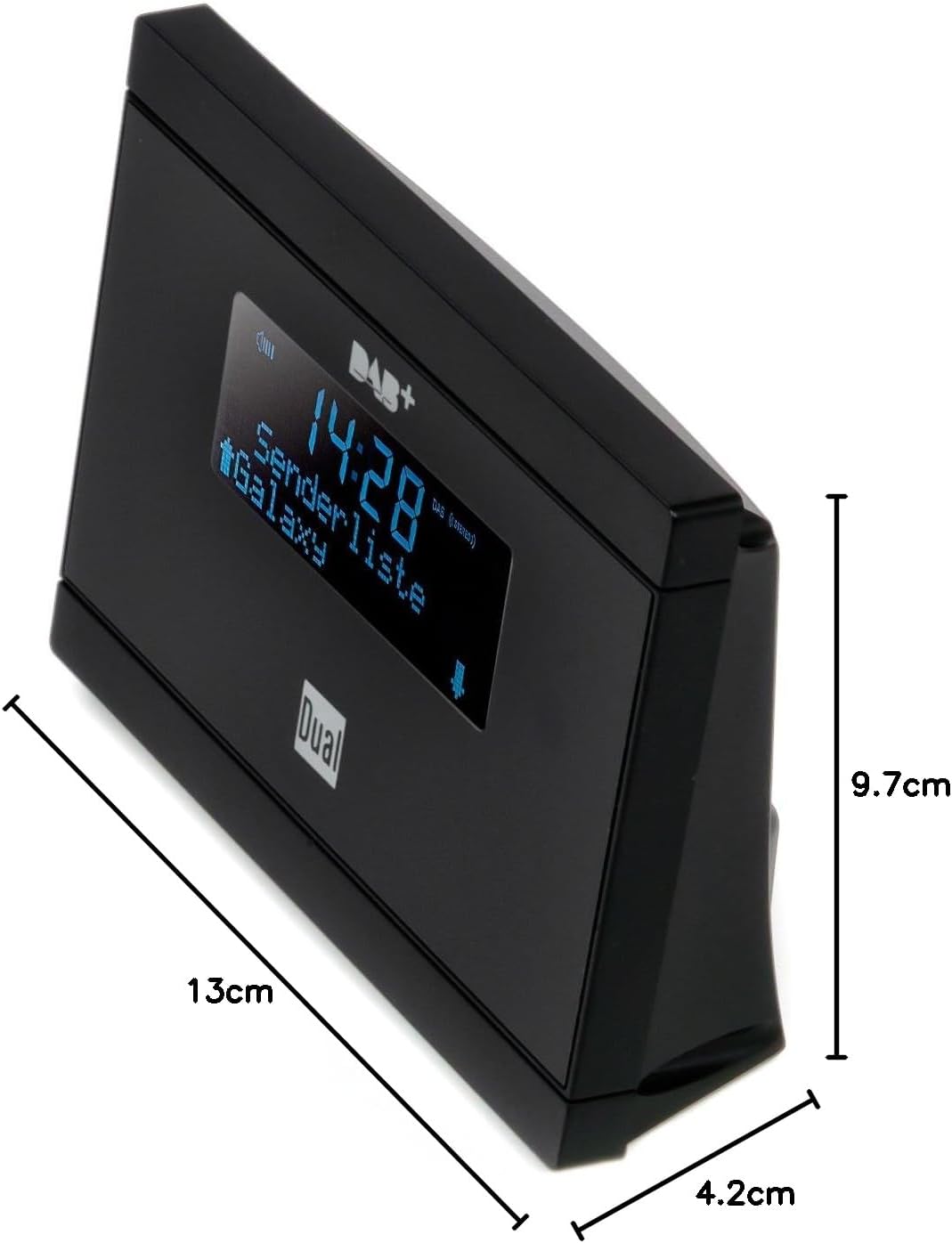
છબી 4.6: Dimensions of the Dual DAB 2 A: 13 cm (length), 4.2 cm (width), and 9.7 cm (height).
5. સેટઅપ
5.1 એન્ટેનાને કનેક્ટ કરી રહ્યું છે
- શોધો એન્ટેના port on the rear of the DAB 2 A.
- Connect the supplied external wire antenna to this port.
- For optimal reception, position the antenna away from other electronic devices and metallic objects. You may also connect a commercially available external antenna for improved signal quality.
5.2 Connecting to your Stereo System
- શોધો લાઇન આઉટ (3.5mm jack) on the rear of the DAB 2 A.
- Connect an audio cable (not supplied) from the લાઇન આઉટ of the DAB 2 A to an available audio input (e.g., AUX IN, LINE IN) on your existing stereo system or audio device.
5.3 પાવર કનેક્શન
- પૂરા પાડવામાં આવેલ પાવર એડેપ્ટરને સાથે જોડો DC 6.0V=0.5A port on the rear of the DAB 2 A.
- પાવર એડેપ્ટરને યોગ્ય વોલ આઉટલેટમાં પ્લગ કરો.
6. ઓપરેટિંગ સૂચનાઓ
6.1 પાવરિંગ ચાલુ/બંધ
દબાવો પાવર button on the rear of the device or on the remote control to turn the unit on or off.
6.2 Initial Scan (DAB/DAB+)
Upon first power-on, the device will automatically perform a scan for available DAB/DAB+ stations. This process may take a few minutes. Once complete, the first available station will begin playing.
6.3 Switching Between DAB/DAB+ and FM
નો ઉપયોગ કરો મોડ button on the remote control or the device (if available) to switch between DAB/DAB+ and FM radio modes.
6.4 Tuning and Station Selection
- DAB/DAB+: નો ઉપયોગ કરો ઉપર/નીચે arrow buttons on the remote control or device to navigate through the list of available digital stations.
- FM: FM મોડમાં, નો ઉપયોગ કરો ઉપર/નીચે arrow buttons to manually tune frequencies or initiate an automatic scan for the next available station.
૬.૩ પ્રીસેટ્સનો સંગ્રહ અને રિકોલ
The DAB 2 A allows you to store up to 20 favorite stations (DAB/DAB+ and FM combined).
- સ્ટોર કરવા માટે: ઇચ્છિત સ્ટેશન પર ટ્યુન કરો. દબાવો અને પકડી રાખો પ્રીસેટ button (or similar, refer to remote control layout) until the display shows a preset number. Use the arrow buttons to select a preset number (1-20) and confirm.
- યાદ કરવા માટે: દબાવો પ્રીસેટ button briefly, then use the arrow buttons to select the desired preset station.
૬.૫ ઘડિયાળ, એલાર્મ અને સ્લીપ ફંક્શન્સ
The device features a clock, alarm, and sleep timer. Refer to the detailed instructions in the full manual for setting these functions. The alarm can be set to wake you with DAB, FM, or a buzzer sound.
7. જાળવણી
- સફાઈ: Always unplug the device before cleaning. Use a soft, dry, lint-free cloth to wipe the surfaces. Do not use abrasive cleaners, waxes, or solvents.
- સંગ્રહ: If not in use for an extended period, unplug the device and store it in a cool, dry place.
8. મુશ્કેલીનિવારણ
| સમસ્યા | સંભવિત કારણ | ઉકેલ |
|---|---|---|
| કોઈ શક્તિ નથી | પાવર એડેપ્ટર કનેક્ટેડ નથી અથવા ખામીયુક્ત આઉટલેટ છે. | ખાતરી કરો કે પાવર એડેપ્ટર ઉપકરણ અને કાર્યરત પાવર આઉટલેટ સાથે સુરક્ષિત રીતે જોડાયેલ છે. |
| કોઈ અવાજ નથી | Audio cable not connected, incorrect input selected on stereo, or volume too low. | Check audio cable connection. Select the correct input on your stereo system. Increase volume on both the DAB 2 A and your stereo. |
| Poor DAB/DAB+ reception or no stations found | Weak signal, antenna not properly connected or positioned. | Ensure the antenna is securely connected and positioned for optimal reception. Try repositioning the antenna. Consider using a higher-gain external antenna. Perform a full scan for stations. |
| નબળું એફએમ સ્વાગત | Weak signal, antenna not properly connected or positioned. | Extend and reposition the wire antenna. Try a different antenna if available. |
| રીમોટ કંટ્રોલ કામ કરતું નથી | Batteries are dead or incorrectly inserted, or line of sight is blocked. | Replace batteries with new ones, ensuring correct polarity. Remove any obstructions between the remote and the device. |
9. સ્પષ્ટીકરણો
| લક્ષણ | વિગત |
|---|---|
| બ્રાન્ડ | ડ્યુઅલ |
| મોડલ નંબર | DAB 2 A |
| રંગ | કાળો |
| કનેક્ટિવિટી ટેકનોલોજી | Auxiliary (3.5mm Line Out) |
| ખાસ લક્ષણો | DAB/DAB+ Radio, FM Tuner, Clock, Alarm, Sleep Function |
| સુસંગત ઉપકરણો | Devices with 3.5 mm audio connector |
| ઉત્પાદનના પરિમાણો (L x W x H) | 13 સેમી x 4.2 સેમી x 9.7 સેમી |
| ટ્યુનિંગ ટેકનોલોજી | FM, DAB, DAB+ |
| પાવર સ્ત્રોત | Electric Cable (DC 6.0V=0.5A) |
| સપોર્ટેડ રેડિયો બેન્ડ્સ | FM, DAB, DAB+ |
| વસ્તુનું વજન | 200 ગ્રામ |
10. વોરંટી અને સપોર્ટ
For warranty information and technical support, please refer to the documentation provided with your purchase or contact Dual customer service. Keep your proof of purchase for any warranty claims.