
પરિચય
This manual provides instructions for the Vivanco RR 220 remote control, designed for compatibility with Samsung Smart TVs. Please read this manual thoroughly before using the device to ensure proper operation and to understand its features.
પેકેજ સામગ્રી
- Vivanco RR 220 Remote Control
- આ વપરાશકર્તા માર્ગદર્શિકા
નોંધ: બેટરીઓ શામેલ નથી અને અલગથી ખરીદવી આવશ્યક છે.
સેટઅપ
1. બેટરી ઇન્સ્ટોલેશન
- રિમોટ કંટ્રોલની પાછળના ભાગમાં બેટરીનો ડબ્બો શોધો.
- બેટરી કવરને નીચે તરફ સ્લાઇડ કરો અથવા લેચ દબાવો અને ખોલવા માટે ઉપાડો.
- બે (2) AAA બેટરી દાખલ કરો, ખાતરી કરો કે ધન (+) અને ઋણ (-) ટર્મિનલ્સ કમ્પાર્ટમેન્ટની અંદરના નિશાનો સાથે સંરેખિત થાય છે.
- Replace the battery cover, ensuring it clicks securely into place.
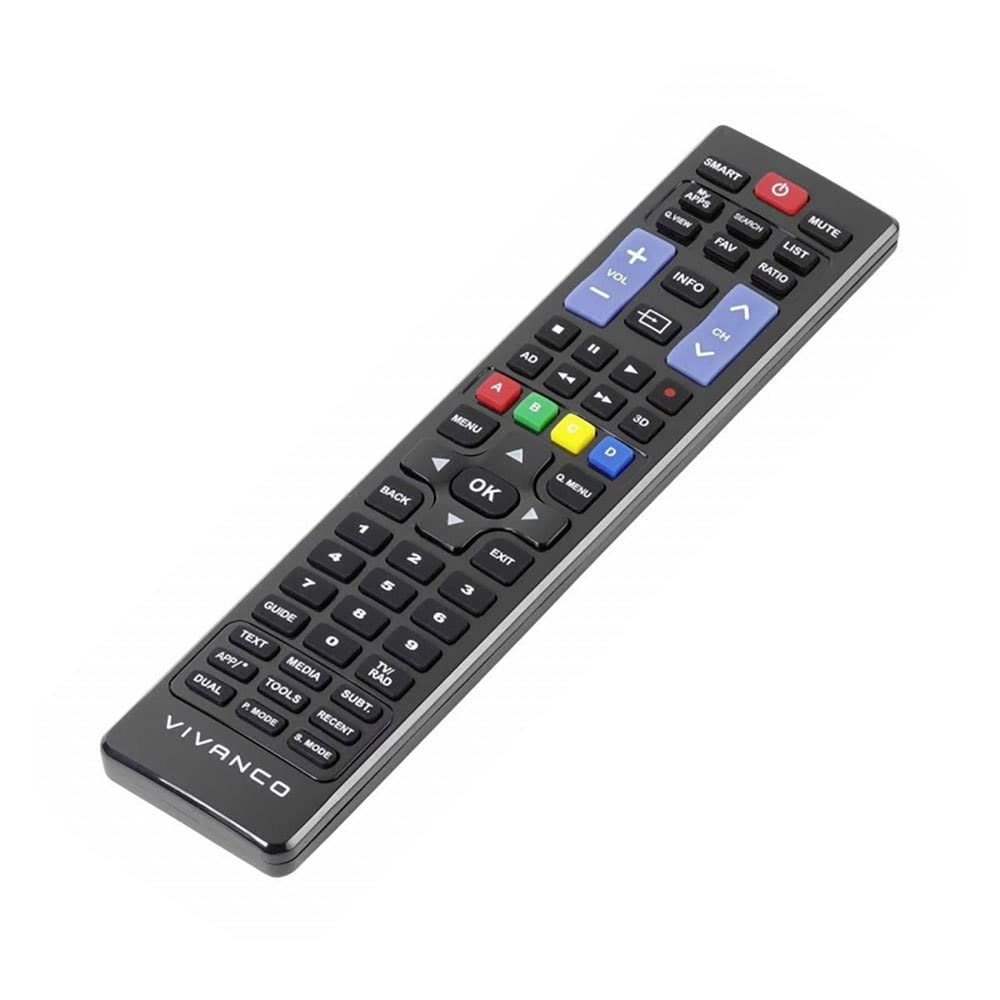
છબી 1: Vivanco RR 220 remote control. This image displays the front of the remote control, highlighting its 57 buttons and ergonomic design. The battery compartment is located on the reverse side.
2. પ્રારંભિક ઉપયોગ
The Vivanco RR 220 is pre-programmed for Samsung Smart TVs. No additional setup or pairing is typically required. Once batteries are installed, point the remote control towards your Samsung Smart TV and press the Power button to test functionality.
ઓપરેટિંગ સૂચનાઓ
The remote control features 57 buttons, providing comprehensive control over your Samsung Smart TV and compatible devices. Below are common button functions:
- પાવર બટન: ટીવી ચાલુ કે બંધ કરે છે.
- નંબર બટનો (0-9): For direct channel selection or data input.
- વોલ્યુમ અપ/ડાઉન: ઓડિયો વોલ્યુમ સમાયોજિત કરે છે.
- ચેનલ ઉપર/નીચે: ટીવી ચેનલો બદલે છે.
- બટન મ્યૂટ કરો: ટીવી ઑડિઓને શાંત કરે છે.
- નેવિગેશન પેડ (ઉપર, નીચે, ડાબે, જમણે, દાખલ કરો): મેનુ નેવિગેટ કરવા અને વિકલ્પો પસંદ કરવા માટે વપરાય છે.
- Back/Return Button: પાછલી સ્ક્રીન અથવા મેનૂ પર પાછા ફરે છે.
- Smart Hub/Home Button: Accesses the Smart Hub or main menu of your Samsung Smart TV.
- સ્ત્રોત/ઇનપુટ બટન: ઇનપુટ સ્ત્રોતો (HDMI, AV, વગેરે) પસંદ કરે છે.
- કલર બટન્સ (લાલ, લીલો, પીળો, વાદળી): For specific functions within certain applications or menus, as indicated on-screen.
- પ્લેબેક નિયંત્રણો (પ્લે, પોઝ, સ્ટોપ, ફાસ્ટ ફોરવર્ડ, રીવાઇન્ડ): Controls media playback on compatible devices or apps.
For specific functions related to your TV model, refer to your Samsung TV's user manual.
જાળવણી
રીમોટ કંટ્રોલની સફાઈ
- રિમોટ કંટ્રોલની સપાટીને સાફ કરવા માટે નરમ, સૂકા કપડાનો ઉપયોગ કરો.
- હઠીલા ગંદકી માટે, સહેજ ડીampen પાણી સાથેનું કપડું અથવા હળવા, બિન-ઘર્ષક ક્લીનર.
- કઠોર રસાયણો, દ્રાવકો અથવા ઘર્ષક સફાઈ પેડ્સનો ઉપયોગ કરશો નહીં, કારણ કે આ રિમોટના ફિનિશ અથવા આંતરિક ઘટકોને નુકસાન પહોંચાડી શકે છે.
- Ensure no liquid enters the remote control through button gaps or the battery compartment.
બેટરી રિપ્લેસમેન્ટ
Replace batteries when the remote's response becomes sluggish or it stops functioning. Always replace both batteries simultaneously with new AAA alkaline batteries. Do not mix old and new batteries or different types of batteries.
મુશ્કેલીનિવારણ
| સમસ્યા | સંભવિત કારણ | ઉકેલ |
|---|---|---|
| રીમોટ કંટ્રોલ કામ કરતું નથી. |
|
|
| કેટલાક બટનો કામ કરતા નથી. |
|
|
વિશિષ્ટતાઓ
- બ્રાન્ડ: Vivanco
- મોડલ નામ: આરઆર એક્સએન્યુએમએક્સ
- ઉત્પાદન મોડલ નંબર: 38016
- સુસંગત ઉપકરણો: Home cinema, DVD/Blu-ray player, Television (Samsung Smart TV compatible)
- કનેક્ટિવિટી ટેકનોલોજી: Wireless IR (Infrared)
- બટનોની સંખ્યા: 57
- બેટરીનો પ્રકાર: 2 x AAA (આલ્કલાઇન ભલામણ કરેલ)
- બેટરીઓ શામેલ છે: ના
- ઉત્પાદન પરિમાણો: 18 x 4.8 x 2.3 સેમી
- ઉત્પાદન વજન: 80 ગ્રામ
- મહત્તમ શ્રેણી: 15 મીટર
- ખાસ લક્ષણો: IPTV, DVB-T, HDTV compatibility