
1. પરિચય
Thank you for choosing the WMF LONO 900W Toaster. This manual provides essential information for the safe and efficient operation, maintenance, and care of your appliance. Please read these instructions thoroughly before first use and keep them for future reference.
2. સલામતી સૂચનાઓ
- Always ensure the toaster is placed on a stable, heat-resistant surface, away from flammable materials.
- Do not operate the toaster near water or other liquids.
- ટોસ્ટર સ્લોટમાં ક્યારેય ધાતુની વસ્તુઓ દાખલ કરશો નહીં.
- Unplug the toaster from the power outlet when not in use, before cleaning, or if a malfunction occurs.
- ગરમ સપાટીને સ્પર્શ કરશો નહીં. હેન્ડલ્સ અથવા નોબ્સનો ઉપયોગ કરો.
- આ ઉપકરણ ઓછી શારીરિક, સંવેદનાત્મક અથવા માનસિક ક્ષમતાઓ અથવા અનુભવ અને જ્ઞાનનો અભાવ ધરાવતી વ્યક્તિઓ (બાળકો સહિત) દ્વારા ઉપયોગ માટે બનાવાયેલ નથી, સિવાય કે તેમની સુરક્ષા માટે જવાબદાર વ્યક્તિ દ્વારા ઉપકરણના ઉપયોગ અંગેની દેખરેખ અથવા સૂચના આપવામાં આવી હોય.
- બાળકો એ ઉપકરણ સાથે રમતા નથી તેની ખાતરી કરવા માટે તેમની દેખરેખ રાખવી જોઈએ.
- ઓપરેશન દરમિયાન ટોસ્ટરને ઢાંકશો નહીં.
- Bread may burn, therefore toasters must not be used near or below curtains and other combustible materials. They must be supervised when in use.
3. ઉત્પાદન ઓવરview
The WMF LONO Toaster is designed for efficient and even toasting of bread slices. It features two wide slots, adjustable browning control, and various functions for optimal results.

Image 1: The WMF LONO 900W Toaster, showcasing its sleek stainless steel and black design with two toasting slots.
મુખ્ય ઘટકો:
- ટોસ્ટિંગ સ્લોટ્સ: Two wide slots for various bread types.
- કેરેજ લીવર: Lowers bread into the toaster and initiates the toasting cycle.
- બ્રાઉનિંગ કંટ્રોલ ડાયલ: Adjusts the desired level of toast browning (settings 1-7).
- નિયંત્રણ બટનો: Defrost, Reheat, and Cancel functions.
- દૂર કરી શકાય તેવી ક્રમ્બ ટ્રે: સરળતાથી સાફ કરવા માટે ભૂકો એકઠો કરે છે.
- Integrated Warming Rack: For warming rolls and pastries.

છબી 2: ક્લોઝ-અપ view of the toaster's control panel, showing the browning control dial and the defrost, reheat, and cancel buttons.

Image 3: The removable crumb tray of the WMF LONO Toaster, shown partially pulled out for cleaning.
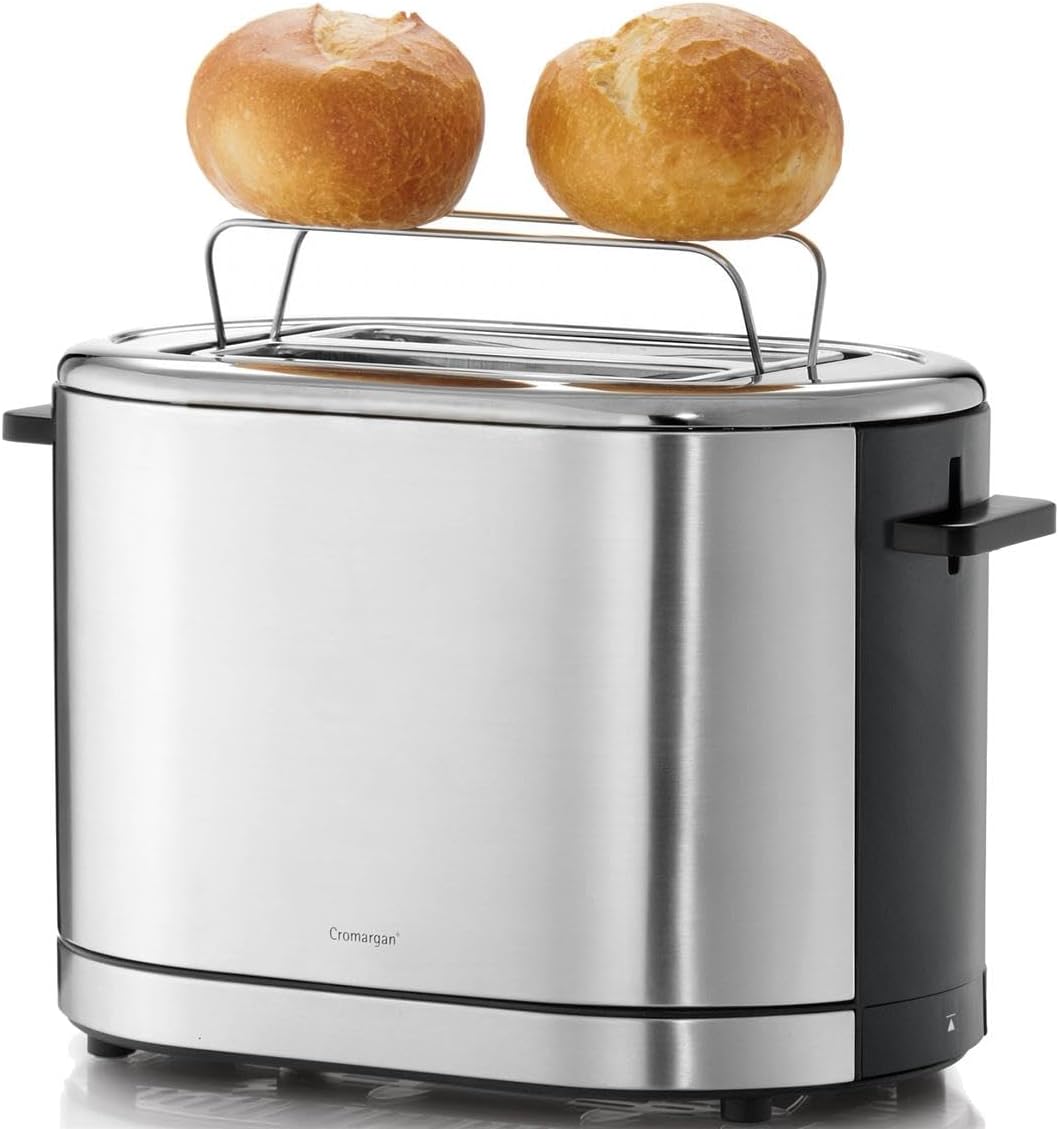
Image 4: The WMF LONO Toaster with its integrated warming rack extended, holding two bread rolls for warming.
4. સેટઅપ
- ટોસ્ટરને અનપેક કરો અને તમામ પેકેજિંગ સામગ્રી દૂર કરો.
- Place the toaster on a clean, dry, stable, and heat-resistant surface. Ensure there is adequate ventilation around the appliance.
- Before first use, operate the toaster without bread for a few cycles at the highest browning setting to burn off any manufacturing residues. This may produce a slight odor, which is normal. Ensure the area is well-ventilated.
- Allow the toaster to cool down completely after the initial burn-off cycles.
5. ઓપરેટિંગ સૂચનાઓ
૫.૧. બ્રેડ ટોસ્ટ કરવી
- Plug the toaster into a suitable power outlet (220-240V, 50/60Hz).
- Place up to two slices of bread into the toasting slots.
- બ્રાઉનિંગ કંટ્રોલ ડાયલ (પ્રકાશ માટે 1, શ્યામ માટે 7) નો ઉપયોગ કરીને તમારા ઇચ્છિત બ્રાઉનિંગ લેવલને પસંદ કરો.
- Press the carriage lever down until it locks into place. The toasting cycle will begin, and the indicator light will illuminate.
- Once the selected browning level is reached, the toast will automatically pop up, and the toaster will switch off.

Image 5: Two slices of bread placed inside the toasting slots of the WMF LONO Toaster, ready for operation.
5.2. ડિફ્રોસ્ટ કાર્ય
ફ્રોઝન બ્રેડ ટોસ્ટ કરવા માટે આ ફંક્શનનો ઉપયોગ કરો.
- Place frozen bread into the slots.
- તમારા ઇચ્છિત બ્રાઉનિંગ લેવલ પસંદ કરો.
- Press the carriage lever down, then press the ડિફ્રોસ્ટ button (snowflake icon). The defrost indicator light will illuminate.
- The toaster will automatically adjust the toasting time to account for defrosting.
5.3. Reheat Function
Use this function to warm up already toasted bread without further browning.
- Place cold, toasted bread into the slots.
- Press the carriage lever down, then press the ફરી ગરમ કરો button (wavy lines icon). The reheat indicator light will illuminate.
- The toaster will briefly warm the bread and then automatically pop it up.
5.4. કાર્ય રદ કરો
કોઈપણ સમયે ટોસ્ટિંગ ચક્ર બંધ કરવા માટે, દબાવો રદ કરો button (circle with diagonal line icon). The toast will pop up immediately.
5.5. Using the Warming Rack
The integrated warming rack is ideal for warming rolls, croissants, or pastries.
- Gently push the warming rack lever upwards until the rack is fully extended.
- Place the items to be warmed on the rack.
- Set the browning control to a low setting (e.g., 1 or 2).
- Press the carriage lever down to start the warming cycle.
- Monitor the items closely to prevent burning. Press the Cancel button when warmed to your preference.
- After use, push the warming rack lever downwards to retract the rack.
6. જાળવણી અને સફાઈ
નિયમિત સફાઈ શ્રેષ્ઠ કામગીરી સુનિશ્ચિત કરે છે અને તમારા ટોસ્ટરનું આયુષ્ય વધારે છે.
- ટોસ્ટરને હંમેશા અનપ્લગ કરો અને સાફ કરતા પહેલા તેને સંપૂર્ણપણે ઠંડુ થવા દો.
- ક્રમ્બ ટ્રે: Pull out the removable crumb tray from the bottom of the toaster. Empty the crumbs and wipe the tray clean with a damp cloth. Ensure it is dry before reinserting.
- બાહ્ય: સોફ્ટ સાથે બાહ્ય સપાટીઓ સાફ કરો, ડીamp cloth. Do not use abrasive cleaners or scouring pads, as these can damage the stainless steel finish.
- ટોસ્ટરને ક્યારેય પાણીમાં કે અન્ય કોઈ પ્રવાહીમાં બોળશો નહીં.
- Do not attempt to clean the inside of the toasting slots with any tools or your fingers.
7. મુશ્કેલીનિવારણ
- ટોસ્ટર ચાલુ થતું નથી: Ensure the power cord is securely plugged into a working outlet. Check if the carriage lever is fully pressed down and locked.
- Bread is unevenly toasted: This can sometimes occur due to variations in bread type or thickness. Try adjusting the browning level.
- Smoke coming from toaster: Unplug immediately. This usually indicates crumbs or food particles are burning inside. Allow to cool, then clean the crumb tray thoroughly. If food is stuck in the slots, unplug and carefully remove it with non-metallic tongs.
- Carriage lever does not stay down: Ensure the toaster is plugged in. The lever will not latch if the toaster is not receiving power. If it still doesn't latch, there might be a mechanical issue; contact customer support.
8. સ્પષ્ટીકરણો
| બ્રાન્ડ | ડબલ્યુએમએફ |
| મોડલ નંબર | 0414090011 |
| ઉત્પાદન પ્રકાર | ટોસ્ટર |
| પાવર વપરાશ | 900 ડબ્લ્યુ |
| ભાગtage | 220 - 240 V / 50/60 Hz |
| સ્લાઇસની સંખ્યા | 2 |
| બ્રાઉનિંગ સ્તરો | 7 |
| રંગ | સિલ્વર/બ્લેક |
| સામગ્રી | ક્રોમાર્ગન સ્ટેનલેસ સ્ટીલ |
| પરિમાણો (L x W x H) | ૨૧.૬૫ x ૨૩.૪૬ x ૩૨.૨ ઇંચ (આશરે ૫૫ x ૫૯.૬ x ૮૧.૮ સે.મી.) |
| વસ્તુનું વજન | 3.49 પાઉન્ડ (1.59 કિગ્રા) |

Image 6: Diagram showing the dimensions of the WMF LONO Toaster: approximately 19 cm height, 29.5 cm length, and 16.5 cm width.
9. વોરંટી અને સપોર્ટ
WMF products are manufactured with high-quality materials and undergo strict quality control. For information regarding warranty terms and conditions, or for technical support, please refer to the warranty card included with your purchase or visit the official WMF webસાઇટ. કોઈપણ વોરંટી દાવા માટે કૃપા કરીને ખરીદીનો પુરાવો રાખો.