
1. પરિચય
This manual provides instructions for the setup, operation, and maintenance of your Uniden AS7412 Corded Phone. Please read this manual thoroughly before using your new phone.
The Uniden AS7412 is a corded telephone featuring a large LCD display and a speakerphone function, designed for clear communication and ease of use.
2. ઉત્પાદન ઓવરview
મુખ્ય લક્ષણો:
- FSK/DTMF Caller ID Display
- Large LCD Display with Clock and Call Timer
- સ્પીકરફોન કાર્ય
- Pre-Dial Function and Last Number Redial
- વિરોધી ચોરી કાર્ય
- Memory for 50 Incoming Calls and 15 Outgoing Calls
- 8 One-Touch Memory and 10 Two-Touch Memory Functions
- IDD Code and PABX Dial Out Code Setting
- Adjustable LCD Contrast
- સંગીત હોલ્ડ પર છે
- Adjustable Flash Timing (90/95/100/120/180/300/600/1000mS)
Phone Components:
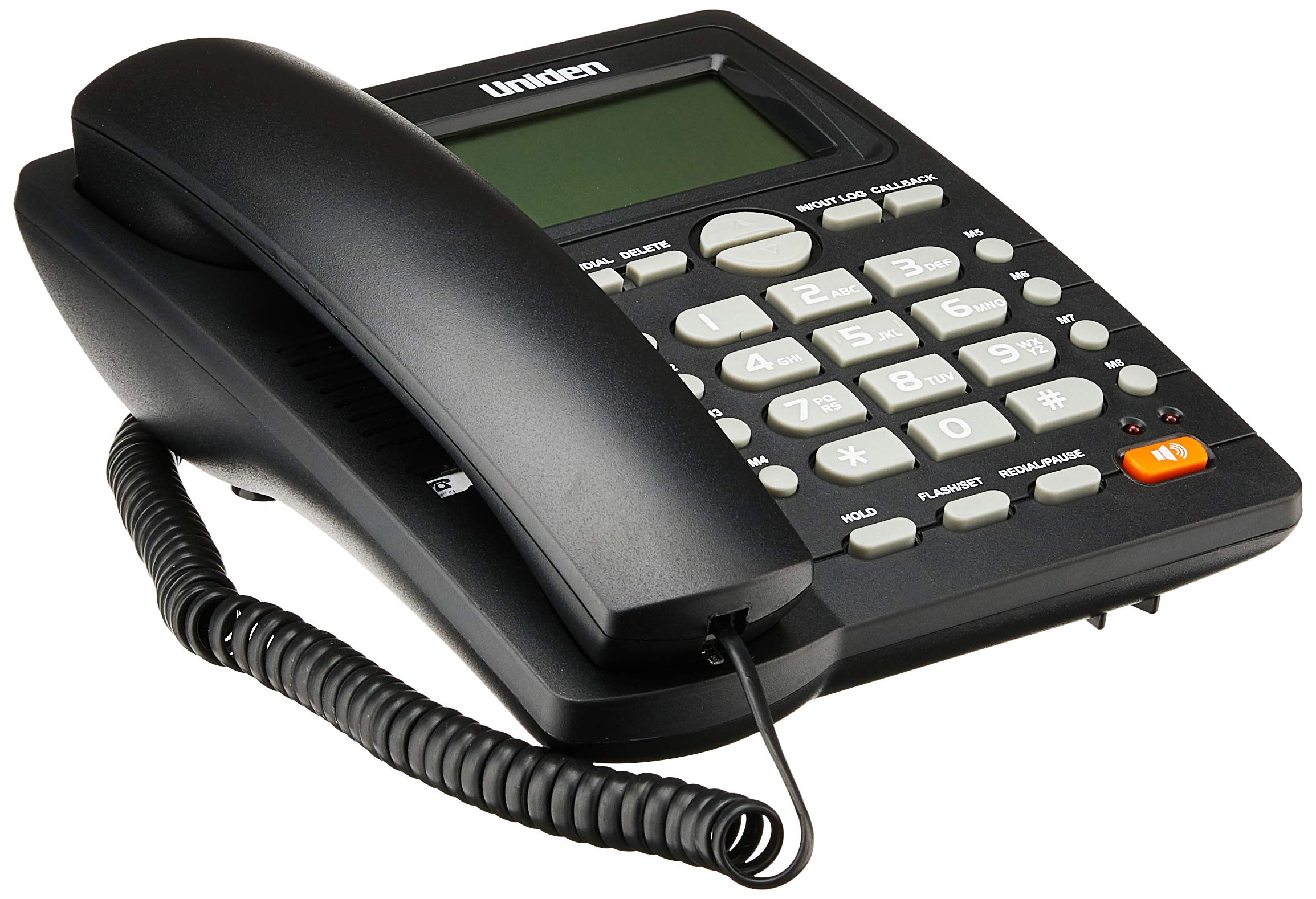
The phone features a standard handset, a numeric keypad, dedicated function buttons, and a large LCD display for caller information and settings. A prominent speakerphone button allows for hands-free communication.

On the rear of the unit, you will find the telephone line input port and a switch for adjusting the ringer volume.
3. સેટઅપ
- હેન્ડસેટ કનેક્ટ કરો: Plug one end of the coiled cord into the handset and the other end into the handset jack on the side of the phone base unit.
- ટેલિફોન લાઇન જોડો: Plug one end of the telephone line cord into the "LINE" jack on the rear of the phone base unit (refer to Figure 2). Plug the other end into your telephone wall jack.
- પાવર કનેક્શન: The phone is powered by the telephone line. No external power adapter is required for basic operation.
- પ્રારંભિક પ્રદર્શન: Upon connection, the LCD display should illuminate and show the current time or a default standby screen.
4. ઓપરેટિંગ સૂચનાઓ
કૉલ કરવો:
- હેન્ડસેટનો ઉપયોગ કરીને: Lift the handset, wait for a dial tone, then dial the desired number using the keypad.
- સ્પીકરફોનનો ઉપયોગ: દબાવો સ્પીકરફોન button, wait for a dial tone, then dial the desired number. To end the call, press the સ્પીકરફોન ફરીથી બટન.
- પ્રી-ડાયલીંગ: Dial the number first, then lift the handset or press the સ્પીકરફોન કોલ શરૂ કરવા માટે બટન.
કૉલ પ્રાપ્ત કરવો:
- જ્યારે ફોન વાગે, ત્યારે હેન્ડસેટ ઉપાડો અથવા દબાવો સ્પીકરફોન જવાબ આપવા માટેનું બટન.
છેલ્લો નંબર ફરીથી ડાયલ કરી રહ્યો છે:
- હેન્ડસેટ ઉપાડો અથવા દબાવો સ્પીકરફોન બટન, પછી દબાવો ફરીથી ડાયલ કરો/થોભો બટન
Caller ID Function:
- When a call comes in, the caller's number (and name, if available and subscribed to service) will be displayed on the LCD screen.
- નો ઉપયોગ કરો IN/OUT LOG buttons (up/down arrows) to scroll through the incoming call history.
- To call back a number from the call log, select the number and press the CALLBACK બટન
Memory Dialing (One-Touch and Two-Touch):
- સંગ્રહ નંબરો:
- દબાવો STORE/DIAL.
- તમે જે ફોન નંબર સ્ટોર કરવા માંગો છો તે ડાયલ કરો.
- દબાવો STORE/DIAL ફરીથી
- Press the desired memory button (M1-M8 for one-touch, or a numeric key for two-touch).
- Dialing from Memory:
- One-Touch: હેન્ડસેટ ઉપાડો અથવા દબાવો સ્પીકરફોન, then press the desired memory button (M1-M8).
- Two-Touch: હેન્ડસેટ ઉપાડો અથવા દબાવો સ્પીકરફોન, પછી દબાવો STORE/DIAL followed by the numeric key where the number is stored.
Adjusting LCD Contrast:
- Refer to the on-screen menu or specific button combination (often involving FLASH/SET or similar) to access display settings and adjust contrast for optimal readability.
5. જાળવણી
- સફાઈ: ફોનને સોફ્ટ, ડી થી સાફ કરો.amp કાપડ કઠોર રસાયણો અથવા ઘર્ષક ક્લીનર્સનો ઉપયોગ કરશો નહીં.
- સ્થાન: ફોનને સ્થિર સપાટી પર રાખો, સીધા સૂર્યપ્રકાશ, ગરમીના સ્ત્રોતો અને ભેજથી દૂર.
- દોરી: Ensure all cords are securely connected and not tangled or pinched.
6. મુશ્કેલીનિવારણ
| સમસ્યા | સંભવિત કારણ | ઉકેલ |
|---|---|---|
| કોઈ ડાયલ ટોન નથી | ટેલિફોન લાઇન કોર્ડ ડિસ્કનેક્ટ થયેલ છે અથવા ખામીયુક્ત છે. | Check the telephone line connection at both the phone and the wall jack. Try a different line cord if available. |
| LCD ડિસ્પ્લે ખાલી અથવા ઝાંખું છે | Contrast setting is too low or phone line power issue. | Adjust the LCD contrast setting. Ensure the phone line is active. |
| કૉલ કરી કે પ્રાપ્ત કરી શકતા નથી | Incorrect line connection or service issue. | Verify all connections. Contact your telephone service provider if the issue persists. |
| Ringer does not sound | Ringer volume is set to OFF. | Adjust the ringer volume switch on the rear of the phone to LOW or HI (refer to Figure 2). |
7. સ્પષ્ટીકરણો
| લક્ષણ | વિગત |
|---|---|
| બ્રાન્ડ | યુનિડેન |
| મોડલ | AS7412 |
| રંગ | કાળો |
| ટેલિફોન પ્રકાર | કોર્ડ્ડ |
| સામગ્રી | પ્લાસ્ટિક |
| પાવર સ્ત્રોત | કોર્ડેડ ઇલેક્ટ્રિક (લાઇન સંચાલિત) |
| ડાયલર પ્રકાર | સિંગલ કીપેડ |
| પરિમાણો (L x W x H) | 21.8 x 7 x 22 સેન્ટિમીટર |
| વસ્તુનું વજન | 650 ગ્રામ |
| મલ્ટીલાઈન ઓપરેશન | સિંગલ-લાઇન ઓપરેશન |
| કોલર ઓળખ | Yes (FSK/DTMF) |
| ઉત્પાદક | UNIDEN |
8. વોરંટી અને સપોર્ટ
For warranty information and technical support, please refer to the warranty card included with your product or visit the official Uniden webસાઇટ. ખરીદીના પુરાવા તરીકે તમારી ખરીદી રસીદ રાખો.
નોંધ: ઉત્પાદન સ્પષ્ટીકરણો અને સુવિધાઓ સૂચના વિના ફેરફારને પાત્ર છે.