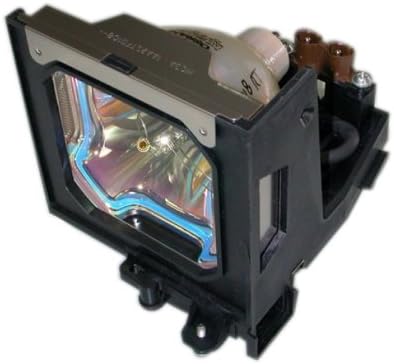
This manual provides essential information for the safe and effective installation, operation, and maintenance of your Boxlight replacement lamp module. This module is designed for use with Boxlight LC-XG110, LC-XG210, and LX32 projector models. Please read these instructions carefully before proceeding with installation.
Image: Boxlight replacement lamp module, showing the bulb encased in its housing with electrical connectors.
The Boxlight replacement lamp module (Part Number: ACTG042) includes an original bulb and housing, ensuring compatibility and optimal performance with your projector. It features a 250-watt bulb with an average lamp life of 2000 hours under normal operating conditions.
મહત્વપૂર્ણ સલામતી માહિતી
આ એલ માં બલ્બamp contains Mercury (Hg). Please dispose of in accordance with local, state, or federal laws. Do not dispose of with regular household waste.
Always disconnect the projector from the power outlet before attempting any installation or maintenance.
Allow the projector to cool down completely (at least 30 minutes) before replacing the lamp. ગરમ lampગંભીર બળતરાનું કારણ બની શકે છે.
Avoid touching the glass surface of the new lamp directly with bare hands. Oils from your skin can reduce lamp life. Use gloves or a clean cloth if necessary.
એલને દબાણ કરશો નહીંamp module into place. If it does not fit easily, recheck the orientation and ensure it is the correct lamp for your projector model.
પ્રોજેક્ટરને ક્યારેય l થી ચલાવશો નહીંamp કવર દૂર કર્યું.
એલ રાખોamp module out of reach of children.
ઇન્સ્ટોલેશન સૂચનાઓ
પાવર બંધ કરો અને ડિસ્કનેક્ટ કરો: Ensure your Boxlight projector is turned off and completely unplugged from the power source.
કૂલ ડાઉન: પ્રોજેક્ટરને ઓછામાં ઓછા 30 મિનિટ સુધી ઠંડુ થવા દો.amp operates at high temperatures and can cause burns if handled while hot.
L શોધોamp કવર: Refer to your projector's user manual to locate the lamp compartment cover. This is typically secured by one or more screws.
એલ દૂર કરોamp કવર: Using a suitable screwdriver, carefully remove the screw(s) securing the lamp cover and then remove the cover.
Unscrew Old Lamp: જૂના એલamp module will be secured by one or more screws. Unscrew these fasteners.
જૂનો L દૂર કરોamp: Gently pull the handle on the old lamp module to slide it out of the projector. Be careful not to drop it.
નવું એલ દાખલ કરોamp: Carefully insert the new Boxlight replacement lamp module into the projector, ensuring it slides smoothly into place. Do not force it.
સિક્યોર ન્યૂ એલamp: Fasten the new lamp module with the screw(s) you removed earlier. Ensure it is securely seated.
એલ બદલોamp કવર: એલ ફરીથી જોડોamp compartment cover and secure it with its screw(s).
એલ રીસેટ કરોamp ટાઈમર: Consult your projector's user manual for instructions on how to reset the lamp ટાઈમર. સચોટ l માટે આ મહત્વપૂર્ણ છેamp જીવન ટ્રેકિંગ.
સંચાલન માર્ગદર્શિકા
યોગ્ય શટડાઉન: Always allow the projector to complete its cooling cycle after use before unplugging it. Abrupt power cuts can shorten lamp જીવન
વેન્ટિલેશન: Ensure the projector has adequate ventilation. Blocked vents can lead to overheating and reduced lamp જીવન
વારંવાર ચાલુ/બંધ ચક્ર ટાળો: Turning the projector on and off frequently can stress the lamp and reduce its lifespan.
Eco Mode (if available): If your projector has an "Eco Mode" or similar power-saving setting, using it can extend lamp જીવન
જાળવણી
એર ફિલ્ટર સફાઈ: Regularly clean or replace your projector's air filter as per your projector's manual. A clogged filter can cause the projector to overheat, negatively impacting lamp જીવન
ધૂળ દૂર કરવી: Keep the projector free from dust. Use a soft, dry cloth to wipe the exterior. Do not use abrasive cleaners or solvents.
Lamp હેન્ડલિંગ: એલ સંભાળતી વખતેamp module, always hold it by its housing, not the bulb itself.
મુશ્કેલીનિવારણ
જો તમને નવું l ઇન્સ્ટોલ કર્યા પછી સમસ્યાઓનો સામનો કરવો પડેamp, નીચેનાનો વિચાર કરો:
Lamp લાઇટિંગ નથી:
એલ ખાતરી કરોamp મોડ્યુલ સંપૂર્ણપણે બેઠેલું છે અને તેના સ્ક્રૂ વડે સુરક્ષિત છે.
એલ ચકાસોamp cover is correctly installed and secured. Many projectors have a safety switch that prevents operation if the cover is open.
Check that the projector is properly plugged into a working power outlet.
Dim Image or Poor Color:
એલ ની પુષ્ટિ કરોamp timer has been reset. If not, the projector might still be operating under the assumption of an old, worn-out lamp.
Check projector settings for brightness or picture modes.
ખાતરી કરો કે પ્રોજેક્ટર લેન્સ સ્વચ્છ છે.
"Lamp Error" Message:
This often indicates the lamp is not properly installed or the lamp cover is not secured. Re-check installation steps.
If the error persists, the lamp itself might be faulty. Contact customer support.
For further assistance, refer to your projector's original user manual or contact Boxlight customer support.
ઉત્પાદન સ્પષ્ટીકરણો
બ્રાન્ડ
બોક્સલાઇટ
મોડલ નંબર
ACTG042
Compatible Projector Models
LC-XG110, LC-XG210, LX32
Lamp ભાગ નંબરો
03-000712-01P; 610 305 5602; MP56T-930; POA-LMP59
વાટtage
250 વોટ
Lamp Life (Normal)
2000 કલાક
પ્રકાશ પ્રકાર
ઝેનોન
Lamp ટેકનોલોજી
એલસીડી
વસ્તુનું વજન
૧.૬૨ ઔંસ (૦.૧ પાઉન્ડ)
ઉત્પાદન પરિમાણો
5.32 x 4.53 x 4.13 ઇંચ
યુપીસી
840398106805
વોરંટી માહિતી
This Boxlight replacement lamp module is covered by a 180- ડે વોરંટી ખરીદીની તારીખથી. આ વોરંટી સામાન્ય ઉપયોગ હેઠળ સામગ્રી અને કારીગરીમાં ખામીઓને આવરી લે છે. વોરંટી દાવાઓ માટે કૃપા કરીને ખરીદીનો પુરાવો રાખો.
For warranty service or inquiries, please contact the seller or manufacturer directly.
ગ્રાહક આધાર
If you require further assistance, have questions about installation, or need to report an issue, please contact the retailer where you purchased this product or the manufacturer, Arclyte Tech. (Boxlight's manufacturer).
When contacting support, please have your product model number (ACTG042) and proof of purchase readily available.
Ask a question about this manual
Ask about setup, troubleshooting, compatibility, parts, safety, or missing instructions. Manuals+ will review the question and use this page’s manual context to help answer it.