
1. પરિચય
ખરીદી બદલ આભારasing the Gotech GTV-7-TFT 7-inch Portable Color TFT LCD TV. This manual provides essential information for the safe and efficient operation of your device. Please read it thoroughly before use and retain it for future reference.
2. મહત્વપૂર્ણ સલામતી સૂચનાઓ
- આગ કે ઇલેક્ટ્રિક આંચકો અટકાવવા માટે યુનિટને વરસાદ કે ભેજના સંપર્કમાં ન લાવો.
- સી ખોલશો નહીંasing. બધી સેવા લાયક કર્મચારીઓને સોંપો.
- ગરમીના સ્ત્રોતોની નજીક અથવા સીધા સૂર્યપ્રકાશમાં યુનિટ રાખવાનું ટાળો.
- એકમની આસપાસ યોગ્ય વેન્ટિલેશનની ખાતરી કરો.
- ફક્ત ઉલ્લેખિત પાવર એડેપ્ટરનો ઉપયોગ કરો.
- એકમને મજબૂત ચુંબકીય ક્ષેત્રોથી દૂર રાખો.
- Clean the unit with a soft, dry cloth. Do not use liquid cleaners.
3. પેકેજ સામગ્રી
ખાતરી કરો કે બધી વસ્તુઓ પેકેજમાં હાજર છે:
- Gotech GTV-7-TFT Portable TV Unit
- રીમોટ કંટ્રોલ
- એસી/ડીસી એડેપ્ટર
- Car Cord (Car Holder not explicitly listed as included, but mentioned as a feature)
- એન્ટેના જેક
- એ.વી. કેબલ
- ડીટેચેબલ સ્ટેન્ડ

Image 3.1: The retail box for the Gotech GTV-7-TFT Portable TV, showing the product, remote control, and included accessories.
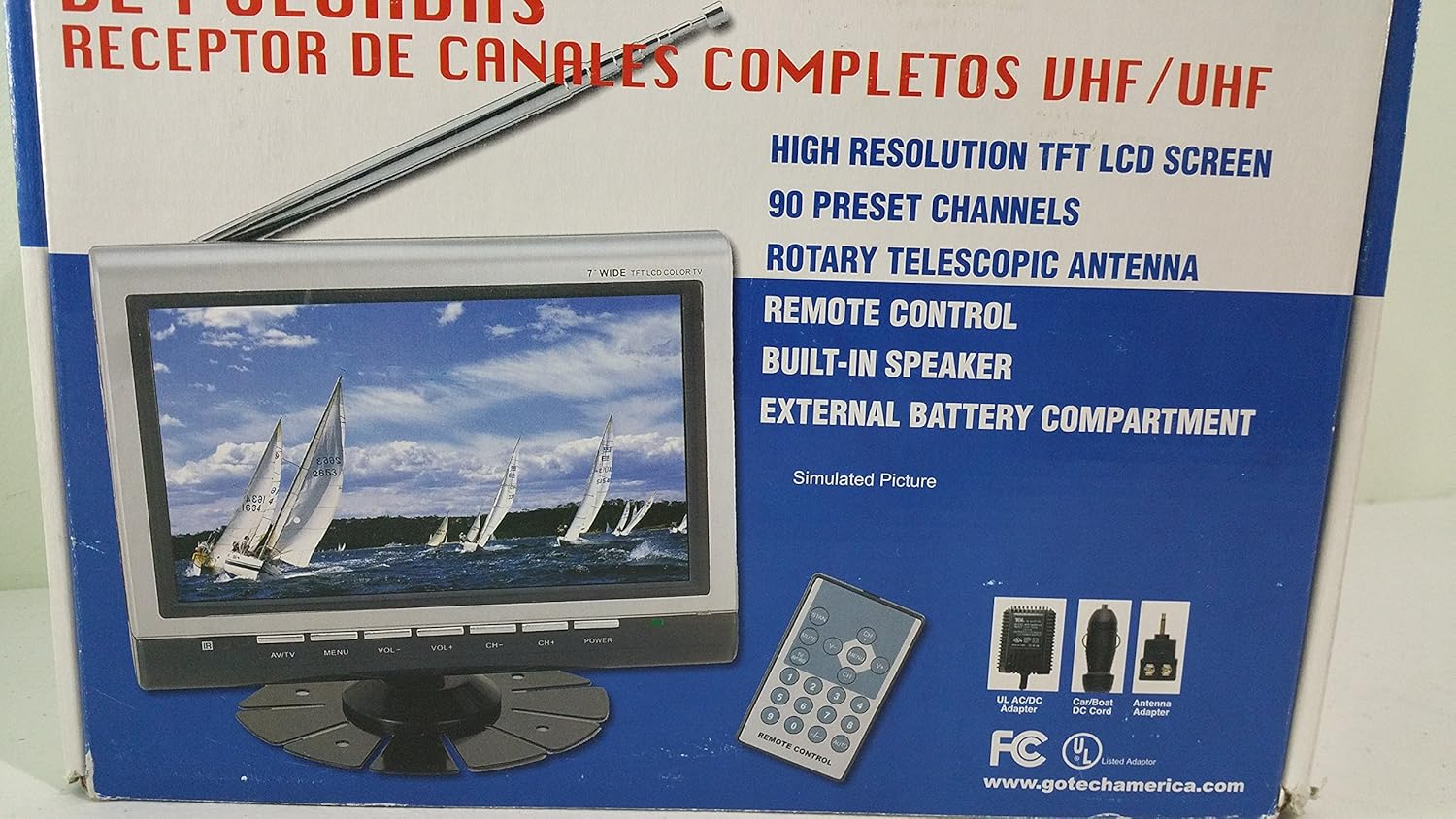
છબી 3.2: નજીક view of the Gotech GTV-7-TFT TV screen and the remote control, as depicted on the product packaging.
4. ઉત્પાદન ઓવરview
4.1 મુખ્ય લક્ષણો
- 7-inch High Resolution TFT LCD Screen
- ફુલ ચેનલ VHF/UHF રીસીવર
- 90 પ્રીસેટ ચેનલો
- Digital Up/Down Tuning
- Auto Channel Programming
- રોટરી ટેલિસ્કોપિક એન્ટેના
- On-Screen Display (OSD) for Picture and Volume Adjustment
- બિલ્ટ-ઇન સ્પીકર
- External Battery Compartment (requires 10x AA batteries, not included)
- Remote Control with Button Cell
- New Detachable Stand with Battery

Image 4.1: Side panel of the Gotech GTV-7-TFT packaging, detailing the product's main features.
5. સેટઅપ
5.1 Powering the TV
The GTV-7-TFT can be powered in several ways:
- એસી/ડીસી એડેપ્ટર: Connect the provided AC/DC adapter to the TV's power input and then to a standard wall outlet.
- Car Cord: For in-vehicle use, connect the car cord to the TV's power input and then to your vehicle's 12V power outlet.
- બાહ્ય બેટરીઓ: Open the external battery compartment and insert 10x AA size batteries (UM3) according to the polarity indicators. Ensure the batteries are fresh and correctly oriented.
5.2 એન્ટેનાને કનેક્ટ કરી રહ્યું છે
Extend the rotary telescopic antenna for optimal signal reception. For improved reception, you may connect an external antenna to the antenna jack using the provided antenna jack adapter.
5.3 Connecting External Devices (AV Input)
To connect external devices such as a DVD player or gaming console, use the provided AV cable. Connect one end to the TV's AV input port and the other end to the AV output ports of your external device. Select the AV input source on the TV to view કનેક્ટેડ ઉપકરણમાંથી સામગ્રી.
6. ઓપરેશન
6.1 પાવર ચાલુ/બંધ
દબાવો પાવર button on the TV unit or the remote control to turn the TV on or off.
6.2 Channel Tuning
- Auto Channel Programming: It is recommended to perform an auto channel scan upon first use or when moving to a new location. Access the menu, navigate to the channel setup, and select 'Auto Scan' or 'Auto Program'. The TV will search and store available channels.
- Digital Up/Down Tuning: નો ઉપયોગ કરો CH+ અને CH- buttons on the TV or remote control to navigate through the preset channels.
6.3 Volume and Picture Adjustment
નો ઉપયોગ કરો VOL+ અને વીઓએલ- buttons on the TV or remote control to adjust the volume. Picture settings (brightness, contrast, color) can be adjusted via the on-screen display (OSD) menu. Press the મેનુ button to access these options.
6.4 રીમોટ કંટ્રોલ
The remote control allows convenient operation from a distance. Ensure the button cell battery is correctly inserted. Point the remote control directly at the TV's infrared sensor.
7. જાળવણી
7.1 સફાઈ
Wipe the TV screen and casing with a soft, dry, lint-free cloth. Do not use abrasive cleaners, waxes, or solvents as they may damage the finish or screen.
7.2 સંગ્રહ
If the TV will not be used for an extended period, remove the external batteries to prevent leakage. Store the unit in a cool, dry place away from direct sunlight and extreme temperatures.
8. મુશ્કેલીનિવારણ
| સમસ્યા | સંભવિત કારણ | ઉકેલ |
|---|---|---|
| કોઈ શક્તિ નથી | Power adapter not connected; Batteries depleted or incorrectly inserted. | Check power connections; Replace or correctly insert batteries. |
| કોઈ ચિત્ર/ધ્વનિ નથી | Incorrect input source; Antenna not connected or extended; No channels scanned. | Select correct input (TV/AV); Extend antenna or connect external one; Perform auto channel scan. |
| નબળું સ્વાગત | Weak signal; Antenna position. | Adjust antenna position; Try an external antenna; Check for local signal strength. |
| રીમોટ કંટ્રોલ કામ કરતું નથી | Battery depleted; Obstruction between remote and TV. | Replace remote control battery; Remove any obstructions. |
9. સ્પષ્ટીકરણો
| લક્ષણ | વિગત |
|---|---|
| મોડલ નંબર | gtv-7-tft |
| સ્ક્રીન માપ | 7 ઇંચ (17.8 સે.મી.) |
| ડિસ્પ્લે પ્રકાર | TFT LCD કલર ડિસ્પ્લે |
| ટ્યુનર પ્રકાર | ફુલ ચેનલ VHF/UHF રીસીવર |
| પ્રીસેટ ચેનલો | 90 |
| ઓડિયો આઉટપુટ પ્રકાર | બિલ્ટ-ઇન સ્પીકર |
| નિયંત્રણ પદ્ધતિ | રીમોટ કંટ્રોલ |
| સુસંગત ઉપકરણો | ટેલિવિઝન, સ્પીકર |
| પાવર સ્ત્રોત | AC/DC Adapter, Car Cord, External Battery Compartment (10x AA batteries, not included) |
10. વોરંટી અને સપોર્ટ
Specific warranty information and customer support details are not provided within this manual. Please refer to the product packaging or contact your retailer for warranty claims and technical assistance.