
પરિચય
This manual provides essential instructions for setting up, operating, and maintaining your Coolpad Note 3 smartphone. Please read this guide thoroughly to ensure proper use and to maximize the features of your device.
સલામતી માહિતી
Warning: Keep away from children.
Always handle your device with care. Avoid exposure to extreme temperatures, direct sunlight, and liquids. Do not attempt to disassemble or repair the device yourself, as this will void the warranty and may cause damage or injury.
પેકેજ સામગ્રી
ચકાસો કે તમારા પેકેજમાં નીચેની વસ્તુઓ છે:
- Coolpad Note 3 Handset
- હેડસેટ
- ચાર્જર
- યુએસબી કેબલ
- રક્ષણાત્મક ફિલ્મ
- વપરાશકર્તા માર્ગદર્શિકા (આ દસ્તાવેજ)
- વોરંટી કાર્ડ
સેટઅપ
1. સિમ કાર્ડ અને માઇક્રોએસડી કાર્ડ દાખલ કરવું
The Coolpad Note 3 supports dual SIM cards (4G+2G) and a MicroSD card for expandable storage up to 64GB. Ensure the device is powered off before inserting or removing cards.
- ઉપકરણની બાજુમાં સિમ/માઈક્રોએસડી કાર્ડ ટ્રે શોધો.
- ટ્રે ખોલવા માટે આપેલા સિમ ઇજેક્ટર ટૂલનો ઉપયોગ કરો.
- Place your SIM cards into the designated slots. Ensure the gold contacts face downwards.
- Insert your MicroSD card into its slot. For 64GB cards, ensure it is formatted to FAT32 for compatibility.
- જ્યાં સુધી તે જગ્યાએ ક્લિક ન થાય ત્યાં સુધી ટ્રેને ઉપકરણમાં કાળજીપૂર્વક પાછળ ધકેલી દો.
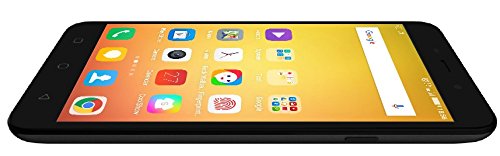
છબી: બાજુ view of the Coolpad Note 3, illustrating the location of the SIM/MicroSD card tray and physical buttons.
2. પ્રારંભિક પાવર ઓન અને સેટઅપ વિઝાર્ડ
- Press and hold the Power button until the Coolpad logo appears.
- તમારી ભાષા પસંદ કરવા, Wi-Fi થી કનેક્ટ કરવા અને તમારું Google એકાઉન્ટ સેટ કરવા માટે સ્ક્રીન પરની સૂચનાઓને અનુસરો.
3. ફિંગરપ્રિન્ટ સેન્સર સેટઅપ
The Coolpad Note 3 features a fingerprint sensor for enhanced security and quick access.
- પર નેવિગેટ કરો સેટિંગ્સ > સુરક્ષા > ફિંગરપ્રિન્ટ.
- Follow the prompts to register your fingerprints. You can register multiple fingers.
- Optionally, customize fingerprints to launch specific applications directly.
ઓપરેટિંગ સૂચનાઓ
1. મૂળભૂત નેવિગેશન
Your Coolpad Note 3 runs on Android v5.1 Lollipop with the COOLUI 6.0 interface. Use the touchscreen for navigation, tapping icons to open apps, swiping to scroll, and pinching to zoom.

છબી: આગળ view of the Coolpad Note 3, showing the vibrant home screen with various application icons.
2. કેમેરાનો ઉપયોગ
The device features a 13MP rear camera and a 5MP front camera.
- ખોલો કેમેરા અરજી
- ફોકસ કરવા માટે સ્ક્રીનને ટેપ કરો.
- ફોટો લેવા અથવા વિડિયો રેકોર્ડિંગ શરૂ/બંધ કરવા માટે શટર બટન દબાવો.
- કેમેરા ટૉગલ આઇકનનો ઉપયોગ કરીને આગળ અને પાછળના કેમેરા વચ્ચે સ્વિચ કરો.
- Explore various shooting modes available in the camera app.
3. Fingerprint Sensor for Unlocking
To unlock your phone, simply place your registered finger on the fingerprint sensor. The device unlocks in approximately 0.5 seconds. The sensor is designed to detect both dry and wet fingers accurately.
4. કનેક્ટિવિટી
- Wi-Fi: પર જાઓ સેટિંગ્સ > Wi-Fi ઉપલબ્ધ નેટવર્ક્સ સાથે જોડાવા માટે.
- મોબાઇલ ડેટા: ખાતરી કરો કે તમારું સિમ કાર્ડ સક્રિય છે અને મોબાઇલ ડેટા સક્ષમ છે સેટિંગ્સ > ડેટા વપરાશ.
- બ્લૂટૂથ: આના દ્વારા અન્ય ઉપકરણો સાથે જોડી બનાવો સેટિંગ્સ > બ્લૂટૂથ.
- USB OTG: The Micro USB port supports On-The-Go (OTG) functionality for connecting external USB devices (e.g., flash drives) with an adapter.
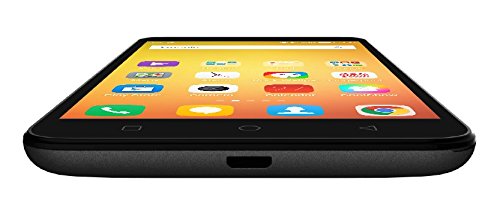
છબી: નીચે view of the Coolpad Note 3, highlighting the Micro USB port for charging and data transfer.
જાળવણી
1. બેટરી ચાર્જ કરી રહી છે
Use the provided charger and USB cable to charge your Coolpad Note 3. Connect the USB cable to the phone's Micro USB port and the charger to a power outlet. A full charge typically takes approximately 2 hours.
2. સોફ્ટવેર અપડેટ્સ
Regularly check for software updates to ensure optimal performance and access to the latest features and security patches. Go to સેટિંગ્સ > ફોન વિશે > સિસ્ટમ અપડેટ્સ.
3. તમારા ઉપકરણને સાફ કરવું
તમારા ફોનની સ્ક્રીન અને બોડી સાફ કરવા માટે નરમ, લિન્ટ-ફ્રી કાપડનો ઉપયોગ કરો. કઠોર રસાયણો અથવા ઘર્ષક સામગ્રીનો ઉપયોગ કરવાનું ટાળો.
૫.૪. સ્ક્રીન પ્રોટેક્શન
While the device features a durable display, it is recommended to use a tempered glass screen protector and a protective case to prevent scratches and damage from accidental drops.
મુશ્કેલીનિવારણ
- Device is heating: It is normal for smartphones to generate some heat during intensive use (e.g., gaming, prolonged video playback). If excessive heating occurs, close background applications and allow the device to cool. Software updates often address heating optimizations.
- Poor camera quality: Ensure good lighting conditions. For potentially improved results, consider using third-party camera applications available on the Google Play Store.
- Network connectivity issues (international travel): The Coolpad Note 3's 3G/4G bands may not be compatible with all international carriers. Verify network compatibility with your service provider before traveling.
- Slow performance/lag: Close unused applications, clear cache, and restart the device. Ensure sufficient free storage space.
વિશિષ્ટતાઓ
| બ્રાન્ડ | કૂલપેડ |
| મોડલ | નોંધ 3 |
| ઓપરેટિંગ સિસ્ટમ | એન્ડ્રોઇડ v5.1 લોલીપોપ |
| પ્રોસેસર | 1.3GHz Cortex-A53 MT6753 Mediatek Octacore |
| રેમ | 3GB |
| આંતરિક સંગ્રહ | 16GB (expandable up to 64GB via MicroSD) |
| ડિસ્પ્લે માપ | 5.5-ઇંચ (13.97 સે.મી.) |
| ડિસ્પ્લે રિઝોલ્યુશન | ૧૯૨૦ x ૭૨૦ પિક્સેલ્સ (HD) |
| રીઅર કેમેરા | 13MP |
| ફ્રન્ટ કેમેરા | 5MP |
| બેટરી ક્ષમતા | 3000mAh લિથિયમ-આયન |
| ટૉક ટાઈમ | 15 કલાક સુધી |
| સ્ટેન્ડબાય સમય | 400 કલાક સુધી |
| સિમ સપોર્ટ | Dual SIM (4G+2G) |
| બાયોમેટ્રિક સુરક્ષા | ફિંગરપ્રિન્ટ ઓળખ |
| સેન્સર્સ | G sensor, Proximity sensor, Light sensor, Gyro sensor, eCompass, Fingerprint sensor |
| પરિમાણો (L x W x H) | 15.2 x 7.7 x 0.9 સેમી |
| વજન | 150 ગ્રામ |
વોરંટી માહિતી
Your Coolpad Note 3 comes with a manufacturer's warranty:
- ઉપકરણ: 1 year manufacturer warranty from the date of purchase.
- In-box Accessories: 6 months manufacturer warranty for accessories including batteries, from the date of purchase.
Please retain your purchase receipt and warranty card for future reference.
આધાર
For further assistance, technical support, or service inquiries, please refer to the official Coolpad support channels. Coolpad has partnered with HCL for service in some regions.
Visit the official Coolpad website for the latest support information and contact details.