
1. પરિચય
ખરીદી બદલ આભારasing the Caliber HPG415BT/B Portable Bluetooth Speaker. This manual provides important information regarding the safe and efficient operation of your device. Please read it thoroughly before use and retain it for future reference.
પેકેજ સામગ્રી
- Caliber HPG415BT/B Portable Bluetooth Speaker
- USB to Mini USB Charging Cable
- 3.5mm ઓડિયો કેબલ
- રીમોટ કંટ્રોલ
- સૂચના માર્ગદર્શિકા
2. સલામતી માહિતી
સલામત કામગીરી સુનિશ્ચિત કરવા અને નુકસાન અટકાવવા માટે, કૃપા કરીને નીચેના સલામતી માર્ગદર્શિકાઓનું પાલન કરો:
- ઉપકરણને વરસાદ, ભેજ અથવા અતિશય તાપમાનના સંપર્કમાં ન લાવો.
- Avoid placing the speaker near heat sources such as radiators, stoves, or other heat-producing appliances.
- યુનિટને જાતે ડિસએસેમ્બલ, રિપેર કે સુધારશો નહીં. બધી સર્વિસિંગ લાયક કર્મચારીઓને સોંપો.
- Use only the specified charging cable and power adapter (5V USB) to charge the battery.
- ઉપકરણને મજબૂત ચુંબકીય ક્ષેત્રોથી દૂર રાખો.
- Clean the device only with a dry, soft cloth. Do not use liquid cleaners.
3. ઉત્પાદન સુવિધાઓ
The Caliber HPG415BT/B speaker offers a range of features for versatile audio playback:
- વાયરલેસ બ્લૂટૂથ ટેકનોલોજી: Connect wirelessly to compatible devices within a 10-meter range (Bluetooth version 2.1, supports A2DP and AVRCP profiles).
- બહુવિધ પ્લેબેક વિકલ્પો: Play audio from USB drives and SD cards (up to 32GB).
- એફએમ રેડિયો: Enjoy your favorite radio stations with automatic search and storage functions.
- એલઇડી ડિસ્પ્લે: Provides clear information on current mode and status.
- High Power Sound: Equipped with 2x 3W speakers for a total of 6W RMS output.
- ઇન્ટિગ્રેટેડ રિચાર્જેબલ બેટરી: Offers up to 5 hours of continuous playback.
- સાહજિક નિયંત્રણો: Features buttons for previous/next track, play/pause, mode selection, EQ adjustment, and volume control.
- Mm.mm મીમી Audioડિઓ ઇનપુટ: Connect external audio devices via the included audio cable.
- રીમોટ કંટ્રોલ: Conveniently operate the speaker from a distance.
4. નિયંત્રણ અને જોડાણો
સ્પીકરના નિયંત્રણો અને કનેક્શન પોર્ટ્સથી પરિચિત થાઓ:
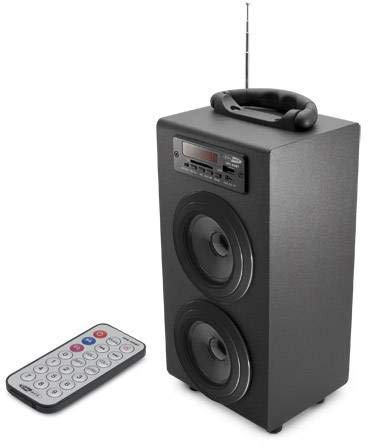
Image 1: Caliber HPG415BT/B Portable Bluetooth Speaker. This image shows the overall design of the speaker, featuring a tubular shape, front-facing speakers, and a control panel on the top or front.
Control Panel (Typical Layout)
- મોડ બટન: Switches between Bluetooth, FM Radio, USB, SD, and AUX modes.
- પ્લે/પોઝ બટન: પ્લેબેક પ્રારંભ થાય છે અથવા થોભાવો છે.
- PREVIOUS/NEXT Buttons: Skips tracks in media modes or changes radio stations in FM mode.
- VOLUME +/- Buttons: ઑડિઓ આઉટપુટ સ્તરને સમાયોજિત કરે છે.
- EQ બટન: ઇક્વેલાઇઝર પ્રીસેટ્સ દ્વારા ચક્ર.
- પાવર ચાલુ/બંધ સ્વીચ: Located typically on the rear or side.
Connection Ports (Typical Layout)
- યુએસબી પોર્ટ: USB ફ્લેશ ડ્રાઇવને કનેક્ટ કરવા માટે.
- SD કાર્ડ સ્લોટ: SD મેમરી કાર્ડ દાખલ કરવા માટે.
- AUX ઇનપુટ (3.5mm): કેબલ દ્વારા બાહ્ય ઑડિઓ ઉપકરણોને કનેક્ટ કરવા માટે.
- Mini USB Charging Port: ચાર્જિંગ કેબલ કનેક્ટ કરવા માટે.
5. સેટઅપ
5.1 પ્રારંભિક ચાર્જિંગ
- Before first use, fully charge the speaker's internal battery.
- Connect the supplied Mini USB cable to the speaker's charging port.
- Connect the other end of the USB cable to a 5V USB power source (e.g., a computer USB port or a USB wall adapter, not included).
- The LED indicator will show charging status. Once fully charged, the indicator may change color or turn off.
5.2 પાવરિંગ ચાલુ/બંધ
- To power on, slide the Power ON/OFF switch to the 'ON' position. The LED display will light up.
- To power off, slide the Power ON/OFF switch to the 'OFF' position.
6. ઓપરેટિંગ સૂચનાઓ
6.1 બ્લૂટૂથ મોડ
- Power on the speaker. It will automatically enter Bluetooth pairing mode, indicated by a flashing Bluetooth icon on the LED display.
- તમારા સ્માર્ટફોન, ટેબ્લેટ અથવા અન્ય બ્લૂટૂથ-સક્ષમ ઉપકરણ પર બ્લૂટૂથ સક્ષમ કરો.
- માટે શોધો available Bluetooth devices and select "HPG415BT" from the list.
- Once paired, the speaker will emit a confirmation sound, and the Bluetooth icon on the display will stop flashing.
- You can now play audio from your connected device through the speaker. Use the PLAY/PAUSE and PREVIOUS/NEXT buttons on the speaker or remote to control playback.
6.2 FM રેડિયો મોડ
- દબાવો મોડ button repeatedly until "FM" appears on the LED display.
- To perform an automatic station scan, press and hold the રમો/થોભો button. The speaker will scan and save available FM stations.
- નો ઉપયોગ કરો પહેલાનું/આગલું સાચવેલા સ્ટેશનો પર નેવિગેટ કરવા માટે બટનો.
૬.૨ યુએસબી/એસડી કાર્ડ પ્લેબેક
- USB પોર્ટમાં USB ફ્લેશ ડ્રાઇવ અથવા SD કાર્ડ સ્લોટમાં SD કાર્ડ દાખલ કરો.
- સ્પીકર આપમેળે USB અથવા SD મોડ પર સ્વિચ કરશે અને ઑડિઓ વગાડવાનું શરૂ કરશે. files. જો નહીં, તો દબાવો મોડ સાચો સ્ત્રોત પસંદ કરવા માટે બટન.
- નો ઉપયોગ કરો રમો/થોભો અને પહેલાનું/આગલું પ્લેબેકને નિયંત્રિત કરવા માટેના બટનો.
૫.૫ AUX ઇનપુટ મોડ
- Connect one end of the supplied 3.5mm audio cable to the speaker's AUX input port.
- Connect the other end of the cable to the headphone jack or audio output of your external audio device.
- દબાવો મોડ button repeatedly until "AUX" appears on the LED display.
- Control playback and volume directly from your external audio device.
7. બેટરી ચાર્જ કરી રહી છે
When the battery is low, the speaker may emit an audible warning or the LED indicator will show a low battery status. To charge:
- Connect the Mini USB charging cable to the speaker's charging port.
- Connect the USB end to a 5V USB power source.
- The charging indicator will illuminate. Charging typically takes several hours.
- Once fully charged, the indicator will change or turn off. Disconnect the charging cable.
8. જાળવણી
- સફાઈ: સ્પીકરના બાહ્ય ભાગને સાફ કરવા માટે નરમ, સૂકા કપડાનો ઉપયોગ કરો. ઘર્ષક ક્લીનર્સ, મીણ અથવા દ્રાવકનો ઉપયોગ કરશો નહીં.
- સંગ્રહ: જ્યારે લાંબા સમય સુધી ઉપયોગમાં ન હોય, ત્યારે સ્પીકરને ઠંડી, સૂકી જગ્યાએ, સીધા સૂર્યપ્રકાશ અને અતિશય તાપમાનથી દૂર રાખો.
- બેટરી સંભાળ: બેટરીનું આયુષ્ય વધારવા માટે, વારંવાર બેટરી સંપૂર્ણપણે ડિસ્ચાર્જ કરવાનું ટાળો. ઉપયોગમાં ન હોય તો પણ તેને નિયમિતપણે ચાર્જ કરો.
9. મુશ્કેલીનિવારણ
| સમસ્યા | સંભવિત કારણ | ઉકેલ |
|---|---|---|
| કોઈ શક્તિ નથી | Battery is discharged; Power switch is OFF. | Charge the battery; Slide the power switch to ON. |
| કોઈ અવાજ નથી | વૉલ્યૂમ ખૂબ ઓછું છે; ખોટો મોડ પસંદ કરેલ છે; ડિવાઇસ યોગ્ય રીતે કનેક્ટ થયેલ નથી. | Increase volume; Press MODE to select correct source; Reconnect device. |
| બ્લૂટૂથ કનેક્ટ થઈ રહ્યું નથી | સ્પીકર પેરિંગ મોડમાં નથી; ડિવાઇસ બ્લૂટૂથ બંધ છે; સ્પીકર ડિવાઇસથી ખૂબ દૂર છે. | Ensure speaker is in Bluetooth mode and flashing; Enable Bluetooth on your device; Move devices closer (within 10m). |
| એફએમ રેડિયો સ્ટેટિક | નબળો સંકેત; હસ્તક્ષેપ. | Relocate the speaker for better reception; Perform an auto-scan again. |
10. સ્પષ્ટીકરણો
- મોડલ: HPG415BT/B
- આઉટપુટ પાવર: ૬૦ વોટ આરએમએસ (૨x ૩૦ વોટ)
- બ્લૂટૂથ સંસ્કરણ: 2.1
- બ્લૂટૂથ ઓપરેટિંગ રેન્જ: 10 મીટર સુધી
- કનેક્ટિવિટી: Bluetooth, USB, SD Card, 3.5mm AUX Input
- સપોર્ટેડ મીડિયા: USB drives, SD cards (up to 32GB)
- એફએમ રેડિયો: Yes, with auto-scan
- પ્રદર્શન: એલઇડી
- બેટરીનો પ્રકાર: Integrated Rechargeable
- બેટરી જીવન: 5 કલાક સુધી
- ચાર્જિંગ: યુએસબી 5V
- પરિમાણો (L x W x H): 140 x 120 x 280 મીમી
- વજન: આશરે 1.04 કિગ્રા (2.29 lbs)
- નિયંત્રણ પ્રકાર: Buttons, Remote Control
11. વોરંટી અને સપોર્ટ
Caliber products are designed and manufactured to the highest quality standards. For warranty information or technical support, please refer to the warranty card included with your product or visit the official Caliber webસંપર્ક વિગતો માટે સાઇટ.