
પરિચય
This manual provides instructions for the safe and efficient operation of your Axess MS3912 Mini Entertainment System. Please read this manual thoroughly before using the device and retain it for future reference.
મુખ્ય લક્ષણો:
- AM/FM રેડિયો
- કેસેટ પ્લેયર અને રેકોર્ડર
- સીડી પ્લેયર
- USB Port for MP3 Playback
- સહાયક ઇનપુટ
- હેડફોન જેક
- Portable/Detachable Speakers
- રીમોટ કંટ્રોલ
- AC/DC Power Operation
સલામતી માહિતી
ચેતવણી:
આ ઉત્પાદનમાં કેન્સર અને જન્મજાત ખામીઓ અથવા અન્ય પ્રજનન નુકસાન પહોંચાડવા માટે કેલિફોર્નિયા રાજ્યમાં જાણીતા રસાયણો છે.
આગ, ઇલેક્ટ્રિક આંચકો અને વ્યક્તિગત ઈજાના જોખમને ઘટાડવા માટે વિદ્યુત ઉપકરણોનો ઉપયોગ કરતી વખતે હંમેશા મૂળભૂત સલામતી સાવચેતીઓનું પાલન કરો.
- આ ઉપકરણને વરસાદ અથવા ભેજ માટે ખુલ્લા કરશો નહીં.
- કોઈપણ વેન્ટિલેશન ઓપનિંગ્સને અવરોધિત કરશો નહીં.
- યોગ્ય વોલ્યુમની ખાતરી કરોtage supply (AC 120V/60Hz for US models, check local specifications).
- Do not open the unit's casing; બધી સેવા લાયક કર્મચારીઓને સોંપવી.
- Keep the unit away from heat sources, direct sunlight, and strong magnetic fields.
- વીજળીના તોફાન દરમિયાન અથવા લાંબા સમય સુધી ઉપયોગ ન હોય ત્યારે યુનિટને અનપ્લગ કરો.
પેકેજ સામગ્રી
ખાતરી કરો કે નીચે સૂચિબદ્ધ બધી વસ્તુઓ તમારા પેકેજમાં શામેલ છે:
- Axess MS3912 Main Unit
- Detachable Speakers (2)
- રીમોટ કંટ્રોલ
- એસી પાવર કોર્ડ
- વપરાશકર્તા માર્ગદર્શિકા (આ દસ્તાવેજ)
નિયંત્રણો અને જોડાણો
Familiarize yourself with the various controls and connection points on your MS3912 system.
ફ્રન્ટ પેનલ નિયંત્રણો
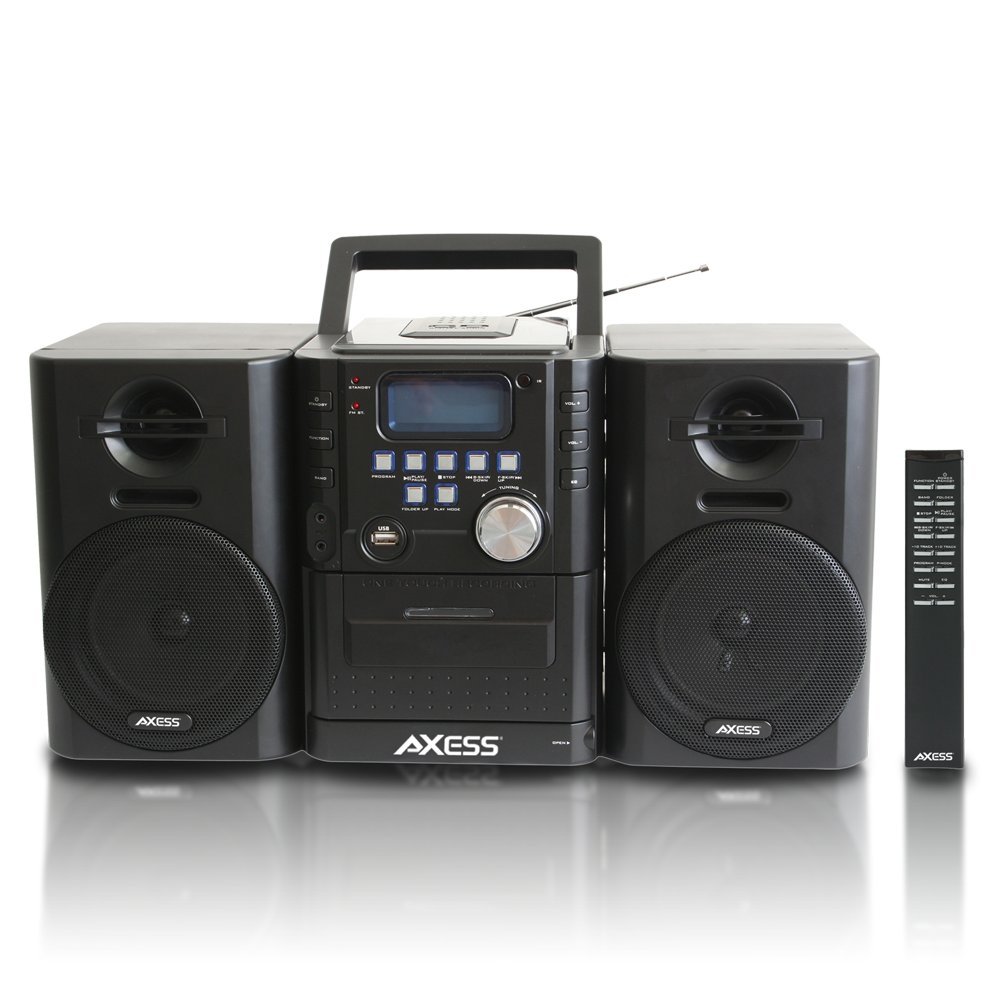
છબી: આગળ view of the Axess MS3912 Mini Entertainment System, showing the central unit with display, control buttons, USB port, CD tray, cassette deck, and two detachable speakers. A remote control is also visible on the right.
- સ્ટેન્ડબાય બટન: યુનિટને ચાલુ અથવા બંધ કરે છે.
- ફંક્શન બટન: Selects between CD, USB, TAPE, AUX, and RADIO modes.
- બેન્ડ બટન: In Radio mode, switches between AM and FM bands.
- પ્રોગ્રામ બટન: Used for programming CD/USB tracks.
- પ્લે/પોઝ બટન: Starts or pauses playback for CD, USB, or Cassette.
- સ્ટોપ બટન: પ્લેબેક બંધ કરે છે.
- છોડો/શોધ બટનો (<< / >>): ટ્રેક છોડી દે છે અથવા ફાસ્ટ ફોરવર્ડ/રીવાઇન્ડ કરે છે.
- FOLDER UP / PLAY MODE Buttons: Navigates folders on USB or changes play mode.
- વોલ્યુમ નોબ: ઑડિઓ આઉટપુટ સ્તરને સમાયોજિત કરે છે.
- યુએસબી પોર્ટ: Connects USB flash drives for MP3 playback.
- PC/AUX IN Jack: બાહ્ય ઑડિઓ ઉપકરણોને જોડે છે.
- હેડફોન જેક: Connects headphones for private listening.
- સીડી કમ્પાર્ટમેન્ટ: Top-loading CD player.
- કેસેટ ડેક: Front-loading cassette player/recorder.
- પ્રદર્શન: વર્તમાન કાર્ય, ટ્રેક નંબર, રેડિયો ફ્રીક્વન્સી, વગેરે બતાવે છે.
રીઅર પેનલ કનેક્શન્સ

છબી: પાછળનો ભાગ view of the Axess MS3912 Mini Entertainment System, showing the FM antenna, battery compartment, AC power input, and speaker connection jacks.
- એફએમ એન્ટેના: Extend for optimal FM reception.
- સ્પીકર જેક્સ: Connect the left and right speakers.
- એસી પાવર ઇનપુટ: AC પાવર કોર્ડને કનેક્ટ કરો.
- બેટરી કમ્પાર્ટમેન્ટ: Holds batteries for portable operation.
સેટઅપ
1. સ્પીકર્સ કનેક્ટ કરી રહ્યા છીએ
Connect the speaker wires from the detachable speakers to the corresponding speaker jacks on the rear of the main unit. Ensure the polarity (+/-) matches for optimal sound quality.
2. એકમને શક્તિ આપવી
એસી પાવર ઓપરેશન:
Insert the AC power cord into the AC power input jack on the rear of the unit, then plug the other end into a standard wall outlet (AC 120V/60Hz).
ડીસી (બેટરી) પાવર ઓપરેશન:
Open the battery compartment cover on the rear of the unit. Insert the required number of C-size batteries (not included), ensuring correct polarity. Close the battery compartment cover securely. The unit will automatically switch to battery power when AC power is disconnected.
3. એન્ટેના સેટઅપ
For FM radio reception, fully extend the telescopic FM antenna. For AM reception, the unit has a built-in AM antenna, which may require rotating the unit for best reception.
ઓપરેટિંગ સૂચનાઓ
1. પાવર ચાલુ/બંધ
દબાવો સ્ટેન્ડબાય યુનિટ ચાલુ અથવા બંધ કરવા માટે ફ્રન્ટ પેનલ અથવા રિમોટ કંટ્રોલ પરનું બટન.
2. કાર્ય પસંદગી
દબાવો કાર્ય button repeatedly to cycle through the available modes: CD, USB, TAPE, AUX, and RADIO.
3. સીડી પ્લેયર ઓપરેશન
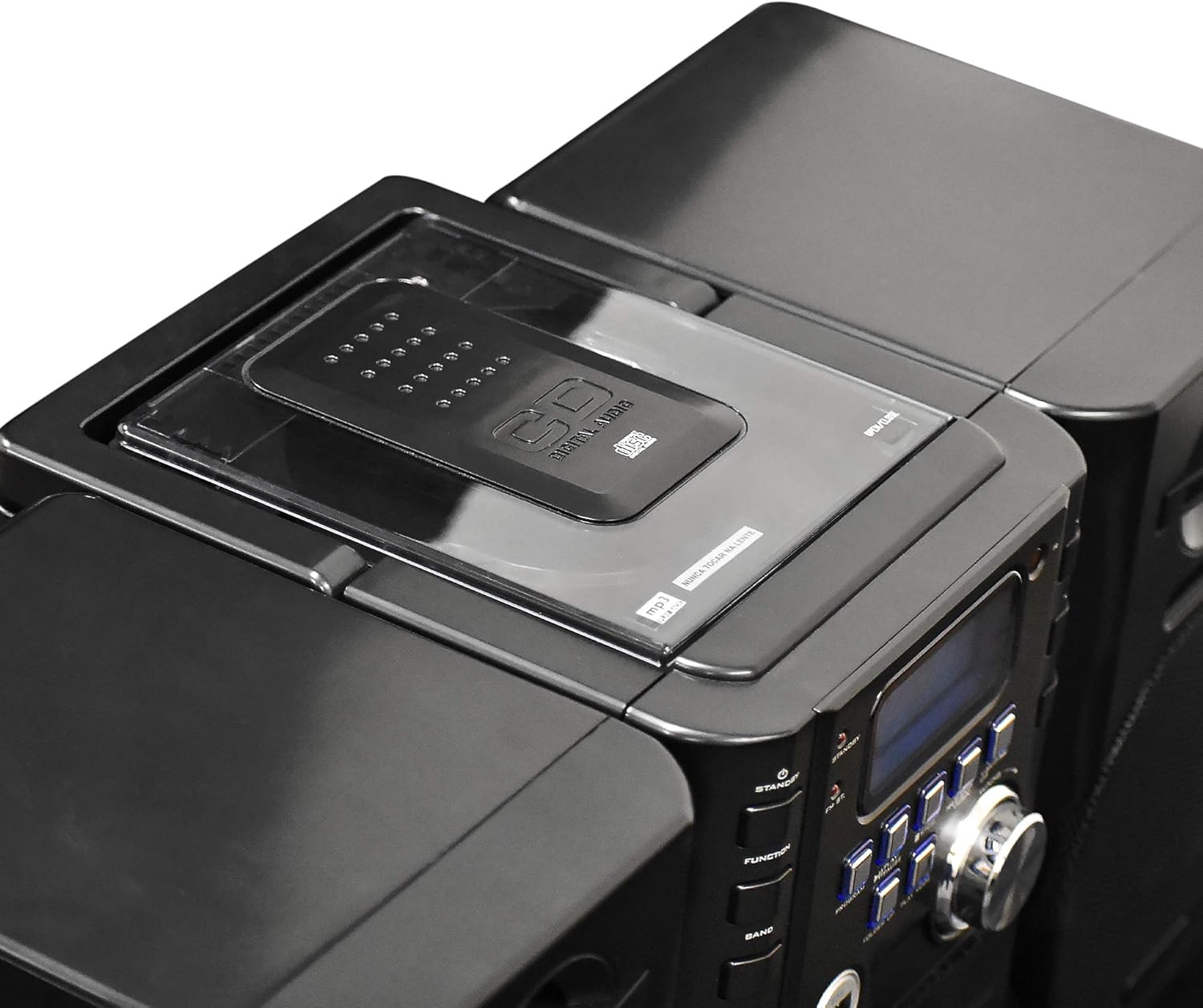
છબી: ટોચ view of the Axess MS3912 Mini Entertainment System, showing the transparent lid of the top-loading CD compartment.
- દબાવો કાર્ય to select CD mode.
- સીડી કમ્પાર્ટમેન્ટ કવર ખોલો.
- લેબલની બાજુ ઉપર તરફ રાખીને સીડી મૂકો.
- સીડી કમ્પાર્ટમેન્ટ કવર બંધ કરો. યુનિટ ડિસ્ક વાંચશે.
- દબાવો રમો/થોભો પ્લેબેક શરૂ કરવા માટે.
- નો ઉપયોગ કરો Skip / Search ટ્રેક નેવિગેટ કરવા માટે બટનો.
- દબાવો રોકો પ્લેબેક સમાપ્ત કરવા માટે.
4. USB/MP3 Player Operation

છબી: બાજુ view of the Axess MS3912 Mini Entertainment System, highlighting the USB port and PC/AUX IN jack on the central unit.
- USB પોર્ટમાં USB ફ્લેશ ડ્રાઇવ દાખલ કરો.
- દબાવો કાર્ય યુએસબી મોડ પસંદ કરવા માટે.
- The unit will automatically begin playing MP3 fileUSB ડ્રાઇવમાંથી.
- ઉપયોગ કરો રમો/થોભો, રોકો, અને Skip / Search નિયંત્રણ માટે બટનો.
- ઉપયોગ કરો ફોલ્ડર ઉપર to navigate between folders on the USB drive.
5. Cassette Player/Recorder Operation
- દબાવો કાર્ય to select TAPE mode.
- Open the cassette deck door and insert a cassette tape.
- દબાવો રમો/થોભો પ્લેબેક શરૂ કરવા માટે.
- નો ઉપયોગ કરો ફાસ્ટ ફોરવર્ડ અને રીવાઇન્ડ કરો buttons (often combined with SKIP/SEARCH buttons) to move through the tape.
- દબાવો રોકો પ્લેબેક સમાપ્ત કરવા માટે.
- રેકોર્ડિંગ: To record from CD, USB, or Radio, select the desired source, then press the રેકોર્ડ કરો button on the cassette deck (if available, or a combination of PLAY and RECORD). Ensure a blank, recordable cassette is inserted.
૫.૩. એએમ/એફએમ રેડિયો ઓપરેશન
- દબાવો કાર્ય રેડિયો મોડ પસંદ કરવા માટે.
- દબાવો બેન્ડ to select AM or FM.
- નો ઉપયોગ કરો ટ્યુનિંગ નોબ અથવા Skip / Search તમારા ઇચ્છિત સ્ટેશન પર ટ્યુન કરવા માટે બટનો.
- For FM, extend the telescopic antenna. For AM, rotate the unit for best reception.
- પ્રીસેટિંગ સ્ટેશનો: Tune to a station, press કાર્યક્રમ, પછી ઉપયોગ કરો Skip / Search પ્રીસેટ નંબર પસંદ કરવા માટે, અને દબાવો કાર્યક્રમ ફરીથી બચાવવા માટે.
7. Auxiliary Input (AUX) Use
બાહ્ય ઓડિયો ઉપકરણ (દા.ત., સ્માર્ટફોન, MP3 પ્લેયર) ને આ સાથે કનેક્ટ કરો PC/AUX IN jack using a 3.5mm audio cable (not included). Press કાર્ય to select AUX mode. Audio from the external device will play through the MS3912 speakers.
૭.૭. હેડફોનનો ઉપયોગ
Plug standard 3.5mm headphones into the હેડફોન jack for private listening. The speakers will automatically mute when headphones are connected.
9. રીમોટ કંટ્રોલ
The included remote control allows for convenient operation of most functions from a distance. Ensure batteries are correctly inserted into the remote control.
જાળવણી
યુનિટની સફાઈ
Wipe the exterior of the unit with a soft, dry cloth. Do not use abrasive cleaners, waxes, or solvents. For the CD lens, use a specialized CD lens cleaner disc. For the cassette deck, use a head cleaning cassette.
સંગ્રહ
If storing the unit for an extended period, remove all batteries to prevent leakage. Store in a cool, dry place away from direct sunlight and extreme temperatures.
મુશ્કેલીનિવારણ
| સમસ્યા | સંભવિત કારણ | ઉકેલ |
|---|---|---|
| કોઈ શક્તિ નથી | AC cord not plugged in; Batteries depleted or incorrectly inserted. | એસી કોર્ડ કનેક્શન તપાસો; બેટરી બદલો અથવા યોગ્ય પોલેરિટી ખાતરી કરો. |
| કોઈ અવાજ નથી | Volume too low; Headphones connected; Speakers not connected properly; Incorrect function selected. | Increase volume; Disconnect headphones; Check speaker connections; Select correct function (CD, USB, TAPE, AUX, RADIO). |
| સીડી ચૂકી જાય છે અથવા વાગતી નથી | સીડી ગંદી અથવા સ્ક્રેચ કરેલી છે; સીડી ખોટી રીતે દાખલ કરવામાં આવી છે; યુનિટ વાઇબ્રેટ થઈ રહ્યું છે. | Clean CD with a soft cloth; Reinsert CD label side up; Place unit on a stable surface. |
| નબળું રેડિયો રિસેપ્શન | FM antenna not extended; Unit position for AM is poor; Interference. | Fully extend FM antenna; Rotate unit for better AM reception; Move unit away from other electronic devices. |
| યુએસબી વગાડતું નથી | USB ડ્રાઇવ યોગ્ય રીતે ફોર્મેટ થયેલ નથી; અસંગત file types; USB drive not inserted fully. | Ensure USB is FAT32 format; Only MP3 files are supported; Reinsert USB drive. |
| Cassette recording not working | Tape is write-protected; No blank tape inserted; Incorrect source selected. | Check tape's write-protect tab; Insert a blank, recordable tape; Select the desired audio source (CD, USB, Radio, AUX). |
વિશિષ્ટતાઓ
| લક્ષણ | સ્પષ્ટીકરણ |
|---|---|
| મોડલ નંબર | MS3912 |
| બ્રાન્ડ | AXESS |
| પાવર આઉટપુટ | 12W સ્પીકર્સ |
| પાવર સ્ત્રોત | AC 120V/60Hz or DC (C-size batteries, not included) |
| રેડિયો ફ્રીક્વન્સીઝ | AM/FM |
| સપોર્ટેડ મીડિયા | CD, MP3 (via USB), Cassette Tape |
| ઇનપુટ્સ | USB Port, 3.5mm AUX Input |
| આઉટપુટ | 3.5mm હેડફોન જેક |
| પરિમાણો (L x W x H) | 43.82 x 21.59 x 24.13 cm (17.25 x 8.5 x 9.5 inches approx.) |
| વજન | ૦.૭૫ કિગ્રા (આશરે ૧.૬૫ પાઉન્ડ) |