
મહત્વપૂર્ણ સલામતી સૂચનાઓ
ઉપયોગ કરતા પહેલા તમામ સૂચનાઓ કાળજીપૂર્વક વાંચો.
- સફાઈ, સર્વિસિંગ અથવા ખસેડતા પહેલા હંમેશા પંખાને પાવર આઉટલેટમાંથી અનપ્લગ કરો.
- પંખો ચાલુ હોય ત્યારે ગ્રિલમાં આંગળીઓ કે અન્ય કોઈ વસ્તુ દાખલ કરશો નહીં.
- ક્ષતિગ્રસ્ત કોર્ડ અથવા પ્લગ સાથે કોઈપણ પંખો ચલાવશો નહીં. પંખો કાઢી નાખો અથવા પરીક્ષા અને/અથવા સમારકામ માટે અધિકૃત સેવા સુવિધા પર પાછા ફરો.
- ગાલીચાની નીચે દોરી ન ચલાવો. કોર્ડને થ્રો રગ્સ, રનર્સ અથવા સમાન આવરણથી ઢાંકશો નહીં. કોર્ડને ટ્રાફિક વિસ્તારથી દૂર ગોઠવો અને જ્યાં તે ફસાઈ ન જાય.
- પંખાનો ઉપયોગ ભીનો અથવા ડીamp locations such as bathrooms or laundry areas.
- This fan is intended for indoor use only. Do not use outdoors.
- Keep the fan away from curtains, drapes, or any objects that may get caught in the fan blades.
- Supervise children when the fan is in use.
ઉત્પાદન ઓવરview
The Optimus 18-inch High Velocity Industrial Floor Fan is designed to provide powerful air circulation in various indoor environments. Its robust construction and high-velocity motor make it suitable for workshops, garages, and large rooms.
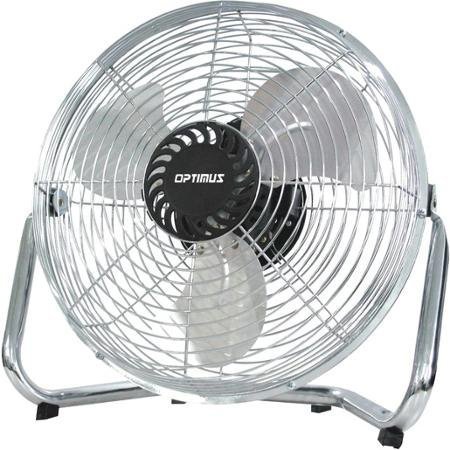
Image: Optimus 18-inch High Velocity Industrial Floor Fan. This image shows the fan with its silver metallic finish and sturdy floor stand.
મુખ્ય લક્ષણો:
- 18-inch diameter for wide air distribution.
- Industrial-grade high velocity airflow.
- Durable metallic finish.
- Floor standing design for stable placement.
- Multiple power levels for adjustable airflow.
સેટઅપ સૂચનાઓ
- પંખાને અનપેક કરો: પેકેજિંગમાંથી પંખો અને બધા ઘટકો કાળજીપૂર્વક દૂર કરો. ભવિષ્યના સંગ્રહ અથવા પરિવહન માટે પેકેજિંગ રાખો.
- Assemble the Floor Stand:
- Attach the fan head to the floor stand using the provided screws and tools. Ensure all connections are secure.
- Verify the fan head can pivot smoothly on the stand.
- પ્લેસમેન્ટ: Place the fan on a firm, level surface. Ensure there is adequate space around the fan for proper air circulation and to prevent obstruction of the air intake/output. Keep the fan at least 3 feet away from walls or furniture.
- પાવર કનેક્શન: Ensure the fan is in the "OFF" position before plugging it into a standard 120V AC electrical outlet.
ઓપરેટિંગ સૂચનાઓ
This fan features push-button controls for easy operation. A remote control may also be included for convenience.
- પાવર ચાલુ/બંધ: Locate the power button on the control panel. Press the button once to turn the fan ON. Press it again to turn the fan OFF.
- પંખાની ગતિને સમાયોજિત કરવી: The fan has 4 power levels. After turning the fan ON, repeatedly press the speed control button to cycle through the available speed settings (Low, Medium, High, Max). The fan will operate at the selected speed.
- એરફ્લો દિશાને સમાયોજિત કરવી: The fan head can be tilted manually to direct airflow upwards or downwards. Gently tilt the fan head to the desired angle. Do not force the fan head beyond its intended range of motion.
જાળવણી
Regular cleaning and maintenance will ensure optimal performance and extend the life of your fan.
- પંખાની સફાઈ:
- સફાઈ કરતા પહેલા હંમેશા પંખાને પાવર સ્ત્રોતમાંથી અનપ્લગ કરો.
- સોફ્ટનો ઉપયોગ કરો, ડીamp cloth to wipe the exterior surfaces of the fan. Do not use abrasive cleaners or harsh chemicals, as these may damage the finish.
- To clean the fan blades, carefully remove the front grille (if detachable, refer to assembly instructions for details). Wipe the blades with a soft cloth. Ensure the grille is securely reattached before operating the fan.
- પંખો પાછો લગાવતા પહેલા ખાતરી કરો કે બધા ભાગો સંપૂર્ણપણે સુકાઈ ગયા છે.
- સંગ્રહ: જ્યારે લાંબા સમય સુધી ઉપયોગમાં ન હોય, ત્યારે પંખાને ઠંડી, સૂકી જગ્યાએ સંગ્રહિત કરો. ધૂળ અને નુકસાનથી બચાવવા માટે તેને તેના મૂળ પેકેજિંગમાં સંગ્રહિત કરવાની ભલામણ કરવામાં આવે છે.
મુશ્કેલીનિવારણ
| સમસ્યા | સંભવિત કારણ | ઉકેલ |
|---|---|---|
| પંખો ચાલુ થતો નથી. | Not plugged in; power outlet not working; fan switch is off. | Ensure fan is securely plugged into a working outlet. Check household fuse/circuit breaker. Press the power button to turn the fan on. |
| નીચા હવા પ્રવાહ. | Fan speed set too low; obstructed intake/output; dirty blades. | Increase fan speed. Clear any obstructions. Clean fan blades and grilles as per maintenance instructions. |
| અસામાન્ય અવાજ કે ખડખડાટ. | Loose parts; fan not on a level surface; foreign object in blades. | Unplug the fan and check for any loose screws or components. Place the fan on a stable, level surface. Carefully inspect for and remove any foreign objects. |
વિશિષ્ટતાઓ
| લક્ષણ | વિગત |
|---|---|
| બ્રાન્ડ | ઓપ્ટીમસ |
| મોડેલનું નામ | ઉચ્ચ વેગ |
| આઇટમ મોડલ નંબર | 306c1b92-f36b-4ccc-ac62-2ad33d5c9efb |
| વ્યાસ | 18 ઇંચ |
| રંગ | ચાંદી |
| શૈલી | ઔદ્યોગિક |
| પાવર સ્ત્રોત | કોર્ડેડ ઇલેક્ટ્રિક |
| પાવર લેવલની સંખ્યા | 4 |
| નિયંત્રણ પદ્ધતિ | બટન નિયંત્રણ |
| ઇન્ડોર/આઉટડોર વપરાશ | ઇન્ડોર |
| સમાવાયેલ ઘટકો | Floor Stand, Remote Control |
| સ્પષ્ટીકરણ મેટ | ઓએસએચએ |
વોરંટી અને આધાર
Optimus products are manufactured to high-quality standards. This product is covered by a limited warranty against defects in materials and workmanship from the date of purchase. Please refer to the warranty card included with your product for specific terms and conditions.
For technical support, troubleshooting assistance, or warranty claims, please contact Optimus customer service. Contact information can typically be found on the product packaging or the official Optimus webસાઇટ
વોરંટી હેતુઓ માટે કૃપા કરીને તમારી ખરીદીનો પુરાવો રાખો.