
1. પરિચય
Thank you for choosing the UNIC UC18 Mini Projector. This compact and portable projector is designed to provide a versatile viewing experience for home entertainment, presentations, and more. Featuring an LED lighting system, built-in speaker, and multiple input options, the UC18 offers convenience and functionality. Please read this manual thoroughly to ensure proper setup, operation, and maintenance of your device.
2. સલામતી માહિતી
- પાવર સપ્લાય: ફક્ત ઉલ્લેખિત પાવર એડેપ્ટરનો ઉપયોગ કરો. ખાતરી કરો કે વોલ્યુમtage પ્રોજેક્ટરની જરૂરિયાતોને પૂર્ણ કરે છે.
- વેન્ટિલેશન: વેન્ટિલેશનના છિદ્રોને અવરોધશો નહીં. ઓવરહિટીંગ અટકાવવા માટે યોગ્ય હવા પ્રવાહ માટે પ્રોજેક્ટરની આસપાસ પૂરતી જગ્યાની ખાતરી કરો.
- ભેજ: Keep the projector away from water, rain, and excessive humidity. Do not operate with wet hands.
- સફાઈ: Disconnect power before cleaning. Use a soft, dry cloth. Avoid liquid or aerosol cleaners.
- હેન્ડલિંગ: Handle the projector with care. Avoid dropping or subjecting it to strong impacts.
- આંખનું રક્ષણ: જ્યારે lamp ચાલુ છે, કારણ કે તેજસ્વી પ્રકાશ આંખમાં તાણ અથવા નુકસાન પહોંચાડી શકે છે.
- છૂટા પાડવા: પ્રોજેક્ટરને જાતે ડિસએસેમ્બલ કરવાનો કે રિપેર કરવાનો પ્રયાસ કરશો નહીં. બધી સર્વિસિંગ લાયક કર્મચારીઓને સોંપો.
3. પેકેજ સામગ્રી
પેકેજ ખોલતી વખતે કૃપા કરીને તેની સામગ્રી તપાસો. જો કોઈ વસ્તુ ખૂટે છે અથવા ક્ષતિગ્રસ્ત છે, તો તમારા રિટેલરનો સંપર્ક કરો.
- UNIC UC18 Mini Projector
- પાવર કેબલ
- 3-ઇન-1 AV કેબલ
- Remote Control (requires lithium battery, not included)
- વપરાશકર્તા માર્ગદર્શિકા
4. ઉત્પાદન ઓવરview
Projector Layout
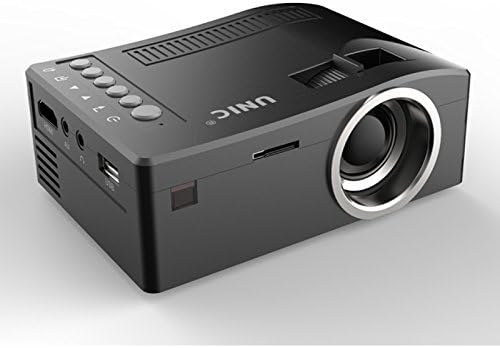
આગળ અને બાજુ view of the UNIC UC18 Mini Projector, showing the lens, ventilation, and various ports.
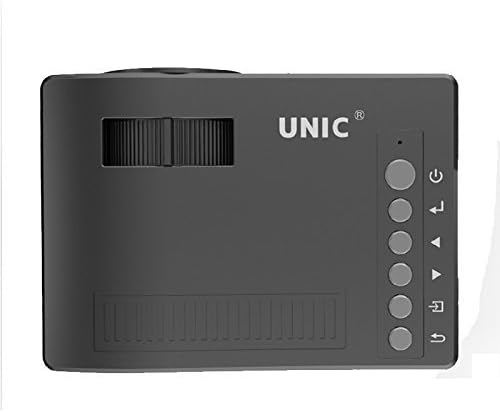
ટોચ view of the UNIC UC18 Mini Projector, highlighting the control buttons and focus wheel.
બંદરો અને નિયંત્રણો
The UNIC UC18 Mini Projector features a range of ports and controls for easy connectivity and operation:
- લેન્સ: છબીને સ્ક્રીન પર પ્રોજેક્ટ કરે છે.
- ફોકસ વ્હીલ: Manual adjustment for image clarity.
- પાવર બટન: પ્રોજેક્ટર ચાલુ અથવા બંધ કરો.
- મેનુ બટન: પ્રોજેક્ટરના સેટિંગ્સ મેનૂને ઍક્સેસ કરે છે.
- નેવિગેશન બટનો (ઉપર/નીચે/ડાબે/જમણે): મેનુ નેવિગેટ કરવા અને સેટિંગ્સ ગોઠવવા માટે વપરાય છે.
- ઓકે બટન: મેનુમાં પસંદગીઓની પુષ્ટિ કરે છે.
- સોર્સ બટન: Selects the input source (HDMI, USB, AV, TF).
- યુએસબી પોર્ટ: મીડિયા પ્લેબેક માટે USB સ્ટોરેજ ડિવાઇસને કનેક્ટ કરે છે.
- HDMI પોર્ટ: Connects to HDMI-enabled devices like laptops, gaming consoles, or media players.
- AV પોર્ટ: Connects to devices using the included 3-in-1 AV cable.
- ટીએફ કાર્ડ સ્લોટ: Inserts a TF (Micro SD) card for media playback.
- 3.5mm હેડફોન જેક: Connects external headphones or speakers.
- આઇઆર રીસીવર: રિમોટ કંટ્રોલથી સંકેતો મેળવે છે.
5. સેટઅપ
5.1 પાવર કનેક્શન
- પાવર કેબલને પ્રોજેક્ટરના પાવર ઇનપુટ પોર્ટ સાથે જોડો.
- પાવર કેબલના બીજા છેડાને યોગ્ય પાવર આઉટલેટમાં પ્લગ કરો.
- પ્રોજેક્ટર પરનો પાવર ઇન્ડિકેટર લાઇટ પ્રકાશિત થશે.
૩.૩ ઇનપુટ ઉપકરણોને જોડવા
- એચડીએમઆઈ: Connect an HDMI cable from your source device (e.g., laptop, DVD player) to the projector's HDMI port.
- યુએસબી: USB પોર્ટમાં USB ફ્લેશ ડ્રાઇવ દાખલ કરો.
- એ.વી .: Use the provided 3-in-1 AV cable to connect to devices with AV output. Match the yellow, white, and red connectors.
- TF કાર્ડ: Insert a TF (Micro SD) card into the TF card slot.
5.3 Positioning the Projector
Place the projector on a stable, flat surface. For optimal image quality, position the projector perpendicular to the projection surface (wall or screen). The throw distance can range from 0.48 to 2.43 meters, producing a picture size from 12 to 66 inches.
6. ઓપરેટિંગ સૂચનાઓ
6.1 પાવરિંગ ચાલુ/બંધ
Press the Power button on the projector or the remote control to turn the device on or off.
૩.૨.૨.૨ ધ્યાન કેન્દ્રિત કરવું
After powering on, if the image appears blurry, rotate the manual focus wheel located near the lens until the image becomes clear and sharp.

Close-up of the manual focus wheel on the UNIC UC18 Mini Projector, located near the lens.
૬.૨ ઇનપુટ સ્ત્રોત પસંદ કરવો
Press the 'Source' button on the projector or remote control. Use the navigation buttons to select your desired input source (HDMI, USB, AV, TF) and press 'OK' to confirm.
6.4 મેનુ નેવિગેશન
Press the 'Menu' button to access the projector's settings. Use the navigation buttons to browse options and 'OK' to select. Press 'Menu' again to exit.
6.5 ઓડિયો આઉટપુટ
The projector has a built-in speaker. For private listening or connecting to external audio systems, plug headphones or external speakers into the 3.5mm headphone jack.
7. જાળવણી
૭.૧ લેન્સ સાફ કરવું
ઓપ્ટિકલ લેન્સ માટે ખાસ રચાયેલ નરમ, લિન્ટ-ફ્રી કાપડનો ઉપયોગ કરો. ધૂળ અથવા ડાઘ દૂર કરવા માટે લેન્સને હળવા હાથે સાફ કરો. ઘર્ષક સામગ્રી અથવા કઠોર રસાયણોનો ઉપયોગ કરવાનું ટાળો.
૫.૨ પ્રોજેક્ટર બોડીની સફાઈ
પ્રોજેક્ટરના બાહ્ય ભાગને નરમ, સૂકા કપડાથી સાફ કરો. પ્રવાહી ક્લીનર્સ અથવા સોલવન્ટનો ઉપયોગ કરશો નહીં.
7.3 સંગ્રહ
When not in use for extended periods, store the projector in a cool, dry place, away from direct sunlight and extreme temperatures. Cover the lens to protect it from dust.
8. મુશ્કેલીનિવારણ
| સમસ્યા | સંભવિત કારણ | ઉકેલ |
|---|---|---|
| કોઈ છબી પ્રદર્શિત નથી | Power not connected; Incorrect input source; Loose cable connection | Check power cable; Select correct input source; Reconnect cables securely |
| છબી અસ્પષ્ટ છે | ફોકસ ગોઠવાયેલ નથી; પ્રોજેક્ટર ખૂબ નજીક/દૂર છે | Adjust the focus wheel; Reposition the projector within recommended throw distance |
| કોઈ અવાજ નથી | Volume too low; Muted; Audio cable not connected; Source device audio issue | Increase volume; Unmute; Check audio cable connection; Verify audio output on source device |
| રીમોટ કંટ્રોલ કામ કરતું નથી | Batteries low/incorrectly inserted; Obstruction between remote and projector | Replace batteries (lithium battery required); Ensure clear line of sight to IR receiver |
| પ્રોજેક્ટર વધુ ગરમ થાય છે | Blocked ventilation; Prolonged use in hot environment | Ensure ventilation openings are clear; Operate in a well-ventilated area; Allow to cool down |
9. સ્પષ્ટીકરણો
ટેકનિકલ વિશિષ્ટતાઓ
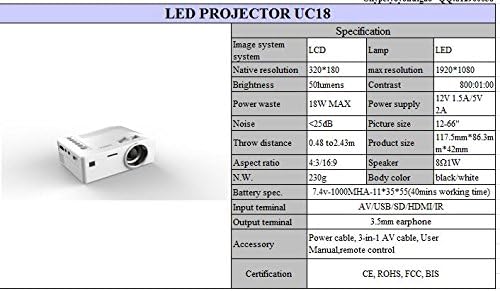
Detailed technical specifications for the UNIC UC18 Mini Projector, including resolution, contrast, and dimensions.
| લક્ષણ | સ્પષ્ટીકરણ |
|---|---|
| બ્રાન્ડ | UNIC |
| મોડેલનું નામ | UC18 |
| ડિસ્પ્લે ટેકનોલોજી | QVGA (LCD) |
| મૂળ ઠરાવ | 320 x 240 પિક્સેલ્સ |
| મહત્તમ સપોર્ટેડ રિઝોલ્યુશન | ૧૯૨૦ x ૧૦૮૦ પિક્સેલ્સ (૧૦૮૦પી) |
| તેજ | 50 લ્યુમેન્સ |
| કોન્ટ્રાસ્ટ રેશિયો | 500:1 |
| પાસા રેશિયો | 16:9 (also supports 4:3) |
| થ્રો ડિસ્ટન્સ | 0.48m - 2.43m (1.57ft - 7.97ft) |
| ચિત્રનું કદ | 12 - 66 ઇંચ |
| ઇનપુટ ટર્મિનલ્સ | AV, USB, SD (TF), HDMI, IR |
| આઉટપુટ ટર્મિનલ | Mm.mm મીમી ઇયરફોન જેક |
| ખાસ લક્ષણો | બિલ્ટ-ઇન સ્પીકર, પોર્ટેબલ |
| પાવર વપરાશ | ૦.૫ વોટ્સ (મહત્તમ ૦.૭ વોટ્સ) |
| પાવર સપ્લાય | 12V 1.5A / 5V 2A |
| અવાજ સ્તર | <25dB |
| ઉત્પાદનના પરિમાણો (L x W x H) | 117.5mm x 86.3mm x 42mm |
| ચોખ્ખું વજન | 230 ગ્રામ |
| માઉન્ટિંગ પ્રકાર | વોલ માઉન્ટ |
| રીમોટ કંટ્રોલ | Yes (battery not included) |
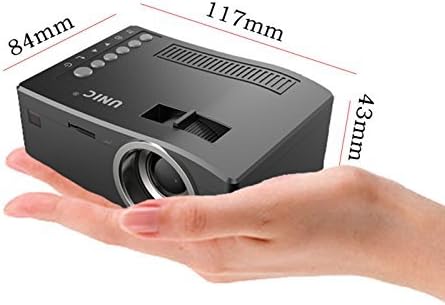
The UNIC UC18 Mini Projector held in a hand, illustrating its compact size and dimensions (117mm x 84mm x 43mm).
10. વોરંટી અને સપોર્ટ
વોરંટી માહિતી અથવા તકનીકી સહાય માટે, કૃપા કરીને ખરીદી સમયે આપેલા દસ્તાવેજોનો સંદર્ભ લો અથવા તમારા રિટેલરનો સંપર્ક કરો. કોઈપણ વોરંટી દાવા માટે ખરીદીનો પુરાવો રાખો.