
પરિચય
Thank you for choosing the Awei A860BL-BK Bluetooth In-Ear Earphones. This manual provides essential information for the proper setup, operation, and maintenance of your device. Please read it thoroughly before use to ensure optimal performance and longevity of your earphones.
પેકેજ સામગ્રી
ખાતરી કરો કે નીચે સૂચિબદ્ધ બધી વસ્તુઓ તમારા પેકેજમાં હાજર છે:
- Awei A860BL-BK Bluetooth In-Ear Earphones
- યુએસબી ચાર્જિંગ કેબલ
- કાનની ટીપ્સ (વિવિધ કદ)
- વપરાશકર્તા માર્ગદર્શિકા

ઉત્પાદન ઓવરview
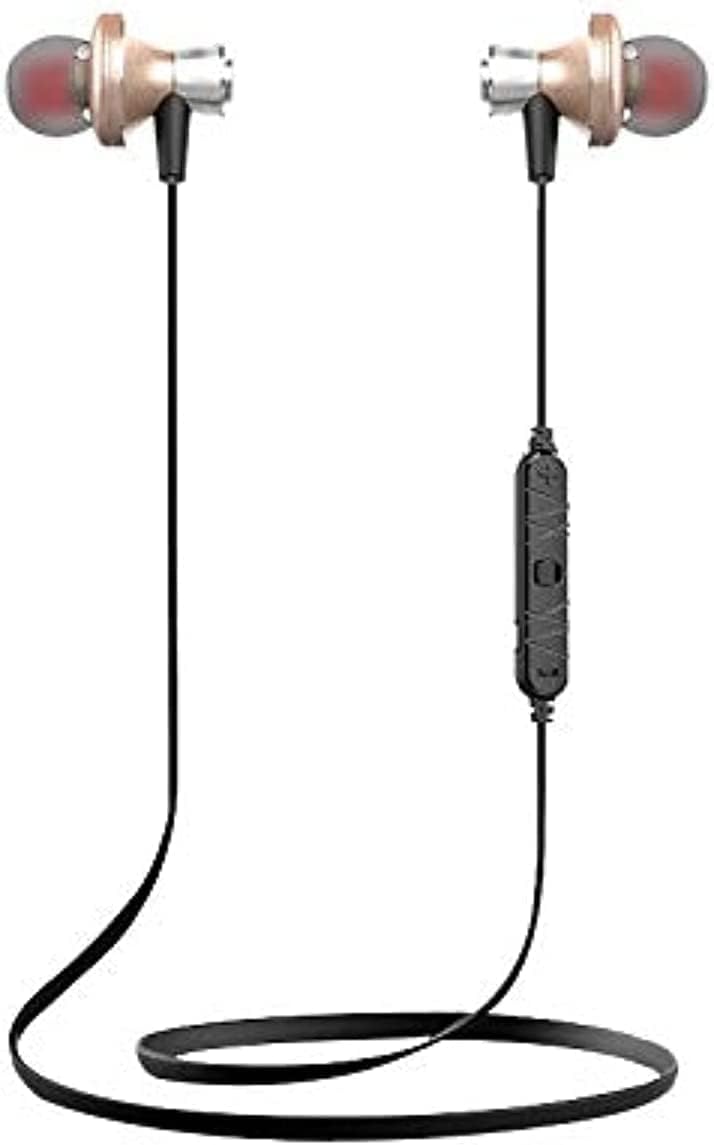
The Awei A860BL-BK earphones are designed for wireless audio playback and hands-free calling. They feature an in-ear design for comfortable fit and sound isolation.

સેટઅપ
૧. ઇયરફોન ચાર્જ કરવા
Before first use, fully charge the earphones. Connect the USB charging cable to the charging port on the earphones and to a compatible USB power source (e.g., computer, wall adapter). The charging indicator light will typically show red during charging and turn off or blue when fully charged.
- ચાર્જિંગ સમય: લગભગ ૧.૫ થી ૨.૫ કલાક.
2. બ્લૂટૂથ જોડી
To connect your earphones to a Bluetooth-enabled device:
- ખાતરી કરો કે ઇયરફોન સંપૂર્ણપણે ચાર્જ અને બંધ છે.
- Press and hold the multi-function button on the earphones until the indicator light flashes red and blue alternately, indicating pairing mode.
- તમારા ઉપકરણ (સ્માર્ટફોન, ટેબ્લેટ, વગેરે) પર, બ્લૂટૂથ સક્ષમ કરો અને ઉપલબ્ધ ઉપકરણો શોધો.
- Select "Awei A860BL-BK" from the list of found devices.
- Once connected, the indicator light on the earphones will typically flash blue slowly or turn off.
If pairing fails, turn off both devices, restart them, and repeat the pairing process.
ઓપરેટિંગ સૂચનાઓ
પાવર ચાલુ/બંધ
- પાવર ચાલુ: Press and hold the multi-function button for approximately 3 seconds until the indicator light flashes blue.
- પાવર બંધ: Press and hold the multi-function button for approximately 3-5 seconds until the indicator light flashes red and then turns off.
સંગીત નિયંત્રણ
- ચલાવો/થોભો: મલ્ટી-ફંક્શન બટનને ટૂંકું દબાવો.
- આગળનો ટ્રેક: વોલ્યુમ + બટનને લાંબા સમય સુધી દબાવી રાખો.
- પાછલો ટ્રેક: વોલ્યુમ - બટનને લાંબા સમય સુધી દબાવી રાખો.
- અવાજ વધારો: વોલ્યુમ + બટનને ટૂંકું દબાવો.
- અવાજ ધીમો: વોલ્યુમ - બટનને ટૂંકું દબાવો.
કૉલ નિયંત્રણ
- જવાબ/કૉલ સમાપ્ત કરો: મલ્ટી-ફંક્શન બટનને ટૂંકું દબાવો.
- કૉલ નકારો: મલ્ટી-ફંક્શન બટનને લાંબા સમય સુધી દબાવો.
- છેલ્લો નંબર ફરીથી ડાયલ કરો: મલ્ટી-ફંક્શન બટનને બે વાર દબાવો.
વૉઇસ સહાયક
- વ Voiceઇસ સહાયકને સક્રિય કરો: Triple-press the multi-function button (functionality depends on your connected device).
જાળવણી
યોગ્ય જાળવણી તમારા ઇયરફોનની આયુષ્ય અને કામગીરી સુનિશ્ચિત કરે છે.
- સફાઈ: ઇયરફોન સાફ કરવા માટે નરમ, સૂકા કપડાનો ઉપયોગ કરો. ઘર્ષક ક્લીનર્સ અથવા સોલવન્ટનો ઉપયોગ કરશો નહીં.
- સંગ્રહ: ઇયરફોનને સીધા સૂર્યપ્રકાશ અને અતિશય તાપમાનથી દૂર ઠંડી, સૂકી જગ્યાએ રાખો.
- પાણી પ્રતિકાર: These earphones are પાણી પ્રતિરોધક નથી. Avoid exposure to liquids, moisture, and high humidity.
- કેબલ કેર: Avoid pulling the cable excessively or bending it sharply to prevent damage.
મુશ્કેલીનિવારણ
If you encounter issues with your Awei A860BL-BK earphones, refer to the following common solutions:
| સમસ્યા | શક્ય ઉકેલ |
|---|---|
| ઇયરફોન ચાલુ થતા નથી. | Ensure the earphones are fully charged. Connect to a power source and charge for 1-2 hours. |
| ઉપકરણ સાથે જોડી બનાવી શકાતી નથી. |
|
| કોઈ અવાજ નથી કે ઓછો અવાજ નથી. |
|
| કોલ ગુણવત્તા નબળી છે. |
|
વિશિષ્ટતાઓ
Detailed technical specifications for the Awei A860BL-BK Bluetooth In-Ear Earphones:
- બ્રાન્ડ: અવેઇ
- મોડલ: A860BL-BK
- કનેક્ટિવિટી: વાયરલેસ (બ્લુટુથ)
- બ્લૂટૂથ સંસ્કરણ: Not specified (assumed standard)
- વાયરલેસ શ્રેણી: 10 મીટર સુધી
- માઇક્રોફોન: હા
- સંગીત સપોર્ટ: હા
- રંગ: કાળો
- ઇયરફોનનો પ્રકાર: ઇન-ઇયર
- ચાર્જિંગ સમય: 1-2 કલાક
- સંગીત રમવાનો સમય: લગભગ 4 કલાક
- વાત કરવાનો સમય: લગભગ 6 કલાક
- અવાજ નિયંત્રણ: ના
- નિયંત્રણ પ્રકાર: Volume control, Touch
- પાણી પ્રતિકાર: પાણી પ્રતિરોધક નથી
- સમાવાયેલ ઘટકો: કાનની ટીપ્સ
સલામતી માહિતી
કૃપા કરીને નીચેના સલામતી માર્ગદર્શિકાઓનું પાલન કરો:
- Do not disassemble, repair, or modify the earphones.
- અતિશય તાપમાન, સીધો સૂર્યપ્રકાશ અને ખુલ્લી જ્વાળાઓથી દૂર રહો.
- પાણી અથવા અન્ય પ્રવાહીના સંપર્કમાં આવવાનું ટાળો.
- Do not use the earphones at excessively high volumes for prolonged periods to prevent hearing damage.
- બાળકો અને પાલતુ પ્રાણીઓની પહોંચથી દૂર રાખો.
વોરંટી અને આધાર
વોરંટી માહિતી અથવા તકનીકી સહાય માટે, કૃપા કરીને ખરીદીના સ્થળે આપેલા દસ્તાવેજોનો સંદર્ભ લો અથવા તમારા રિટેલરનો સંપર્ક કરો. કોઈપણ વોરંટી દાવા માટે ખરીદીનો પુરાવો રાખો.