
1. પરિચય
The Surecom SR-629 is a compact and efficient 2-in-1 Duplex Cross Band Radio Repeater Controller designed to enhance the communication capabilities of your handheld walkie-talkies. This device acts as a relay station, allowing two radios to communicate over a greater distance or across different frequency bands. It features a built-in Li-ion battery for extended operation and supports external 5V DC power. The SR-629 is compatible with most popular handheld radios and offers two distinct operating modes to suit various communication needs.
2. સલામતી માહિતી
- ઉપકરણને અતિશય તાપમાન, સીધો સૂર્યપ્રકાશ અથવા ભેજના સંપર્કમાં ન લાવો.
- Use only the provided USB charger cable and a compatible 5V AC adapter.
- ઉપકરણને મજબૂત ઇલેક્ટ્રોમેગ્નેટિક ક્ષેત્રોથી દૂર રાખો.
- Ensure proper ventilation when operating for extended periods.
- ઉપકરણને ડિસએસેમ્બલ કરવાનો કે તેમાં ફેરફાર કરવાનો પ્રયાસ કરશો નહીં. બધી સર્વિસિંગ લાયક કર્મચારીઓને સોંપો.
3. પેકેજ સામગ્રી
ખાતરી કરો કે બધી વસ્તુઓ તમારા પેકેજમાં હાજર છે:
- 1x SR-629 Duplex Repeater Controller
- 2x K1 Plug Cables (for connecting radios)
- 1x Micro USB Cable (for charging)
- 1x USB AC Adapter (100-240V)
- ૧x અંગ્રેજી વપરાશકર્તા માર્ગદર્શિકા

Image: Contents of the SR-629 package, showing the main controller unit, two K1 plug cables, a micro USB charging cable, and the user manual.
4. ઉત્પાદન ઓવરview
The SR-629 controller features a compact design with clearly labeled ports and indicators.

છબી: વિગતવાર view of the SR-629 controller, highlighting the Charger In (Micro USB) port, Mode 1/Off/Mode 2 switch, Radio A Input, Radio B Input, Radio A LED (Green RX / Red TX), and Radio B LED (Green RX / Red TX).
મુખ્ય ઘટકો:
- Charger In (Micro USB): Used for charging the internal battery and providing external power.
- Mode 1/Off/Mode 2 Switch: Selects the operating mode or turns the device off.
- Radio A Input: 2-pin K1 port for connecting the first handheld radio.
- Radio B Input: 2-pin K1 port for connecting the second handheld radio.
- એલઇડી સ્થિતિ સૂચકાંકો: Two LEDs (one for Radio A, one for Radio B) indicate transmit (Red) and receive (Green) status.
5. સેટઅપ
Follow these steps to set up your SR-629 repeater controller:
- ઉપકરણ ચાર્જ કરો: Connect the micro USB cable to the 'Charger In' port on the SR-629 and the other end to the USB AC adapter. Plug the adapter into a power outlet. The LED indicators may show charging status.
- રેડિયો તૈયાર કરો: Ensure your two handheld radios are powered on and set to the desired frequencies. Adjust their volume levels appropriately.
- Connect Radios: Use the provided K1 plug cables to connect your handheld radios to the 'Radio A Input' and 'Radio B Input' ports on the SR-629. Ensure the plugs are fully inserted into the sockets on both the controller and the radios.

Image: Illustration demonstrating the importance of fully inserting the K1 plug cables into the SR-629 controller's ports to ensure proper connection.
- Position Radios: For optimal performance and to minimize interference, place the two connected radios and their antennas at a reasonable distance from each other (e.g., several feet apart).
- મોડ પસંદ કરો: Use the 'Mode 1/Off/Mode 2' switch to select your desired operating mode (see Section 6 for details).

Image: The SR-629 controller connected via K1 cables to two handheld walkie-talkies, illustrating a typical setup for extending radio communication.
Ope. Opeપરેટિંગ
The SR-629 offers two operating modes:
Mode 1: One-Way Relay (A RX → B TX)
In this mode, when Radio A receives a signal, the SR-629 automatically triggers Radio B to transmit that signal. Radio B will not trigger Radio A. This is useful for creating a simple unidirectional repeater link.
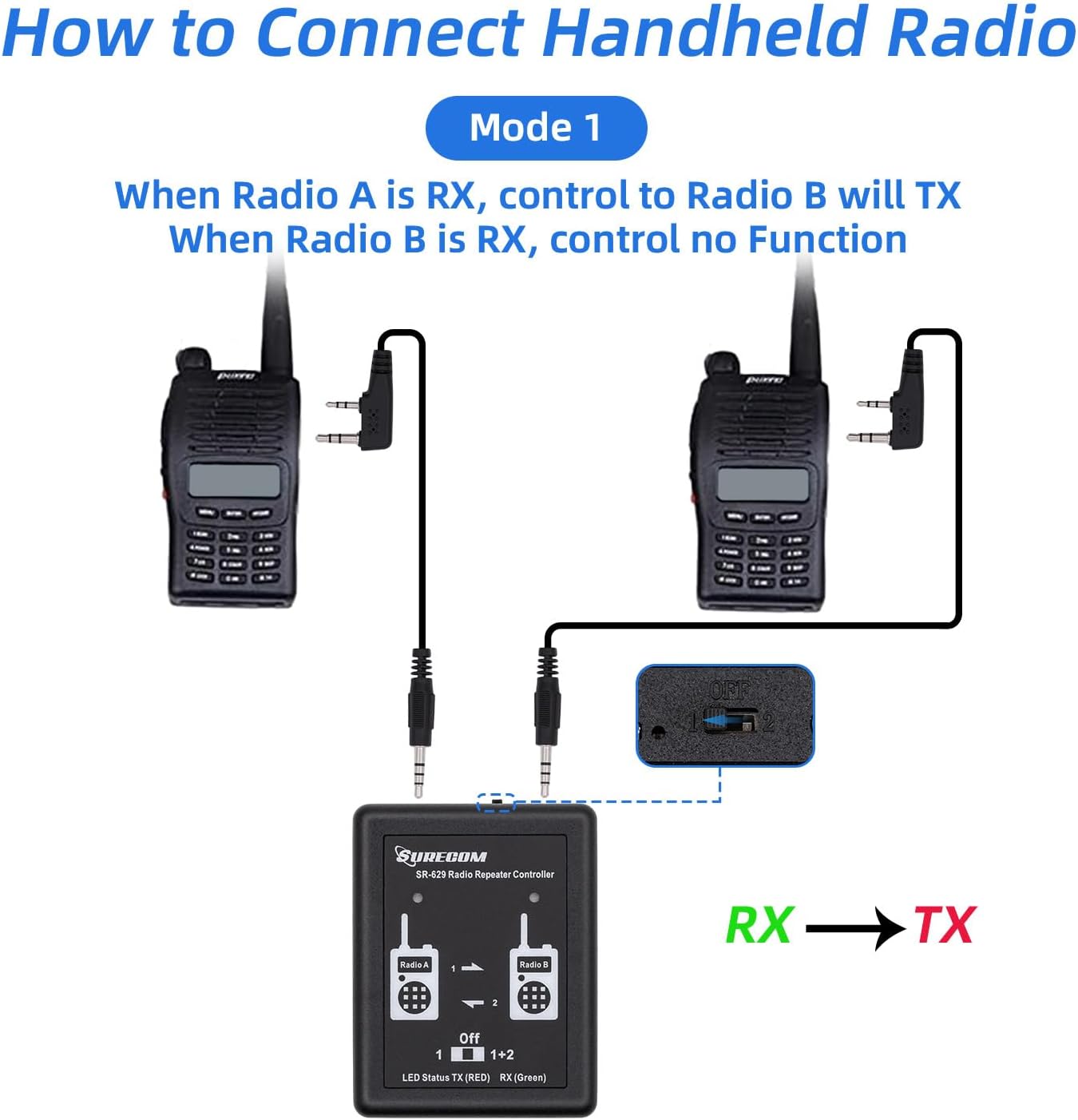
Image: A visual representation of Mode 1, showing audio flow from Radio A (Receive) to Radio B (Transmit) through the SR-629 controller.
Mode 2: Two-Way Relay (A RX → B TX and B RX → A TX)
In this mode, the SR-629 functions as a full duplex repeater. When Radio A receives a signal, Radio B transmits it, and conversely, when Radio B receives a signal, Radio A transmits it. This allows for bidirectional communication between two radios or groups of radios.

Image: A visual representation of Mode 2, showing bidirectional audio flow between Radio A and Radio B through the SR-629 controller, enabling two-way communication.
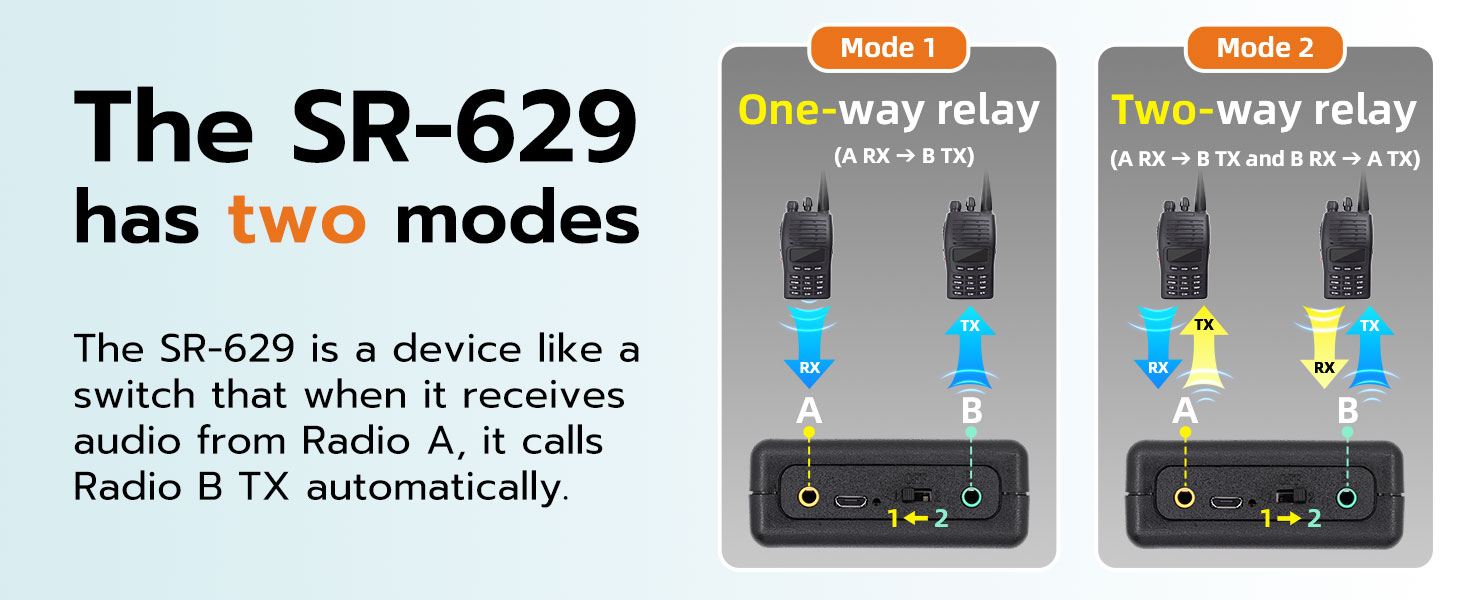
Image: A comparative diagram explaining the two operational modes of the SR-629: Mode 1 for one-way relay (A RX to B TX) and Mode 2 for two-way relay (A RX to B TX and B RX to A TX).
એલઇડી સૂચકાંકો:
- લીલો એલઇડી: Indicates receiving (RX) activity on the corresponding radio.
- લાલ એલઇડી: Indicates transmitting (TX) activity on the corresponding radio.
વોલ્યુમ એડજસ્ટમેન્ટ:
The repeater controller uses voice triggering (VOX) to activate the other party's radio. Proper volume adjustment on the connected radios is crucial for reliable operation. If the volume is too low, the delay may be too short, or the VOX sensitivity is not appropriate, it may result in false triggering (transmitting as soon as receiving) or non-triggering (no response at all). Adjust the volume on your handheld radios until the repeater functions smoothly.
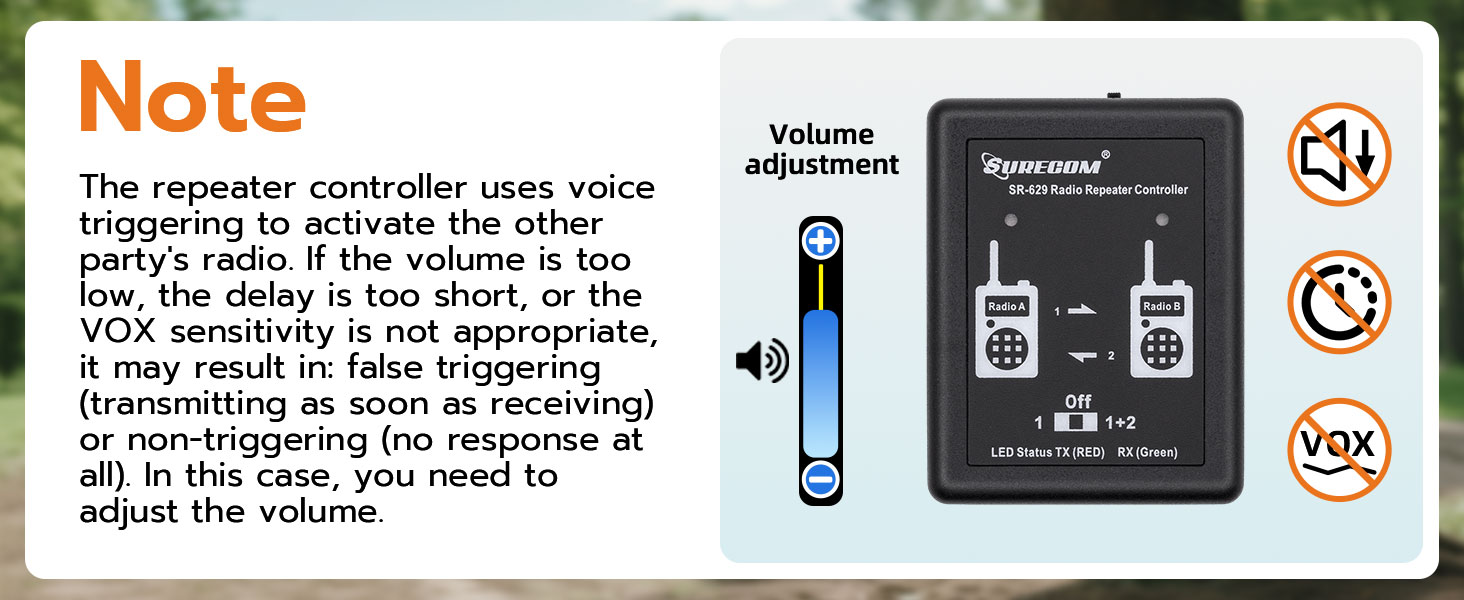
Image: A visual note emphasizing the need for correct volume adjustment on connected radios to ensure proper voice triggering and prevent false or missed transmissions by the SR-629.
DTMF Remote Control Password:
The SR-629 allows users to change the DTMF remote control password directly via a connected radio. Refer to the specific instructions for your handheld radio model on how to input DTMF tones.
7. જાળવણી
- ઉપકરણને સ્વચ્છ અને ધૂળથી મુક્ત રાખો. સફાઈ માટે નરમ, સૂકા કપડાનો ઉપયોગ કરો.
- જ્યારે ઉપયોગમાં ન હોય ત્યારે ઉપકરણને ઠંડી, સૂકી જગ્યાએ સંગ્રહિત કરો.
- ઉપકરણને મજબૂત અસરમાં મૂકવા અથવા આધીન કરવાનું ટાળો.
- Regularly check the connection cables for any signs of wear or damage.
8. મુશ્કેલીનિવારણ
- No Repeater Functionality:
- Ensure the SR-629 is powered on and the mode switch is set to '1' or '2'.
- Check that both K1 cables are fully inserted into the SR-629 and the radios.
- Verify that the radios are powered on and set to appropriate frequencies.
- Adjust the volume on the handheld radios. Insufficient volume can prevent VOX triggering.
- False Triggering or Constant Transmission:
- The volume on the receiving radio might be too high, causing the SR-629 to constantly detect audio. Reduce the volume.
- Ensure the radios are not too close to each other, which can cause feedback or interference.
- Poor Audio Quality or Static:
- ઢીલાપણું કે નુકસાન માટે કેબલ કનેક્શન તપાસો.
- Ensure radios are properly tuned and have good signal strength.
- Increase the physical separation between the two radios and their antennas to reduce desensitization.
- ટૂંકી બેટરી જીવન:
- ખાતરી કરો કે ઉપયોગ કરતા પહેલા ઉપકરણ સંપૂર્ણપણે ચાર્જ થયેલ છે.
- If operating for extended periods, consider using the external 5V DC power supply.
9. સ્પષ્ટીકરણો
| લક્ષણ | સ્પષ્ટીકરણ |
|---|---|
| મોડલ નંબર | SR-629 |
| ઉત્પાદન પરિમાણો | 7.48 x 4.72 x 1.97 ઇંચ (19 x 12 x 5 સેમી) |
| વસ્તુનું વજન | 3.17 ઔંસ (90 ગ્રામ) |
| પાવર સપ્લાય | Built-in Li-ion battery, External DC 5V |
| બેટરી જીવન | Up to 72 hours (typical) |
| ચેનલોની સંખ્યા | 1 (for repeater control) |
| ખાસ લક્ષણો | Two mode select, Multi-LED display, DTMF remote control password change |
| સમાવેલ કેબલ્સ | 2 x K1 plug Cable, 1 x USB charger cable |
10. વોરંટી અને સપોર્ટ
Surecom products are manufactured to high-quality standards. For warranty information and technical support, please refer to the documentation provided with your purchase or visit the official Surecom webસાઇટ. વોરંટી દાવાઓ માટે તમારી ખરીદીનો પુરાવો રાખો.