
પરિચય
This manual provides essential instructions for the safe and efficient use of your Lepro Industrial LED Desk Lamp. આ બહુમુખી એલamp features an adjustable arm and a sturdy clamp, making it suitable for various environments such as study desks, office workstations, or bedside tables. It is designed to accommodate an E27 bulb (not included), allowing you to choose the light source that best fits your needs.
કૃપા કરીને ઇન્સ્ટોલેશન અને ઓપરેશન પહેલાં આ માર્ગદર્શિકાને સારી રીતે વાંચો, અને ભવિષ્યના સંદર્ભ માટે તેને જાળવી રાખો.

Image: The Lepro Industrial LED Desk Lamp providing illumination on a modern desk setup.
સલામતી સૂચનાઓ
- l નો ઉપયોગ કરતા પહેલા બધી સૂચનાઓ કાળજીપૂર્વક વાંચો.amp.
- Ensure the power supply is disconnected before installing, cleaning, or replacing the bulb.
- Use only E27 base bulbs with a maximum wattage 40W.
- એલનો ઉપયોગ કરશો નહીંamp ક્ષતિગ્રસ્ત પાવર કોર્ડ અથવા પ્લગ સાથે.
- આ ઉત્પાદન ફક્ત ઘરની અંદરના ઉપયોગ માટે બનાવાયેલ છે. પાણી અથવા ઉચ્ચ ભેજના સંપર્કમાં આવશો નહીં.
- એલ રાખોamp જ્વલનશીલ પદાર્થોથી દૂર.
- એલને ડિસએસેમ્બલ અથવા રિપેર કરવાનો પ્રયાસ કરશો નહીંamp yourself. Contact qualified personnel for service.
પેકેજ સામગ્રી
કૃપા કરીને નીચેની વસ્તુઓ માટે પેકેજ તપાસો:
- Lepro Industrial LED Desk Lamp (main unit with clamp)
- વપરાશકર્તા માર્ગદર્શિકા
Note: The E27 bulb is not included and must be purchased separately.
સેટઅપ અને ઇન્સ્ટોલેશન
Follow these steps to assemble and install your desk lamp:
- Cl જોડોamp: સીએલને સુરક્ષિત રીતે જોડોamp to a desk or shelf edge. The clamp can accommodate surfaces up to 5.4 cm thick. Tighten the screw until the clamp is firmly in place, ensuring stability for both vertical and horizontal mounting.
- એલ એસેમ્બલ કરોamp વડા: એલ ઇન્સ્ટોલ કરોamp cover onto the upper part of the main unit. Twist the cover in the direction indicated (usually clockwise) to tighten it securely.
- Insert the Arm: કાળજીપૂર્વક એલ દાખલ કરોamp arm into the designated joint on the clamp base. Ensure it clicks or locks into place for stable positioning.
- બલ્બ ઇન્સ્ટોલ કરો: એલ ખાતરી કરોamp is unplugged from the power outlet. Screw an E27 base bulb (not included) into the lamp સોકેટ. વધારે કડક ન કરો.
- પાવરથી કનેક્ટ કરો: એલને પ્લગ કરોamp's power cord into a suitable electrical outlet.

Image: The bidirectional clamp allows for both vertical and horizontal mounting on surfaces up to 5.4 cm thick.

છબી: ધ એલamp requires an E27 bulb, which is not included. Various E27 bulb types can be used.
ઓપરેટિંગ સૂચનાઓ
પાવર ચાલુ/બંધ: Locate the rocker switch on the power cord. Press the switch to turn the lamp ચાલુ અથવા બંધ.
પ્રકાશ કોણને સમાયોજિત કરવું: એલamp features a highly flexible and adjustable arm with multiple joints. You can rotate the lamp head up to 300 degrees and adjust the arm at various angles (e.g., 120 degrees at the main joints, 360 degrees at the base clamp) to direct light precisely where needed. The spring-balanced arm ensures the lamp stays in your desired position.
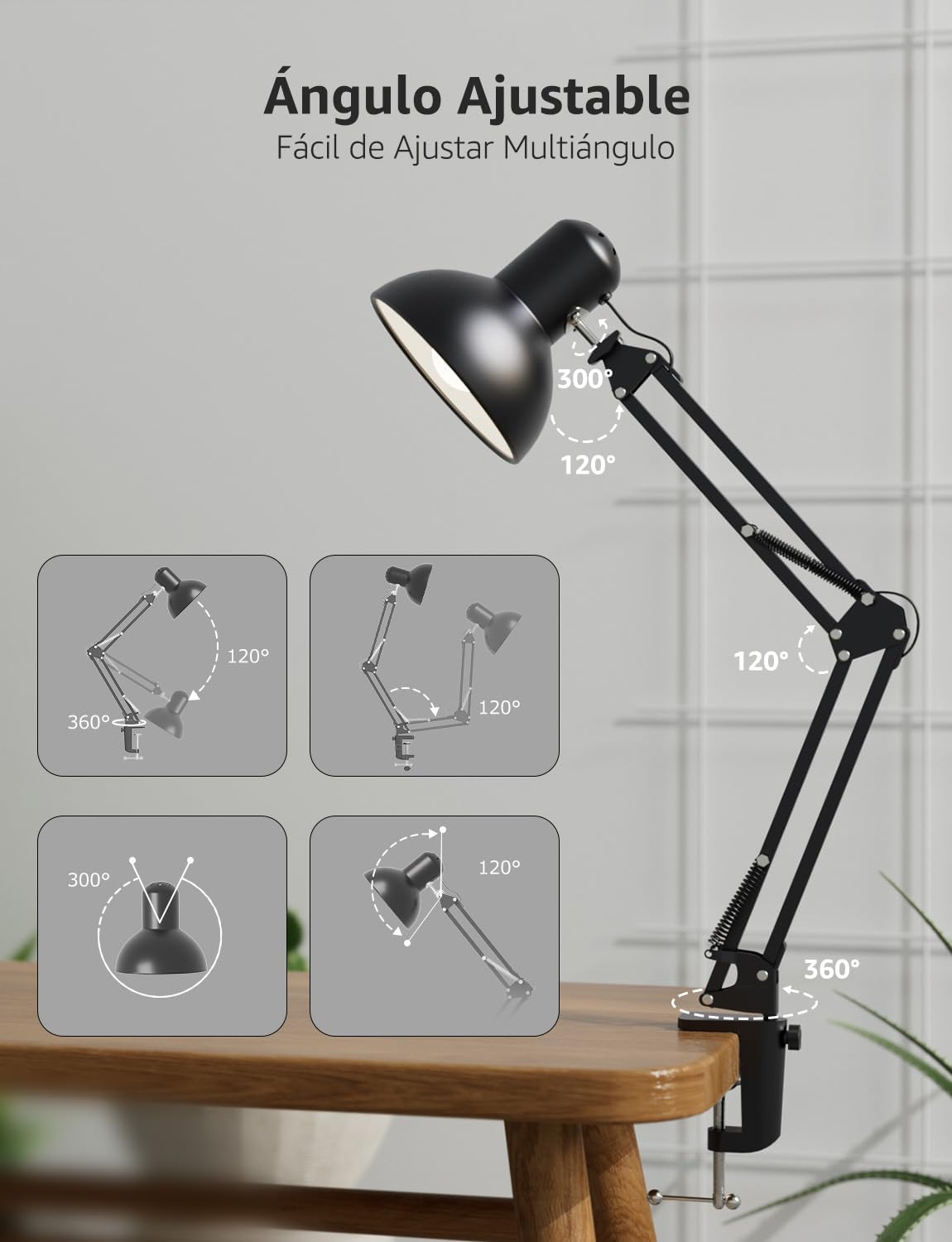
છબી: ધ એલamp's flexible arm and head allow for multi-angle adjustment to optimize lighting.
જાળવણી
સફાઈ: એલ સાફ કરવા માટેamp, ensure it is unplugged and cool. Wipe the surfaces with a soft, dry cloth. Do not use abrasive cleaners, solvents, or liquids, as these may damage the finish or electrical components.
બલ્બ રિપ્લેસમેન્ટ: Before replacing the bulb, ensure the lamp is unplugged and the old bulb has cooled down completely. Carefully unscrew the old E27 bulb and screw in a new E27 bulb (maximum 40W). Ensure the new bulb is securely seated before plugging the lamp પાછા અંદર
મુશ્કેલીનિવારણ
- Lamp ચાલુ થતું નથી:
- આઉટલેટમાં પાવર કોર્ડ સુરક્ષિત રીતે પ્લગ થયેલ છે કે કેમ તે તપાસો.
- Ensure the rocker switch on the cord is in the 'ON' position.
- Verify that the E27 bulb is correctly installed and not faulty. Try testing with a known working bulb.
- બીજા ઉપકરણને પ્લગ ઇન કરીને પાવર આઉટલેટ તપાસો.
- પ્રકાશ ચમકતો હોય છે:
- ખાતરી કરો કે બલ્બ કડક રીતે સ્ક્રૂ કરેલો છે.
- The bulb may be faulty or incompatible. Replace it with a new E27 bulb.
- Check for loose connections in the power cord or outlet.
- Lamp અસ્થિર છે:
- cl ખાતરી કરોamp is tightened securely to the desk or surface.
- Verify that the surface thickness is within the maximum 5.4 cm limit for the clamp.
- તપાસો કે એલamp arm is properly inserted into the clamp સંયુક્ત
વિશિષ્ટતાઓ
| લક્ષણ | સ્પષ્ટીકરણ |
|---|---|
| મોડલ નંબર | 3100027-DW-EU |
| પરિમાણો (L x W x H) | 38 x 15 x 27 સેમી |
| વજન | 900 ગ્રામ |
| બલ્બ બેઝ | E27 |
| મેક્સ વોટtage | 40 વોટ્સ |
| પાવર સ્ત્રોત | કોર્ડેડ ઇલેક્ટ્રિક |
| સામગ્રી | ધાતુ |
| સ્વિચ પ્રકાર | રોકર સ્વિચ |
| ભાગtage | 240 વોલ્ટ |
| મેક્સ ક્લamp જાડાઈ | 5.4 સે.મી |
| પાવર કેબલ લંબાઈ | આશરે. 1.6 મીટર |

Image: Product dimensions and key features like E27 bulb base and power cord length.
વોરંટી અને આધાર
વોરંટી: This Lepro Industrial LED Desk Lamp comes with a 1-year warranty for replacement parts in the EU, covering manufacturing defects from the date of purchase. This warranty does not cover damage caused by misuse, accidents, unauthorized modifications, or normal wear and tear.
ગ્રાહક આધાર: For technical assistance, troubleshooting, or warranty claims, please contact Lepro customer support through the retailer where the product was purchased or visit the official Lepro website for contact information. Please have your model number (3100027-DW-EU) and proof of purchase ready when contacting support.