
1. પરિચય
This manual provides essential instructions for the safe and effective use of your BEPER 40.300 Hair Clipper. Please read all instructions carefully before operating the device and retain this manual for future reference. The BEPER 40.300 is a rechargeable hair clipper equipped with ceramic and titanium blades, designed for precise cutting and comfortable handling.
2. સલામતી માહિતી
- ઉપકરણને સૂકું રાખો. પાણીની નજીક કે ભીની સ્થિતિમાં તેનો ઉપયોગ કરશો નહીં.
- ઉપકરણને પાણી અથવા અન્ય પ્રવાહીમાં ડૂબાડશો નહીં.
- બાળકોની પહોંચથી દૂર રાખો.
- ખાતરી કરો કે પાવર એડેપ્ટર તમારા સ્થાનિક પાવર સપ્લાય સાથે સુસંગત છે.
- સફાઈ અથવા જાળવણી પહેલાં ઉપકરણને અનપ્લગ કરો.
- Do not use if the blades are damaged or broken, as this may cause injury.
- Only use original accessories provided by the manufacturer.
3. પેકેજ સામગ્રી
બોક્સને કાળજીપૂર્વક ખોલો અને ખાતરી કરો કે બધી વસ્તુઓ હાજર છે અને સારી સ્થિતિમાં છે. જો કોઈ વસ્તુ ખૂટે છે અથવા ક્ષતિગ્રસ્ત છે, તો તમારા રિટેલરનો સંપર્ક કરો.
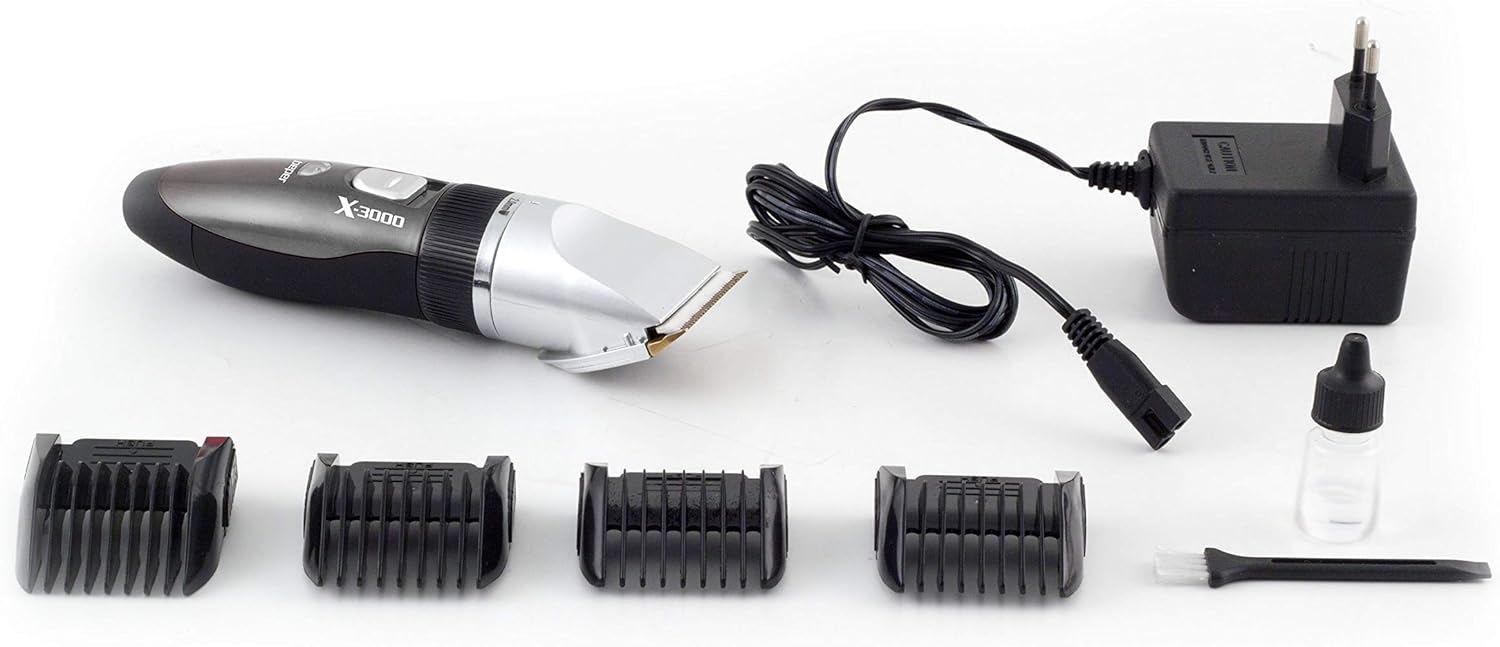
Image: The BEPER 40.300 Hair Clipper shown with all included accessories.
- BEPER 40.300 Hair Clipper
- ચાર્જિંગ એડેપ્ટર
- સફાઈ બ્રશ
- લુબ્રિકેટિંગ તેલ બોટલ
- 4 Interchangeable Comb Attachments (3mm, 6mm, 9mm, 12mm)
4. ઉત્પાદન ઓવરview
Familiarize yourself with the main components of your hair clipper before use.

છબી: બાજુ view of the BEPER 40.300 Hair Clipper, highlighting its ergonomic design.
- Ceramic and Titanium Blades: For precise and efficient cutting.
- Adjustable Rotary Ring: Allows for fine-tuning of cutting lengths from 0.8mm to 2mm.
- વીજળીનું બટન: To turn the clipper on and off.
- ચાર્જિંગ પોર્ટ: ચાર્જિંગ એડેપ્ટરને કનેક્ટ કરવા માટે.
- અર્ગનોમિક હેન્ડલ: Designed for comfortable grip and control.
5. સેટઅપ
5.1 Charging the Clipper
- ખાતરી કરો કે ક્લિપર બંધ છે.
- Connect the charging adapter to the charging port on the clipper.
- એડેપ્ટરને યોગ્ય પાવર આઉટલેટમાં પ્લગ કરો.
- Allow approximately 8 hours for a full charge. A fully charged clipper provides up to 60 minutes of continuous operation.
- Do not overcharge the battery. Unplug the charger once charging is complete.
5.2 Attaching Comb Attachments
The clipper comes with 4 comb attachments for different cutting lengths (3mm, 6mm, 9mm, 12mm).
- ખાતરી કરો કે ક્લિપર બંધ છે.
- Select the desired comb attachment.
- Align the comb attachment with the clipper head and slide it on until it clicks securely into place.
- To remove, gently push the comb attachment upwards and slide it off.
6. ઓપરેટિંગ સૂચનાઓ
6.1 મૂળભૂત કામગીરી
- Ensure the clipper is fully charged or connected to power if using corded.
- Select your desired cutting length using either the adjustable rotary ring or by attaching a comb guide.
- Press the power switch to turn on the clipper.
- Hold the clipper with the blades facing downwards and gently move it against the direction of hair growth.
- For best results, use on clean, dry hair.
- After use, press the power switch to turn off the clipper.
6.2 Adjusting Cutting Length (without comb attachment)
The rotary ring allows for precise adjustments of the blade length from 0.8mm to 2mm.

Image: Detail of the adjustable rotary ring on the BEPER 40.300 Hair Clipper, showing length settings.
- Rotate the ring located just below the blades to select your desired length: 0.8mm, 1.1mm, 1.4mm, 1.7mm, or 2mm.
- Ensure the ring clicks into place at the chosen setting before use.
6.3 Using Comb Attachments
For longer cutting lengths, use the provided comb attachments (3mm, 6mm, 9mm, 12mm).
- Attach the desired comb attachment as described in Section 5.2.
- The rotary ring setting will be overridden by the comb attachment.
- Move the clipper smoothly through the hair, ensuring the comb attachment remains flat against the scalp or skin.
7. જાળવણી
Regular cleaning and maintenance will ensure optimal performance and extend the life of your hair clipper.
૧૨.૨ બ્લેડ સાફ કરવા
- Ensure the clipper is switched off and unplugged from the charger.
- Remove any attached comb guide.
- Use the provided cleaning brush to remove loose hairs from the blades and the clipper head.
- For a more thorough clean, the blade set can be carefully detached (refer to specific instructions if provided with the product for blade removal). Rinse the detached blades under running water, ensuring the main body of the clipper does not get wet. Dry thoroughly before reattaching.
- ઘર્ષક ક્લીનર્સ અથવા સોલવન્ટનો ઉપયોગ કરશો નહીં.
૫.૨ બ્લેડને તેલ લગાવવું
To maintain cutting performance, lubricate the blades regularly.
- After cleaning, apply 1-2 drops of the provided lubricating oil to the blades.
- Turn on the clipper for a few seconds to allow the oil to distribute evenly.
- કોઈપણ વધારાનું તેલ નરમ કપડાથી સાફ કરો.
8. મુશ્કેલીનિવારણ
If you encounter issues with your BEPER 40.300 Hair Clipper, refer to the following common problems and solutions:
| સમસ્યા | સંભવિત કારણ | ઉકેલ |
|---|---|---|
| ક્લિપર ચાલુ થતું નથી. | બેટરી ડિસ્ચાર્જ થાય છે. | ક્લિપરને 8 કલાક માટે ચાર્જ કરો. |
| નબળી કટીંગ કામગીરી. | બ્લેડ ગંદા છે અથવા તેલયુક્ત નથી. | Clean and oil the blades as per maintenance instructions. |
| Clipper pulls hair. | બ્લેડ ઝાંખા અથવા ગંદા છે. | Clean and oil blades. If problem persists, blades may need replacement. |
| ક્લિપર અસામાન્ય અવાજ કરે છે. | Blades are not properly aligned or lubricated. | Ensure blades are clean and oiled. Check for proper blade attachment. |
જો આ ઉકેલો અજમાવવા પછી પણ સમસ્યા ચાલુ રહે, તો કૃપા કરીને ગ્રાહક સપોર્ટનો સંપર્ક કરો.
9. સ્પષ્ટીકરણો
- મોડલ: 40.300
- બ્રાન્ડ: BEPER
- બ્લેડ: Ceramic and Titanium
- Adjustable Cutting Lengths (without comb): 0.8mm, 1.1mm, 1.4mm, 1.7mm, 2mm
- કાંસકો જોડાણો: 3mm, 6mm, 9mm, 12mm
- પાવર સ્ત્રોત: Rechargeable Battery (1 C battery included)
- ચાર્જિંગ સમય: લગભગ 8 કલાક
- ઓપરેટિંગ સમય: ૧૮૦ મિનિટ સુધી (સંપૂર્ણ ચાર્જ)
- સામગ્રી: Ceramic (blades)
- પરિમાણો: ૧૭.૭ x ૯.૬ x ૩.૪ સેમી (પેકેજ)
- વજન: ૯૨૦.૦૨ ગ્રામ (પેકેજ)
- ASIN: B076DC7MGS
- GTIN: 08051772717940
10. વોરંટી અને સપોર્ટ
This product is covered by a manufacturer's warranty. Please refer to the warranty card included in your package for specific terms and conditions. For technical support, spare parts, or any inquiries not covered in this manual, please contact BEPER customer service or your local retailer.
વોરંટી દાવાઓ માટે ખરીદીના પુરાવા તરીકે તમારી ખરીદી રસીદ રાખો.