
પરિચય
This manual provides essential instructions for the Jam Audio Out There Active Noise Cancelling On-Ear Bluetooth Headphones. Please read this guide thoroughly to ensure proper use, maintenance, and to maximize your listening experience. These headphones offer active noise cancellation, Bluetooth connectivity, hands-free calling, and a comfortable on-ear design.
બૉક્સમાં શું છે
ખાતરી કરો કે બધી વસ્તુઓ પેકેજિંગમાં હાજર છે:
- Out There Headphones
- AUX કેબલ (3.5mm)
- યુએસબી ચાર્જિંગ કેબલ
- ઝડપી શરૂઆત માર્ગદર્શિકા (વિગતવાર સૂચનાઓ માટે આ માર્ગદર્શિકાનો સંદર્ભ લો)

Image: Contents of the Jam Audio Out There headphone package, including the headphones, AUX cable, and USB charging cable.
ઉત્પાદન ઓવરview અને નિયંત્રણો
Familiarize yourself with the headphone's layout and controls for optimal use.
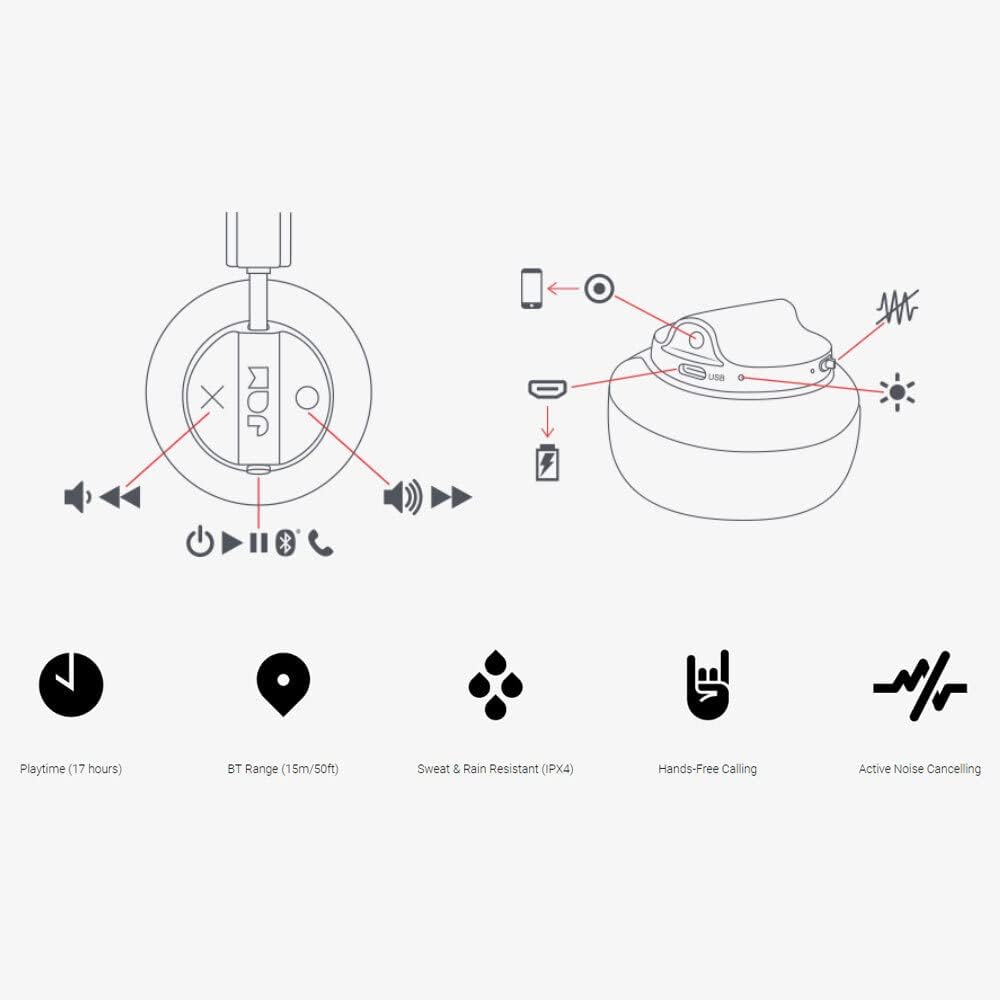
Image: Detailed diagram illustrating the control buttons and ports on the Jam Audio Out There headphones, including power, volume, track navigation, call management, and the charging port.
- પાવર બટન: પાવર ચાલુ/બંધ કરવા માટે દબાવો અને પકડી રાખો.
- વોલ્યુમ અપ/નેક્સ્ટ ટ્રેક: વોલ્યુમ વધારવા માટે ટૂંકું દબાવો, આગલા ટ્રેક માટે લાંબા સમય સુધી દબાવો.
- વોલ્યુમ ડાઉન/ગત ટ્રેક: વોલ્યુમ ઘટાડવા માટે ટૂંકું દબાવો, પાછલા ટ્રેક માટે લાંબા સમય સુધી દબાવો.
- કૉલ ચલાવો/થોભો/જવાબ આપો: Single press to play/pause music or answer/end a call.
- Active Noise Cancelling (ANC) Switch: Toggle to activate or deactivate noise cancellation.
- ચાર્જિંગ પોર્ટ: ચાર્જિંગ માટે માઇક્રો યુએસબી પોર્ટ.
- AUX-ઇન પોર્ટ: 3.5mm jack for wired audio connection.
સેટઅપ
1. હેડફોન ચાર્જ કરવા
Before first use, fully charge your headphones. Connect the provided USB charging cable to the charging port on the headphones and the other end to a USB power source. The LED indicator will show charging status and turn off when fully charged. A full charge takes approximately 2 hours and provides up to 17 hours of playtime.

Image: The Jam Audio Out There headphones provide up to 17 hours of playtime on a single charge.
2. પાવર ચાલુ/બંધ
- To power on: Press and hold the Power button for 3 seconds. The LED indicator will flash.
- To power off: Press and hold the Power button for 3 seconds. The LED indicator will turn off.
3. બ્લૂટૂથ જોડી
- ખાતરી કરો કે હેડફોન્સ બંધ છે.
- પાવર બટનને 5 સેકન્ડ સુધી દબાવી રાખો જ્યાં સુધી LED સૂચક લાલ અને વાદળી રંગમાં ચમકતો નથી, જે પેરિંગ મોડ સૂચવે છે.
- તમારા ઉપકરણ (સ્માર્ટફોન, ટેબ્લેટ, કમ્પ્યુટર) પર, બ્લૂટૂથ સક્ષમ કરો અને ઉપલબ્ધ ઉપકરણો શોધો.
- Select "JAM Out There" from the list of devices.
- Once paired, the LED indicator on the headphones will turn solid blue.
- The headphones have a Bluetooth range of up to 15 meters (50 feet).

Image: The Jam Audio Out There headphones offer Bluetooth compatibility, allowing a range of up to 15 meters or 50 feet from your connected device.
ઓપરેટિંગ સૂચનાઓ
સંગીત પ્લેબેક
- ચલાવો/થોભો: એકવાર પ્લે/પોઝ બટન દબાવો.
- આગળનો ટ્રેક: વોલ્યુમ અપ બટનને લાંબા સમય સુધી દબાવી રાખો.
- પાછલો ટ્રેક: વોલ્યુમ ડાઉન બટનને લાંબા સમય સુધી દબાવી રાખો.
- વોલ્યુમ એડજસ્ટમેન્ટ: Short press the Volume Up or Volume Down buttons.
હેન્ડ્સ-ફ્રી કૉલિંગ
- જવાબ/કૉલ સમાપ્ત કરો: એકવાર પ્લે/પોઝ બટન દબાવો.
- કૉલ નકારો: પ્લે/પોઝ બટનને 2 સેકન્ડ માટે દબાવી રાખો.
- ક Callલ કરો: Initiate the call from your connected device. The audio will automatically transfer to the headphones.
- Music will automatically pause during a call and resume after the call ends.
સક્રિય અવાજ રદ (ANC)
- To activate ANC: Slide the ANC switch to the ON position. The ANC indicator light will illuminate.
- To deactivate ANC: Slide the ANC switch to the OFF position. The ANC indicator light will turn off.
- Using ANC can reduce ambient noise, enhancing your listening experience. Note that ANC can be used independently or with Bluetooth audio.
Wired Connection (AUX-in)
For a wired connection, use the provided 3.5mm AUX cable. Plug one end into the headphone's AUX-in port and the other into your audio device. This allows you to continue listening even if the headphone battery is depleted or if Bluetooth is not available.
જાળવણી
- સફાઈ: Wipe the headphones with a soft, dry cloth. Do not use harsh chemicals or abrasive materials.
- સંગ્રહ: હેડફોનને અતિશય તાપમાનથી દૂર ઠંડી, સૂકી જગ્યાએ સંગ્રહિત કરો.
- પાણી પ્રતિકાર: These headphones are IPX4 rated, meaning they are resistant to sweat and light splashes of water. Do not submerge them in water or expose them to heavy rain. Ensure the charging port cover is securely closed when not charging to maintain water resistance.
- બેટરી સંભાળ: બેટરી લાઇફ વધારવા માટે, હેડફોનને વારંવાર સંપૂર્ણપણે ડિસ્ચાર્જ કરવાનું ટાળો. લાંબા સમય સુધી ઉપયોગમાં ન હોય તો પણ, તેમને નિયમિતપણે ચાર્જ કરો.
મુશ્કેલીનિવારણ
| સમસ્યા | ઉકેલ |
|---|---|
| Headphones not powering on | Ensure the headphones are charged. Connect to a power source using the USB cable. |
| બ્લૂટૂથ દ્વારા જોડાણ કરી શકાતું નથી |
|
| અવાજ અથવા નીચો અવાજ નથી |
|
| Active Noise Cancelling not working | Ensure the ANC switch is in the ON position and the ANC indicator light is illuminated. |
| Headphones falling apart or breaking | While the product is designed for durability, excessive force or improper handling can cause damage. Handle with care. If issues persist, refer to warranty information. |
વિશિષ્ટતાઓ
- મોડલ નામ: ત્યાં બહાર
- મોડલ નંબર: HX-HP303BK
- કનેક્ટિવિટી: Bluetooth, 3.5 mm Jack (AUX-in)
- વાયરલેસ શ્રેણી: 15 મીટર (50 ફૂટ) સુધી
- બેટરી જીવન: 17 કલાક સુધી
- અવાજ નિયંત્રણ: સક્રિય અવાજ રદ
- પાણી પ્રતિકાર: IPX4 Rated (Sweat and Rain Resistant)
- ઇયર પ્લેસમેન્ટ: કાન પર
- સામગ્રી: રબર, સિલિકોન
- વસ્તુનું વજન: ૧.૬૨ ઔંસ (૦.૧ પાઉન્ડ)
- ઉત્પાદન પરિમાણો: 8.58 x 3.19 x 8.66 ઇંચ
- સમાવાયેલ ઘટકો: Headphones, Charging Cord, AUX Cable
ઉત્પાદન વિડિઓ સમાપ્તview
વિઝ્યુઅલ ઓવર માટે આ સત્તાવાર પ્રોડક્ટ વિડિઓ જુઓview of the Jam Audio product line, including the Out There headphones.
Video: An official Jam Audio sizzle video showcasing various products, including the Out There headphones, highlighting their design and features.
વોરંટી અને આધાર
For warranty information, product registration, or technical support, please refer to the official Jam Audio webસાઇટ પર જાઓ અથવા તેમની ગ્રાહક સેવાનો સંપર્ક કરો. વોરંટી દાવાઓ માટે ખરીદીનો પુરાવો રાખો.