
Youshiko YC8061-B
Youshiko YC8061-B Jumbo Radio Controlled Wall Clock
વપરાશકર્તા સૂચના માર્ગદર્શિકા
1. પરિચય
Thank you for choosing the Youshiko YC8061-B Jumbo Radio Controlled Wall Clock. This clock is designed to provide precise timekeeping, automatically synchronizing with the MSF radio signal for the UK and Ireland. It features a large, clear LCD display that shows time, date, day of the week, indoor temperature, and humidity. This manual will guide you through the setup, operation, and maintenance of your new clock.
આકૃતિ 1.1: ફ્રન્ટ view of the Youshiko YC8061-B Jumbo Radio Controlled Wall Clock, displaying time, date, day, temperature, and humidity.
2. પેકેજ સામગ્રી
- Youshiko YC8061-B Jumbo Radio Controlled Wall Clock
- સૂચના માર્ગદર્શિકા
નોંધ: ઓપરેશન માટે 4 x AA બેટરી જરૂરી છે અને તે પેકેજમાં શામેલ નથી.
3. ઉત્પાદન ઓવરview
Familiarize yourself with the main components and controls of your clock.
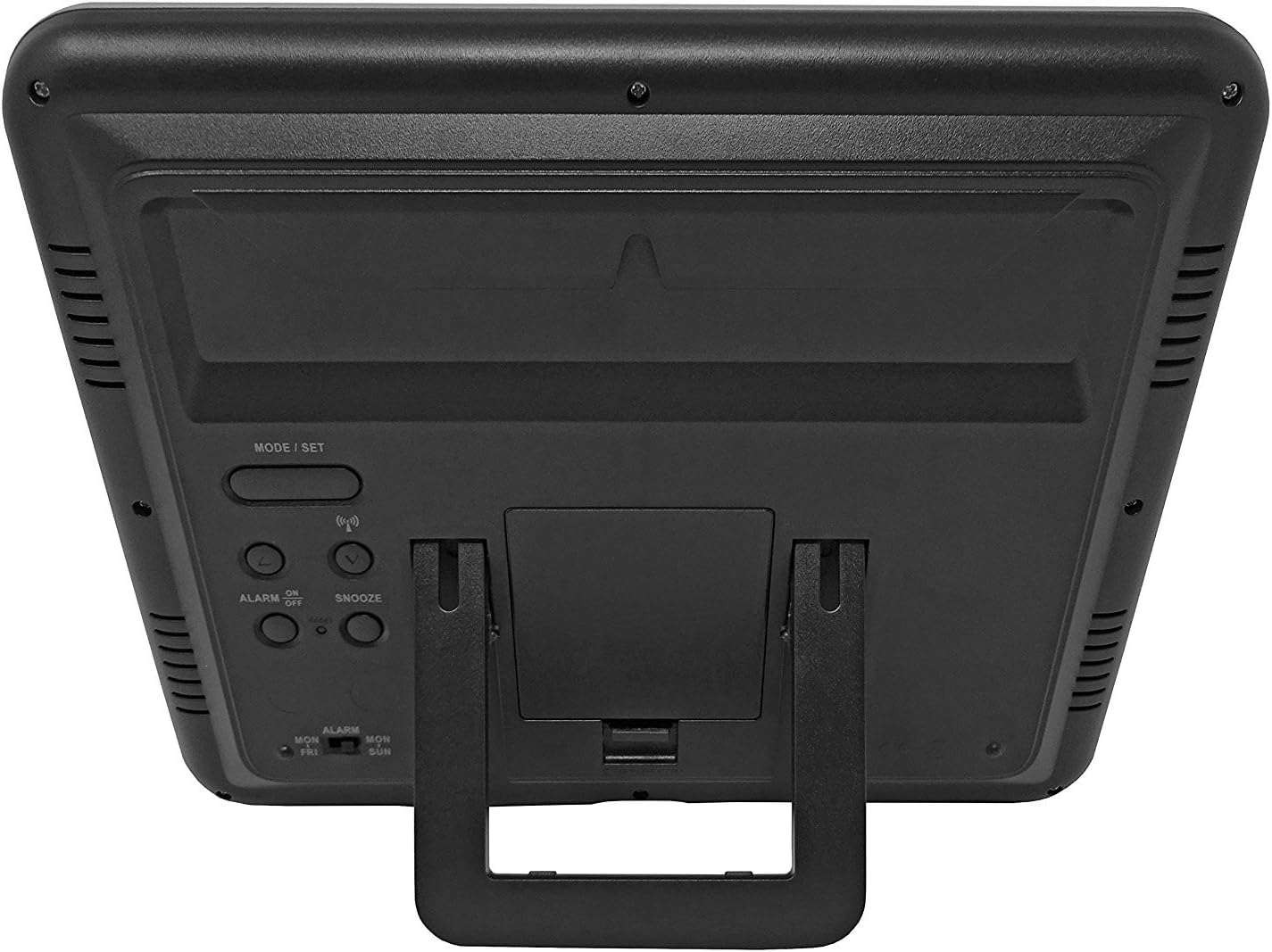
આકૃતિ 3.1: પાછળ view of the clock, highlighting the battery compartment and control buttons.
નિયંત્રણ બટનો:
- MODE / SET: Used to switch between display modes and enter setting mode.
- ઉપર નીચે: સેટિંગ મોડ દરમિયાન મૂલ્યોને સમાયોજિત કરવા માટે વપરાય છે.
- WAVE / RCC: Manually initiates or stops radio control signal reception.
- ALARM ON / OFF: Activates or deactivates the alarm.
- સ્નૂઝ: જ્યારે એલાર્મ વાગે ત્યારે સ્નૂઝ ફંક્શન સક્રિય કરે છે.
4. બેટરી ઇન્સ્ટોલેશન
- ઘડિયાળની પાછળ બેટરી કમ્પાર્ટમેન્ટ કવર શોધો.
- Remove the cover by sliding it down or lifting it off.
- Insert 4 new AA batteries, ensuring the correct polarity (+ and -) as indicated inside the compartment.
- બેટરી કમ્પાર્ટમેન્ટ કવર બદલો.
The clock will power on and begin searching for the radio control signal automatically.
5. Initial Setup & Time Synchronization
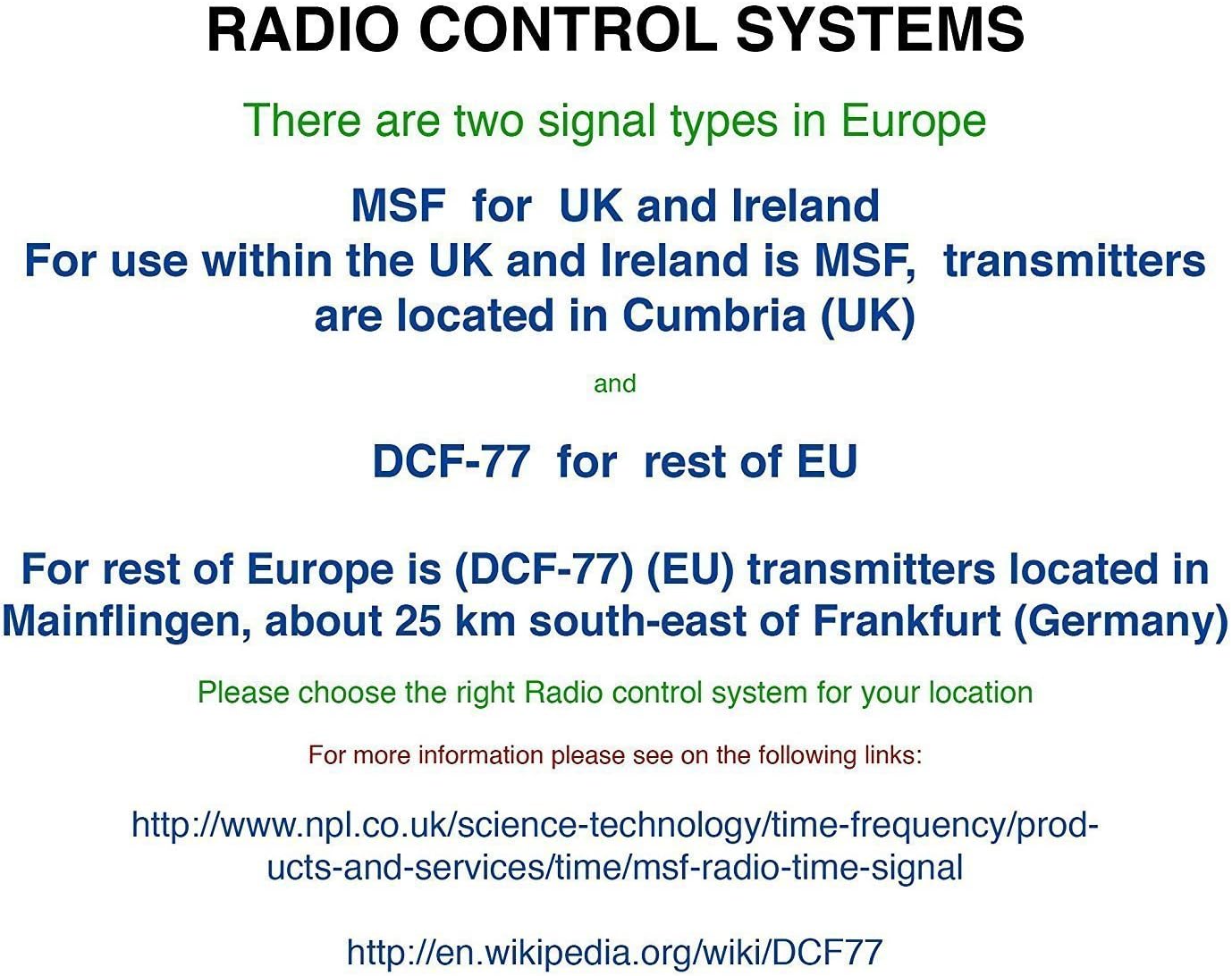
The Youshiko YC8061-B clock is designed to automatically set its time and date via the MSF radio signal broadcast from Cumbria, UK. This signal is specifically for use within the UK and Ireland.

Figure 5.1: Explanation of radio control systems (MSF for UK/Ireland, DCF-77 for rest of EU).
સ્વચાલિત સિંક્રનાઇઝેશન:
- After battery installation, the clock will automatically start searching for the MSF signal. A radio wave icon will flash on the display.
- Place the clock near a window, away from electronic devices that may cause interference.
- The initial synchronization process may take several minutes to a few hours, depending on your location and signal strength.
- Once the signal is successfully received, the radio wave icon will appear solid on the display, and the clock will show the correct time and date.
- The clock will automatically adjust for Daylight Saving Time (DST) and perform daily checks to maintain accuracy.
મેન્યુઅલ સિગ્નલ શોધ:
If the clock does not synchronize automatically or if you wish to force a signal search, press and hold the WAVE / RCC button. The radio wave icon will flash, indicating it is searching for the signal.
Manual Time Setting (if radio signal is unavailable):
In areas where the radio signal cannot be received, you can manually set the time and date:
- દબાવો અને પકડી રાખો MODE / SET સમય અંકો ફ્લેશ થવા લાગે ત્યાં સુધી બટન.
- નો ઉપયોગ કરો UP or નીચે buttons to adjust the flashing value (e.g., hour, minute).
- દબાવો MODE / SET again to confirm the setting and move to the next adjustable item (e.g., minute, year, month, day, 12/24-hour format, temperature unit).
- Repeat steps 2 and 3 until all settings are configured.
- દબાવો MODE / SET સેટિંગ મોડમાંથી બહાર નીકળવા માટે એક છેલ્લી વાર.
6. ઓપરેટિંગ સૂચનાઓ
ડિસ્પ્લે મોડ્સ:
The clock displays time (hours, minutes, seconds), date (day, month, year), day of the week, indoor temperature, and humidity. The time digits are large (8.3 cm) for easy readability.
એલાર્મ કાર્ય:
- એલાર્મ સમય સેટ કરવા માટે, દબાવો MODE / SET button repeatedly until the alarm time is displayed.
- દબાવો અને પકડી રાખો MODE / SET until the alarm hour flashes. Use UP or નીચે સંતુલિત કરવા માટે.
- દબાવો MODE / SET to confirm the hour and move to minutes. Use UP or નીચે સંતુલિત કરવા માટે.
- દબાવો MODE / SET એલાર્મ સેટિંગમાંથી બહાર નીકળવા માટે.
- એલાર્મને સક્રિય અથવા નિષ્ક્રિય કરવા માટે, દબાવો એલાર્મ ચાલુ / બંધ button. An alarm icon will appear on the display when activated.
સ્નૂઝ ફંક્શન:
જ્યારે એલાર્મ વાગે ત્યારે, દબાવો સ્નૂઝ એલાર્મને અસ્થાયી રૂપે શાંત કરવા માટે બટન. લગભગ 5 મિનિટ પછી એલાર્મ ફરીથી વાગશે.
તાપમાન એકમ પસંદગી:
To switch between Celsius (°C) and Fahrenheit (°F) for temperature display, press the UP button during normal time display.
7. માઉન્ટિંગ વિકલ્પો
The Youshiko YC8061-B clock offers versatile placement options:
વોલ માઉન્ટિંગ:
The clock features a keyhole slot on the back for easy wall mounting. Use a suitable screw (not included) in your desired location.

Figure 7.1: The clock displayed on a wall, showcasing its suitability for wall mounting.
ટેબલ સ્ટેન્ડ:
An integrated foldable stand on the back allows the clock to be placed on any flat surface, such as a desk, shelf, or bedside table.

Figure 7.2: The clock positioned on a table using its integrated stand.
8. જાળવણી
સફાઈ:
Wipe the clock with a soft, dry cloth. Do not use abrasive cleaners or solvents, as these may damage the display or casing.
બેટરી રિપ્લેસમેન્ટ:
When the display dims or the clock stops functioning correctly, replace all 4 AA batteries simultaneously. Do not mix old and new batteries or different types of batteries.
9. મુશ્કેલીનિવારણ
| સમસ્યા | સંભવિત કારણ | ઉકેલ |
|---|---|---|
| ઘડિયાળ કંઈપણ બતાવતું નથી. | બેટરીઓ મરી ગઈ છે અથવા ખોટી રીતે દાખલ કરવામાં આવી છે. | યોગ્ય ધ્રુવીયતા સુનિશ્ચિત કરીને બેટરીને નવી સાથે બદલો. |
| Radio wave icon is flashing, or time is incorrect. | ખરાબ રેડિયો સિગ્નલ રિસેપ્શન. | Move the clock to a location with better signal reception (e.g., near a window, away from electronics). Manually initiate signal search using the WAVE / RCC button. |
| એલાર્મ વાગતો નથી. | એલાર્મ સક્રિય થયેલ નથી. | Press the ALARM ON / OFF button to activate the alarm (alarm icon should appear). |
| તાપમાન/ભેજના રીડિંગ્સ ખોટા લાગે છે. | Clock is placed in an area with extreme temperature fluctuations or direct sunlight. | Relocate the clock to a stable indoor environment. Allow time for readings to stabilize. |
10. સ્પષ્ટીકરણો

Figure 10.1: Dimensions of the Youshiko YC8061-B Jumbo Radio Controlled Wall Clock.
| લક્ષણ | વિગત |
|---|---|
| મોડલ નંબર | YC8061-B |
| પરિમાણો (L x W x H) | 24.8 x 20.6 x 2.8 સેમી (9.76 x 8.11 x 1.1 ઇંચ) |
| વજન | 600 ગ્રામ |
| પાવર સ્ત્રોત | 4 x AA બેટરી (શામેલ નથી) |
| ડિસ્પ્લે પ્રકાર | ડિજિટલ એલસીડી |
| સમય સંકેત | MSF (UK & Ireland version) |
| ખાસ લક્ષણો | Radio-controlled, Automatic DST adjustment, Indoor Temperature Display, Indoor Humidity Display, Calendar (Day, Month, Year), Alarm with Snooze, Wall Mountable / Table Stand |
| રંગ | કાળો |
11. વોરંટી માહિતી
Youshiko products are manufactured to high-quality standards. This product is covered by a standard manufacturer's warranty against defects in materials and workmanship. Please retain your proof of purchase for warranty claims. Specific warranty terms and duration may vary by region. For detailed warranty information, please refer to the documentation provided at the time of purchase or contact Youshiko customer support.
12. આધાર
Should you encounter any issues or have questions regarding your Youshiko YC8061-B Jumbo Radio Controlled Wall Clock that are not addressed in this manual, please contact Youshiko customer support. Contact details can typically be found on the product packaging or the official Youshiko webસાઇટ
Ask a question about this manual
Ask about setup, troubleshooting, compatibility, parts, safety, or missing instructions. Manuals+ will review the question and use this page’s manual context to help answer it.