
પરિચય
Thank you for choosing the Awei B923BL Wireless Magnetic Sports Bluetooth Earphones. This manual provides essential information for setting up, operating, maintaining, and troubleshooting your new earphones. Please read it carefully before use to ensure optimal performance and longevity of your device.
પેકેજ સામગ્રી
કૃપા કરીને નીચેની વસ્તુઓ માટે પેકેજ તપાસો:
- Awei B923BL Wireless Magnetic Sports Bluetooth Earphones
- યુએસબી ચાર્જિંગ કેબલ
- કાનની ટીપ્સના બહુવિધ કદ
- વપરાશકર્તા માર્ગદર્શિકા
ઉત્પાદન ઓવરview
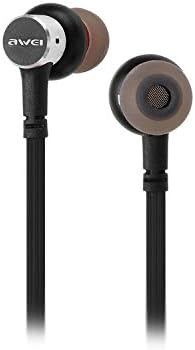
The Awei B923BL earphones are designed for active lifestyles, featuring a wireless Bluetooth connection and a magnetic design for convenient storage around your neck when not in use. They include an integrated microphone for hands-free calling.

સેટઅપ
૧. ઇયરફોન ચાર્જ કરવા
Before first use, fully charge your earphones. Connect the provided USB charging cable to the charging port on the earphones and the other end to a USB power source (e.g., computer USB port, wall adapter). The indicator light will show charging status and turn off or change color when fully charged.
2. બ્લૂટૂથ જોડી
- ખાતરી કરો કે ઇયરફોન બંધ છે.
- Press and hold the multi-function button (usually the power button) until the indicator light flashes red and blue alternately, indicating pairing mode.
- On your mobile phone or Bluetooth-enabled device, go to the Bluetooth settings and enable Bluetooth.
- માટે શોધો available devices. You should see "Awei B923BL" or a similar name in the list.
- Select "Awei B923BL" to connect. Once connected, the indicator light will usually flash blue slowly or turn off, and you may hear a confirmation tone.
- જો પાસવર્ડ માટે પૂછવામાં આવે, તો "0000" દાખલ કરો.
Once paired, the earphones will automatically connect to the last paired device when turned on, if the device's Bluetooth is active and within range.
ઓપરેટિંગ સૂચનાઓ
પાવર ચાલુ/બંધ
- પાવર ચાલુ: Press and hold the multi-function button for approximately 3 seconds until the blue indicator light flashes.
- પાવર બંધ: Press and hold the multi-function button for approximately 5 seconds until the red indicator light flashes and then turns off.
સંગીત પ્લેબેક
- ચલાવો/થોભો: એકવાર મલ્ટી-ફંક્શન બટન દબાવો.
- આગળનો ટ્રેક: વોલ્યુમ + બટન દબાવો અને પકડી રાખો.
- પાછલો ટ્રેક: વોલ્યુમ - બટન દબાવો અને પકડી રાખો.
ક Callલ મેનેજમેન્ટ
- જવાબ/કૉલ સમાપ્ત કરો: એકવાર મલ્ટી-ફંક્શન બટન દબાવો.
- કૉલ નકારો: મલ્ટિ-ફંક્શન બટનને લગભગ 2 સેકન્ડ માટે દબાવી રાખો.
- છેલ્લો નંબર ફરીથી ડાયલ કરો: મલ્ટી-ફંક્શન બટનને બે વાર દબાવો.
વોલ્યુમ નિયંત્રણ
- વોલ્યુમ વધારો: વોલ્યુમ + બટન દબાવો.
- વોલ્યુમ ઘટાડો: વોલ્યુમ - બટન દબાવો.
જાળવણી
- Clean the earphones regularly with a soft, dry cloth. Do not use harsh chemicals or abrasive materials.
- કાનની ટીપ્સ દૂર કરો અને જો જરૂરી હોય તો તેને હળવા સાબુ અને પાણીથી સાફ કરો, ખાતરી કરો કે તે ફરીથી જોડતા પહેલા સંપૂર્ણપણે સુકાઈ ગયા છે.
- ઇયરફોનને સીધા સૂર્યપ્રકાશ અને અતિશય તાપમાનથી દૂર ઠંડી, સૂકી જગ્યાએ રાખો.
- Avoid exposing the earphones to water or excessive moisture.
- Do not attempt to disassemble or modify the earphones, as this will void the warranty.
મુશ્કેલીનિવારણ
- Earphones not turning on: ખાતરી કરો કે ઇયરફોન સંપૂર્ણપણે ચાર્જ થયેલ છે.
- ઉપકરણ સાથે જોડી બનાવી શકાતી નથી:
- Make sure the earphones are in pairing mode (flashing red and blue).
- ખાતરી કરો કે તમારા ઉપકરણ પર બ્લૂટૂથ સક્ષમ છે.
- ઇયરફોનને તમારા ઉપકરણની નજીક ખસેડો.
- Try restarting both the earphones and your device.
- જો તમારી પાસે ઘણા બધા બ્લૂટૂથ કનેક્શન હોય, તો તમારા ડિવાઇસ પરના પહેલાના બ્લૂટૂથ કનેક્શન સાફ કરો.
- કોઈ અવાજ નહીં અથવા ઓછો અવાજ નહીં:
- ઇયરફોન અને તમારા કનેક્ટેડ ડિવાઇસ બંને પર વોલ્યુમ લેવલ તપાસો.
- ખાતરી કરો કે ઇયરફોન તમારા ઉપકરણ સાથે યોગ્ય રીતે જોડાયેલા છે.
- અલગ અલગ ઓડિયો સ્ત્રોતો વગાડવાનો પ્રયાસ કરો.
- કૉલ ગુણવત્તા સમસ્યાઓ:
- ખાતરી કરો કે માઇક્રોફોન અવરોધિત નથી.
- ઓછા દખલવાળા વિસ્તારમાં ખસેડો.
વિશિષ્ટતાઓ
| લક્ષણ | વિગત |
|---|---|
| બ્રાન્ડ નામ | અવેઇ |
| મોડલ નંબર | B923BL |
| રંગ | કાળો |
| હેડફોન ફોર્મ ફેક્ટર | કાન માં |
| કનેક્ટિવિટી ટેકનોલોજી | વાયરલેસ |
| વાયરલેસ કોમ્યુનિકેશન ટેકનોલોજી | વાયરલેસ |
| વય શ્રેણી વર્ણન | પુખ્ત |
| સામગ્રી | રબર |
| સુસંગત ઉપકરણો | મોબાઈલ ફોન |
| કેબલ લક્ષણ | કેબલ વગર |
| નિયંત્રણ પદ્ધતિ | સ્પર્શ |
| વસ્તુઓની સંખ્યા | 1 |
| ઉત્પાદક | અવેઇ |
| ખાસ લક્ષણો | Microphone Included (Note: This model does not feature active noise cancellation as per product description.) |
વોરંટી અને આધાર
વોરંટી માહિતી
This product comes with a 1-year manufacturer's warranty from the date of purchase. For warranty claims or service, please contact the manufacturer or their authorized service agent. For further details, you may also contact the retailer where the product was purchased.
ગ્રાહક આધાર
If you encounter any issues not covered in this manual or require further assistance, please refer to the contact information provided with your product packaging or visit the official Awei webઆધાર સંસાધનો માટે સાઇટ.