
પરિચય
This manual provides comprehensive instructions for the setup, operation, and maintenance of your Pro-Ject Primary E turntable. Please read this manual carefully before using the product to ensure proper function and longevity. Keep this manual for future reference.
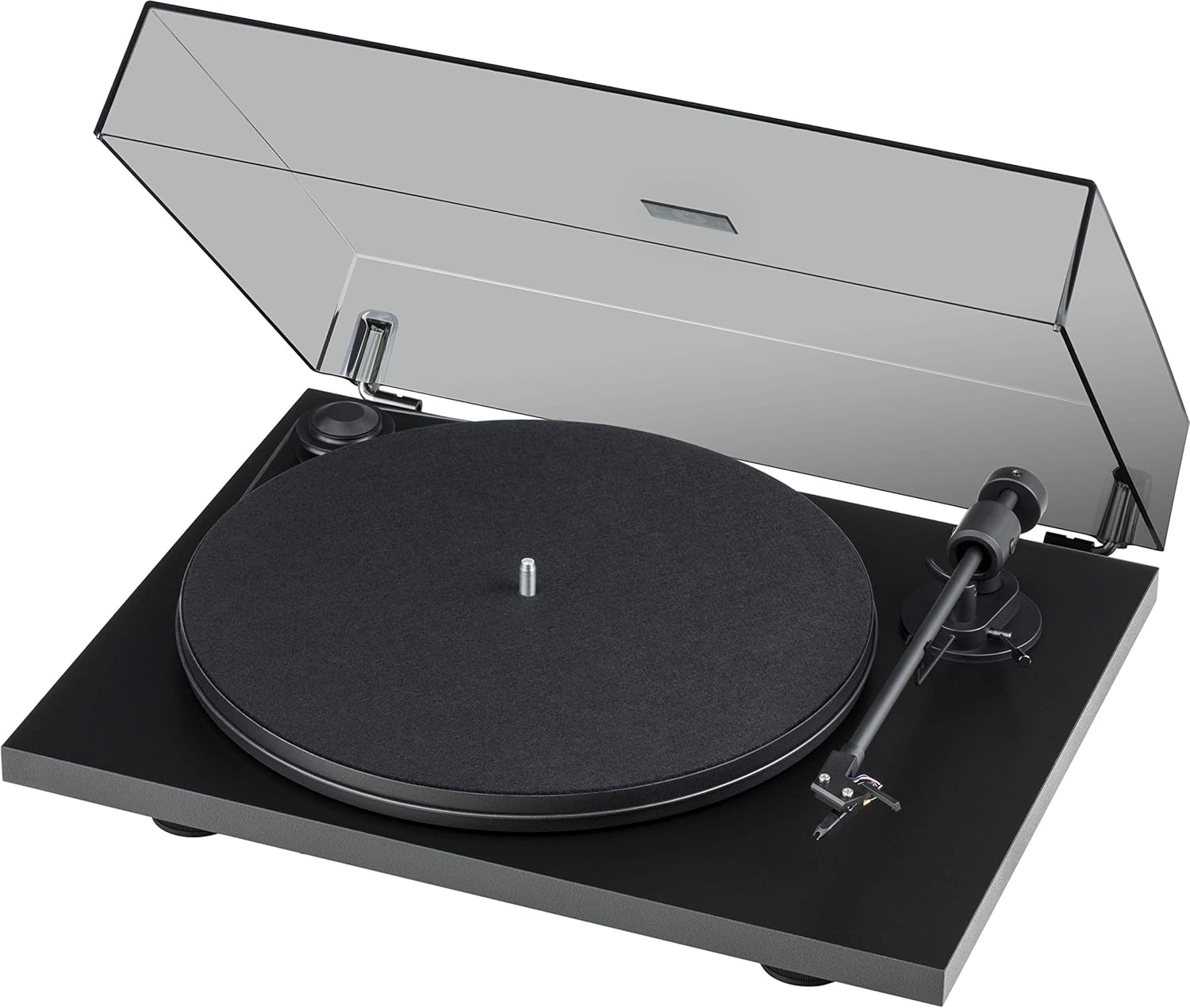
Figure 1: Pro-Ject Primary E Turntable with dust cover open, showcasing its matte black finish and minimalist design.
મહત્વપૂર્ણ સલામતી સૂચનાઓ
- આ સૂચનાઓ વાંચો.
- આ સૂચનાઓ રાખો.
- બધી ચેતવણીઓ પર ધ્યાન આપો.
- બધી સૂચનાઓનું પાલન કરો.
- પાણીની નજીક આ ઉપકરણનો ઉપયોગ કરશો નહીં.
- માત્ર સૂકા કપડાથી સાફ કરો.
- કોઈપણ વેન્ટિલેશન ઓપનિંગ્સને અવરોધિત કરશો નહીં. ઉત્પાદકની સૂચનાઓ અનુસાર ઇન્સ્ટોલ કરો.
- રેડિએટર્સ, હીટ રજિસ્ટર, સ્ટોવ અથવા અન્ય ઉપકરણો જેવા કોઈપણ હીટ સ્ત્રોતોની નજીક ઇન્સ્ટોલ કરશો નહીં (સહિત ampલિફાયર) જે ગરમી ઉત્પન્ન કરે છે.
- પાવર કોર્ડને ચાલવાથી અથવા પિંચ થવાથી સુરક્ષિત કરો, ખાસ કરીને પ્લગ, સગવડતા રીસેપ્ટેકલ્સ અને તે બિંદુ જ્યાં તેઓ ઉપકરણમાંથી બહાર નીકળે છે.
- માત્ર ઉત્પાદક દ્વારા ઉલ્લેખિત જોડાણો/એસેસરીઝનો ઉપયોગ કરો.
- વીજળીના વાવાઝોડા દરમિયાન અથવા લાંબા સમય સુધી ઉપયોગ ન થાય ત્યારે આ ઉપકરણને અનપ્લગ કરો.
- તમામ સેવાનો સંદર્ભ લાયક સેવા કર્મચારીઓને આપો. જ્યારે ઉપકરણને કોઈપણ રીતે નુકસાન થયું હોય, જેમ કે પાવર-સપ્લાય કોર્ડ અથવા પ્લગને નુકસાન થયું હોય, પ્રવાહી ઢોળાયેલું હોય અથવા ઉપકરણમાં વસ્તુઓ પડી હોય, ઉપકરણ વરસાદ અથવા ભેજના સંપર્કમાં આવ્યું હોય, સામાન્ય રીતે કામ કરતું નથી ત્યારે સર્વિસિંગ જરૂરી છે. , અથવા પડતું મૂકવામાં આવ્યું છે.
સેટઅપ
૧. અનપેકિંગ અને સામગ્રી ચકાસણી
Carefully unpack all components from the packaging. Retain the packaging for future transport or storage. Verify that all items listed below are present:
- Primary E Phono turntable with Ortofon OM cartridge
- Gold-plated RCA Phono Cable
- લાગ્યું સાદડી
- ધૂળ આવરણ
- Adapter for 7-inch singles
- વીજ પુરવઠો
- એલન કી
- સ્ટાયલસ પ્રેશર ગેજ
2. પ્લેસમેન્ટ
Place the turntable on a stable, level surface, away from direct sunlight, heat sources, and excessive vibration. Ensure adequate ventilation around the unit.
3. એસેમ્બલી
- પ્લેટર અને બેલ્ટ ઇન્સ્ટોલેશન:
Carefully place the platter onto the spindle. Locate the drive belt and stretch it around the motor pulley and the outer rim of the platter. Ensure the belt is seated correctly and not twisted.

આકૃતિ 2: વિગતવાર view of the belt drive system, showing the belt correctly positioned around the motor pulley and platter.
- Cartridge and Tonearm Setup:
The Ortofon OM NN cartridge is pre-mounted and aligned. Ensure the stylus guard is removed before operation. The tonearm features an 8.6-inch aluminum design with sapphire bearings.

Figure 3: Close-up of the pre-mounted Ortofon OM NN cartridge and the tonearm, ready for playback.

આકૃતિ 4: View of the tonearm base, showing the cueing lever and anti-skate mechanism.
- ડસ્ટ કવર ઇન્સ્ટોલેશન:
Attach the dust cover to the hinges at the rear of the turntable. The hinges are adjustable.

Figure 5: The turntable base without the dust cover, illustrating the points where the dust cover hinges attach.
4. જોડાણો
- ઓડિયો કનેક્શન: Connect the supplied gold-plated RCA phono cable from the turntable's output to the phono input of your ampલિફાયર અથવા ફોનો પ્રીampલાઇફાયર. ડાબી અને જમણી ચેનલના યોગ્ય જોડાણોની ખાતરી કરો.
- પાવર કનેક્શન: Connect the power supply to the DC input on the turntable and then plug it into a suitable wall outlet.
ઓપરેટિંગ સૂચનાઓ
1. પાવર ચાલુ/બંધ
The turntable is powered on by connecting the power supply. There is no separate power switch. To turn off, disconnect the power supply.
2. ઝડપ પસંદગી
The Primary E supports 33 1/3 and 45 RPM playback. To change speed, manually move the drive belt to the appropriate step on the motor pulley. The larger diameter step is for 33 1/3 RPM, and the smaller diameter step is for 45 RPM.
3. રેકોર્ડ વગાડવો
- પ્લેટર પર એક રેકોર્ડ મૂકો, ખાતરી કરો કે તે મધ્યમાં છે.
- If using a 7-inch single, place the adapter on the spindle first.
- ક્યુઇંગ લીવરનો ઉપયોગ કરીને ટોનઆર્મ ઉપાડો.
- રેકોર્ડના ઇચ્છિત શરૂઆતના ખાંચ પર ટોનઆર્મ કાળજીપૂર્વક મૂકો.
- Gently lower the tonearm using the cueing lever. The stylus will descend onto the record and playback will begin.
4. પ્લેબેક રોકવું
- ક્યુઇંગ લીવરનો ઉપયોગ કરીને ટોનઆર્મ ઉપાડો.
- Return the tonearm to its rest.
- Gently lower the cueing lever to secure the tonearm.
- Remove the record from the platter.
જાળવણી
1. સફાઈ
- ધૂળ આવરણ: ડસ્ટ કવરને સોફ્ટ, ડી વડે સાફ કરો.amp કાપડ ઘર્ષક ક્લીનર્સ ટાળો.
- Turntable Chassis: Wipe the matte black chassis with a soft, dry cloth. Do not use chemical cleaners.
- સ્ટાયલસ: Use a dedicated stylus brush to gently clean the stylus from back to front. Clean regularly to prevent debris buildup.
- રેકોર્ડ્સ: Keep your records clean using a record brush or cleaning solution to minimize dust and static.
2. Belt Replacement
Over time, the drive belt may stretch or degrade, affecting speed stability. If you notice inconsistent speed or the belt slipping, it may be time for a replacement. Contact Pro-Ject support or an authorized dealer for genuine replacement belts.
3. Cartridge and Stylus Care
The stylus is a delicate component. Avoid touching it with your fingers. If the stylus becomes bent or damaged, it will need to be replaced. The Ortofon OM NN cartridge allows for stylus replacement without replacing the entire cartridge body.
મુશ્કેલીનિવારણ
If you encounter issues with your turntable, consult the following table before contacting support.
| સમસ્યા | સંભવિત કારણ | ઉકેલ |
|---|---|---|
| No sound from one or both channels. |
|
|
| વિકૃત અથવા અસ્પષ્ટ અવાજ. |
|
|
| Turntable speed is incorrect (too fast/slow). |
|
|
| Record skipping. |
|
|
વિશિષ્ટતાઓ
- મોડલ: Primary E (OM NN) - Matte Black
- બ્રાન્ડ: પ્રો-જેક્ટ
- ઉત્પાદન પરિમાણો: 16.54 x 12.99 x 4.41 ઇંચ (42 x 33 x 11.2 સેમી)
- વસ્તુનું વજન: 11.5 પાઉન્ડ (5.2 કિગ્રા)
- સામગ્રી: Composite Fiber, Stainless Steel, Brass, Aluminum
- ટોનઆર્મ: 8.6-inch aluminum tonearm with sapphire bearings
- ડ્રાઇવ સિસ્ટમ: Belt-drive with synchronous motor
- કારતૂસ: Ortofon OM NN phono cartridge (pre-mounted)
- ઝડપ: 33 1/3, 45 RPM (manual speed change)
- વિશેષતાઓ: Vibration absorbing feet, machined special composite fiber chassis, elegant dust cover with adjustable hinges.
- Power Consumption (On-mode): 4.50 વોટ
- સમાવાયેલ ઘટકો: Primary E Phono with Ortofon OM cartridge, Gold-plated RCA Phono Cable, Felt mat, Dust cover, Adapter for 7-inch singles, Power supply, Allen key, Stylus pressure gauge.
વોરંટી અને આધાર
વોરંટી માહિતી
Pro-Ject Audio Systems products are manufactured to the highest quality standards. For specific warranty terms and conditions, please refer to the warranty card included with your product or visit the official Pro-Ject Audio Systems webસાઇટ. વોરંટી દાવાઓ માટે તમારી ખરીદીનો પુરાવો રાખો.
ગ્રાહક આધાર
For technical assistance, troubleshooting beyond this manual, or inquiries about replacement parts, please contact Pro-Ject Audio Systems customer support or your authorized dealer. You can find more information and contact details on the official Pro-Ject webસાઇટ: Visit the Pro-Ject Store on Amazon or search for the official Pro-Ject Audio Systems webસાઇટ


