
Utilitech GYQ27-W
Utilitech GYQ27-W Motion Sensor Instruction Manual
Model: GYQ27-W
ઉત્પાદન ઓવરview
The Utilitech GYQ27-W is a white wire-in replacement motion sensor designed for outdoor lighting applications. It provides automatic light control by detecting motion and activating the light for a set duration. This sensor offers wide coverage and includes features for energy efficiency and manual override.
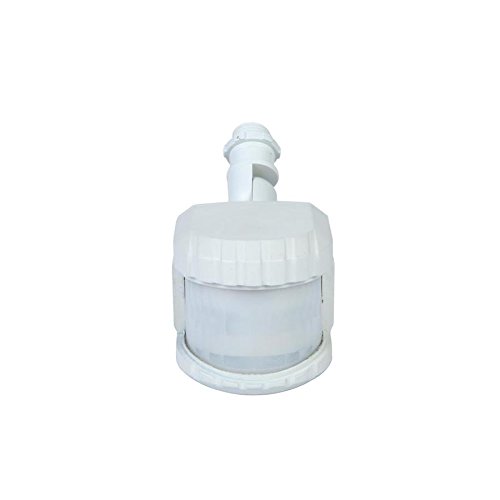
આકૃતિ 1: આગળ view of the Utilitech GYQ27-W White Wire-in Replacement Motion Sensor. The sensor features a compact, white housing with a translucent detection lens at the front and a threaded base for wire-in installation.
મુખ્ય લક્ષણો
- Automatic Light Control: Turns lights on when motion is detected.
- એડજસ્ટેબલ ટાઈમર: Light remains on for 1, 3, or 10 minutes after motion ceases, with a 5-second test mode.
- વ્યાપક કવરેજ: Provides up to 240° coverage and 69-ft of downward perimeter protection.
- ડસ્ક-ટુ-ડૉન સેન્સર: Automatically activates at dusk and deactivates at dawn.
- વ્યાપક સુસંગતતા: Compatible with dimmable LED, dimmable CFL, halogen, and incandescent bulbs.
- ઊર્જા કાર્યક્ષમતા: Features 2-level brightness technology.
- મેન્યુઅલ ઓવરરાઇડ: Allows the light to operate constantly for a selected period.
સેટઅપ અને ઇન્સ્ટોલેશન
Proper installation is crucial for optimal performance and safety. It is recommended to consult a qualified electrician if you are unsure about any steps.
સલામતી સાવચેતીઓ
- ઇન્સ્ટોલેશન અથવા સર્વિસિંગ પહેલાં હંમેશા સર્કિટ બ્રેકર પર પાવર બંધ કરો.
- Ensure wiring connections are secure and comply with local electrical codes.
- મહત્તમ વોટ કરતાં વધી જશો નહીંtage rating of the connected lighting fixture.
સ્થાપન પગલાં
- પાવર બંધ કરો: Locate the circuit breaker controlling the outdoor light fixture and switch it to the OFF position. Verify power is off using a voltage પરીક્ષક.
- Remove Existing Sensor (if applicable): Carefully disconnect the wiring from the old motion sensor or light fixture.
- વાયરિંગ કનેક્ટ કરો: Follow the wiring diagram provided with your specific light fixture. Typically, this involves connecting the sensor's wires (line, load, neutral) to the corresponding wires from the power supply and the light fixture. Ensure all connections are tight and insulated with wire nuts.
- માઉન્ટ સેન્સર: Securely mount the Utilitech GYQ27-W motion sensor to the desired location. Ensure it has a clear line of sight to the area you wish to monitor.
- પાવર પુન Restસ્થાપિત કરો: Once all connections are secure and the sensor is mounted, turn the power back on at the circuit breaker.
ઓપરેટિંગ સૂચનાઓ
The GYQ27-W motion sensor offers several adjustable settings to customize its operation.
ગોઠવણ સેટિંગ્સ
- સમય સેટિંગ: The sensor allows you to set the duration the light remains on after motion is detected. Common settings are 1, 3, or 10 minutes. Refer to the sensor's physical controls for specific adjustment methods (e.g., dial, switch).
- પરીક્ષણ મોડ: A 5-second test mode is available for initial setup and aiming. In this mode, the light will turn on for approximately 5 seconds each time motion is detected, regardless of the set time.
- સાંજથી સવાર સુધીની સુવિધા: The integrated photocell automatically prevents the light from activating during daylight hours, conserving energy. The sensor will only activate the light when ambient light levels fall below a certain threshold.
- સંવેદનશીલતા ગોઠવણ: Some models may include a sensitivity dial to adjust the range or sensitivity of motion detection. Adjust this to prevent false triggers from small animals or distant objects.
મેન્યુઅલ ઓવરરાઇડ
To keep the light on continuously for a period, you can typically activate the manual override function. This is often done by quickly turning the light switch OFF and then ON within a few seconds. The light will then stay on until the override period expires or the switch is cycled again. Consult the specific instructions that came with your sensor for precise manual override steps.
જાળવણી
The Utilitech GYQ27-W motion sensor requires minimal maintenance to ensure long-term performance.
- સફાઈ: Periodically wipe the sensor lens with a soft, damp cloth to remove dust, dirt, or cobwebs that may obstruct the sensor's viewઘર્ષક ક્લીનર્સનો ઉપયોગ કરશો નહીં.
- નિરીક્ષણ: Annually inspect the wiring and mounting for any signs of wear, damage, or loosening. Ensure the sensor is still securely positioned.
- પર્યાવરણીય પરિબળો: Keep the area around the sensor clear of obstructions like tree branches or tall shrubs that could block the detection field or cause false triggers due to wind movement.
મુશ્કેલીનિવારણ
If your Utilitech GYQ27-W motion sensor is not functioning as expected, refer to the following common issues and solutions:
| સમસ્યા | સંભવિત કારણ | ઉકેલ |
|---|---|---|
| Light does not turn on when motion is detected. |
|
|
| પ્રકાશ સતત ચાલુ રહે છે. |
|
|
| Light turns on for no apparent reason (false triggers). |
|
|
વિશિષ્ટતાઓ
| વિશેષતા | મૂલ્ય |
|---|---|
| મોડલ નંબર | GYQ27-W |
| બ્રાન્ડ | યુટિલિટેક |
| રંગ | સફેદ |
| પાવર સ્ત્રોત | કોર્ડેડ ઇલેક્ટ્રિક |
| ઉત્પાદન પરિમાણો | 5 x 3 x 2 ઇંચ |
| વસ્તુનું વજન | 1.2 પાઉન્ડ |
| મહત્તમ શ્રેણી | 69 ફીટ |
| કવરેજ એંગલ | 240° સુધી |
| સુસંગત બલ્બ | Dimmable LED, Dimmable CFL, Halogen, Incandescent |
વોરંટી અને આધાર
Information regarding specific warranty terms for the Utilitech GYQ27-W motion sensor is not provided in this manual. For warranty details, technical support, or replacement parts, please refer to the original product packaging or contact Utilitech customer service directly.
You may also visit the official Utilitech webસૌથી અદ્યતન માહિતી અને સહાયક સંસાધનો માટે સાઇટ.
Ask a question about this manual
Ask about setup, troubleshooting, compatibility, parts, safety, or missing instructions. Manuals+ will review the question and use this page’s manual context to help answer it.