
પરિચય
This manual provides detailed instructions for the setup, operation, and maintenance of your Zerone BN59-01179A Replacement Remote Control. Please read this manual carefully before using the product to ensure proper functionality and longevity.
ઉત્પાદન ઓવરview
The Zerone BN59-01179A is a universal replacement remote control designed for compatible Smart TVs. It offers a compact design and a comprehensive set of buttons for various functions.
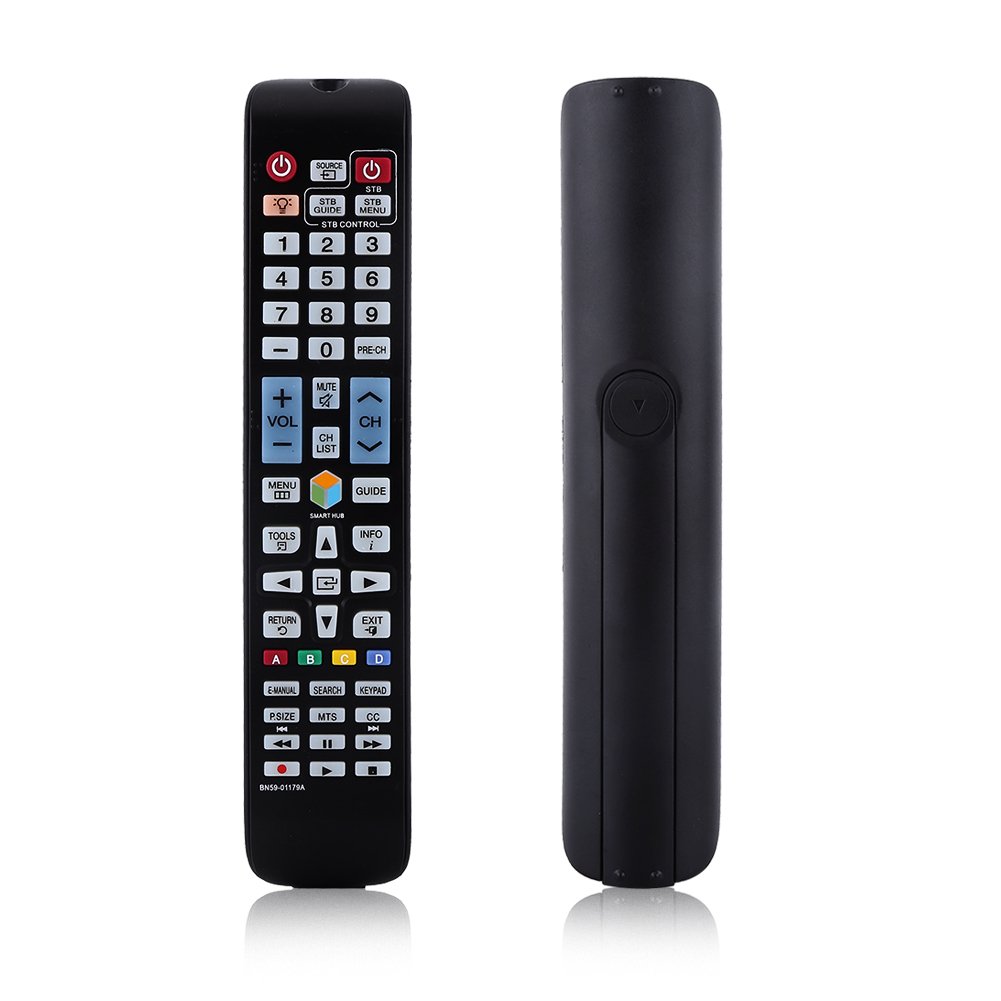
છબી: આગળ view of the Zerone BN59-01179A remote control, showing its full layout and approximate dimensions (23cm length, 4.7cm width, 2cm thickness).
સેટઅપ
બેટરી ઇન્સ્ટોલેશન
- રિમોટ કંટ્રોલની પાછળના ભાગમાં બેટરીનો ડબ્બો શોધો.
- બેટરી કવરને નીચે તરફ સ્લાઇડ કરો અથવા લેચ દબાવો અને ખોલવા માટે ઉપાડો.
- બે (2) AAA બેટરી દાખલ કરો, ખાતરી કરો કે ધન (+) અને ઋણ (-) ટર્મિનલ્સ કમ્પાર્ટમેન્ટની અંદરના નિશાનો સાથે યોગ્ય રીતે ગોઠવાય છે.
- બેટરી કવરને ફરીથી સ્થિતિમાં સ્લાઇડ કરીને બદલો જ્યાં સુધી તે સુરક્ષિત રીતે ક્લિક ન થાય.
નોંધ: Batteries are not included with the remote control. Please use new AAA batteries for optimal performance.

Image: The back of the remote control with the battery cover removed, showing the empty battery compartment ready for two AAA batteries.
ઓપરેટિંગ સૂચનાઓ
This remote control is designed for immediate use with compatible TVs without requiring programming. Simply insert batteries and point the remote towards your television.
મુખ્ય કાર્યો

Image: A hand holding the Zerone remote control, with inset close-ups highlighting the power/source buttons and the navigation/Smart Hub buttons.
- પાવર (લાલ બટન): ટીવી ચાલુ કે બંધ કરે છે.
- સ્ત્રોત: ઇનપુટ સ્ત્રોતો (HDMI, AV, વગેરે) પસંદ કરે છે.
- STB/DTV: Switches between Set-Top Box and Digital TV modes.
- નંબર બટનો (0-9): સીધી ચેનલ પસંદગી.
- પૂર્વ-CH: પાછલી ચેનલ પર પાછા ફરે છે.
- વોલ્યુમ (+/-): વોલ્યુમ સ્તરને સમાયોજિત કરે છે.
- મ્યૂટ: ટીવીના અવાજને મ્યૂટ અથવા અનમ્યૂટ કરે છે.
- Channel (CH Up/Down): ક્રમિક રીતે ટીવી ચેનલો બદલે છે.
- સીએચ યાદી: ચેનલ સૂચિ પ્રદર્શિત કરે છે.
- મેનુ: ટીવીના મુખ્ય મેનુને ઍક્સેસ કરે છે.
- સ્માર્ટ હબ: એપ્લિકેશન્સ અને સ્ટ્રીમિંગ સેવાઓ માટે સ્માર્ટ હબ ઇન્ટરફેસ ખોલે છે.
- માર્ગદર્શિકા: ઇલેક્ટ્રોનિક પ્રોગ્રામ માર્ગદર્શિકા દર્શાવે છે.
- માહિતી: Shows information about the current program.
- સાધનો: Accesses quick settings or contextual options.
- નેવિગેશન બટનો (ઉપર/નીચે/ડાબે/જમણે/દાખલ કરો): મેનુઓમાંથી નેવિગેટ કરે છે અને વિકલ્પો પસંદ કરે છે.
- રીટર્ન: પાછલી સ્ક્રીન અથવા મેનૂ પર પાછા જાય છે.
- બહાર નીકળો: વર્તમાન મેનુ અથવા એપ્લિકેશનમાંથી બહાર નીકળે છે.
- રંગ બટનો (A, B, C, D): Functionality varies by TV model and application.
- E-MANUAL: ટીવીના ઇલેક્ટ્રોનિક મેન્યુઅલને ઍક્સેસ કરે છે.
- શોધો: શોધ કાર્ય ખોલે છે.
- કીપેડ: Displays an on-screen keypad.
- પી.સાઇઝ: ચિત્રનું કદ/પાસા ગુણોત્તર સમાયોજિત કરે છે.
- MTS: Multi-channel Television Sound (SAP).
- CC: બંધ કૅપ્શનિંગ.
- મીડિયા કંટ્રોલ બટન્સ (પ્લે, પોઝ, સ્ટોપ, રીવાઇન્ડ, ફાસ્ટ ફોરવર્ડ): મીડિયા પ્લેબેકને નિયંત્રિત કરે છે.
જાળવણી
- સફાઈ: રિમોટ કંટ્રોલ સાફ કરવા માટે નરમ, સૂકા કપડાનો ઉપયોગ કરો. પ્રવાહી ક્લીનર્સ અથવા ઘર્ષક સામગ્રીનો ઉપયોગ કરશો નહીં.
- બેટરી રિપ્લેસમેન્ટ: જ્યારે રિમોટનો પ્રતિભાવ ધીમો પડી જાય અથવા કામ કરવાનું બંધ કરી દે ત્યારે બેટરી બદલો. હંમેશા બંને બેટરીઓને એક જ સમયે નવી બેટરીથી બદલો.
- સંગ્રહ: જો રિમોટનો લાંબા સમય સુધી ઉપયોગ ન થાય, તો લીકેજ અને નુકસાન અટકાવવા માટે બેટરીઓ દૂર કરો.
- સંપર્કમાં આવવાનું ટાળો: Keep the remote away from direct sunlight, heat sources, and moisture.
મુશ્કેલીનિવારણ
- રિમોટ પ્રતિસાદ આપતું નથી:
- ખાતરી કરો કે બેટરીઓ યોગ્ય ધ્રુવીયતા સાથે યોગ્ય રીતે દાખલ કરવામાં આવી છે.
- જૂની બેટરીઓને નવી AAA બેટરીથી બદલો.
- રિમોટ અને ટીવીના ઇન્ફ્રારેડ સેન્સર વચ્ચે કોઈ અવરોધ છે કે નહીં તે તપાસો.
- ખાતરી કરો કે રિમોટ સીધો ટીવી પર હોય.
- મર્યાદિત શ્રેણી:
- બેટરી બદલો.
- Ensure there are no strong light sources or electronic devices interfering with the signal.
- ચોક્કસ બટનો કામ કરતા નથી:
- કોઈપણ ગંદકી અથવા કચરો દૂર કરવા માટે રિમોટ કંટ્રોલને સાફ કરો, ખાસ કરીને પ્રતિભાવ ન આપતા બટનોની આસપાસ.
- If the issue persists after battery replacement and cleaning, the remote may be faulty.
વિશિષ્ટતાઓ
| લક્ષણ | વર્ણન |
|---|---|
| બ્રાન્ડ | ઝેરોન |
| મોડેલનું નામ | Zerone32687x9gqs (BN59-01179A compatible) |
| કનેક્ટિવિટી ટેકનોલોજી | ઇન્ફ્રારેડ |
| સુસંગત ઉપકરણો | Television (specifically for Samsung BN59-01179A compatible models) |
| સમર્થિત ઉપકરણોની મહત્તમ સંખ્યા | 8 (Universal functionality) |
| બટન જથ્થો | 12 (referring to main function groups, actual count is higher) |
| નિયંત્રક પ્રકાર | બટન નિયંત્રણ |
| મહત્તમ શ્રેણી | 8 મીટર |
| બેટરીનો પ્રકાર | એએએ |
| બેટરીની સંખ્યા | 2 AAA બેટરી જરૂરી છે (શામેલ નથી) |
| ખાસ લક્ષણ | Universal replacement, no programming required |
વોરંટી અને આધાર
Zerone provides a service guarantee for this product. If you encounter any questions or issues regarding your remote control, please contact the seller or manufacturer for assistance. They will provide follow-up services to address your concerns.
For specific warranty details and support contact information, please refer to your purchase documentation or the retailer's webસાઇટ