
મહત્વપૂર્ણ સલામતી માહિતી
Read all instructions carefully before using this product. Keep this manual for future reference.
- હેડસેટને ભારે તાપમાન અથવા ભેજના સંપર્કમાં આવવાનું ટાળો.
- હેડસેટને જાતે જ ડિસએસેમ્બલ કરશો નહીં અથવા રિપેર કરવાનો પ્રયાસ કરશો નહીં.
- Clean the headset with a soft, dry cloth. Do not use liquid cleaners.
- ઊંચા અવાજના સ્તરે લાંબા સમય સુધી સાંભળવાથી સુનાવણીને નુકસાન થઈ શકે છે.
પેકેજ સામગ્રી
ખાતરી કરો કે બધી વસ્તુઓ પેકેજમાં હાજર છે:
- NUBWO HW02 USB Computer Headset
- યુએસબી કેબલ
- વપરાશકર્તા માર્ગદર્શિકા (આ દસ્તાવેજ)
સેટઅપ
Connecting to a Computer (USB)
- તમારા કમ્પ્યુટર પર ઉપલબ્ધ USB પોર્ટ શોધો.
- Plug the USB connector of the NUBWO HW02 headset into the USB port.
- The operating system will typically install the necessary drivers automatically. This may take a few moments.
- Once installed, the headset should be recognized as an audio input and output device.
- You may need to select the "NUBWO HW02" headset as your default audio device in your computer's sound settings.
Connecting to a Device (3.5mm Jack)
The NUBWO HW02 headset features a 3.5mm jack for broader compatibility.
- Locate the 3.5mm audio jack on your device (e.g., gaming console controller, smartphone, tablet).
- Insert the 3.5mm connector from the headset into the device's audio jack.
- ખાતરી કરો કે કનેક્શન સુરક્ષિત છે.
- Adjust audio settings on your device as needed to select the headset for input and output.
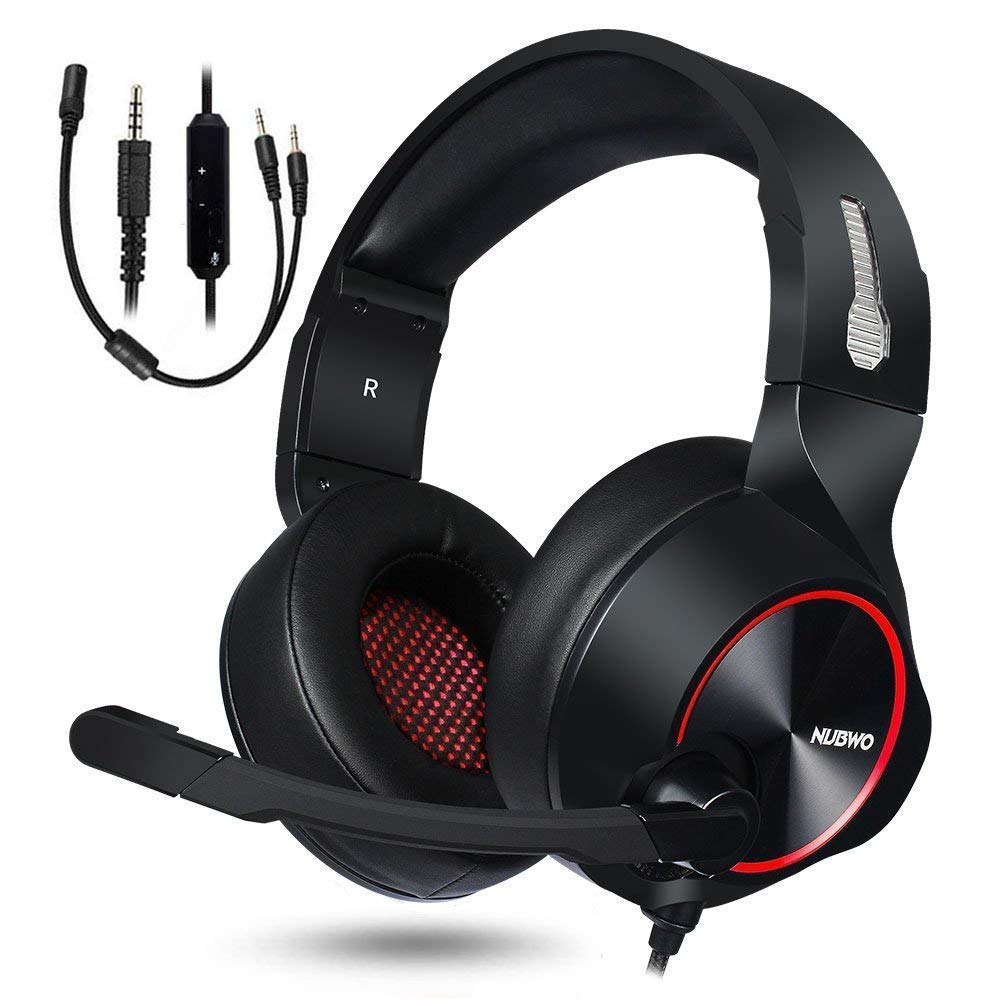
Image: NUBWO HW02 USB Computer Headset. This image displays the overall design of the headset, featuring orange accents on the earcups and headband, with a flexible microphone arm.
ઓપરેટિંગ સૂચનાઓ
હેડસેટ એડજસ્ટ કરી રહ્યા છીએ
- હેડબેન્ડ ગોઠવણ: Gently slide the earcups up or down along the headband to achieve a comfortable fit over your ears.
- માઇક્રોફોન પોઝિશનિંગ: Bend the flexible microphone arm to position the microphone approximately 1-2 inches from your mouth for optimal voice clarity.
વોલ્યુમ નિયંત્રણ
The NUBWO HW02 headset features an in-line volume control.
- વોલ્યુમ વધારો: Roll the volume wheel upwards.
- વોલ્યુમ ઘટાડો: Roll the volume wheel downwards.
Microphone Mute Function
An in-line switch allows you to mute or unmute the microphone.
- મ્યૂટ માઇક્રોફોન: Slide the switch to the "Mute" position.
- Unmute Microphone: Slide the switch to the "Unmute" position.
જાળવણી
- સફાઈ: Use a soft, dry, lint-free cloth to wipe down the earcups and headband. Do not use abrasive cleaners, alcohol, or solvents.
- સંગ્રહ: When not in use, store the headset in a clean, dry place away from direct sunlight and extreme temperatures.
- કેબલ કેર: નુકસાન ટાળવા માટે કેબલ પર તીક્ષ્ણ વળાંક અથવા વધુ પડતું ખેંચાણ ટાળો.
મુશ્કેલીનિવારણ
| સમસ્યા | સંભવિત કારણ | ઉકેલ |
|---|---|---|
| હેડસેટમાંથી કોઈ અવાજ નથી | હેડસેટ યોગ્ય રીતે જોડાયેલ નથી. વોલ્યુમ ખૂબ ઓછું છે. ખોટો ઓડિયો આઉટપુટ ઉપકરણ પસંદ કરેલ છે. | Ensure USB or 3.5mm jack is fully inserted. Increase volume using in-line control and computer/device settings. Select "NUBWO HW02" as the default playback device in your sound settings. |
| માઇક્રોફોન કામ કરતું નથી | માઇક્રોફોન મ્યૂટ છે. ખોટું ઑડિઓ ઇનપુટ ઉપકરણ પસંદ કરેલ છે. માઇક્રોફોન ખોટી રીતે સ્થિત થયેલ છે. | Check the in-line mute switch. Select "NUBWO HW02" as the default recording device in your sound settings. Adjust microphone position closer to your mouth. |
| ધ્વનિ ગુણવત્તા નબળી અથવા વિકૃત છે | વોલ્યુમ ખૂબ ંચું છે. છૂટક જોડાણ. દખલગીરી. | વોલ્યુમ ઓછું કરો. Re-seat the USB or 3.5mm connection. કોઈ અલગ USB પોર્ટ અથવા ઉપકરણ સાથે કનેક્ટ કરવાનો પ્રયાસ કરો. |
વિશિષ્ટતાઓ
- મોડલ: HW02
- કનેક્ટિવિટી: વાયર્ડ (USB, 3.5mm જેક)
- ઇયર પ્લેસમેન્ટ: કાન ઉપર
- અવાજ નિયંત્રણ: સક્રિય અવાજ રદ
- પ્લેટફોર્મ સુસંગતતા: ગેમિંગ કન્સોલ, પીસી
- સામગ્રી: સિલિકોન
- વસ્તુનું વજન: 1.11 પાઉન્ડ
- ઉત્પાદન પરિમાણો: 9 x 7 x 4 ઇંચ
વોરંટી અને આધાર
For warranty information or technical support, please refer to the NUBWO official webસાઇટ પર જાઓ અથવા તેમની ગ્રાહક સેવાનો સંપર્ક કરો. ખરીદીના પુરાવા તરીકે તમારી ખરીદી રસીદ રાખો.
NUBWO Official Webસાઇટ: Visit the NUBWO Store on Amazon