
1. પરિચય
Thank you for choosing the Decdeal WiFi Electric Heating Thermostat. This programmable thermostat is designed to control electric heating systems, offering convenience through its dual sensor capabilities, white backlight display, and voice control compatibility. This manual provides detailed instructions for installation, operation, and maintenance to ensure optimal performance and longevity of your device.
2. ઉત્પાદન ઓવરview
The Decdeal WiFi Electric Heating Thermostat features a clear LCD display and intuitive buttons for easy control. It integrates with your home WiFi network for remote management via a smartphone application and supports voice commands through compatible smart home assistants like Amazon Alexa.
મુખ્ય લક્ષણો:
- WiFi Connectivity for remote control
- Programmable scheduling for energy efficiency
- Dual sensor (internal air sensor and external floor sensor)
- White backlight for clear visibility
- Voice control compatible with Amazon Alexa
- ટચ બટન ઈન્ટરફેસ
Thermostat Components and Display:

This image illustrates the front panel of the thermostat, highlighting its display elements and control buttons. The display shows the current time, set temperature, and room temperature. The buttons include Turn ON/OFF, Set Key, Confirm Key, Increase Key, and Decrease Key.

This image shows the Decdeal thermostat mounted on a wall, with a smartphone displaying its control application. This demonstrates the WiFi connectivity and remote control capabilities of the device.
3. સેટઅપ અને ઇન્સ્ટોલેશન
મહત્વપૂર્ણ સુરક્ષા માહિતી: Installation should only be performed by a qualified electrician. Ensure the main power supply is turned off before beginning any wiring work to prevent electric shock.
પેકેજ સામગ્રી:
- Decdeal WiFi Electric Heating Thermostat
- External NTC Sensor (if included with your model)
- માઉન્ટિંગ સ્ક્રૂ
- વપરાશકર્તા માર્ગદર્શિકા

This image displays the thermostat alongside its external NTC sensor and mounting screws, representing the typical contents of the product package.
વાયરિંગ સૂચનાઓ:
Refer to the wiring diagram on the back of the thermostat for correct connections. Ensure all connections are secure.
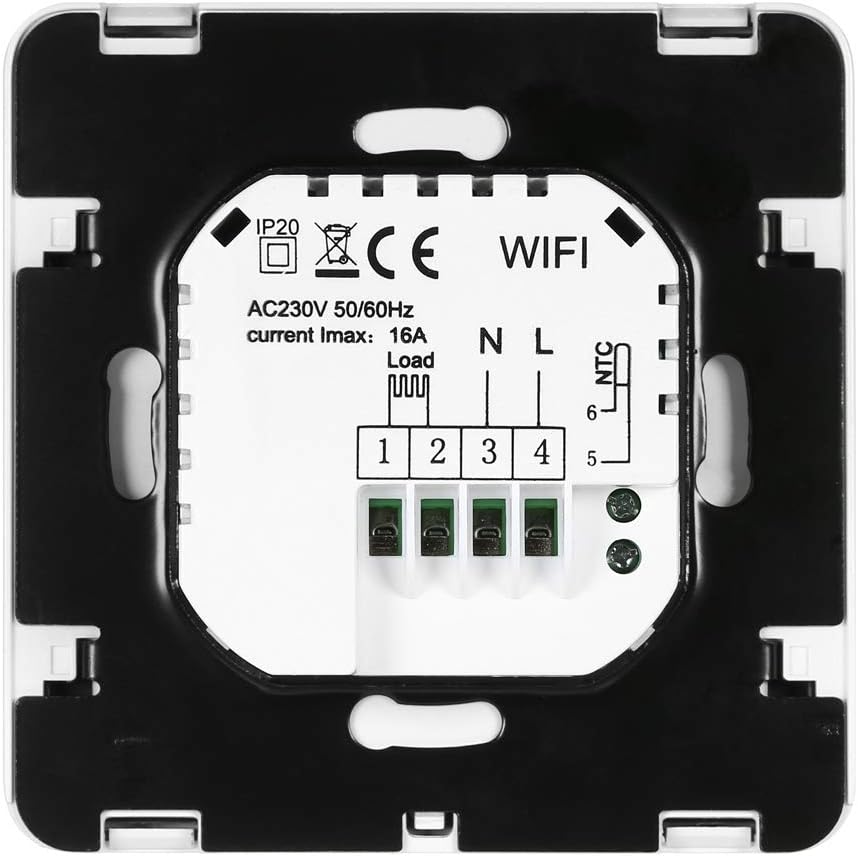
આ છબી પાછળનો ભાગ બતાવે છે view of the thermostat, detailing the wiring terminals. Terminals 1 and 2 are for the load (heating element), 3 and 4 for the neutral (N) and live (L) power supply, and 5 and 6 for the NTC external sensor.
- Disconnect power to the heating circuit at the main breaker.
- Mount the thermostat base to a standard electrical box using the provided screws.
- Connect the heating load wires to terminals 1 and 2.
- Connect the live (L) and neutral (N) power supply wires to terminals 3 and 4 respectively.
- If using an external floor sensor, connect its wires to terminals 5 and 6.
- Carefully attach the thermostat front panel to the base.
Initial Power-On and WiFi Setup:
After installation, restore power. The thermostat display will light up. To connect to WiFi:
- Download the compatible smartphone application (refer to the user manual included in the box for QR code or app name).
- Follow the in-app instructions to add your device. This typically involves putting the thermostat into pairing mode (often by holding a specific button combination) and connecting to its temporary WiFi hotspot or allowing the app to discover it on your home network.
- Ensure your WiFi network is 2.4GHz, as 5GHz networks are generally not supported by this device.
4. ઓપરેશન
The thermostat can be operated manually via its buttons or remotely through the smartphone application and voice commands.
મેન્યુઅલ નિયંત્રણ:
- પાવર ચાલુ/બંધ: Press the power button (⏻) to turn the thermostat on or off.
- તાપમાન સેટ કરો: Press the 'SET' button to enter temperature setting mode. Use the '▲' (Increase) and '▼' (Decrease) buttons to adjust the desired temperature. Press 'OK' to confirm.
- મોડ પસંદગી: The thermostat supports manual mode and programmable mode. Use the 'SET' button to cycle through modes or access advanced settings.
Programmable Scheduling:
The thermostat allows you to set a weekly schedule with different temperature settings for various times of the day. Refer to the detailed instructions in the included paper manual or the smartphone application for setting up your personalized heating schedule.
WiFi and App Control:
Once connected to WiFi, you can control your thermostat from anywhere using the dedicated smartphone application. This includes:
- એડજસ્ટિંગ તાપમાન
- ઓપરેટિંગ મોડ્સ બદલી રહ્યા છીએ
- Setting and modifying schedules
- Monitoring current room and set temperatures
અવાજ નિયંત્રણ:
The thermostat is compatible with Amazon Alexa. To enable voice control:
- Ensure your thermostat is successfully connected to the smartphone app.
- Open the Amazon Alexa app and enable the skill for your thermostat (e.g., search for 'Smart Life' or the specific app name).
- Link your thermostat account with Alexa.
- Discover devices in the Alexa app. You can then use voice commands such as, "Alexa, set the thermostat to 22 degrees."
5. જાળવણી
The Decdeal WiFi Electric Heating Thermostat requires minimal maintenance.
- સફાઈ: ડિસ્પ્લે સાફ કરો અને casing with a soft, dry cloth. Do not use abrasive cleaners or solvents, as these can damage the surface.
- સેન્સર કેર: Ensure the internal and external sensors are free from dust and obstructions for accurate temperature readings.
- સૉફ્ટવેર અપડેટ્સ: Periodically check the smartphone application for any available firmware updates for your thermostat to ensure optimal performance and security.
6. મુશ્કેલીનિવારણ
જો તમને તમારા થર્મોસ્ટેટમાં સમસ્યાઓ આવે, તો નીચેની સામાન્ય સમસ્યાઓ અને ઉકેલોનો સંદર્ભ લો:
| સમસ્યા | સંભવિત કારણ | ઉકેલ |
|---|---|---|
| થર્મોસ્ટેટ ચાલુ નથી થઈ રહ્યું | No power supply; incorrect wiring; tripped circuit breaker. | Check circuit breaker. Verify wiring connections (consult an electrician if unsure). Ensure main power is on. |
| વાઇફાઇ સાથે કનેક્ટ કરી શકાતું નથી | Incorrect WiFi password; 5GHz network used; thermostat not in pairing mode; weak WiFi signal. | Ensure correct 2.4GHz WiFi password. Put thermostat into pairing mode. Move thermostat closer to router or improve signal. Restart router. |
| Heating not turning on/off | Temperature settings incorrect; thermostat in OFF mode; wiring issue; heating system fault. | Check set temperature and current room temperature. Ensure thermostat is ON. Verify heating system is functional. Check wiring. |
| તાપમાનનું અચોક્કસ વાંચન | Sensor obstructed or faulty; thermostat placed near heat source/draft. | Ensure sensors are clean and unobstructed. Relocate thermostat if exposed to direct heat/cold sources. |
| અવાજ નિયંત્રણ કામ કરતું નથી | Alexa skill not enabled; account not linked; incorrect commands. | Verify Alexa skill is enabled and linked. Use correct voice commands. Ensure thermostat is online. |
જો આ ઉકેલો અજમાવવા પછી પણ સમસ્યા ચાલુ રહે, તો કૃપા કરીને ગ્રાહક સપોર્ટનો સંપર્ક કરો.
7. સ્પષ્ટીકરણો
Detailed technical specifications for the Decdeal WiFi Electric Heating Thermostat:
| લક્ષણ | વિગત |
|---|---|
| બ્રાન્ડ | Decdeal |
| મોડલ નંબર | XOY6858830357994NM |
| ભાગtage | 230 વોલ્ટ, 250 વોલ્ટ |
| વર્તમાન લોડ | મહત્તમ 16A |
| પાવર સ્ત્રોત | કોર્ડેડ ઇલેક્ટ્રિક |
| કનેક્ટિવિટી પ્રોટોકોલ | Wi-Fi (2.4GHz) |
| નિયંત્રક પ્રકાર | એમેઝોન એલેક્સા સુસંગત |
| બેકલાઇટ | હા |
| વસ્તુનું વજન | 180 ગ્રામ |
| પાર્સલ પરિમાણો | 11.2 x 10.4 x 5.8 સેમી |
| તાપમાન નિયંત્રણ શ્રેણી | Typically 5℃ to 35℃ (may vary by model settings) |
| તાપમાનની ચોકસાઈ | +/- 0.5℃ |
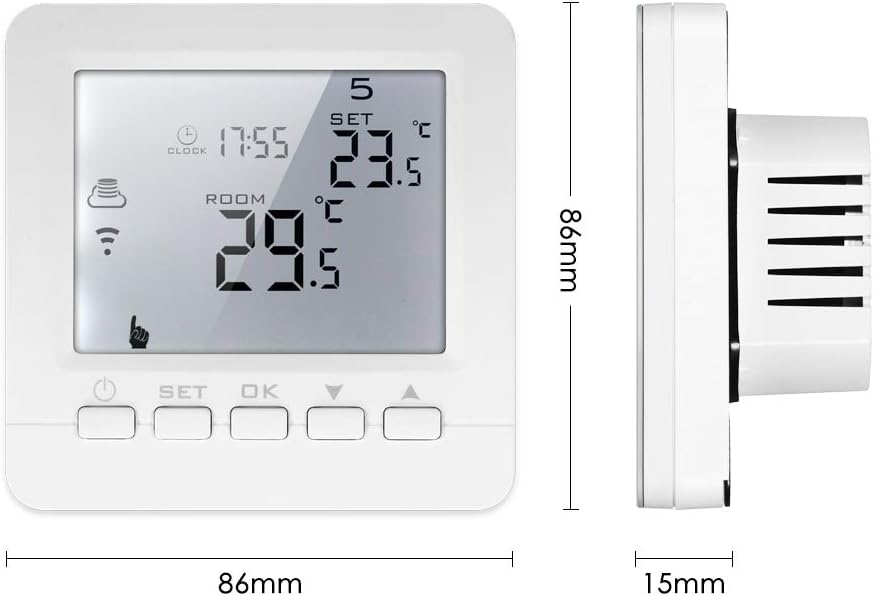
This image provides the physical dimensions of the thermostat, showing a width of 86mm and a height of 86mm, with a depth of 15mm from the wall surface.
8. વોરંટી અને સપોર્ટ
For warranty information and technical support, please refer to the documentation included with your product or contact Decdeal customer service through their official website or the retailer where the product was purchased. Please have your model number (XOY6858830357994NM) and purchase date available when seeking support.