
1. પરિચય
ખરીદી બદલ આભારasing the GooDee Mini Projector GD-DE-9. This manual provides essential information for setting up, operating, and maintaining your projector. Please read it thoroughly before use to ensure optimal performance and safety.
The GooDee GD-DE-9 is a portable LED projector designed for home entertainment, gaming, and presentations. It features a native resolution of 800x480p, supports up to 1080p input, and offers multiple connectivity options including HDMI, VGA, USB, AV, and SD card. Its advanced cooling system ensures quiet operation, and the integrated 2W speaker provides clear audio.

આકૃતિ 1.1: ફ્રન્ટ view of the GooDee Mini Projector GD-DE-9.
2. સલામતી માહિતી
આગ, ઇલેક્ટ્રિક આંચકો અથવા ઈજાથી બચવા માટે, કૃપા કરીને નીચેની સલામતી સાવચેતીઓનું પાલન કરો:
- પ્રોજેક્ટર ખોલશો નહીં casing. બધી સર્વિસિંગ લાયક સેવા કર્મચારીઓને સોંપો.
- આગ અથવા ઇલેક્ટ્રિક આંચકો અટકાવવા માટે પ્રોજેક્ટરને વરસાદ અથવા ભેજ માટે ખુલ્લા ન કરો.
- યોગ્ય વેન્ટિલેશનની ખાતરી કરો. વેન્ટિલેશનના છિદ્રોને અવરોધશો નહીં.
- પ્રોજેક્ટર સાથે પૂરા પાડવામાં આવેલ પાવર એડેપ્ટરનો જ ઉપયોગ કરો.
- પ્રોજેક્ટર લેન્સમાં સીધું જોવાનું ટાળો જ્યારે એલamp ચાલુ છે.
- પ્રોજેક્ટરને સ્થિર, સ્તરની સપાટી પર મૂકો.
- વીજળીના તોફાન દરમિયાન અથવા લાંબા સમય સુધી ઉપયોગ ન કરવામાં આવે ત્યારે પ્રોજેક્ટરને પાવર આઉટલેટમાંથી અનપ્લગ કરો.
3. પેકેજ સામગ્રી
કૃપા કરીને ખાતરી કરો કે બધી વસ્તુઓ તમારા પેકેજમાં શામેલ છે:
- GooDee Mini Projector GD-DE-9
- પાવર એડેપ્ટર
- રીમોટ કંટ્રોલ
- HDMI કેબલ
- એ.વી. કેબલ
- વપરાશકર્તા માર્ગદર્શિકા
4. ઉત્પાદન ઓવરview
૨.૨ પ્રોજેક્ટર ઘટકો

આકૃતિ 4.1: બાજુ view with input/output ports.
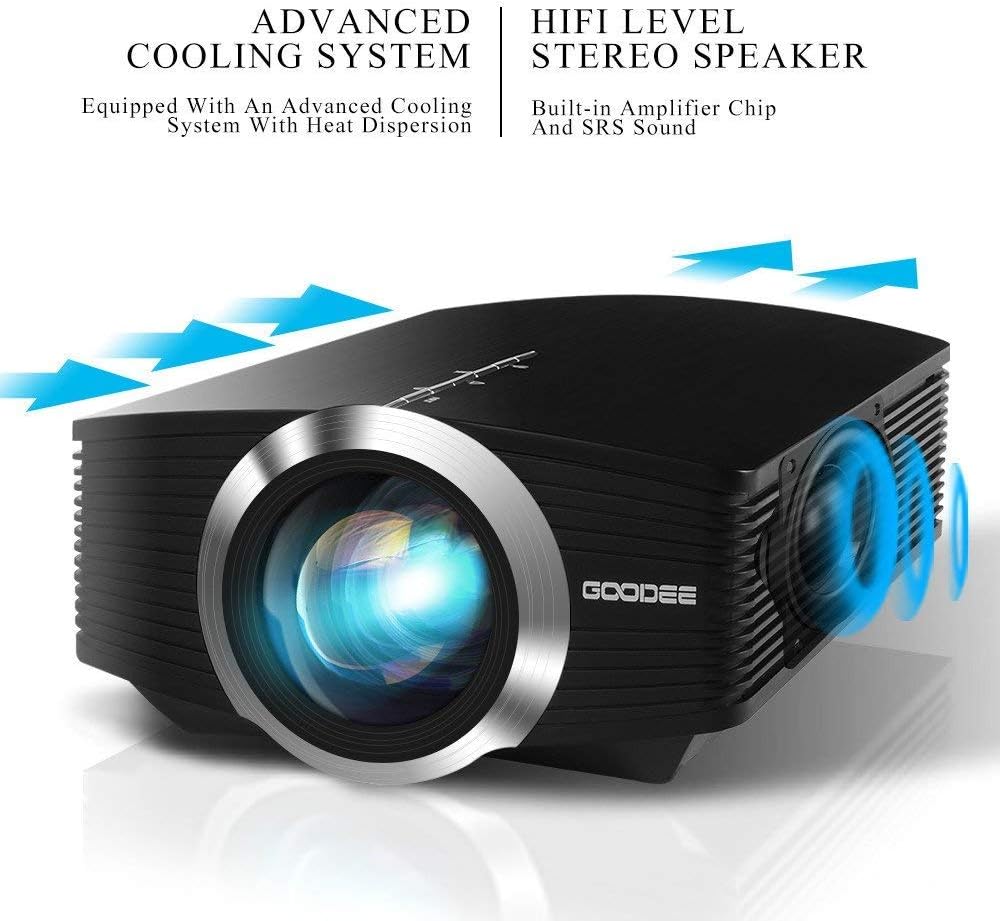
The projector features a direct light path optical technology for enhanced brightness and an advanced cooling system for quiet operation.

Figure 4.2: Advanced Cooling System and HIFI Stereo Speaker.
4.2 રીમોટ કંટ્રોલ
The remote control allows you to operate the projector from a distance. Insert two AAA batteries (not included) into the remote control before use.

આકૃતિ 4.3: રિમોટ કંટ્રોલ.
5. સેટઅપ
5.1 Placement and Projection Distance
The image size is adjusted by changing the projection distance. For optimal viewing, a projection distance between 1.5 to 4 meters is recommended, yielding screen sizes from 50 to 130 inches. The best projection size is typically 80-100 inches at a distance of 6.6-8 feet.

Figure 5.1: Projection Distance and Screen Size Chart.
આકૃતિ 5.2: ઉદાample Projector Placement.
5.2 પાવર કનેક્શન
Connect the power adapter to the projector's power input port, then plug the adapter into a power outlet.
૩.૩ ઇનપુટ ઉપકરણોને જોડવા
The projector supports various input sources including HDMI, VGA, USB, AV, and SD card. It can connect to PCs, laptops, DVD players, PS3/4, Xbox ONE, and smartphones/tablets (via MHL cable and adapter, not included).

Figure 5.3: Multimedia Connection Diagram.
To connect a smartphone or tablet, ensure your device supports MHL functionality. You will need an MHL cable and a suitable adapter (not included).

Figure 5.4: Connecting Smartphones/Tablets.
5.4 Focus Adjustment and Keystone Correction
Adjust the focus ring on the projector lens until the image is clear. Use the keystone correction feature to adjust the image if it appears trapezoidal. The projector supports a ±15° keystone correction.
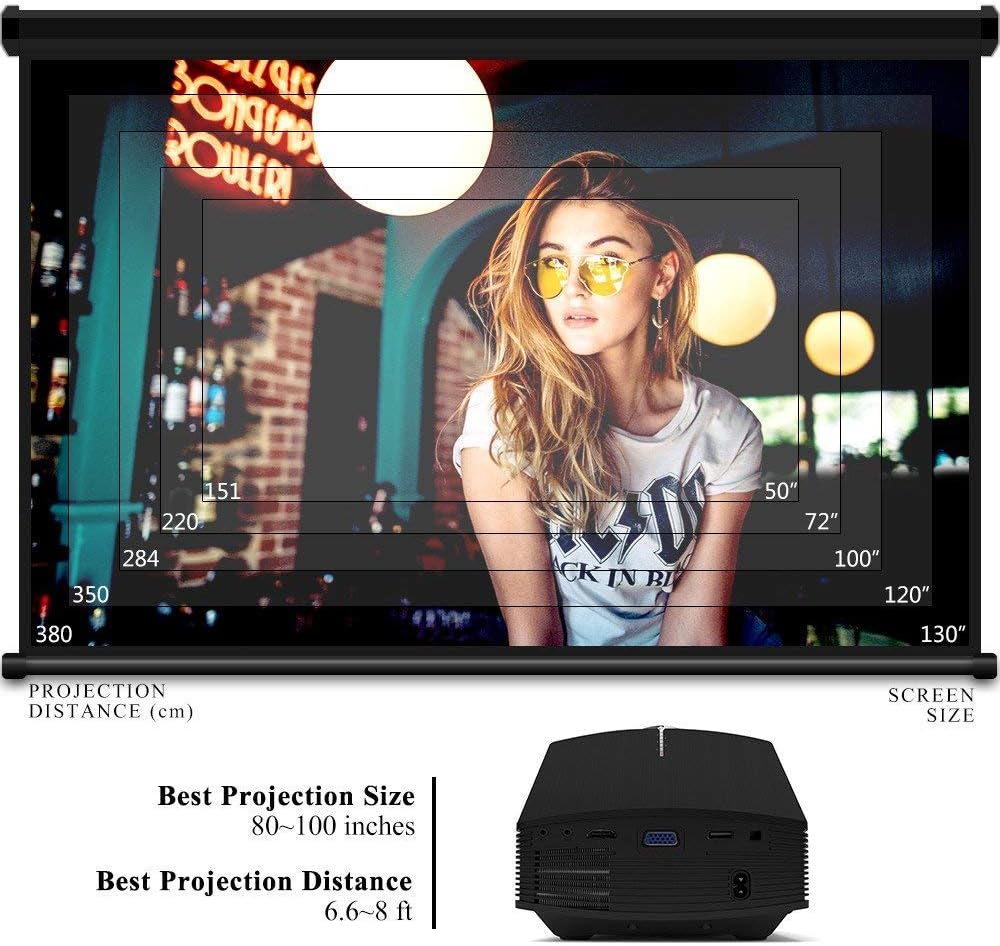
Figure 5.5: Focus and Keystone Adjustment.
6. ઓપરેટિંગ સૂચનાઓ
6.1 પાવર ચાલુ/બંધ
Press the power button on the projector or the remote control to turn the projector on or off.
6.2 સ્ત્રોત પસંદગી
Press the 'Source' button on the projector or remote control to cycle through available input sources (HDMI, VGA, USB, AV, SD). Select the desired input source corresponding to your connected device.
6.3 મેનુ નેવિગેશન
Use the arrow buttons on the projector or remote control to navigate through the on-screen menu. Press 'OK' or 'Enter' to confirm selections. Use the 'Menu' button to access settings and 'Exit' or 'Return' to go back.
6.4 ઓડિયો આઉટપુટ
The projector has a built-in 2W speaker. For external audio, connect speakers or headphones to the 3.5mm audio output jack on the projector.
7. જાળવણી
૭.૧ લેન્સ સાફ કરવું
Use a soft, lint-free cloth or lens cleaning paper to gently wipe the projector lens. Do not use abrasive cleaners or solvents.
7.2 Cleaning Air Vents
Regularly clean the air vents to ensure proper airflow and prevent overheating. Use a soft brush or compressed air to remove dust accumulation.
7.3 સંગ્રહ
જ્યારે ઉપયોગમાં ન હોય, ત્યારે પ્રોજેક્ટરને સીધા સૂર્યપ્રકાશ અને અતિશય તાપમાનથી દૂર ઠંડી, સૂકી જગ્યાએ સંગ્રહિત કરો. ધૂળ અને નુકસાનને રોકવા માટે મૂળ પેકેજિંગ અથવા રક્ષણાત્મક કેસનો ઉપયોગ કરો.
8. મુશ્કેલીનિવારણ
| સમસ્યા | સંભવિત કારણ | ઉકેલ |
|---|---|---|
| કોઈ છબી પ્રદર્શિત નથી | Incorrect input source selected; Cable not connected properly; Device not powered on. | Select the correct input source; Check all cable connections; Ensure the source device is powered on. |
| છબી અસ્પષ્ટ છે | ફોકસ ગોઠવાયેલ નથી; પ્રોજેક્ટર સ્ક્રીનથી ખૂબ નજીક/દૂર છે. | ફોકસ રિંગ ગોઠવો; પ્રક્ષેપણ અંતર ગોઠવો. |
| છબી ટ્રેપેઝોઇડલ છે | પ્રોજેક્ટર સ્ક્રીન પર લંબ નથી. | કીસ્ટોન કરેક્શન ગોઠવો. |
| કોઈ અવાજ નથી | અવાજ ખૂબ ઓછો છે; મ્યૂટ કરેલ છે; બાહ્ય ઑડિઓ ઉપકરણ કનેક્ટેડ/કન્ફિગર કરેલ નથી. | વોલ્યુમ વધારો; અનમ્યૂટ કરો; બાહ્ય ઑડિઓ કનેક્શન અને સેટિંગ્સ તપાસો. |
| રીમોટ કંટ્રોલ કામ કરતું નથી | Batteries low/dead; Obstruction between remote and projector; Remote sensor blocked. | Replace batteries; Remove obstructions; Ensure remote sensor is clear. |
9. સ્પષ્ટીકરણો
| લક્ષણ | વિગત |
|---|---|
| બ્રાન્ડ | ગુડી |
| મોડલ નંબર | GD-DE-9 |
| ડિસ્પ્લે પ્રકાર | એલસીડી |
| મૂળ ઠરાવ | 800 x 480 પિક્સેલ્સ |
| આધારભૂત ઠરાવ | 1080p સુધી |
| તેજ | 3000 Lumens (LED) |
| Lamp જીવન | 30,000 કલાક |
| કનેક્ટિવિટી ટેકનોલોજી | HDMI, USB, VGA, AV, SD કાર્ડ |
| હાર્ડવેર ઇંટરફેસ | HDMI, USB, VGA |
| સંકલિત સ્પીકર | 2W Stereo Speaker |
| પ્રક્ષેપણ અંતર | 1.5 - 4 meters (6.6 - 8 feet recommended) |
| સ્ક્રીન માપ | 50 - 130 inches (80 - 100 inches recommended) |
| કીસ્ટોન સુધારણા | ±15° મેન્યુઅલ |
| ફોર્મ ફેક્ટર | પોર્ટેબલ |
| માઉન્ટિંગ પ્રકાર | ટેબલટોપ માઉન્ટ |
| રંગ | કાળો |
| પેકેજ પરિમાણો | 33 x 21.6 x 11.8 સેમી |
| વસ્તુનું વજન | 1.48 કિગ્રા |
| ભલામણ કરેલ ઉપયોગ | Gaming, Home Theater |
| સુસંગત ઉપકરણો | Smartphone, PC, Laptop, DVD Player, PS3/4, Xbox ONE, Fire TV Stick |
10. વોરંટી અને સપોર્ટ
GooDee offers a 3-year warranty for this projector. If you encounter any issues or are not completely satisfied with your purchase, please contact GooDee customer support. A refund or replacement is available within the first 2 months of purchase. Customer satisfaction is our top priority.
For support, please refer to the contact information provided on the GooDee official webસાઇટ અથવા તમારા ખરીદી પ્લેટફોર્મ.