
1. પરિચય
Thank you for choosing the MAJORITY Snowdon Bluetooth Soundbar. This manual provides essential information for the safe and efficient operation of your device. Please read it thoroughly before use and retain it for future reference.

Image: The MAJORITY Snowdon Soundbar, a sleek black unit, is shown with its remote control. Key features like Bluetooth connectivity, 120 Watts power output, and 2.1 audio channels are highlighted.
2. સલામતી માહિતી
કૃપા કરીને નીચેની સલામતી સાવચેતીઓનું પાલન કરો:
- એકમને વરસાદ, ભેજ અથવા અતિશય તાપમાનના સંપર્કમાં ન લાવો.
- યોગ્ય વેન્ટિલેશનની ખાતરી કરો; કોઈપણ વેન્ટિલેશન છિદ્રોને અવરોધશો નહીં.
- એકમ સાથે પૂરા પાડવામાં આવેલ પાવર એડેપ્ટરનો જ ઉપયોગ કરો.
- યુનિટ જાતે ખોલવાનો કે રિપેર કરવાનો પ્રયાસ કરશો નહીં. બધી સર્વિસિંગ લાયક કર્મચારીઓને સોંપો.
- રેડિએટર્સ, હીટ રજિસ્ટર, સ્ટોવ અથવા ગરમી ઉત્પન્ન કરતા અન્ય ઉપકરણો જેવા ગરમીના સ્ત્રોતોથી યુનિટને દૂર રાખો.
3. પેકેજ સામગ્રી
ખાતરી કરો કે બધી વસ્તુઓ પેકેજમાં હાજર છે:
- MAJORITY Snowdon Soundbar
- રીમોટ કંટ્રોલ
- પાવર એડેપ્ટર
- 3.5mm ઓડિયો કેબલ (AUX કેબલ)
- આરસીએ કેબલ
- વપરાશકર્તા માર્ગદર્શિકા
- Wall Mounting Screws and Plugs (for optional wall installation)

Image: A clear layout of the MAJORITY Snowdon Soundbar and its accessories. The soundbar is positioned at the top, with the remote control, RCA cable, AUX cable, power adapter, and user manual arranged below it.
4. ઉત્પાદન ઓવરview
4.1 Front and Top Panel Controls
- પાવર: યુનિટને ચાલુ અથવા બંધ કરવા માટે દબાવો.
- સ્ત્રોત: Press to cycle through input modes (Bluetooth, Optical, AUX, RCA).
- VOL+: વોલ્યુમ વધારો.
- વીઓએલ-: વોલ્યુમ ઘટાડો.
- જોડી: Press and hold to initiate Bluetooth pairing.
- લાઈન ઇન: 3.5mm AUX input port.
4.2 રીઅર પેનલ કનેક્શન્સ
- ઓપ્ટીકલ ઇન: For connecting to devices via optical cable.
- ડીસી 18 વી: પાવર ઇનપુટ બંદર.
- L/R RCA: For connecting to devices via RCA cables.

Image: A close-up of the rear panel of the soundbar, clearly displaying the various input ports including AUX, Optical, and RCA connections, along with the DC 18V power input.
5. સેટઅપ
5.1 પ્લેસમેન્ટ
The soundbar can be placed on a flat surface in front of your TV or wall-mounted.
- ટેબલટોપ પ્લેસમેન્ટ: Position the soundbar on a stable, flat surface directly below your television.
- વોલ માઉન્ટિંગ: Use the provided screws and plugs to securely mount the soundbar to a wall. Ensure the wall can support the weight of the soundbar.

Image: The MAJORITY Snowdon Soundbar is shown mounted on a wall directly beneath a television, demonstrating its wall-mountable capability in a home environment.
5.2 પાવર સાથે જોડાણ
- Connect the power adapter to the DC 18V input port on the rear of the soundbar.
- પાવર એડેપ્ટરને વોલ આઉટલેટમાં પ્લગ કરો.
5.3 ઓડિયો કનેક્શન્સ
તમારા ઑડિઓ સ્રોતને કનેક્ટ કરવા માટે નીચેની પદ્ધતિઓમાંથી એક પસંદ કરો:
5.3.1 બ્લૂટૂથ કનેક્શન
- દબાવો પાવર button on the soundbar or remote to turn it on.
- દબાવો સ્ત્રોત button repeatedly until 'BT' (Bluetooth) mode is selected. The indicator light will flash.
- On your device (e.g., smartphone, tablet), enable Bluetooth and search for 'MAJORITY Snowdon'.
- Select 'MAJORITY Snowdon' to pair. Once connected, the indicator light will stop flashing.

Image: The MAJORITY Snowdon Soundbar is depicted alongside a smartphone, which shows a music player interface and a prominent 'Bluetooth 5.0' graphic, illustrating wireless connectivity.
૬.૨ ઓપ્ટિકલ કનેક્શન
- Connect one end of an optical cable to the OPTICAL OUT port on your TV or audio device.
- બીજા છેડાને જોડો ઓપ્ટીકલ ઇન સાઉન્ડબાર પર પોર્ટ.
- દબાવો સ્ત્રોત button on the soundbar or remote until 'OPT' (Optical) mode is selected.
.5.3.3..XNUMX AUક્સ કનેક્શન
- Connect one end of the 3.5mm audio cable to the headphone jack or AUX OUT port on your device.
- બીજા છેડાને જોડો લાઇન ઇન સાઉન્ડબાર પર પોર્ટ.
- દબાવો સ્ત્રોત button on the soundbar or remote until 'AUX' mode is selected.
૪.૨.૨ આરસીએ કનેક્શન
- Connect the red and white plugs of the RCA cable to the corresponding audio output ports on your TV or audio device.
- Connect the other end of the RCA cable to the L/R RCA input ports on the soundbar.
- દબાવો સ્ત્રોત button on the soundbar or remote until 'RCA' mode is selected.
6. ઓપરેટિંગ સૂચનાઓ
6.1 પાવર ચાલુ/બંધ
દબાવો પાવર button on the soundbar or remote control to turn the unit on or off.
6.2 સ્ત્રોત પસંદગી
દબાવો સ્ત્રોત button on the soundbar or remote control to switch between input modes: Bluetooth, Optical, AUX, and RCA.
6.3 વોલ્યુમ નિયંત્રણ
નો ઉપયોગ કરો VOL+ અને વીઓએલ- buttons on the soundbar or the volume buttons on the remote control to adjust the audio level.
6.4 રીમોટ કંટ્રોલ કાર્યો
The included remote control provides convenient access to all soundbar functions:
- શક્તિ: Turn the soundbar on or off.
- સ્ત્રોત: Select input mode.
- વોલ્યુમ અપ/ડાઉન: વોલ્યુમ સ્તરને સમાયોજિત કરો.
- મ્યૂટ: અવાજને મ્યૂટ કરો અથવા અવાજ બંધ કરો.
- ચલાવો/થોભો: બ્લૂટૂથ મોડમાં મીડિયા પ્લેબેકને નિયંત્રિત કરો.
- પાછલો/આગલો ટ્રેક: Skip tracks in Bluetooth mode.
- EQ મોડ્સ: Select preset equalizer settings (e.g., Music, Movie, News).
7. જાળવણી
તમારા સાઉન્ડબારની દીર્ધાયુષ્ય અને શ્રેષ્ઠ કામગીરી સુનિશ્ચિત કરવા માટે:
- સફાઈ: સાઉન્ડબારના બાહ્ય ભાગને સાફ કરવા માટે નરમ, સૂકા કપડાનો ઉપયોગ કરો. પ્રવાહી ક્લીનર્સ અથવા ઘર્ષક સામગ્રીનો ઉપયોગ કરશો નહીં.
- સંગ્રહ: જો સાઉન્ડબારને લાંબા સમય સુધી સ્ટોર કરી રહ્યા હોવ, તો તેને પાવરથી ડિસ્કનેક્ટ કરો અને તેને ઠંડી, સૂકી જગ્યાએ સ્ટોર કરો.
- અવરોધો ટાળો: Ensure no objects block the speaker grilles or ventilation openings.
8. મુશ્કેલીનિવારણ
જો તમને તમારા સાઉન્ડબારમાં સમસ્યાઓ આવે, તો નીચેની સામાન્ય સમસ્યાઓ અને ઉકેલોનો સંદર્ભ લો:
| સમસ્યા | સંભવિત કારણ | ઉકેલ |
|---|---|---|
| કોઈ શક્તિ નથી | પાવર કેબલ જોડાયેલ નથી; પાવર આઉટલેટ સક્રિય નથી | પાવર કેબલ કનેક્શન તપાસો; અલગ પાવર આઉટલેટ અજમાવી જુઓ |
| કોઈ અવાજ નથી | Incorrect input source selected; Volume too low; Audio cable not connected properly | Select correct input source; Increase volume; Reconnect audio cables securely |
| બ્લૂટૂથ પેરિંગ નિષ્ફળ જાય છે | સાઉન્ડબાર પેરિંગ મોડમાં નથી; ડિવાઇસ ખૂબ દૂર છે; દખલગીરી | Ensure soundbar is in BT pairing mode; Move device closer; Turn off other Bluetooth devices |
| વિકૃત અવાજ | Volume too high; Poor audio source quality; Loose cable connection | Reduce volume; Try a different audio source; Check cable connections |
9. સ્પષ્ટીકરણો
| લક્ષણ | વિગત |
|---|---|
| મોડેલનું નામ | Snowdon |
| બ્રાન્ડ | બહુમતી |
| પાવર આઉટપુટ | 120 વોટ્સ |
| સાઉન્ડ ચેનલો | 2.1 (with integrated subwoofer) |
| કનેક્ટિવિટી ટેકનોલોજી | Bluetooth, AUX, Optical, RCA |
| બ્લૂટૂથ સંસ્કરણ | 5.0 |
| પરિમાણો (L x D x H) | 81 સેમી x 8.3 સેમી x 8.3 સેમી |
| વજન | 1.2 કિલોગ્રામ |
| આવર્તન પ્રતિભાવ | 18 KHz |
| નિયંત્રણ પદ્ધતિ | રીમોટ કંટ્રોલ |
| સામગ્રી | પ્લાસ્ટિક |
| રંગ | કાળો |
| માઉન્ટિંગ પ્રકાર | વોલ માઉન્ટ કરી શકાય તેવું |
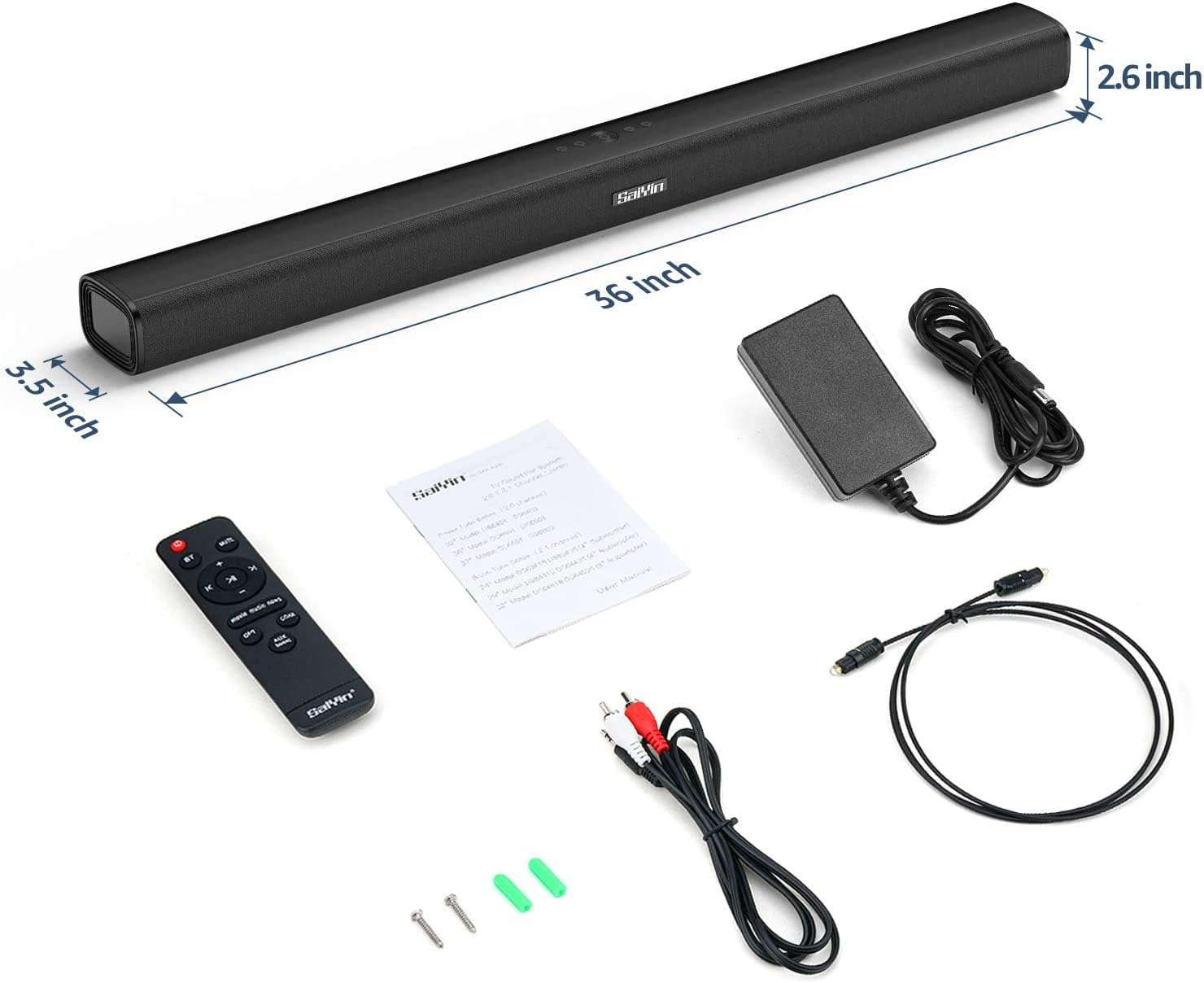
Image: The MAJORITY Snowdon Soundbar is displayed with its accessories, including the remote, power adapter, and various cables. Dimensions are overlaid on the image, showing the soundbar's length as 36 inches (approximately 91.4 cm), depth as 3.5 inches (approximately 8.9 cm), and height as 2.6 inches (approximately 6.6 cm).

છબી: વિગતવાર view of the soundbar's internal speaker component, emphasizing its 120W power output and Xtra Bass technology for enhanced low-frequency audio.
10. વોરંટી અને સપોર્ટ
10.1 વોરંટી માહિતી
The MAJORITY Snowdon Soundbar comes with a 3-વર્ષની વિસ્તૃત વોરંટી. Please retain your proof of purchase for warranty claims. For specific terms and conditions, refer to the warranty card included in your package or visit the official MAJORITY webસાઇટ
10.2 ગ્રાહક સપોર્ટ
For technical assistance, troubleshooting beyond this manual, or warranty inquiries, please contact MAJORITY customer support through their official webસાઇટ અથવા તમારા ઉત્પાદન દસ્તાવેજોમાં આપેલી સંપર્ક માહિતી.