
1. પરિચય
This manual provides detailed instructions for the KECAG KC-608EW Portable DVD/CD Player. This device integrates multiple functions including a DVD player, CD player, Bluetooth speaker, FM radio, and USB player, offering versatile audio and video entertainment. Please read this manual thoroughly before use to ensure proper operation and to maximize your product experience.
2. સલામતી માહિતી
- આગ કે ઇલેક્ટ્રિક આંચકો અટકાવવા માટે ઉપકરણને વરસાદ કે ભેજના સંપર્કમાં ન લાવો.
- સી ખોલશો નહીંasing. બધી સેવા લાયક કર્મચારીઓને સોંપો.
- ખાતરી કરો કે પાવર સપ્લાય વોલ્યુમ સાથે મેળ ખાય છેtage requirements specified on the device.
- ઉપકરણને ગરમીના સ્ત્રોતો જેમ કે રેડિએટર્સ, હીટ રજીસ્ટર, સ્ટોવ અથવા અન્ય ઉપકરણોથી દૂર રાખો જે ગરમી ઉત્પન્ન કરે છે.
- માત્ર સૂકા કપડાથી સાફ કરો.
- Avoid placing the device on unstable surfaces.
- કોઈપણ વેન્ટિલેશન ઓપનિંગ્સને અવરોધિત કરશો નહીં.
3. પેકેજ સામગ્રી
ખાતરી કરો કે નીચે સૂચિબદ્ધ બધી વસ્તુઓ તમારા પેકેજમાં શામેલ છે. જો કોઈ વસ્તુ ખૂટે છે અથવા ક્ષતિગ્રસ્ત છે, તો કૃપા કરીને ગ્રાહક સપોર્ટનો સંપર્ક કરો.

Image: Contents of the KECAG KC-608EW player package, showing the DVD player, wall mount plate, wall mount kit, desk stand, 5V2A USB adapter, disc cover, remote control, HDMI cord, and AV cord.
- KECAG KC-608EW DVD/CD Player (with 2.5m power cord)
- વોલ માઉન્ટ પ્લેટ
- વોલ માઉન્ટ કીટ (સ્ક્રૂ અને એન્કર)
- ડેસ્ક સ્ટેન્ડ
- 5V2A USB Adapter
- ડિસ્ક કવર
- રિમોટ કંટ્રોલ (1 CR2 બેટરી સહિત)
- HDMI કેબલ
- એ.વી. કેબલ
4. ઉત્પાદન ઓવરview
4.1 મુખ્ય લક્ષણો

છબી: આગળ view of the KECAG KC-608EW player on a desk stand, highlighting its functions: DVD player, CD player, Bluetooth speaker, FM radio, USB player, and Line in/out.
- ડીવીડી પ્લેયર: Full-HD 1080p output via HDMI, 480p+720p output via AV port.
- સીડી પ્લેયર: Supports various CD/DVD formats including CD, DVD, CD-R/RW, DVD-R/+R, DVD+RW/-RW, VCD, SVCD.
- બ્લૂટૂથ સ્પીકર: Built-in Bluetooth 4.2 receiver for wireless audio streaming.
- એફએમ રેડિયો: Full band 87.5KHz-108.0MHz with auto search and manual set, 99 presets.
- યુએસબી પ્લેયર: Reads and plays video, audio, and photo fileયુએસબી ડ્રાઇવમાંથી s.
- Line In/Out: 3.5mm auxiliary input for connecting external devices (laptops, iPods) and output for headphones/external speakers/ampજીવનદાતાઓ.
- સંકલિત સ્પીકર્સ: Built-in HiFi stereo speakers.
- સ્લીપ ટાઇમર: Adjustable sleep timer from 30 to 180 minutes.
૨.૨ નિયંત્રણો અને બંદરો

છબી: ઉપરથી નીચે સુધી view of the KECAG KC-608EW player, showing the disc protection dust cover, various control buttons (MODE, VOL-, VOL+, PREV/REWIND, NEXT/FORWARD), and connection ports (AV, HDMI, USB charging, USB reading). The pull switch for power on/off is also illustrated.
- સ્વિચ ખેંચો: Located at the bottom, pull the power cord to turn the unit ON or OFF.
- મોડ બટન: Cycles through DVD, USB, Bluetooth (BT), FM Radio, and AUX input modes.
- VOL - / VOL + Buttons: વોલ્યુમ સ્તરને સમાયોજિત કરો.
- PREV/REWIND Button: Skips to the previous track/chapter or rewinds during playback.
- NEXT/FORWARD Button: Skips to the next track/chapter or fast-forwards during playback.
- Disc Cover: A removable transparent cover protects the disc slot.
- HDMI આઉટપુટ: For connecting to a TV or projector for Full HD 1080p video output.
- AV આઉટપુટ: For connecting to a TV or display using composite video and stereo audio cables (480p + 720p output).
- યુએસબી પોર્ટ: મીડિયા ચલાવવા માટે fileયુએસબી ડ્રાઇવમાંથી s.
- AUX Input/Output (3.5mm jack): For connecting external audio sources or outputting audio to headphones/speakers.
5. સેટઅપ
5.1 પાવર કનેક્શન
- Connect the power cord to the DC IN port on the player.
- Plug the 5V2A USB adapter into a standard wall outlet.
- To power on the device, gently pull the power cord downwards (the pull switch). Pull again to power off.
5.2 માઉન્ટિંગ વિકલ્પો
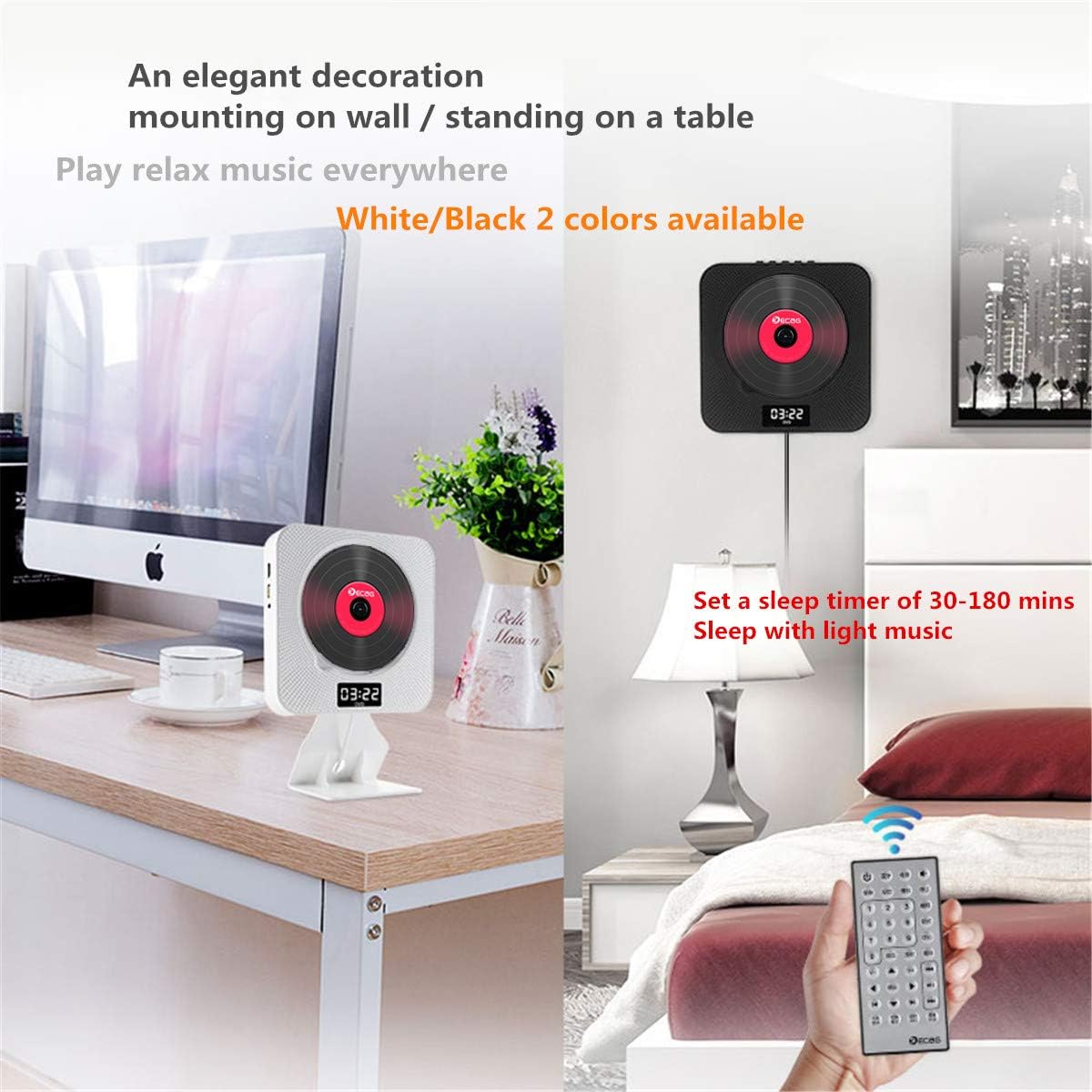
Image: Two KECAG KC-608EW players, one mounted on a wall and another standing on a desk with its stand, demonstrating flexible placement options.
5.2.1 વોલ માઉન્ટિંગ
- Choose a suitable location on a wall.
- Use the provided wall mount plate as a template to mark the drilling points.
- છિદ્રો ડ્રિલ કરો અને દિવાલના એન્કર દાખલ કરો.
- Secure the wall mount plate to the wall using the screws.
- Carefully slide the DVD player onto the mounted plate until it clicks into place.
5.2.2 Desk Stand Installation
- Insert the bottom edge of the DVD player into the slot on the desk stand.
- Ensure the player is securely seated in the stand.
- Place the assembled unit on a stable, flat surface.
5.3 Connecting to a TV/Display
5.3.1 HDMI Connection (Recommended for Full HD)

Image: The KECAG KC-608EW player connected to a television via an HDMI cable, illustrating its use as a home entertainment device.
- Ensure both the DVD player and your TV are powered off.
- Connect one end of the HDMI cable to the HDMI OUT port on the DVD player.
- Connect the other end of the HDMI cable to an HDMI IN port on your TV.
- Power on both devices and select the correct HDMI input source on your TV.
5.3.2 AV કનેક્શન
- Ensure both the DVD player and your TV are powered off.
- Connect the AV cable to the AV OUT ports on the DVD player (Yellow for Video, White for Left Audio, Red for Right Audio).
- Connect the other end of the AV cable to the corresponding AV IN ports on your TV.
- Power on both devices and select the correct AV input source on your TV.
6. ઓપરેટિંગ સૂચનાઓ
Use the MODE button on the player or the remote control to switch between functions.
૫.૬ ડીવીડી/સીડી પ્લેબેક
- ખાતરી કરો કે પ્લેયર ચાલુ છે.
- Gently remove the disc protection dust cover.
- Insert a DVD or CD into the disc slot with the label side facing outwards.
- Replace the disc protection dust cover.
- Press the MODE button until "DVD" or "CD" mode is selected.
- The disc should begin playing automatically. If not, press the PLAY button on the remote control.
- Use the PREV/REWIND, NEXT/FORWARD, PLAY, PAUSE, and STOP buttons on the player or remote for control.
સપોર્ટેડ ડિસ્ક ફોર્મેટ્સ: DVD, CD, CD-ROM, CD-RM, CD-G, HD-CD, DVD-RM, DVD-R, VCD, WMA, AVI, XVID, MP3, JPEG.
6.2 બ્લૂટૂથ મોડ

Image: The KECAG KC-608EW player wirelessly connected via Bluetooth to a smartphone, indicating its use for streaming music.
- Press the MODE button until "BT" (Bluetooth) mode is selected. The display will show "BT" and a blinking Bluetooth icon, indicating it's ready for pairing.
- તમારા મોબાઇલ ઉપકરણ (સ્માર્ટફોન, ટેબ્લેટ, વગેરે) પર, બ્લૂટૂથ સક્ષમ કરો અને ઉપલબ્ધ ઉપકરણો શોધો.
- Select "KECAG KC-608EW" from the list of devices.
- Once paired, the Bluetooth icon on the player's display will stop blinking.
- You can now play audio from your mobile device through the player's speakers. Use your mobile device or the player's controls for playback.
6.3 FM રેડિયો મોડ
- Press the MODE button until "FM" mode is selected.
- સ્વતઃ શોધ: Press the PLAY/PAUSE button on the remote control or player to initiate an auto-scan for FM stations. The player will automatically save found stations (up to 99 presets).
- મેન્યુઅલ ટ્યુનિંગ: Use the PREV/REWIND or NEXT/FORWARD buttons to manually tune to specific frequencies or navigate through saved presets.
૬.૪ યુએસબી પ્લેબેક
- Insert a USB flash drive into the USB port on the player.
- Press the MODE button until "USB" mode is selected.
- The player will automatically detect and begin playing compatible media fileUSB ડ્રાઇવમાંથી.
- Use the PREV/REWIND, NEXT/FORWARD, PLAY, PAUSE, and STOP buttons for control.
સપોર્ટેડ યુએસબી File ફોર્મેટ્સ: WMA, AVI, XVID, MP3, JPEG.
6.5 AUX Input/Output
- AUX ઇનપુટ: Connect an external audio device (e.g., smartphone, MP3 player) to the 3.5mm AUX jack using an audio cable. Press the MODE button until "AUX" mode is selected. Audio from the external device will play through the player's speakers.
- AUX આઉટપુટ: Connect headphones or external speakers/amplifiers to the 3.5mm AUX jack. The player's audio will be routed to the connected device.
6.6 સ્લીપ ટાઈમર
The sleep timer allows you to set a duration after which the player will automatically turn off. This feature is useful for falling asleep to music or radio.
- While the player is on, press the SLEEP button on the remote control.
- Repeatedly press the SLEEP button to cycle through available timer settings (e.g., 30, 60, 90, 120, 180 minutes, or OFF).
- The selected time will be displayed briefly. The player will automatically power off after the set duration.
7. જાળવણી
7.1 યુનિટની સફાઈ
- સફાઈ કરતા પહેલા હંમેશા પાવર કોર્ડને અનપ્લગ કરો.
- પ્લેયરની બાહ્ય સપાટીઓ સાફ કરવા માટે નરમ, સૂકા કપડાનો ઉપયોગ કરો.
- ઘર્ષક ક્લીનર્સ, મીણ અથવા સોલવન્ટનો ઉપયોગ કરશો નહીં કારણ કે તે ફિનિશને નુકસાન પહોંચાડી શકે છે.
૪.૨ ડિસ્ક હેન્ડલિંગ
- રમવાની સપાટી પર આંગળીના નિશાન ન રહે તે માટે ડિસ્કને તેમની ધારથી પકડો.
- ડિસ્કને સ્વચ્છ અને સ્ક્રેચમુદ્દે મુક્ત રાખો. જો સફાઈ જરૂરી હોય તો ડિસ્કને નરમ, લિન્ટ-ફ્રી કપડાથી મધ્યથી બહારની તરફ હળવેથી સાફ કરો.
- Store discs in their cases when not in use to prevent dust and damage.
8. મુશ્કેલીનિવારણ
| સમસ્યા | સંભવિત કારણ | ઉકેલ |
|---|---|---|
| કોઈ શક્તિ નથી | Power cord not properly connected or unit not turned on via pull switch. | Ensure the power adapter is securely plugged into the wall outlet and the player. Pull the power cord downwards to activate the pull switch and turn on the unit. |
| કોઈ અવાજ નથી | Volume too low; incorrect mode selected; external speakers/headphones not connected properly. | Increase the volume. Ensure the correct mode (DVD, BT, FM, USB, AUX) is selected. Check connections if using external audio devices. |
| ટીવી પર કોઈ વિડિઓ આઉટપુટ નથી | Incorrect TV input selected; HDMI/AV cable loose or faulty. | Select the correct HDMI or AV input on your TV. Check that the HDMI or AV cables are securely connected to both the player and the TV. |
| Disc error or disc not playing | ડિસ્ક ગંદી, સ્ક્રેચવાળી અથવા અસંગત ફોર્મેટમાં છે. | Clean the disc with a soft cloth. Try a different disc. Ensure the disc format is supported by the player. |
| બ્લૂટૂથ પેરિંગ નિષ્ફળ થયું | Player not in BT mode; device too far; Bluetooth on mobile device is off. | Ensure the player is in "BT" mode. Keep your mobile device within range. Turn Bluetooth on your mobile device off and on again. |
| નબળું એફએમ રેડિયો રિસેપ્શન | નબળો સંકેત; દખલગીરી. | Adjust the position of the player. Try auto-scanning again. Avoid placing near other electronic devices that may cause interference. |
9. સ્પષ્ટીકરણો
- મોડલ નંબર: KC-608EW
- બ્રાન્ડ: KECAG
- કનેક્ટિવિટી ટેકનોલોજી: HDMI, AV, AUX 3.5 mm
- રંગ: સફેદ
- સ્પીકરનો પ્રકાર: ડ્યુઅલ સ્પીકર્સ
- આઇટમના પરિમાણો (L x W x H): 19.7 x 19.7 x 3.7 સેમી (7.76 x 7.76 x 1.46 ઇંચ)
- પાવર સ્ત્રોત: Electric Cable (5V2A USB adapter)
- Supported Standards (Disc): CD, MP3, WMA, WAV, DVD, CD-ROM, CD-RM, CD-G, HD-CD, DVD-RM, DVD-R, VCD, AVI, XVID, JPEG
- બ્લૂટૂથ સુસંગત: Yes (Bluetooth 4.2)
- Audioડિઓ ફોર્મેટ સપોર્ટેડ: MP3, WMA, CD-DA
- વક્તાઓની સંખ્યા: 2
- એફએમ રેડિયો આવર્તન: 87.5KHz-108.0MHz
- બેટરી (રિમોટ): ૧ CR2 (શામેલ)
10. વોરંટી અને સપોર્ટ
Specific warranty information for the KECAG KC-608EW is not available in the provided product details. For warranty claims or technical support, please refer to the documentation included with your purchase or contact the retailer/manufacturer directly.