
1. પરિચય
This manual provides essential information for the safe and efficient operation of your Zerone 10.8V-12V Lithium Battery Charger. This charger is designed for use with 10.8V to 12V Lithium-Ion batteries, offering quick and reliable charging. Please read this manual thoroughly before first use and retain it for future reference.

Image 1: The Zerone 10.8V-12V Lithium Battery Charger, showing its compact design and universal compatibility label.
2. સલામતી સૂચનાઓ
Always observe the following safety precautions to reduce the risk of electric shock, fire, or serious injury:
- બધી સૂચનાઓ વાંચો: ચાર્જરનો ઉપયોગ કરતા પહેલા, બેટરીનો ઉપયોગ કરીને ચાર્જર, બેટરી અને ઉત્પાદન પરની તમામ સૂચનાઓ અને સાવચેતીના નિશાનો વાંચો.
- ફક્ત આંતરિક ઉપયોગ: વરસાદ અથવા ભીની સ્થિતિમાં ચાર્જરને ખુલ્લા પાડશો નહીં.
- યોગ્ય વોલ્યુમtage: પાવર સપ્લાય વોલ્યુમની ખાતરી કરોtage વોલ્યુમ સાથે મેળ ખાય છેtage specified on the charger's rating plate.
- નુકસાન ટાળો: Do not operate the charger if it has received a sharp blow, been dropped, or otherwise damaged. Take it to a qualified service person.
- વેન્ટિલેશન: Do not block any ventilation openings. Ensure adequate airflow around the charger during operation.
- ઉપયોગમાં ન હોય ત્યારે અનપ્લગ કરો: Always unplug the charger from the power outlet before attempting any maintenance or cleaning, and when not in use.
- Use specified batteries: Only charge batteries specifically designed for this charger. Charging other battery types may cause them to burst, leading to personal injury and damage.
- શોર્ટ-સર્કિટ ન કરો: બેટરી ટર્મિનલ્સને ક્યારેય શોર્ટ-સર્કિટ કરશો નહીં.
- બાળકોથી દૂર રહો: આ ઉપકરણ ઓછી શારીરિક, સંવેદનાત્મક અથવા માનસિક ક્ષમતાઓ અથવા અનુભવ અને જ્ઞાનનો અભાવ ધરાવતી વ્યક્તિઓ (બાળકો સહિત) દ્વારા ઉપયોગ માટે બનાવાયેલ નથી, સિવાય કે તેમની સુરક્ષા માટે જવાબદાર વ્યક્તિ દ્વારા ઉપકરણના ઉપયોગ અંગેની દેખરેખ અથવા સૂચના આપવામાં આવી હોય.
3. પેકેજ સામગ્રી
ખાતરી કરો કે બધી વસ્તુઓ હાજર છે અને સારી સ્થિતિમાં છે:
- 1 x Zerone 10.8V-12V Lithium Battery Charger
- 1 x વપરાશકર્તા માર્ગદર્શિકા
4. ઉત્પાદન સુવિધાઓ
The Zerone 10.8V-12V Lithium Battery Charger offers the following key features:
- સાર્વત્રિક સુસંગતતા: Specifically designed for 10.8V to 12V Lithium-Ion batteries.
- એલઇડી સૂચક: Built-in LED display provides intuitive monitoring of battery status.
- સ્માર્ટ ચાર્જિંગ મેનેજમેન્ટ: Utilizes a 'first in, first charged' system and protects against overload.
- ઝડપી ચાર્જિંગ: Capable of charging a 12V Lithium-Ion 1.5Ah battery in approximately 50 minutes.
- Wide Model Compatibility: Compatible with models such as DC10WD, DC10SB, DC10WC, BL1015, BL1016, BL1021B, and BL1041B.

Image 2: The charger displaying its compatibility with various battery models, including DC10WD, DC10SB, DC10WC, BL1015, BL1016, BL1021B, and BL1041B.
5. સેટઅપ
Follow these steps to set up your battery charger:
- ચાર્જરને અનપેક કરો: Carefully remove the charger and all components from the packaging.
- પાવરથી કનેક્ટ કરો: Plug the charger's power cord into a standard 100V-260V AC electrical outlet. The charger's LED indicator will flash green once to confirm power connection.
- બેટરી તૈયાર કરો: Ensure the battery to be charged is clean and free from debris.
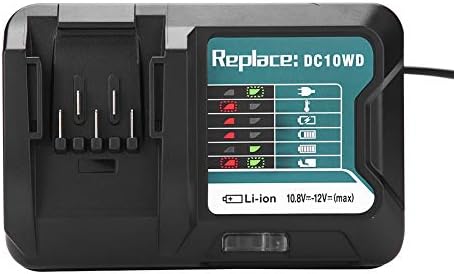
Image 3: The Zerone charger with its integrated power cord, ready for connection to an electrical outlet.
6. ઓપરેટિંગ સૂચનાઓ
બેટરી ચાર્જ કરવા માટે:
- બેટરી દાખલ કરો: બેટરીને ચાર્જરના સ્લોટ સાથે સંરેખિત કરો અને જ્યાં સુધી તે સુરક્ષિત રીતે સ્થાને ન આવે ત્યાં સુધી તેને અંદર સ્લાઇડ કરો.
- મોનિટર ચાર્જિંગ: The LED indicator will show the charging status. Refer to the "LED Indicator Guide" section for detailed explanations of the light patterns.
- ચાર્જિંગ પૂર્ણ: Once the battery is fully charged, the LED indicator will show a solid green light.
- બેટરી દૂર કરો: Press the release button on the battery (if applicable) and slide it out of the charger.
- ચાર્જર અનપ્લગ કરો: જ્યારે ઉપયોગમાં ન હોય ત્યારે પાવર આઉટલેટમાંથી ચાર્જરને ડિસ્કનેક્ટ કરો.

Image 4: The Zerone charger with a compatible lithium-ion battery inserted, ready for charging.
7. એલઇડી સૂચક માર્ગદર્શિકા
The charger features an LED display to communicate the battery's status:
| સૂચક પ્રકાશ | સ્થિતિ |
|---|---|
| ગ્રીન ફ્લેશિંગ | Charger is plugged in and ready. |
| લાલ ફ્લેશિંગ | Battery is in cooling mode. Charging will begin once the battery temperature is within the optimal range. |
| Red Sustained Light | Battery is currently charging (0-100%). |
| Green Sustained Light | Charging is completed. The battery is fully charged. |
| Red and Green Flashing | Indicates a defective battery pack or charger. |

છબી ૫.૧: નજીકથી નજર view of the charger's LED indicator panel, detailing the meaning of each light pattern for battery status.
8. જાળવણી
યોગ્ય જાળવણી તમારા ચાર્જરની આયુષ્ય અને કામગીરી સુનિશ્ચિત કરે છે:
- સફાઈ: Disconnect the charger from the power supply before cleaning. Use a dry, soft cloth to wipe the exterior of the charger. Do not use water or chemical cleaners.
- સંગ્રહ: Store the charger in a dry, cool place, away from direct sunlight and moisture.
- નિયમિત તપાસ કરો: Periodically inspect the charger and its cord for any signs of damage. If damage is found, discontinue use and seek professional repair.
9. મુશ્કેલીનિવારણ
જો તમને તમારા ચાર્જરમાં સમસ્યાઓ આવે, તો નીચેની સામાન્ય સમસ્યાઓ અને ઉકેલોનો સંદર્ભ લો:
- ચાર્જર ચાલુ નથી:
- Ensure the power cord is securely plugged into both the charger and a working electrical outlet.
- પાવર આઉટલેટ કાર્યરત છે કે નહીં તેની ખાતરી કરવા માટે બીજા ઉપકરણ સાથે તપાસો.
- Battery not charging (Red Flashing LED):
- The battery may be too hot or too cold. Allow the battery to reach room temperature before attempting to charge again. Charging will automatically resume once the temperature is optimal.
- Battery not charging (Red and Green Flashing LED):
- This indicates a defective battery or charger. Try charging a different, known-good battery. If the issue persists, the charger may be faulty. If only the original battery causes this, the battery is likely defective.
- ધીમું ચાર્જિંગ:
- Ensure the battery is fully seated in the charger.
- Verify that the battery is compatible with this charger.
જો આ પગલાંઓથી સમસ્યાનો ઉકેલ ન આવે, તો કૃપા કરીને ગ્રાહક સપોર્ટનો સંપર્ક કરો.
10. સ્પષ્ટીકરણો
| સ્પષ્ટીકરણ | વિગત |
|---|---|
| મોડલ નંબર | Zeronegfvetp6dn8-01 |
| ઇનપુટ વોલ્યુમtage | 100V-260V AC, 50-60Hz |
| આઉટપુટ વોલ્યુમtage | ૧.૫V-૩.૬V (ડીસી) |
| ઉત્પાદન પરિમાણો | 4.72 x 1.97 x 5.91 ઇંચ |
| વસ્તુનું વજન | 11.6 ઔંસ (0.33 કિલોગ્રામ) |
| ઉત્પાદક | ઝેરોન |
| સુસંગત બેટરી પ્રકારો | 10.8V-12V Lithium-Ion (e.g., BL1015, BL1016, BL1021B, BL1041B) |
| સુસંગત ચાર્જર મોડેલ્સ | DC10WD, DC10SB, DC10WC |

Image 6: The bottom view of the Zerone charger, showing its input/output specifications and model number.
11. વોરંટી અને સપોર્ટ
For warranty information or technical support, please refer to the documentation provided with your purchase or contact Zerone customer service through the retailer where the product was purchased. Keep your purchase receipt as proof of purchase.