
1. મહત્વપૂર્ણ સલામતી માહિતી
Please read all instructions and safety warnings carefully before using the DOMAS TENS EMS Unit. Failure to follow these instructions may result in injury or device malfunction.
- Keep the device dry and away from water. Do not use while bathing or near water sources.
- Consult a healthcare professional before use, especially if you have pre-existing medical conditions, are pregnant, have a pacemaker, or any other implanted electronic device.
- Do not apply electrode pads over open wounds, rashes, swollen, red, infected, or inflamed skin areas.
- Do not apply electrode pads over the carotid sinus nerves (front of the neck), on the head, or directly over the heart.
- બાળકોની પહોંચથી દૂર રાખો.
- Discontinue use if you experience any adverse reactions such as skin irritation, discomfort, or dizziness.
- આ ઉપકરણ અંગેના નિવેદનોનું FDA દ્વારા મૂલ્યાંકન કરવામાં આવ્યું નથી અને તેનો હેતુ કોઈપણ રોગ અથવા આરોગ્ય સ્થિતિનું નિદાન, સારવાર, ઉપચાર અથવા અટકાવવાનો નથી.
2. ઉત્પાદન ઓવરview
The DOMAS Touch Screen TENS EMS Unit is a dual-channel muscle stimulator designed for temporary relief of pain associated with sore and aching muscles due to strain from exercise or normal household and work activities. It features a touch screen interface, 24 modes, and adjustable intensity levels.

Figure 2.1: The DOMAS Touch Screen TENS EMS Unit, showing the main device, electrode pads, and charging adapter.
2.1 મુખ્ય લક્ષણો
- ટચ સ્ક્રીન ડિસ્પ્લે: Intuitive interface for easy navigation and selection.
- 24 મસાજ મોડ્સ: A variety of pre-programmed modes for different types of stimulation.
- 20 તીવ્રતા સ્તરો: Customizable intensity to suit individual comfort and needs.
- Dual Channel Output: Allows for simultaneous treatment of two different body areas or two people.
- એડજસ્ટેબલ ટાઈમર: Sessions can be set from 10 to 60 minutes.
- USB રિચાર્જ કરવા યોગ્ય: Built-in lithium battery for convenient charging.
- પોર્ટેબલ ડિઝાઇન: Compact and lightweight for use at home or on the go.
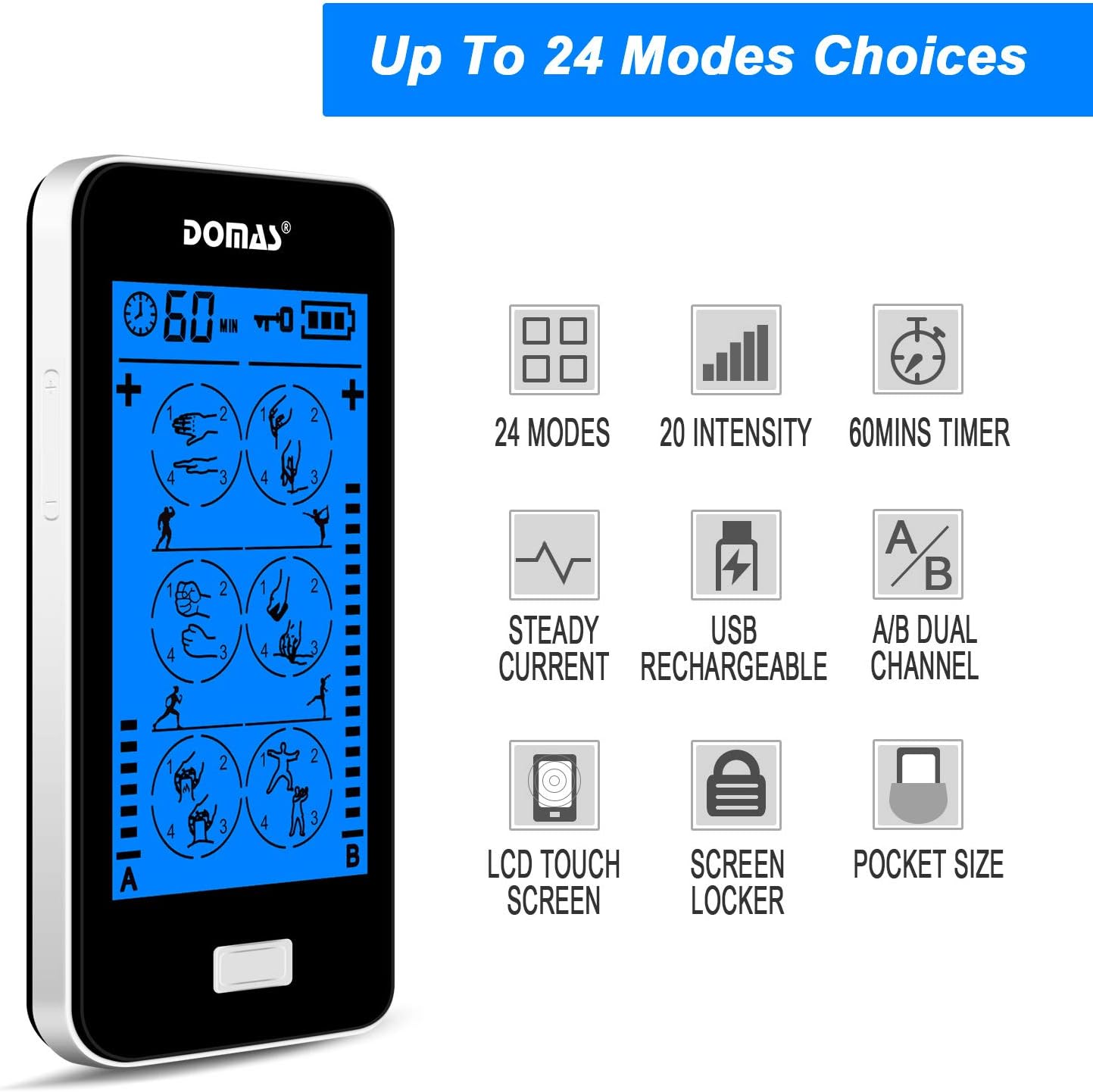
Figure 2.2: Visual representation of the unit's key features, including mode count, intensity levels, and portability.
2.2 પેકેજ સામગ્રી
Upon opening your DOMAS TENS EMS Unit package, please ensure all the following items are present:
- DOMAS Touch Screen TENS EMS Unit
- Electrode Pads (various sizes)
- લીડ વાયર
- યુએસબી ચાર્જિંગ કેબલ
- એસી એડેપ્ટર
- Pad Holder/Storage Pouch
- સૂચના માર્ગદર્શિકા

Figure 2.3: All components included in the DOMAS TENS EMS Unit package.
૨.૧ ઉપકરણ ઘટકો
Familiarize yourself with the different parts of your TENS EMS unit:

Figure 2.4: Labeled diagram of the DOMAS TENS EMS Unit's external features.
- A & B Dual-output Channel: Ports for connecting lead wires to electrode pads.
- ટાઈમર ડિસ્પ્લે: Shows remaining treatment time.
- પાવર ચાલુ/બંધ બટન: ઉપકરણ ચાલુ અથવા બંધ કરવા માટે.
- Intensity Adjustment Buttons (+/-): To increase or decrease stimulation intensity for each channel.
- લોક બટન: To prevent accidental changes during use.
- Rechargeable USB Port: ઉપકરણ ચાર્જ કરવા માટે.
- ટચ સ્ક્રીન: Main interface for mode selection and settings.
3. સેટઅપ
Follow these steps to prepare your DOMAS TENS EMS Unit for use:
3.1 ઉપકરણને ચાર્જ કરવું
- Connect the USB charging cable to the device's USB port.
- USB કેબલના બીજા છેડાને AC એડેપ્ટરમાં પ્લગ કરો.
- Insert the AC adapter into a standard wall outlet.
- The battery indicator on the screen will show charging status. Charge fully before first use.

આકૃતિ 3.1: USB ચાર્જિંગ કેબલને ઉપકરણ સાથે કનેક્ટ કરવું.
3.2 Connecting Electrode Pads
- ખાતરી કરો કે ઉપકરણ બંધ છે.
- Connect the lead wires to the electrode pads by snapping them onto the metal studs.
- Plug the lead wires into the A and/or B output ports on the top of the device.

Figure 3.2: Attaching the lead wire to an electrode pad.
3.3 Applying Electrode Pads
- Clean and dry the skin area where you intend to place the pads.
- Carefully peel the transparent protective film from the adhesive side of the electrode pads. Retain the film for storage.
- Place the pads firmly on the desired treatment area. Ensure good skin contact.

Figure 3.3: Visual guide for connecting pads and applying them to the skin.
4. ઓપરેટિંગ સૂચનાઓ
Once the device is set up, follow these steps to begin your therapy session:
- ચાલુ કરો: Press and hold the Power ON/OFF button located on the top of the device until the screen illuminates.
- મોડ પસંદ કરો: The touch screen will display various massage modes. Tap on your desired mode icon to select it. The device offers 24 different modes, each providing a unique stimulation pattern.
- તીવ્રતા સમાયોજિત કરો: Use the '+' and '-' buttons on the sides of the device to adjust the intensity level for Channel A and Channel B independently. Start with the lowest intensity and gradually increase until you feel a comfortable, yet effective, sensation. Avoid increasing intensity to an uncomfortable level.
- ટાઇમર સેટ કરો: The default session time is usually 20 minutes. You can adjust the timer by tapping the timer icon on the screen and selecting your preferred duration (e.g., 10, 20, 30, 40, 50, 60 minutes).
- Lock Screen (Optional): To prevent accidental changes during a session, press the Lock button. The screen will lock, and a lock icon will appear. Press it again to unlock.
- સત્ર સમાપ્ત: The device will automatically turn off once the timer expires. To manually end a session, press and hold the Power ON/OFF button.

Figure 4.1: The touch screen interface showing available massage modes and settings.
4.1 Mode Selection Guide
The unit offers 24 distinct modes. Experiment with different modes to find what works best for your specific needs and comfort. Common mode categories include:
- માલિશ: Gentle, rhythmic pulses for relaxation.
- ગૂંથવું: Deeper, more intense pressure simulation.
- Acupuncture: Sharp, tapping sensations.
- કપીંગ: Suction-like sensation.
- સ્ક્રેપિંગ: Gliding, scraping sensation.
- ટેપીંગ: Quick, light pulses.

આકૃતિ 4.2: ઉદાamples of body areas suitable for TENS EMS therapy and the variety of modes available.
5. જાળવણી
Proper care and maintenance will extend the life of your DOMAS TENS EMS Unit and its accessories.
5.1 ઉપકરણની સફાઈ
- Turn off the device and disconnect all wires before cleaning.
- ઉપકરણને સોફ્ટ સાથે સાફ કરો, ડીamp કાપડ ઘર્ષક ક્લીનર્સનો ઉપયોગ કરશો નહીં અથવા ઉપકરણને પાણીમાં ડૂબાડશો નહીં.
- Ensure the device is completely dry before storing or next use.
૬.૧ ઇલેક્ટ્રોડ પેડ કેર
- After each use, gently remove the pads from your skin.
- Place the adhesive side of the pads back onto the transparent protective film.
- Store the pads in the provided storage pouch to keep them clean and prevent drying out.
- If pads lose their stickiness, gently wipe the adhesive surface with a damp cloth and let air dry. Replace pads when they no longer adhere well to the skin.
5.3 સંગ્રહ
- Store the device and accessories in a cool, dry place, away from direct sunlight and extreme temperatures.
- Keep the device and pads in the provided storage pouch or a clean, dry container.
6. મુશ્કેલીનિવારણ
If you encounter issues with your DOMAS TENS EMS Unit, refer to the following common troubleshooting tips:
| સમસ્યા | સંભવિત કારણ | ઉકેલ |
|---|---|---|
| ડિવાઇસ ચાલુ થતું નથી. | Low battery or device not charged. | Charge the device fully using the provided USB cable and AC adapter. |
| કોઈ સંવેદના કે નબળી સંવેદના નહીં. |
|
|
| Pads lose stickiness quickly. | Skin is oily or dirty; pads are drying out. | Clean skin thoroughly before application. After use, place pads back on the protective film and store in the pouch. Gently wipe adhesive with a damp cloth if needed. Replace pads when necessary. |
| સ્ક્રીન પ્રતિભાવવિહીન અથવા સ્થિર છે. | કામચલાઉ સોફ્ટવેર ખામી. | Press and hold the Power ON/OFF button for 10-15 seconds to perform a hard reset. If the issue persists, contact customer support. |
| Discomfort or skin irritation. | Intensity too high; allergic reaction to pads; improper pad placement. | Decrease intensity immediately. Discontinue use if irritation persists. Ensure pads are not placed over sensitive or broken skin. Try different pad placement. |
7. સ્પષ્ટીકરણો
Technical details for the DOMAS Touch Screen TENS EMS Unit:
- મોડલ નંબર: 898a53b9-6ac2-4d6b-9e0a-edbe601818f0
- પાવર સ્ત્રોત: બેટરી સંચાલિત (USB રિચાર્જેબલ)
- સામગ્રી: પ્લાસ્ટિક
- ચેનલો: Dual Output (A & B)
- સ્થિતિઓ: 24
- તીવ્રતા સ્તર: 20
- ટાઈમર: Adjustable (e.g., 10-60 minutes)
- પરિમાણો: આશરે 6.06 x 3.54 x 3.07 ઇંચ
- વજન: આશરે 15.2 ઔંસ
- ઉત્પાદક: ડોમસ
8. વોરંટી અને સપોર્ટ
DOMAS is committed to providing high-quality products. For specific warranty information, please refer to the warranty card included in your product packaging or contact DOMAS customer support directly.
8.1 ગ્રાહક સપોર્ટ
If you have any questions, require assistance, or experience issues not covered in this manual, please contact DOMAS customer support. Contact details can typically be found on the product packaging, the official DOMAS webસાઇટ, અથવા તમારા ખરીદી પ્લેટફોર્મ દ્વારા.