
AWEI T5
AWEI T5 True Wireless Earbuds User Manual
પરિચય
This manual provides detailed instructions for the AWEI T5 True Wireless Earbuds. Please read this guide carefully before using the product to ensure proper operation and to maximize your listening experience.
પેકેજ સામગ્રી
ખાતરી કરો કે નીચે સૂચિબદ્ધ બધી વસ્તુઓ તમારા પેકેજમાં હાજર છે:
- AWEI T5 True Wireless Earbuds (Left and Right)
- ચાર્જિંગ કેસ
- યુએસબી ચાર્જિંગ કેબલ
- વપરાશકર્તા માર્ગદર્શિકા
- કાનની ટોચના અનેક કદ

Image: AWEI T5 True Wireless Earbuds retail packaging, showing the brand logo and product model.
ઉત્પાદન ઓવરview
Familiarize yourself with the components of your AWEI T5 True Wireless Earbuds and charging case.

Image: The AWEI T5 True Wireless Earbuds inside their charging case, with an additional image showing an earbud being worn by a user.

છબી: ક્લોઝ-અપ view of the AWEI T5 True Wireless Earbuds and their charging case resting on a laptop keyboard.
The earbuds are designed for a secure and comfortable fit, and the charging case provides both protection and power on the go.
સેટઅપ
૪.૩. પ્રારંભિક ચાર્જિંગ
પ્રથમ ઉપયોગ કરતા પહેલા, ઇયરબડ્સ અને ચાર્જિંગ કેસને સંપૂર્ણપણે ચાર્જ કરો.
- ચાર્જિંગ કેસમાં બંને ઇયરબડ્સ મૂકો.
- USB ચાર્જિંગ કેબલને ચાર્જિંગ કેસ અને પાવર સ્ત્રોત સાથે જોડો.
- The indicator lights on the case and earbuds will show charging status.
- એકવાર સંપૂર્ણ ચાર્જ થઈ ગયા પછી, કેબલને ડિસ્કનેક્ટ કરો.
2. ઉપકરણ સાથે જોડી બનાવવી
To connect your AWEI T5 earbuds to a Bluetooth-enabled device:
- ખાતરી કરો કે ઇયરબડ્સ ચાર્જ થયા છે.
- ચાર્જિંગ કેસ ખોલો અને બંને ઇયરબડ કાઢી નાખો. તે આપમેળે પેરિંગ મોડમાં પ્રવેશ કરશે.
- તમારા ઉપકરણ (સ્માર્ટફોન, ટેબ્લેટ, વગેરે) પર, બ્લૂટૂથ સેટિંગ્સ પર જાઓ અને બ્લૂટૂથ સક્ષમ કરો.
- માટે શોધો available devices and select "AWEI T5" from the list.
- Once connected, you will hear a confirmation tone, and the indicator lights on the earbuds will change.
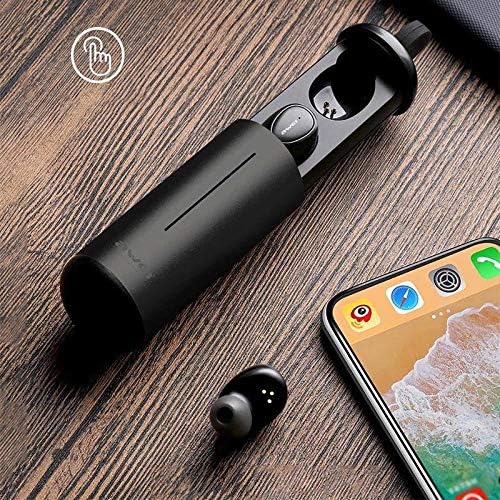
Image: AWEI T5 Earbuds in their charging case, positioned next to a smartphone, illustrating the pairing process.
ઓપરેટિંગ સૂચનાઓ
મૂળભૂત નિયંત્રણો
The AWEI T5 earbuds feature touch controls for various functions:
- ચલાવો/થોભો: બંને ઇયરબડ પર એકવાર ટેપ કરો.
- આગળનો ટ્રેક: જમણા ઇયરબડને બે વાર ટૅપ કરો.
- પાછલો ટ્રેક: ડાબા ઇયરબડને બે વાર ટૅપ કરો.
- જવાબ/કૉલ સમાપ્ત કરો: Tap once on either earbud during an incoming call.
- કૉલ નકારો: ઇનકમિંગ કોલ દરમિયાન કોઈપણ ઇયરબડને 2 સેકન્ડ માટે દબાવી રાખો.
- વ Voiceઇસ સહાયકને સક્રિય કરો: કોઈપણ ઈયરબડ પર ત્રણ વાર ટૅપ કરો.
સિંગલ એરબડ મોડ
You can use either the left or right earbud independently:
- Remove one earbud from the charging case. It will automatically connect to the last paired device.
- The other earbud can remain in the case or be turned off.
ડ્યુઅલ ઇયરબડ મોડ
For a stereo audio experience, use both earbuds:
- Remove both earbuds from the charging case. They will automatically connect to each other and then to the last paired device.
જાળવણી અને સંભાળ
To ensure the longevity and optimal performance of your AWEI T5 earbuds:
- સફાઈ: ઇયરબડ્સ અને ચાર્જિંગ કેસને નિયમિતપણે નરમ, સૂકા, લિન્ટ-ફ્રી કપડાથી સાફ કરો. કઠોર રસાયણો અથવા ઘર્ષક સામગ્રીનો ઉપયોગ કરશો નહીં.
- સંગ્રહ: જ્યારે ઉપયોગમાં ન હોય, ત્યારે ઇયરબડ્સને ધૂળ અને નુકસાનથી બચાવવા માટે તેમના ચાર્જિંગ કેસમાં રાખો.
- બેટરી સંભાળ: Avoid fully discharging the battery frequently. Charge the earbuds and case regularly, even if not used for extended periods.
- પાણી પ્રતિકાર: The earbuds are rated IPX4, meaning they are resistant to splashing water from any direction. Do not submerge them in water or expose them to heavy rain.

Image: AWEI T5 Earbuds with water droplets, indicating their IPX4 splash-resistant rating.
મુશ્કેલીનિવારણ
If you encounter issues with your AWEI T5 earbuds, refer to the following common problems and solutions:
| સમસ્યા | ઉકેલ |
|---|---|
| ઇયરબડ્સ ડિવાઇસ સાથે જોડાઈ રહ્યા નથી. | Ensure earbuds are charged. Turn off and on Bluetooth on your device. Forget "AWEI T5" from your device's Bluetooth list and re-pair. |
| માત્ર એક ઇયરબડ કામ કરી રહ્યું છે. | Place both earbuds back into the charging case, close the lid, then open and remove them together. Ensure both are charged. |
| કોઈ અવાજ નથી કે ઓછો અવાજ નથી. | Check volume levels on both your device and the earbuds. Ensure earbuds are properly connected. |
| ચાર્જિંગ કેસ ચાર્જ થઈ રહ્યો નથી. | Verify the USB cable is securely connected to both the case and the power source. Try a different cable or power adapter. |
વિશિષ્ટતાઓ
Technical details for the AWEI T5 True Wireless Earbuds:
| લક્ષણ | વિગત |
|---|---|
| મોડલ નંબર | T5 |
| કનેક્ટિવિટી | બ્લૂટૂથ |
| ફોર્મ ફેક્ટર | ઇન-ઇયર |
| સામગ્રી | પ્લાસ્ટિક |
| રંગ | કાળો |
| પરિમાણો (ઉત્પાદન) | 4 x 10 x 16.5 સેમી |
| વજન (ઉત્પાદન) | 4.54 ગ્રામ |
| બેટરીનો પ્રકાર | 1 Lithium Ion (per earbud, typically) |
| પાણી પ્રતિકાર રેટિંગ | IPX4 (સ્પ્લેશ-પ્રૂફ) |
વોરંટી અને આધાર
વોરંટી માહિતી અને ગ્રાહક સપોર્ટ માટે, કૃપા કરીને તમારી ખરીદી સાથે આપેલા દસ્તાવેજોનો સંદર્ભ લો અથવા રિટેલરનો સંપર્ક કરો. કોઈપણ વોરંટી દાવા માટે તમારી ખરીદીનો પુરાવો રાખો.
Ask a question about this manual
Ask about setup, troubleshooting, compatibility, parts, safety, or missing instructions. Manuals+ will review the question and use this page’s manual context to help answer it.