
પરિચય
This manual provides detailed instructions for the installation, operation, and maintenance of your NEC SL2100 IP7WW-12TXH-B1 12-Button Display Speaker Telephone. Please read this manual thoroughly before using the telephone to ensure proper functionality and to prevent damage.
સલામતી માહિતી
આગ, ઇલેક્ટ્રિક આંચકો અને વ્યક્તિઓને ઇજા થવાનું જોખમ ઘટાડવા માટે આ ઉત્પાદનનો ઉપયોગ કરતી વખતે હંમેશા મૂળભૂત સલામતી સાવચેતીઓનું પાલન કરો.
- પાણીની નજીક આ ઉત્પાદનનો ઉપયોગ કરશો નહીં, ઉદાહરણ તરીકેample, બાથટબની નજીક, બાઉલ ધોવા, રસોડામાં સિંક, અથવા લોન્ડ્રી ટબ, ભીના ભોંયરામાં અથવા સ્વિમિંગ પૂલની નજીક.
- વીજળીના તોફાન દરમિયાન ટેલિફોનનો ઉપયોગ કરવાનું ટાળો. વીજળી પડવાથી ઇલેક્ટ્રિક શોક લાગવાનું જોખમ રહેલું છે.
- લીકની આસપાસના વિસ્તારમાં ગેસ લીકની જાણ કરવા માટે ટેલિફોનનો ઉપયોગ કરશો નહીં.
- Use only the power source specified in this manual or marked on the product. This telephone is powered by the phone system.
- સફાઈ કરતા પહેલા આ ઉત્પાદનને દિવાલના આઉટલેટમાંથી અનપ્લગ કરો. લિક્વિડ ક્લીનર્સ અથવા એરોસોલ ક્લીનર્સનો ઉપયોગ કરશો નહીં. જાહેરાતનો ઉપયોગ કરોamp સફાઈ માટે કાપડ.
પેકેજ સામગ્રી
ખાતરી કરો કે બધી વસ્તુઓ પેકેજમાં હાજર છે:
- NEC SL2100 IP7WW-12TXH-B1 12-Button Display Speaker Telephone (Black)
- હેન્ડસેટ
- હેન્ડસેટ કોર્ડ
- Base Stand (for desk or wall mounting)
- Ethernet Cable (if applicable for IP connection)
ઉત્પાદન ઓવરview
The NEC SL2100 IP7WW-12TXH-B1 is a corded 12-button display speaker telephone designed for use with NEC SL2100 systems. It features a clear display for call information and menu navigation, a built-in speakerphone for hands-free communication, and 12 programmable function keys.
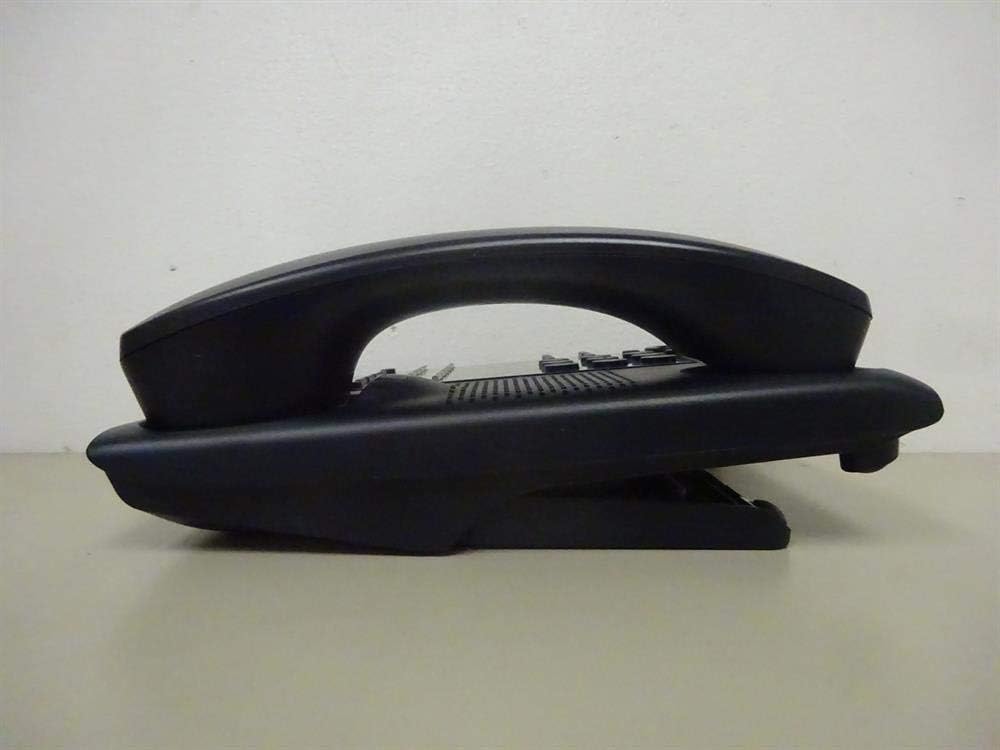
આકૃતિ 1: બાજુ view of the NEC SL2100 IP7WW-12TXH-B1 telephone, showing the ergonomic design of the handset and base unit.

આકૃતિ 2: પાછળ view of the telephone, illustrating the various connection ports for the handset and network, as well as the integrated wall-mounting slots.
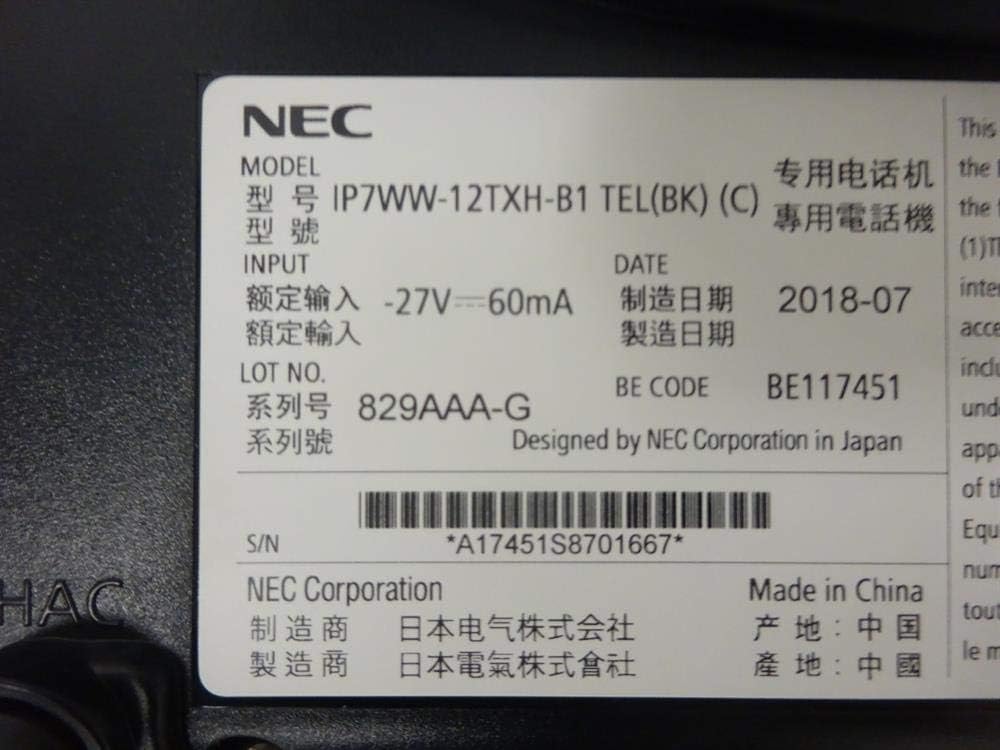
આકૃતિ 3: Close-up of the product label, displaying model number IP7WW-12TXH-B1, input specifications, and manufacturer details.
સેટઅપ
1. Assembling the Telephone
- બેઝ સ્ટેન્ડ જોડો: Align the base stand with the slots on the bottom of the telephone. Slide it into place until it clicks securely. The stand can be adjusted for different viewing angles or reversed for wall mounting.
- હેન્ડસેટ કનેક્ટ કરો: Plug one end of the coiled handset cord into the handset and the other end into the designated port on the side of the telephone base.
2. Connecting to the System
This telephone is designed to connect to an NEC SL2100 system. Ensure your SL2100 system is properly installed and configured.
- નેટવર્ક કેબલ કનેક્ટ કરો: Plug one end of an Ethernet cable into the LAN port on the back of the telephone. Plug the other end into an available port on your NEC SL2100 system or a network switch connected to the system.
- પાવર ચાલુ: The telephone receives power directly from the NEC SL2100 system (Power over Ethernet - PoE) or via a separate power adapter (not included, if PoE is not available). Once connected, the telephone should power on automatically.
- પ્રારંભિક રૂપરેખાંકન: The telephone will typically register with the SL2100 system automatically. If prompted, follow the on-screen instructions or consult your system administrator for specific extension number assignment or network settings.
ઓપરેટિંગ સૂચનાઓ
કૉલ્સ કરી રહ્યાં છીએ
- લિફ્ટ હેન્ડસેટ: હેન્ડસેટ ઉપાડો અને ડાયલ ટોન સાંભળો.
- ડાયલ નંબર: કીપેડનો ઉપયોગ કરીને ઇચ્છિત ટેલિફોન નંબર ડાયલ કરો.
- સ્પીકરફોન: દબાવો વક્તા button to activate the speakerphone, then dial the number.
કૉલ્સ પ્રાપ્ત કરી રહ્યાં છીએ
- લિફ્ટ હેન્ડસેટ: When the telephone rings, lift the handset to answer.
- સ્પીકરફોન: દબાવો વક્તા button to answer the call hands-free.
ડિસ્પ્લેનો ઉપયોગ કરીને
The display shows call information, menu options, and system status. Use the navigation buttons (usually arrow keys) to scroll through menus and the દાખલ કરો or પસંદ કરો પસંદગીની પુષ્ટિ કરવા માટે બટન.
Programmable Function Keys (12 Buttons)
The 12 buttons on the telephone can be programmed for various functions such as speed dial, line access, feature activation, or direct station selection. Consult your system administrator for the specific programming of these keys.
કોન્ફરન્સ કોલ્સ
The telephone supports 3-way conference calls. To initiate a conference call:
- પહેલા પક્ષ સાથે કૉલ કરો.
- દબાવો સીએનએફ (Conference) button or the designated programmable key. The first party will be put on hold.
- બીજા પક્ષનો નંબર ડાયલ કરો.
- Once connected to the second party, press the સીએનએફ button again to join all three parties.
કૉલર ID
When an incoming call is received, the caller's information (name and number, if available) will be displayed on the screen.
મલ્ટીલાઈન ઓપરેશન
This telephone supports multi-line operation, allowing you to manage multiple calls simultaneously. Use the designated line keys or programmable keys to switch between active lines or place calls on hold.
જાળવણી
સફાઈ
To clean the telephone, unplug it from the network connection. Use a soft, slightly damp cloth. Do not use harsh chemicals, abrasive cleaners, or excessive moisture. Avoid spraying cleaners directly onto the telephone.
સંગ્રહ
If storing the telephone for an extended period, ensure it is clean and dry. Store it in a cool, dry place away from direct sunlight and extreme temperatures.
મુશ્કેલીનિવારણ
- કોઈ ડાયલ ટોન નથી:
- Check all cable connections, especially the network cable to the SL2100 system.
- Ensure the SL2100 system is powered on and functioning correctly.
- If using a separate power adapter (not PoE), ensure it is properly connected and receiving power.
- ડિસ્પ્લે કામ કરતું નથી:
- Verify the telephone is receiving power.
- Try disconnecting and reconnecting the network cable.
- કૉલ્સ કરી/પ્રાપ્ત કરી શકાતા નથી:
- ડાયલ ટોન માટે તપાસો.
- Ensure the telephone is properly registered with the SL2100 system.
- Contact your system administrator to verify line assignments and system status.
- નબળી ઓડિયો ગુણવત્તા:
- Check handset and network cable connections.
- ખાતરી કરો કે અન્ય ઇલેક્ટ્રોનિક ઉપકરણોથી કોઈ દખલ ન થાય.
- Test with another telephone if possible to isolate the issue.
વિશિષ્ટતાઓ
| લક્ષણ | સ્પષ્ટીકરણ |
|---|---|
| બ્રાન્ડ | NEC |
| મોડલ નંબર | IP7WW-12TXH-B1 (Mfr Part Number: BE117451) |
| રંગ | કાળો |
| ટેલિફોન પ્રકાર | કોર્ડ્ડ |
| સામગ્રી | પ્લાસ્ટિક |
| પાવર સ્ત્રોત | Phone System (PoE compatible) |
| ડાયલરનો પ્રકાર | સિંગલ કીપેડ |
| આઇટમના પરિમાણો (L x W x H) | 15 x 12 x 6 ઇંચ |
| જવાબ આપતી સિસ્ટમનો પ્રકાર | Digital (System Dependent) |
| સુસંગત ઉપકરણો | NEC SL2100 Systems, NEC SL2100 IP7WW-082U-B1 8 Port Digital Station Card |
| કોન્ફરન્સ કોલ ક્ષમતા | 3-માર્ગ |
| મલ્ટીલાઈન ઓપરેશન | હા |
| કૉલર ID | હા |
વોરંટી અને આધાર
For warranty information, please refer to the documentation provided with your NEC SL2100 system or contact your NEC authorized dealer. For technical support, please contact your system administrator or NEC customer service.
NEC કોર્પોરેશન
For further assistance, please visit the official NEC website or contact your local support representative.