
1. પરિચય
Thank you for choosing the Setty Power Bank with Solar Panels. This portable power bank is designed to provide convenient charging for your electronic devices on the go, featuring a 5000 mAh battery capacity and an integrated solar panel for supplementary charging. Please read this manual carefully before using the product to ensure safe and optimal performance.
2. સલામતી માહિતી
- Do not expose the power bank to extreme temperatures, direct sunlight for prolonged periods (beyond charging), or fire.
- Avoid contact with water or other liquids. This device is not fully waterproof.
- Do not disassemble, modify, or attempt to repair the device yourself. Contact qualified service personnel.
- બાળકોની પહોંચથી દૂર રાખો.
- માત્ર સુસંગત ચાર્જિંગ કેબલ અને એડેપ્ટરનો ઉપયોગ કરો.
- સ્થાનિક નિયમો અનુસાર પાવર બેંકનો જવાબદારીપૂર્વક નિકાલ કરો.
3. પેકેજ સામગ્રી
- Setty Power Bank with Solar Panels (5000 mAh)
- USB Charging Cable (Micro-USB)
- વપરાશકર્તા માર્ગદર્શિકા
4. ઉત્પાદન ઓવરview
Familiarize yourself with the components of your Setty Power Bank.
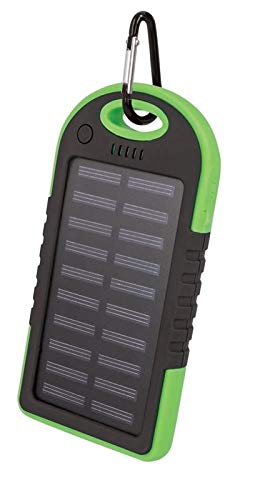
છબી 1: Setty Power Bank with Solar Panels. The image displays the power bank in its packaging, highlighting its green and black design, solar panel, and a carabiner clip for portability. The packaging also indicates "SOLAR TRAVEL BATTERY 5000 mAh".
- સૌર પેનલ: Converts sunlight into electrical energy to slowly charge the internal battery.
- USB Output Ports (2): બાહ્ય ઉપકરણો ચાર્જ કરવા માટે.
- માઇક્રો-યુએસબી ઇનપુટ પોર્ટ: For charging the power bank itself.
- એલઇડી સૂચકાંકો: Show battery level and charging status.
- પાવર બટન: To turn on/off the device and activate the flashlight.
- ફ્લેશલાઇટ: રોશની માટે સંકલિત LED લાઇટ.
- કેરાબીનર ક્લિપ: For attaching the power bank to bags or gear.
5. સેટઅપ
૨.૧ પાવર બેંકનું પ્રારંભિક ચાર્જિંગ
Before first use, it is recommended to fully charge the power bank via a USB power source.
- Connect the provided Micro-USB cable to the power bank's input port.
- Connect the other end of the USB cable to a USB wall adapter (not included), computer USB port, or other compatible USB power source.
- The LED indicators will illuminate to show the charging progress. Once all LEDs are solid, the power bank is fully charged.
- એકવાર ચાર્જિંગ પૂર્ણ થઈ જાય પછી કેબલને ડિસ્કનેક્ટ કરો.
નોંધ: Solar charging is a supplementary feature and is significantly slower than wall charging. For optimal performance, always fully charge the power bank via USB before extended use.
6. ઓપરેટિંગ સૂચનાઓ
૪.૨ બાહ્ય ઉપકરણો ચાર્જ કરવા
- તમારા ડિવાઇસના ચાર્જિંગ કેબલને પાવર બેંક પરના USB આઉટપુટ પોર્ટમાંથી એક સાથે કનેક્ટ કરો.
- કેબલના બીજા છેડાને તમારા ઇલેક્ટ્રોનિક ઉપકરણ (દા.ત., સ્માર્ટફોન, ટેબ્લેટ) સાથે જોડો.
- પાવર બેંક આપમેળે તમારા ઉપકરણને ચાર્જ કરવાનું શરૂ કરશે. જો નહીં, તો ચાર્જિંગ શરૂ કરવા માટે પાવર બટન એકવાર દબાવો.
- LED સૂચકાંકો પાવર બેંકના બાકીના બેટરી સ્તરને બતાવશે.
- Disconnect your device once it is fully charged or when you no longer need to charge it.
6.2 સૌર ચાર્જિંગ
The integrated solar panel allows for emergency or supplementary charging when no other power source is available.
- પાવર બેંકને એવી રીતે મૂકો કે સોલાર પેનલ સીધી સૂર્યપ્રકાશ તરફ હોય.
- A dedicated LED indicator (if present) or the main battery indicators may show that solar charging is active.
- Solar charging is slow and dependent on sunlight intensity. It is not intended as the primary charging method.
6.3 LED Indicator Functions
The LED lights indicate the power bank's status:
- Solid LEDs: Indicate remaining battery capacity. (e.g., 4 LEDs = 75-100%, 3 LEDs = 50-75%, etc.)
- ફ્લેશિંગ એલઈડી: Indicate the power bank is currently being charged.
૪.૪ ફ્લેશલાઇટ ફંક્શન
To use the integrated flashlight:
- ચાલુ કરો: પાવર બટનને લગભગ 2-3 સેકન્ડ માટે દબાવી રાખો.
- બંધ કરો: Press and hold the power button again for approximately 2-3 seconds.
7. જાળવણી
- Clean the power bank with a soft, dry cloth. Do not use harsh chemicals or abrasive cleaners.
- Keep the solar panel clean and free of dust or debris for optimal solar charging efficiency.
- જ્યારે ઉપયોગમાં ન હોય ત્યારે પાવર બેંકને ઠંડી, સૂકી જગ્યાએ સ્ટોર કરો.
- If storing for extended periods, charge the power bank to at least 50% every 3 months to prolong battery life.
8. મુશ્કેલીનિવારણ
| સમસ્યા | સંભવિત કારણ | ઉકેલ |
|---|---|---|
| પાવર બેંક ચાર્જ થતી નથી. |
|
|
| પાવર બેંકમાંથી ડિવાઇસ ચાર્જ થઈ રહ્યું નથી. |
|
|
| Solar charging is very slow. |
|
|
9. સ્પષ્ટીકરણો
- બ્રાન્ડ: Setty
- મોડલ નંબર: 5900495682062
- બેટરી ક્ષમતા: ૬૭૦૦ mAh (મિલીampપૂર્વ કલાક)
- ઇનપુટ: યુએસબી (માઈક્રો-યુએસબી)
- આઉટપુટ: 2 x યુએસબી પોર્ટ
- આઉટપુટ વર્તમાન: 1 એ
- પાવર સ્ત્રોત: Solar Powered, USB
- સુસંગત ઉપકરણો: Computer (and other USB-chargeable devices)
10. વોરંટી માહિતી
Setty products are manufactured to high-quality standards. For specific warranty terms and conditions, please refer to the warranty card included with your purchase or contact your retailer. Keep your proof of purchase for any warranty claims.
11. આધાર
If you encounter any issues or have questions regarding your Setty Power Bank that are not covered in this manual, please contact the retailer where you purchased the product or visit the official Setty webવધુ સહાય માટે સાઇટ.