
1. પરિચય
The nJoy Aten Pro 1000VA is an advanced Uninterruptible Power Supply (UPS) designed to provide reliable power protection for sensitive electronic equipment. This online double-conversion UPS ensures a continuous, clean power supply, safeguarding your devices against power outages, વોલ્યુમtage fluctuations, and surges. It features a pure sine wave output, an LCD display for real-time status, and communication ports for comprehensive management.
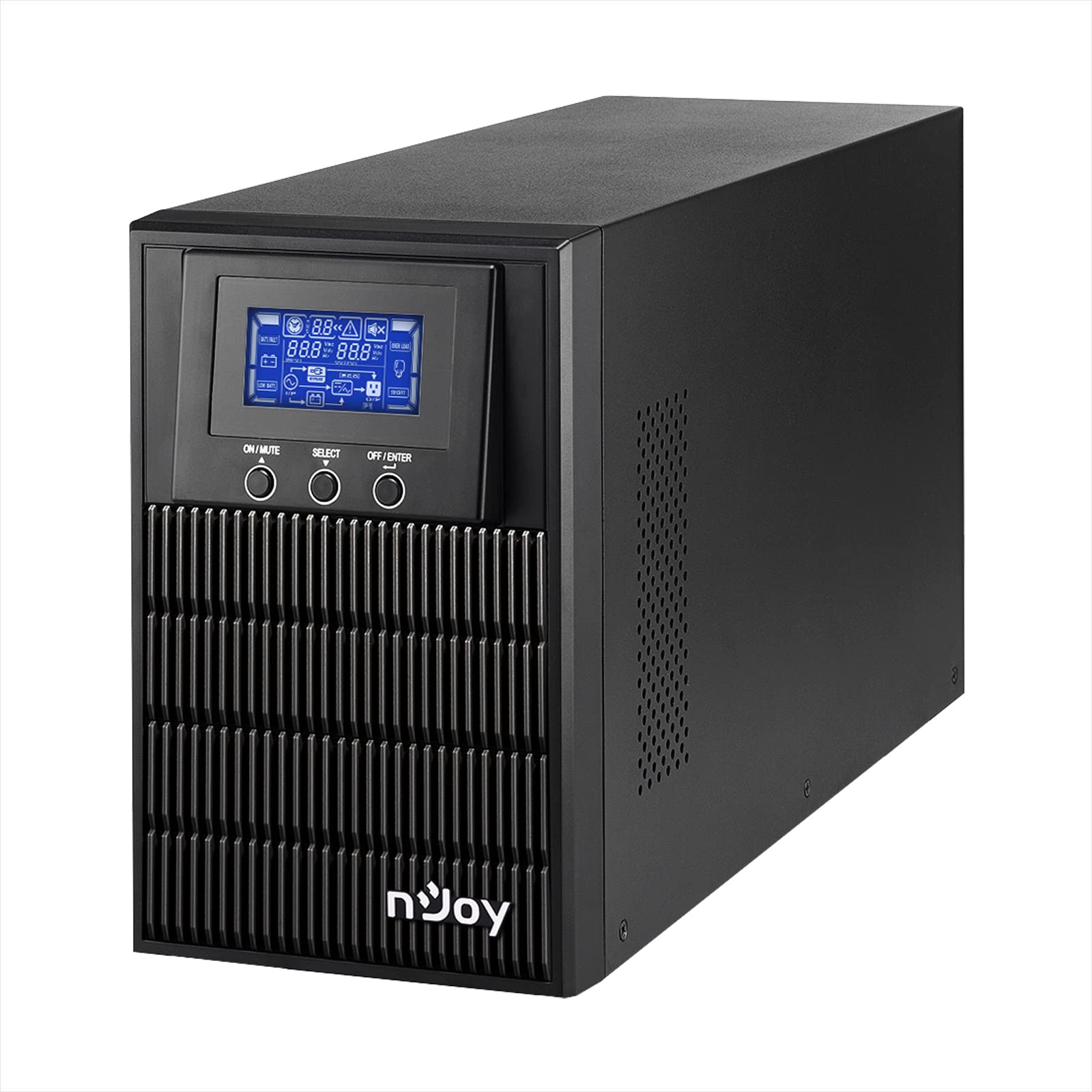
Figure 1: nJoy Aten Pro 1000VA UPS Front View
This image shows the front of the nJoy Aten Pro 1000VA UPS, highlighting its compact tower design and the integrated LCD display panel with control buttons.

આકૃતિ 2: મુખ્ય લાક્ષણિકતાઓ ઓવરview
This image visually summarizes the main features of the nJoy Aten Pro 1000VA UPS, including its online double-conversion technology, 1000VA/900W capacity, dual 12V@9.0Ah batteries, USB interface, LCD display, pure sine wave output, and SNMP capability.
2. સલામતી માહિતી
Please read and follow all safety instructions carefully before installing, operating, or maintaining the UPS.
- This UPS is designed for indoor use only.
- યુપીએસ સી ખોલશો નહીંasing. અંદર કોઈ ઉપયોગ કરી શકાય તેવા ભાગો નથી. બધી સર્વિસિંગ લાયક સેવા કર્મચારીઓને સોંપો.
- Ensure the UPS is connected to a properly grounded AC power outlet.
- Do not block ventilation openings. Maintain adequate airflow around the UPS.
- Avoid placing the UPS in direct sunlight, near heat sources, or in environments with excessive dust, humidity, or corrosive substances.
- કોઈપણ જાળવણી અથવા સફાઈ કરતા પહેલા AC પાવર સ્ત્રોતથી UPS ને ડિસ્કનેક્ટ કરો.
- બેટરીઓ ઇલેક્ટ્રિક શોક અને ઉચ્ચ શોર્ટ-સર્કિટ કરંટનું જોખમ રજૂ કરી શકે છે. નીચેની સાવચેતીઓનું પાલન કરો:
- ઘડિયાળો, વીંટી અથવા અન્ય ધાતુની વસ્તુઓ દૂર કરો.
- ઇન્સ્યુલેટેડ હેન્ડલ્સ સાથે સાધનોનો ઉપયોગ કરો.
- રબરના મોજા અને બૂટ પહેરો.
3. ઉત્પાદન સુવિધાઓ અને ઘટકો
The nJoy Aten Pro 1000VA UPS is equipped with several features and ports for optimal performance and connectivity.
3.1 ફ્રન્ટ પેનલ

આકૃતિ 3: ફ્રન્ટ પેનલ ઓવરview
This image displays the front panel of the UPS, showing the LCD screen that provides real-time status updates and the three control buttons: ON/MUTE, SELECT, and OFF/ENTER.
- એલસીડી ડિસ્પ્લે: Shows real-time status information such as AC mode, battery mode, charge level, battery level, input voltage, આઉટપુટ વોલ્યુમtage, overload, fault, and low battery.
- ON/MUTE Button: Powers on the UPS or mutes the alarm.
- પસંદ કરો બટન: Navigates through LCD display menus.
- OFF/ENTER Button: Powers off the UPS or confirms selections.
3.2 રીઅર પેનલ

આકૃતિ 4: પાછળના પેનલ કનેક્શન્સ
This image illustrates the rear panel of the UPS, detailing the various connection ports and components, including RS232, Schuko outputs, circuit breaker, intelligent slot, USB, and AC input.
- RS232 ઇન્ટરફેસ: For serial communication with a computer.
- Schuko Outputs (3): Connect your critical devices here for battery backup and surge protection.
- સર્કિટ બ્રેકર: ઓવરલોડ સુરક્ષા પૂરી પાડે છે.
- Intelligent Slot (SNMP): For optional SNMP card for network management.
- યુએસબી ઈન્ટરફેસ: For USB communication with a computer.
- એસી ઇનપુટ: Connect the UPS to the main AC power supply.
4. સેટઅપ સૂચનાઓ
4.1 અનપેકિંગ અને નિરીક્ષણ
- Carefully unpack the UPS and inspect it for any shipping damage. If any damage is found, do not install the unit and contact your dealer.
- Verify that all accessories are included: UPS unit, USB cable, RS232 cable, and user manual.
4.2 પ્લેસમેન્ટ
- Place the UPS in a clean, dry, and temperature-controlled environment.
- Ensure adequate clearance (at least 20 cm) around the UPS for proper ventilation.
- Avoid placing the UPS near water or excessive humidity.
4.3 પ્રારંભિક ચાર્જિંગ
- Before initial use, connect the UPS to a standard AC power outlet for at least 4 hours to ensure the batteries are fully charged. This will maximize battery runtime.
4.4 કનેક્ટિંગ ઇક્વિપમેન્ટ
- Connect your computer, monitor, and other critical devices to the Schuko output receptacles on the rear panel of the UPS.
- Do not connect laser printers or strip heaters to the UPS outputs, as these devices can draw significant power and overload the UPS.
- પ્રદાન કરેલ પાવર કોર્ડનો ઉપયોગ કરીને UPS ને દિવાલના આઉટલેટ સાથે જોડો.
૪.૨ સોફ્ટવેર ઇન્સ્ટોલેશન (વૈકલ્પિક)
For advanced monitoring and management, install the UPS management software on your computer.

Figure 5: UPS Management Software
This image shows a graphical representation of the UPS management software interface, illustrating its capabilities for monitoring UPS status, scheduling operations, and configuring settings across various operating systems like Mac OS, Linux, and Windows.
- Connect the UPS to your computer using either the USB or RS232 cable.
- Install the provided management software (compatible with Mac OS, Linux, Windows).
- The software allows for:
- Real-time status visualization.
- Scheduling of power on/off and battery tests.
- Comprehensive UPS configuration.
5. ઓપરેટિંગ સૂચનાઓ
5.1 UPS ચાલુ/બંધ કરવું
- ચાલુ કરવા માટે: દબાવો અને પકડી રાખો ચાલુ/મ્યૂટ button until you hear a beep. The UPS will perform a self-test and then enter AC mode.
- બંધ કરવા માટે: દબાવો અને પકડી રાખો બંધ/એન્ટર button until the UPS powers down.
૫.૪ એલસીડી ડિસ્પ્લે માહિતી
The LCD display provides critical information about the UPS status. Use the પસંદ કરો button to cycle through different display modes.
- એસી મોડ: Indicates the UPS is operating on utility power.
- બેટરી મોડ: Indicates the UPS is operating on battery power (during an outagઇ).
- ચાર્જ લેવલ: વર્તમાન લોડ ટકાવારી દર્શાવે છેtage.
- બેટરી સ્તર: બાકીની બેટરી ક્ષમતા દર્શાવે છે.
- ઇનપુટ વોલ્યુમtage: Current incoming AC voltage.
- આઉટપુટ વોલ્યુમtage: Current outgoing AC voltage.
- ઓવરલોડ: Indicates connected equipment exceeds UPS capacity.
- દોષ: Indicates a system error.
- ઓછી બેટરી: Warning that battery power is critically low.
5.3 ઇકો મોડ
The Eco Mode feature helps reduce energy consumption. When the input voltage is within the acceptable range, the UPS will bypass the inverter and directly supply power from the utility, increasing energy efficiency. This mode can be configured via the management software.

Figure 6: Key Operational Features
This image highlights three core operational features of the UPS: Pure Sine Wave output for clean power, Zero Transfer Time for seamless power transition, and Eco Mode for energy efficiency.
6. જાળવણી
6.1 Battery Care and Replacement
- The UPS uses sealed lead-acid batteries (2 x 12V/9Ah). These batteries are designed for a specific lifespan.
- To maximize battery life, ensure the UPS is always connected to AC power to keep the batteries charged.
- Batteries are user-replaceable by qualified personnel only. Contact NJOY support or a certified technician for battery replacement.
- સ્થાનિક નિયમો અનુસાર જૂની બેટરીનો યોગ્ય રીતે નિકાલ કરો.
6.2 સફાઈ
- સફાઈ કરતા પહેલા ખાતરી કરો કે UPS બંધ છે અને AC પાવરથી ડિસ્કનેક્ટ થયેલ છે.
- યુપીએસના બાહ્ય ભાગને સાફ કરવા માટે નરમ, સૂકા કપડાનો ઉપયોગ કરો.
- પ્રવાહી અથવા એરોસોલ ક્લીનર્સનો ઉપયોગ કરશો નહીં.
- Periodically clean the ventilation openings to prevent dust buildup.
7. મુશ્કેલીનિવારણ
If the UPS is not operating correctly, refer to the following table for common issues and solutions.
| સમસ્યા | સંભવિત કારણ | ઉકેલ |
|---|---|---|
| યુપીએસ ચાલુ થતું નથી. | No AC input power; Low battery. | Ensure the power cord is securely connected. Allow the UPS to charge for at least 4 hours. |
| UPS is in battery mode frequently. | Unstable AC input power; High sensitivity setting. | Check the utility power quality. Adjust the UPS input voltage sensitivity via software if necessary. |
| Overload warning on LCD. | Too many devices connected; Connected devices draw too much power. | Disconnect non-essential equipment. Ensure total load does not exceed 900W. |
| ટૂંકો બેટરી રનટાઇમ. | Batteries not fully charged; Batteries reaching end of life. | Allow the UPS to charge for 24 hours. Consider battery replacement if batteries are old. |
| UPS emits continuous alarm. | Overload; Battery fault; System fault. | Check LCD for specific error codes. Reduce load. If alarm persists, contact support. |
For issues not listed here, or if problems persist, please contact NJOY customer support.
8. સ્પષ્ટીકરણો
Detailed technical specifications for the nJoy Aten Pro 1000VA UPS.
| લક્ષણ | સ્પષ્ટીકરણ |
|---|---|
| મોડલ નંબર | PWUP-OL100AP-AZ01B |
| ક્ષમતા | 1000 VA / 900 W |
| યુપીએસ પ્રકાર | On-line Double Conversion |
| નોમિનલ ઇનપુટ વોલ્યુમtage | 110 - 300 Vac |
| નોમિનલ આઉટપુટ વોલ્યુમtage | 230 Vac (± 1% in battery mode) |
| આવર્તન શ્રેણી | 40 હર્ટ્ઝ ~ 70 હર્ટ્ઝ |
| આઉટપુટ સોકેટ્સ | 3 એક્સ શુકો |
| સ્થાનાંતરણ સમય (AC થી DC) | શૂન્ય |
| ટ્રાન્સફર સમય (ઇન્વર્ટરથી બાયપાસ) | 4 એમ.એસ |
| કોમ્યુનિકેશન બંદરો | USB, RS232 (Optional: Smart SNMP card) |
| ઓપરેટિંગ તાપમાન | 0 ~ 40 °C |
| કાર્યક્ષમતા | 90% સુધી |
| બેટરીનો પ્રકાર | 2 x 12V/9Ah Sealed Lead-Acid |
| પરિમાણો (L x W x H) | 28.2 x 14.5 x 22 સેમી |
| વજન | 7 કિલોગ્રામ |
8.1 Runtime Chart
The following chart illustrates the approximate battery runtime based on the connected load.
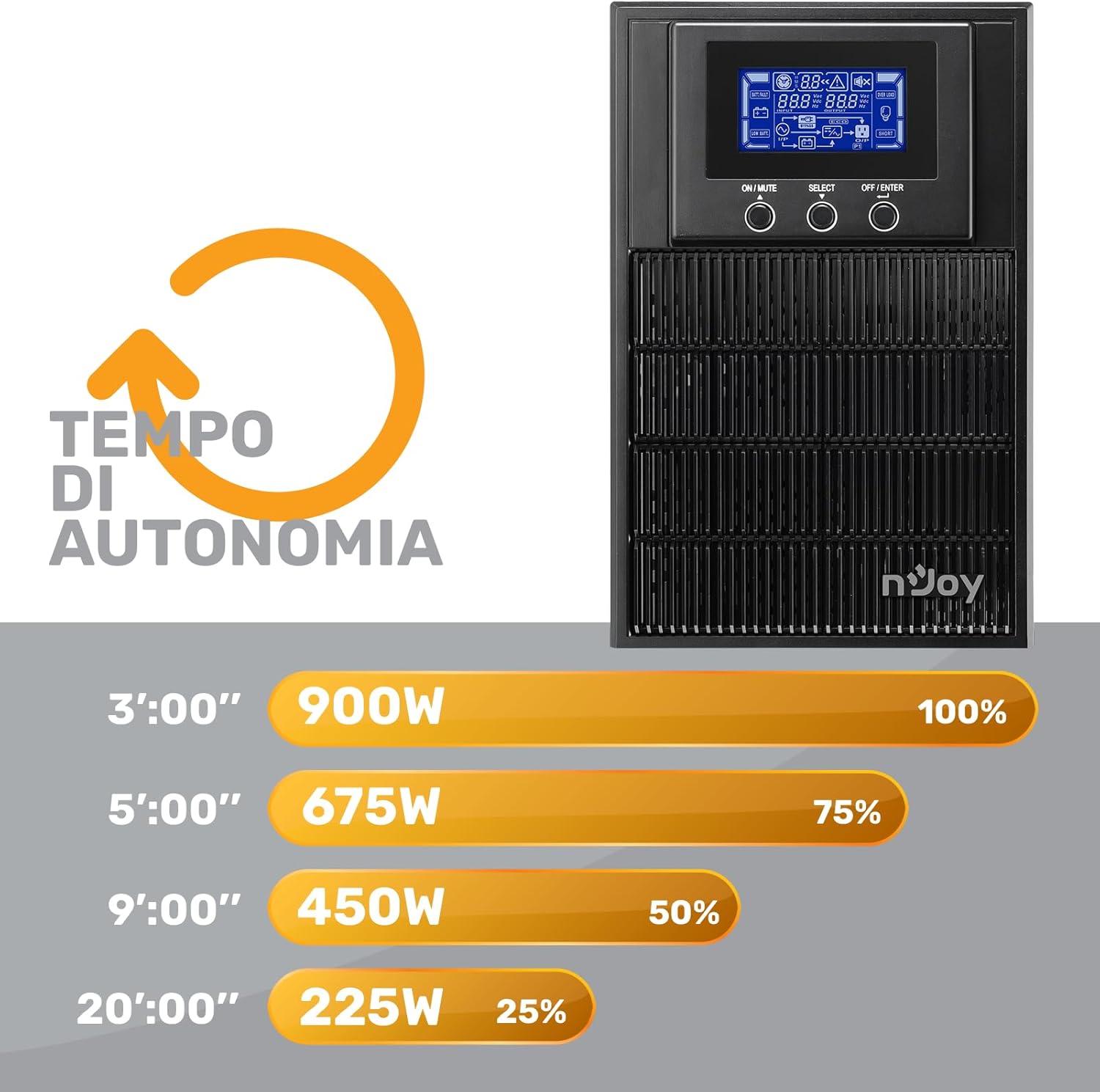
Figure 7: Battery Runtime vs. Load
This graph shows the estimated battery runtime in minutes for the nJoy Aten Pro 1000VA UPS at different load percentages. માજી માટેample, at 100% load (900W), the runtime is approximately 3 minutes, while at 25% load (225W), it can last up to 20 minutes.
- 100% Load (900W): Approximately 3 minutes
- 75% Load (675W): Approximately 5 minutes
- 50% Load (450W): Approximately 9 minutes
- 25% Load (225W): Approximately 20 minutes
9. વોરંટી અને સપોર્ટ
NJOY provides a comprehensive warranty and dedicated customer support for the Aten Pro series.
- વોરંટી અવધિ: The nJoy Aten Pro UPS comes with a 3 વર્ષની વોરંટી. Batteries are covered by a 1 વર્ષની વોરંટી.
- ગ્રાહક આધાર: Our professional customer service team is available to provide prompt and quality assistance. If you require help or support before, during, or after your purchase, please do not hesitate to contact NJOY customer service. Refer to your product packaging or the NJOY official webચોક્કસ સંપર્ક વિગતો માટે સાઇટ.