
1. પરિચય
ખરીદી બદલ આભારasing the Infocus 24-inch 720p LED TV, model IM24ED800. This manual provides essential information for setting up, operating, and maintaining your television. Please read this manual thoroughly before using the product and retain it for future reference.
સલામતી માહિતી
- ટીવીને વરસાદ અથવા ભેજ માટે ખુલ્લા ન કરો.
- વેન્ટિલેશનના પ્રારંભને અવરોધિત કરશો નહીં.
- યોગ્ય પાવર સપ્લાય વોલ્યુમની ખાતરી કરોtage.
- પાવર કોર્ડને ચાલવા અથવા પિંચ થવાથી સુરક્ષિત કરો.
- તમામ સેવાનો સંદર્ભ લાયક સેવા કર્મચારીઓને આપો.
- ટીવીને સીધા સૂર્યપ્રકાશ, ગરમીના સ્ત્રોતો અને મજબૂત ચુંબકીય ક્ષેત્રોથી દૂર રાખો.
2. પેકેજ સામગ્રી
કૃપા કરીને નીચેની વસ્તુઓ માટે બોક્સ ચેક કરો:
- Infocus 24-inch 720p LED TV (IM24ED800)
- રિમોટ કંટ્રોલ (બેટરી સાથે, જો શામેલ હોય તો)
- પાવર કોર્ડ
- ટીવી સ્ટેન્ડ (2 ટુકડાઓ)
- ટીવી સ્ટેન્ડ માટે સ્ક્રૂ
- વપરાશકર્તા માર્ગદર્શિકા (આ દસ્તાવેજ)
3. સેટઅપ
૩.૧ ટીવી સ્ટેન્ડ જોડવું
To attach the stand to your Infocus TV:
- સ્ક્રેચમુદ્દે ટાળવા માટે ટીવી સ્ક્રીનને નરમ, સ્વચ્છ સપાટી પર કાળજીપૂર્વક નીચે મૂકો.
- દરેક સ્ટેન્ડ પીસને ટીવીના તળિયે અનુરૂપ સ્લોટ્સ સાથે સંરેખિત કરો.
- આપેલા સ્ક્રૂનો ઉપયોગ કરીને દરેક સ્ટેન્ડ પીસને સુરક્ષિત કરો. ખાતરી કરો કે તે મજબૂત રીતે કડક છે.
- ટીવીને કાળજીપૂર્વક ઉપાડો અને તેને સ્થિર, સમતલ સપાટી પર મૂકો.
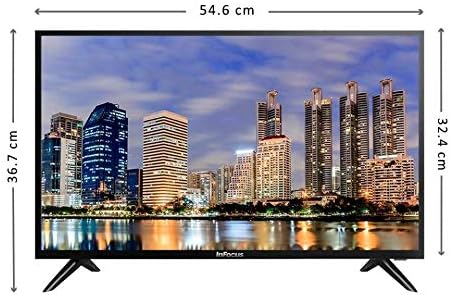
છબી: આગળ view of the Infocus 24-inch LED TV with dimensions indicated. The TV measures approximately 54.6 cm in width and 36.7 cm in height with the stand.
3.2 કનેક્ટિંગ ઉપકરણો
Your Infocus TV features multiple input ports for connecting external devices.

છબી: પાછળનો ભાગ view of the Infocus 24-inch LED TV, highlighting the location of various input ports including HDMI and USB.
- HDMI કનેક્શન્સ: Connect Blu-ray players, game consoles, or cable/satellite boxes to the HDMI ports. The TV has 2 HDMI inputs.
- યુએસબી કનેક્શન્સ: Connect USB flash drives for media playback to the USB ports. The TV has 2 USB inputs.
- એન્ટેના/કેબલ: Connect an antenna or cable TV signal to the RF input (if available, not explicitly listed but standard for TVs).
- શક્તિ: પાવર કોર્ડને ટીવીના પાવર ઇનપુટ સાથે અને પછી દિવાલના આઉટલેટ સાથે જોડો.
3.3 પ્રારંભિક પાવર ચાલુ
બધા જરૂરી કેબલ કનેક્ટ કર્યા પછી:
- Ensure the power cord is securely plugged into both the TV and a power outlet.
- રિમોટ કંટ્રોલ પર અથવા ટીવી પર જ પાવર બટન દબાવો.
- Follow the on-screen instructions for initial setup, which may include language selection, time zone, and channel scanning.
4. તમારા ટીવીનું સંચાલન
4.1 રીમોટ કંટ્રોલ ઓવરview
The remote control allows you to access all TV functions. While specific button layouts may vary, common functions include:
- શક્તિ: ટીવી ચાલુ કે બંધ કરે છે.
- ઇનપુટ/સ્રોત: ઇનપુટ સ્ત્રોત (HDMI 1, HDMI 2, USB, TV) પસંદ કરે છે.
- વોલ્યુમ અપ/ડાઉન: સાઉન્ડ લેવલ એડજસ્ટ કરે છે.
- ચેનલ ઉપર/નીચે: ટીવી ચેનલો બદલે છે.
- મ્યૂટ: ટીવી ઑડિઓને શાંત કરે છે.
- મેનુ: Opens the main menu for settings adjustments.
- નેવિગેશન બટનો (ઉપર/નીચે/ડાબે/જમણે/ઓકે): મેનુઓ નેવિગેટ કરવા અને પસંદગીઓની પુષ્ટિ કરવા માટે વપરાય છે.
- બહાર નીકળો/પાછળ: પાછલી સ્ક્રીન પર પાછા ફરે છે અથવા મેનુમાંથી બહાર નીકળે છે.
4.2 મૂળભૂત કાર્યો
- ઇનપુટ સ્ત્રોત બદલવું: દબાવો ઇનપુટ or સ્ત્રોત button on your remote control. Use the navigation buttons to select the desired input (e.g., HDMI 1, USB) and press OK.
- વોલ્યુમ એડજસ્ટ કરી રહ્યું છે: નો ઉપયોગ કરો વોલ્યુમ વધારો (+) or અવાજ ધીમો (-) બટનો
- ચેનલો બદલવી: નો ઉપયોગ કરો Channel Up (CH+) or Channel Down (CH-) બટનો
૬.૨ યુએસબી મીડિયા પ્લેબેક
મીડિયા ચલાવવા માટે files from a USB flash drive:
- Insert a USB flash drive into one of the TV's USB ports.
- દબાવો ઇનપુટ or સ્ત્રોત તમારા રીમોટ કંટ્રોલ પર બટન અને પસંદ કરો યુએસબી.
- ટીવીનું મીડિયા બ્રાઉઝર દેખાવું જોઈએ. તમારા દ્વારા નેવિગેટ કરો files (photos, music, videos) using the remote control.
- એ પસંદ કરો file અને દબાવો OK તેને રમવા માટે.
5. જાળવણી
૮.૧ સ્ક્રીન સાફ કરવી
- Turn off the TV and unplug the power cord before cleaning.
- Use a soft, lint-free cloth (e.g., microfiber cloth) to gently wipe the screen.
- હઠીલા ગુણ માટે, થોડું ડીampપાણી અથવા વિશિષ્ટ સ્ક્રીન ક્લીનરથી કપડાને સાફ કરો. ક્યારેય પણ સ્ક્રીન પર સીધું ક્લીનર સ્પ્રે ન કરો.
- Avoid using abrasive cleaners, alcohol, benzene, or thinners, as these can damage the screen.
.5.2.૧ સામાન્ય કાળજી
- Keep the TV in a well-ventilated area.
- ટીવીની ટોચ પર ભારે વસ્તુઓ મૂકવાનું ટાળો.
- વીજળી પડતા વાવાઝોડા દરમિયાન અથવા જ્યારે ટીવી લાંબા સમય સુધી ઉપયોગમાં ન હોય ત્યારે તેને અનપ્લગ કરો.
6. મુશ્કેલીનિવારણ
જો તમને તમારા ટીવીમાં સમસ્યાઓ આવે, તો નીચેની સામાન્ય સમસ્યાઓ અને ઉકેલોનો સંદર્ભ લો:
| સમસ્યા | સંભવિત કારણ | ઉકેલ |
|---|---|---|
| કોઈ શક્તિ નથી | Power cord not connected; power outlet issue | ખાતરી કરો કે પાવર કોર્ડ સુરક્ષિત રીતે પ્લગ ઇન થયેલ છે. બીજા ઉપકરણ સાથે આઉટલેટનું પરીક્ષણ કરો. |
| કોઈ ચિત્ર નથી, પણ અવાજ છે. | Incorrect input source selected; loose video cable | દબાવો ઇનપુટ/સ્રોત સાચો ઇનપુટ પસંદ કરવા માટે બટન દબાવો. વિડિઓ કેબલ કનેક્શન તપાસો. |
| અવાજ નથી, પણ ચિત્ર હાજર છે. | Volume muted or too low; audio cable issue | દબાવો મ્યૂટ કરો બટન દબાવો અથવા વોલ્યુમ વધારો. ઓડિયો કેબલ કનેક્શન તપાસો. |
| રીમોટ કંટ્રોલ કામ કરતું નથી | Batteries depleted; obstruction; remote sensor blocked | Replace batteries. Remove any obstructions between the remote and TV. Ensure the TV's remote sensor is clear. |
| "નો સિગ્નલ" સંદેશ | Incorrect input source; device not powered on; cable issue | Verify the correct input source is selected. Ensure the connected device is powered on. Check all cable connections. |
7. સ્પષ્ટીકરણો
The following are the technical specifications for the Infocus 24-inch 720p LED TV model IM24ED800:
| લક્ષણ | વિગત |
|---|---|
| મોડલ નંબર | IM24ED800 |
| સ્ક્રીન માપ | 24 ઇંચ (61 સે.મી.) |
| ડિસ્પ્લે ટેકનોલોજી | એલઇડી |
| ઠરાવ | ૧૨૮૦ x ૭૨૦ (૭૨૦પી એચડી) |
| તાજું દર | 60 હર્ટ્ઝ |
| એચડીએમઆઈ ઇનપુટ્સ | 2 |
| યુએસબી ઇનપુટ્સ | 2 |
| કનેક્ટિવિટી | HDMI, USB |
| માઉન્ટિંગ પ્રકાર | ટેબલ સ્ટેન્ડ |
| પેકેજ પરિમાણો | 60.8 x 37.8 x 12 સેમી |
| પેકેજ વજન | 5 કિગ્રા |
8. વોરંટી અને સપોર્ટ
This Infocus TV is sold as a renewed product, which typically comes with a limited warranty provided by the seller or refurbisher. Please refer to your purchase documentation or contact your retailer for specific warranty terms and conditions.
For technical support or service inquiries, please contact the customer support channel provided by your retailer or the Infocus support webસાઇટ