
XENOCAM A6708NH
XENOCAM 8CH 1080N Hybrid 5-in-1 AHD DVR User Manual
Model: A6708NH
1. પરિચય
This manual provides comprehensive instructions for the installation, configuration, and operation of your XENOCAM 8-channel 1080N Hybrid 5-in-1 AHD Digital Video Recorder (DVR). This DVR supports multiple video input formats including Analog, AHD, HD-TVI, CVI, and IP (NVR) cameras, offering versatile surveillance solutions. Please read this manual thoroughly before operating the device to ensure proper usage and optimal performance.
2. સલામતી માહિતી
- પાવર સપ્લાય વોલ્યુમની ખાતરી કરોtage matches the DVR's requirements.
- Do not expose the DVR to moisture, rain, or extreme temperatures.
- Avoid placing the DVR in direct sunlight or near heat sources.
- DVR ખોલશો નહીં casing; બધી સેવા લાયક કર્મચારીઓને સોંપવી.
- Install the DVR in a well-ventilated area to prevent overheating.
3. પેકેજ સામગ્રી
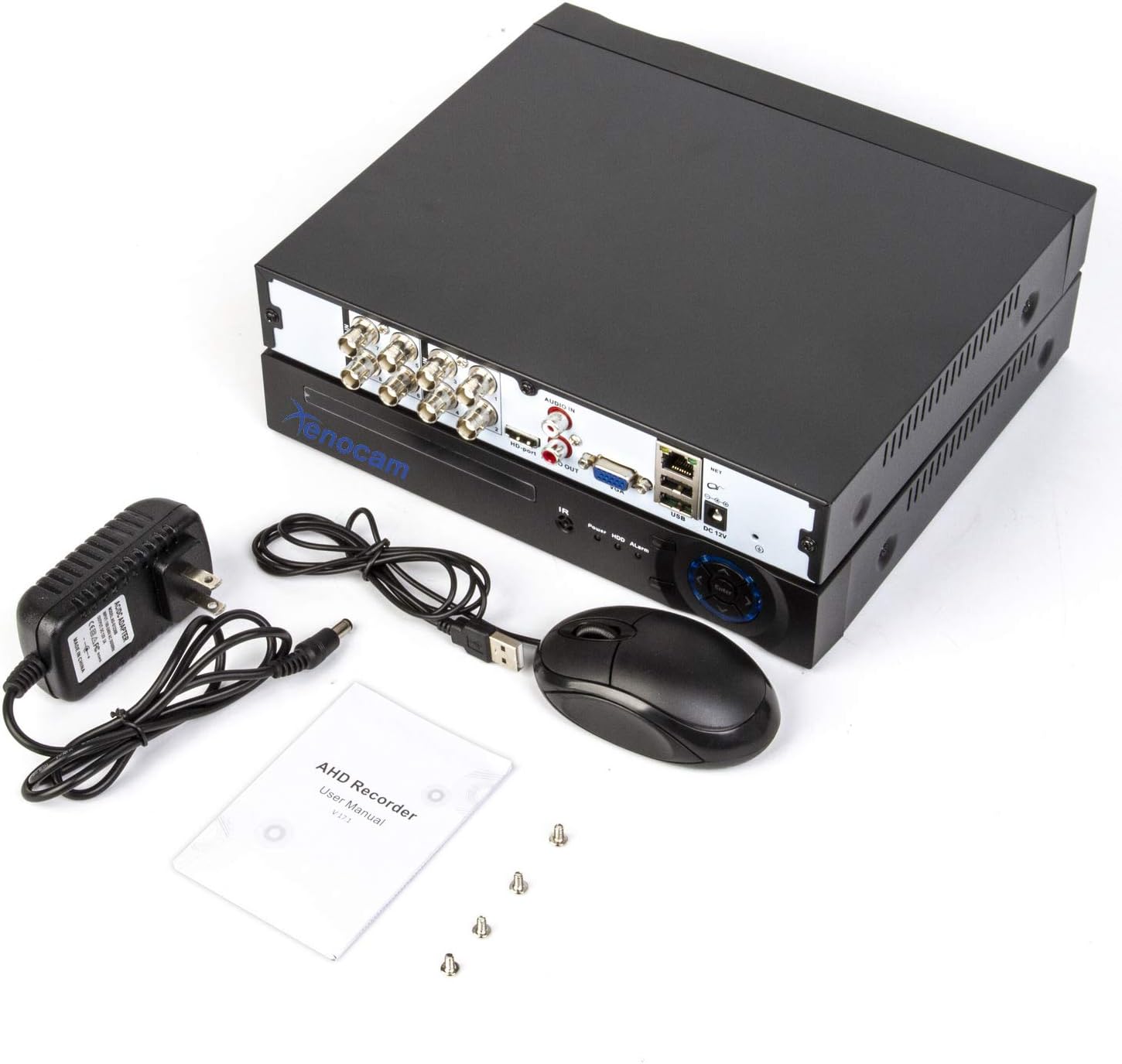
ખાતરી કરો કે બધી વસ્તુઓ પેકેજમાં હાજર છે:
- XENOCAM 8CH 1080N Hybrid 5-in-1 AHD DVR Unit
- પાવર એડેપ્ટર
- યુએસબી માઉસ
- હાર્ડ ડ્રાઈવ ઇન્સ્ટોલેશન માટે સ્ક્રૂ
- વપરાશકર્તા માર્ગદર્શિકા (ઝડપી શરૂઆત માર્ગદર્શિકા)
આકૃતિ 3.1: Included accessories for the XENOCAM DVR system.
4. ઉત્પાદન ઓવરview
4.1 ફ્રન્ટ અને રીઅર પેનલ્સ
Familiarize yourself with the ports and indicators on the DVR unit.

આકૃતિ 4.1: Front and Rear Panels of the DVR.
- ફ્રન્ટ પેનલ: Power indicator, HDD activity indicator, Alarm indicator, IR receiver, Navigation buttons (ESC, Enter, Menu).
- રીઅર પેનલ:
- VIDEO IN (1-8): BNC connectors for analog, AHD, HD-TVI, CVI camera inputs.
- ઑડિયો ઇન/આઉટ: ઓડિયો ઇનપુટ અને આઉટપુટ માટે RCA કનેક્ટર્સ.
- HD-port (HDMI): Video output to monitor/TV.
- વીજીએ: Video output to monitor/TV.
- યુએસબી: Ports for mouse, USB backup devices.
- NET (RJ45): નેટવર્ક કનેક્શન માટે ઇથરનેટ પોર્ટ.
- ડીસી 12 વી: પાવર ઇનપુટ.
4.2 ઉત્પાદન પરિમાણો
The physical dimensions of the DVR unit are important for installation planning.

આકૃતિ 4.2: DVR Dimensions (Length: 9.96 in, Width: 9.37 in, Height: 1.65 in).
5. સેટઅપ
૪.૧ હાર્ડ ડ્રાઈવ ઇન્સ્ટોલેશન (HDD શામેલ નથી)
A hard drive is required for recording video footage. Ensure the DVR is powered off before installation.
- DVR ના ઉપરના કવરને સ્ક્રૂ કાઢીને દૂર કરો.
- Connect the SATA power and data cables from the DVR to the hard drive.
- આપેલા સ્ક્રૂનો ઉપયોગ કરીને હાર્ડ ડ્રાઇવને DVR ચેસિસ સાથે જોડો.
- ઉપરનું કવર બદલો અને તેને સ્ક્રૂ વડે સુરક્ષિત કરો.
5.2 Camera and Monitor Connection
Connect your cameras and a monitor to the DVR as illustrated below.
આકૃતિ 5.1: System Connection Diagram.
- Connect BNC cables from your cameras to the "VIDEO IN" ports (1-8) on the DVR.
- Connect a monitor or TV to the DVR using either the HDMI or VGA port.
- DVR પર USB માઉસને USB પોર્ટ સાથે કનેક્ટ કરો.
- દૂરસ્થ માટે viewing, connect an Ethernet cable from the DVR's "NET" port to your router.
- Connect the power adapter to the "DC 12V" input and then to a power outlet.
૩.૩ પ્રારંભિક પાવર-અપ અને ગોઠવણી
Upon first power-up, the DVR will guide you through an initial setup wizard.
- DVR ચાલુ કરો.
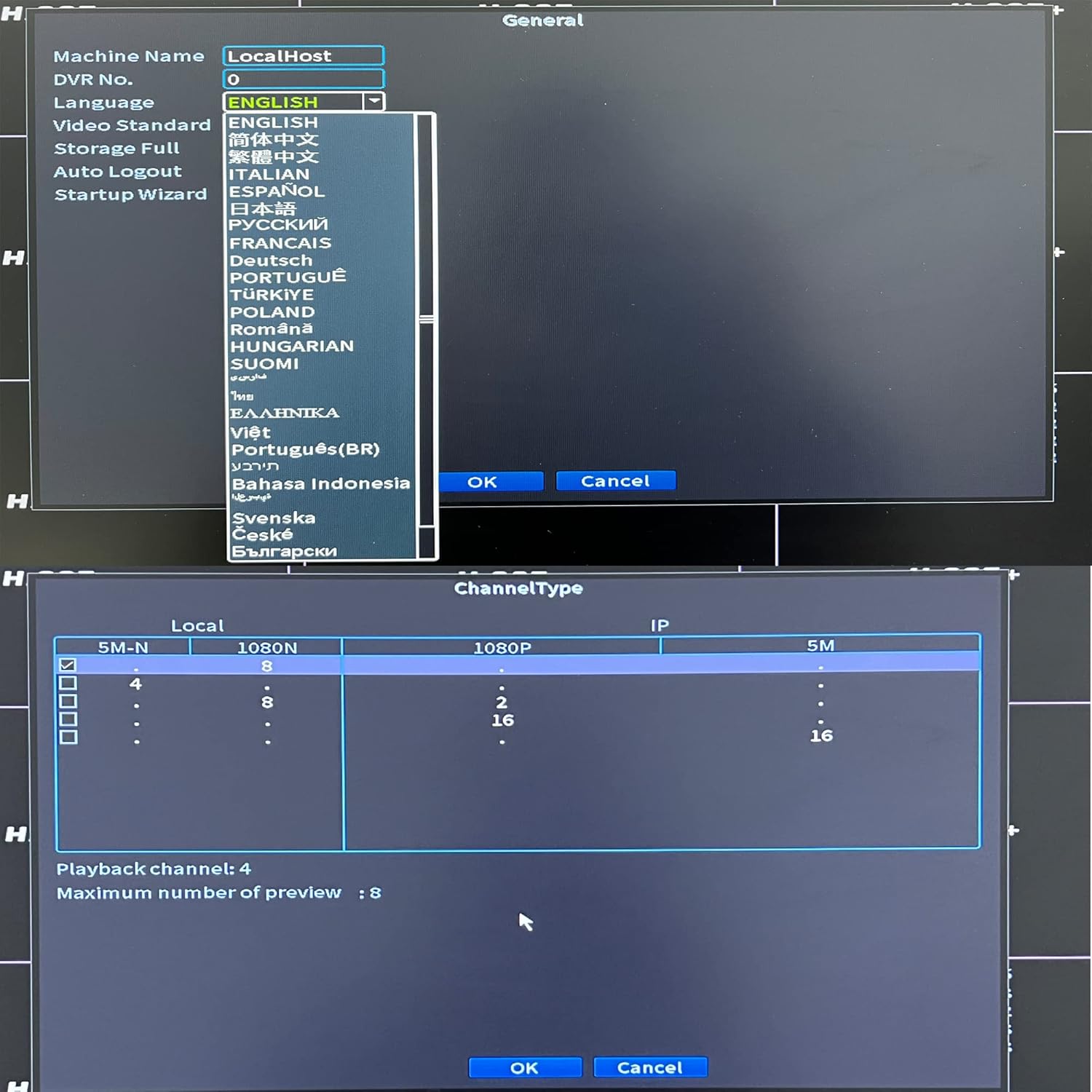
- Follow the on-screen prompts to set the language, date/time, and network settings.
- If a new hard drive is installed, the system may prompt you to format it. Confirm to proceed.
- Configure the channel type to match your connected cameras (Analog, AHD, TVI, CVI, IP).

આકૃતિ 5.2: Language and Channel Type Configuration Interface.
નોંધ: To enable IP cameras (NVR mode), you may need to select a hybrid channel type that supports IP inputs. Refer to the on-screen options for specific configurations like "IP" or "Hybrid" modes.
6. ઓપરેટિંગ સૂચનાઓ
૬.૧ યુઝર ઇન્ટરફેસ નેવિગેશન
Use the connected USB mouse to navigate the DVR's graphical user interface (GUI).

આકૃતિ 6.1: Main Menu Interface.
- જમણું-ક્લિક કરો: Access the main menu or return to the previous screen.
- ડાબું-ક્લિક કરો: Select options or confirm actions.
- મુખ્ય મેનુ: Provides access to system settings, recording, playback, network, and advanced features.
6.2 જીવંત View
After successful camera connection, the live view will display video feeds from all active channels. You can switch between single-channel view and multi-channel grid views.
૧૦.૬.૧ રેકોર્ડિંગ રૂપરેખાંકન
Access "Record Conf" from the main menu to set up recording schedules and motion detection.

આકૃતિ 6.2: System Menu Interface.
- શેડ્યૂલ રેકોર્ડિંગ: Set continuous recording or specific time periods for each channel.
- ગતિ શોધ: Enable motion-triggered recording for selected channels. Configure sensitivity and detection areas. This feature can significantly extend recording times.
- અલાર્મ: Configure alarm actions such as email notifications or mobile push alerts upon motion detection.
6.4 પ્લેબેક
Select "PlayBack" from the main menu to review રેકોર્ડેડ footage.
- Choose the date and time range for playback.
- Select the desired channels to view.
- foo દ્વારા નેવિગેટ કરવા માટે પ્લેબેક નિયંત્રણો (પ્લે, પોઝ, ફાસ્ટ ફોરવર્ડ, રીવાઇન્ડ) નો ઉપયોગ કરો.tage.
6.5 Remote Access (Xmeye App)
The Xmeye app allows live viewing and playback on smartphone devices via Wi-Fi, 2G, 3G, or 4G networks.
- Download the "Xmeye" app from your smartphone's app store.
- Register an account or log in.
- Add your DVR device by scanning the QR code (usually found in the DVR's network settings) or manually entering the device ID.
- Ensure your DVR is connected to the internet via the Ethernet port.
6.6 બેકઅપ
To back up video footage, connect a USB flash drive to one of the DVR's USB ports. Navigate to the "Backup" option in the main menu to select footage and initiate the transfer.
7. જાળવણી
- હાર્ડ ડ્રાઈવ મેનેજમેન્ટ: Regularly check the hard drive status in the system settings. Format the hard drive periodically if needed, ensuring important footage is backed up first.
- સફાઈ: Keep the DVR unit clean and free from dust. Use a soft, dry cloth. Do not use liquid cleaners.
- ફર્મવેર અપડેટ્સ: Periodically check the XENOCAM official website for available firmware updates. Follow the provided instructions carefully for any updates.
8. મુશ્કેલીનિવારણ
| સમસ્યા | સંભવિત કારણ | ઉકેલ |
|---|---|---|
| મોનિટર પર કોઈ વિડિઓ ડિસ્પ્લે નથી. | Loose video cable, incorrect monitor input, DVR not powered on. | HDMI/VGA કેબલ કનેક્શન તપાસો. ખાતરી કરો કે મોનિટર યોગ્ય ઇનપુટ પર છે. DVR પાવર ચકાસો. |
| કેમેરાની કોઈ છબી નથી. | Camera power issue, faulty cable, incorrect channel type setting. | Check camera power supply. Inspect BNC cables. Verify DVR channel type matches camera type. |
| DVR રિમોટલી ઍક્સેસ કરી શકાતું નથી. | No network connection, incorrect app settings, firewall issues. | Ensure DVR is connected to router. Check network settings on DVR and app. Verify router firewall settings. |
| DVR રેકોર્ડિંગ નથી કરી રહ્યું. | No hard drive, hard drive full/faulty, recording schedule not set. | Install/check HDD. Format HDD if necessary (backup data first). Configure recording schedule. |
9. સ્પષ્ટીકરણો
- મોડલ: A6708NH
- વિડિઓ ઇનપુટ: 8 Channels (Analog, AHD, HD-TVI, CVI, 1080P NVR)
- વિડિઓ રિઝોલ્યુશન: 1080N (1080P Lite), 960H, 720P, 1080P (IP)
- વિડિઓ આઉટપુટ: એચડીએમઆઇ, વીજીએ
- ઓડિયો ઇનપુટ/આઉટપુટ: આરસીએ
- Hard Disk Support: ૬ ટીબી સુધી (એચડીડી શામેલ નથી)
- કનેક્ટિવિટી: Ethernet (RJ45), USB, Wi-Fi (via USB Wi-Fi adapter, if supported)
- રીમોટ એક્સેસ: Xmeye App (iOS/Android)
- પાવર સપ્લાય: ડીસી 12 વી
- ઉત્પાદન પરિમાણો: ૭૭.૧૭"L x ૭૭.૧૭"W x ૨૫.૯૮"H (૧૯૬ સેમી x ૧૯૬ સેમી x ૬૬ સેમી)
- વસ્તુનું વજન: 2.53 પાઉન્ડ (1.15 કિગ્રા)
10. વોરંટી અને સપોર્ટ
XENOCAM products typically come with a limited warranty. For specific warranty terms, technical support, or service inquiries, please refer to the warranty card included with your product or visit the official XENOCAM webસાઇટ. ખરીદીના પુરાવા તરીકે તમારી ખરીદી રસીદ રાખો.
For further assistance, you may contact XENOCAM customer support through their official channels.
Ask a question about this manual
Ask about setup, troubleshooting, compatibility, parts, safety, or missing instructions. Manuals+ will review the question and use this page’s manual context to help answer it.