
1. પરિચય
The JDIAG JD101 is a universal On-Board Diagnostics II (OBD2) car code reader designed to diagnose engine-related issues in vehicles. It provides essential information such as Diagnostic Trouble Codes (DTCs), live data streams, and vehicle information, helping users identify and resolve common car problems. This device also includes a battery test function to assess the vehicle's battery status. It is compatible with most OBDII compliant vehicles manufactured in the USA (1996 and newer), Europe (EOBD, 2000 and newer), and Asia (2000 and newer), as well as newer OBDII and CAN protocol vehicles.

આકૃતિ 1.1: The JDIAG JD101 scanner helps identify various vehicle issues.
2. પેકેજ સામગ્રી
પેકેજ ખોલતી વખતે, કૃપા કરીને ખાતરી કરો કે બધી વસ્તુઓ હાજર છે અને સારી સ્થિતિમાં છે:
- 1 x JDIAG JD101 OBD2 Scanner Unit
- ૧ x બહુભાષી વપરાશકર્તા માર્ગદર્શિકા

આકૃતિ 2.1: Contents of the JDIAG JD101 package.
3. ઉત્પાદન ઓવરview
The JDIAG JD101 features a compact design with a 2.4-inch LCD display and a user-friendly 4-button keypad for navigation. It connects directly to your vehicle's OBD2 port for power and data transfer.

આકૃતિ 3.1: JDIAG JD101 Product Components.
મુખ્ય લક્ષણો:
- સાર્વત્રિક સુસંગતતા: Supports most US OBDII (1996+), European EOBD (2000+), Asian (2000+) vehicles, and newer OBDII/CAN protocols.
- One-Click I/M Readiness: Quickly checks emission system status.
- DTC Retrieval: Reads generic (P0, P2, P3, U0) and manufacturer-specific (P1, P3, U1) codes, including pending, stored, and permanent codes.
- MIL Control: Determines the reason for the Malfunction Indicator Lamp (MIL) illumination and allows for its deactivation.
- પ્રદર્શન: 2.4-inch LCD with DTC definitions directly on screen.
- ડેટા ડિસ્પ્લે: Shows freeze frame data and live data streams (over 130 PIDs).
- DTC લુકઅપ: Built-in DTC library for quick reference.
- વાહનની માહિતી: Retrieves Vehicle Identification Number (VIN), Calibration ID (CIN), and Calibration Verification Number (CVN).
- બેટરી ટેસ્ટ કાર્ય: Assesses the vehicle's battery status.
- બહુભાષી આધાર: English, Spanish, French, Russian, German, Italian, etc.
- ફર્મવેર અપડેટ્સ: Free online firmware updates via USB cable.

આકૃતિ 3.2: કી એડવાનtages of the JDIAG JD101 scanner.
4. સેટઅપ અને કનેક્શન
The JDIAG JD101 does not require batteries. It is powered directly by your vehicle's OBD2 port.
- OBD2 પોર્ટ શોધો: The OBD2 port is typically located under the dashboard on the driver's side, often near the steering column. Refer to your vehicle's owner's manual if you cannot find it.
- ઇગ્નીશન બંધ કરો: Ensure your vehicle's ignition is in the OFF position before connecting the scanner.
- સ્કેનર કનેક્ટ કરો: Plug the OBD2 connector of the JD101 scanner firmly into your vehicle's OBD2 port.
- ઇગ્નીશન ચાલુ કરો: Turn the vehicle's ignition to the ON position (do not start the engine unless instructed by a specific test procedure). The scanner will automatically power on and display the main menu.
5. ઓપરેટિંગ સૂચનાઓ
નો ઉપયોગ કરો Up અને નીચે buttons to navigate through menu options, the દાખલ કરો button to select an option, and the બહાર નીકળો button to return to the previous menu or exit a function.
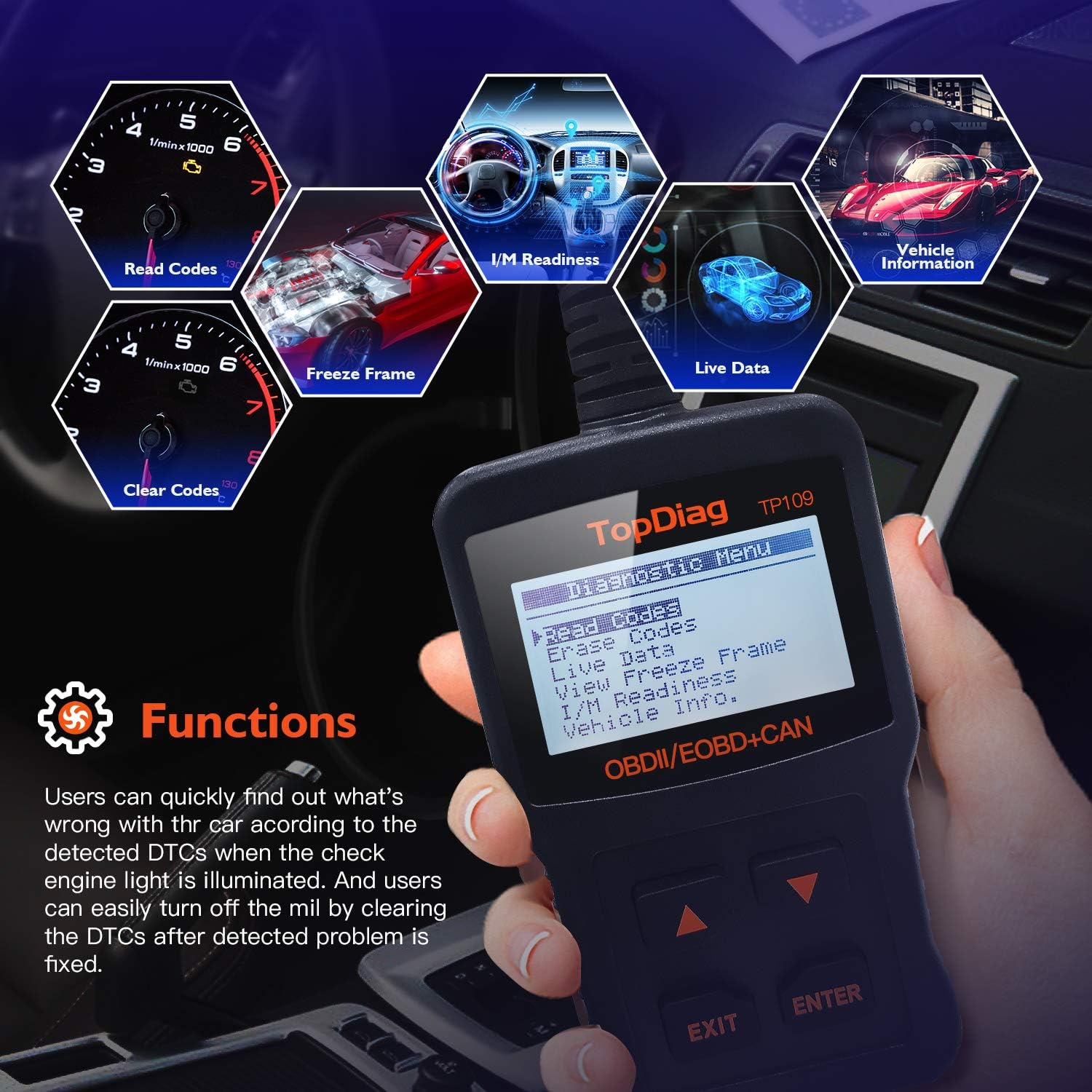
આકૃતિ 5.1: Main functions of the JDIAG JD101 scanner.
5.1. કોડ્સ વાંચો
This function retrieves Diagnostic Trouble Codes (DTCs) from the vehicle's computer. These codes indicate specific issues detected by the vehicle's self-diagnostic system.
- મુખ્ય મેનુમાંથી, પસંદ કરો કોડ્સ વાંચો અને દબાવો દાખલ કરો.
- The scanner will display any detected DTCs, along with their definitions on the 2.4-inch LCD.
- નો ઉપયોગ કરો Up અને નીચે buttons to scroll through multiple codes if present.
5.2. કોડ્સ ભૂંસી નાખો
This function clears all Diagnostic Trouble Codes (DTCs) from the vehicle's computer and turns off the Malfunction Indicator Lamp (MIL). Ensure the underlying issue has been resolved before clearing codes.
- મુખ્ય મેનુમાંથી, પસંદ કરો કોડ્સ ભૂંસી નાખો અને દબાવો દાખલ કરો.
- પૂછવામાં આવે ત્યારે તમારી પસંદગીની પુષ્ટિ કરો.
- The scanner will clear the codes and turn off the MIL.
૩.૨. લાઈવ ડેટા સ્ટ્રીમ
This function displays real-time operational parameters from the vehicle's sensors and components, such as engine RPM, vehicle speed, oxygen sensor readings, and more. The JD101 supports over 130 PIDs (Parameter IDs).
- મુખ્ય મેનુમાંથી, પસંદ કરો લાઇવ ડેટા અને દબાવો દાખલ કરો.
- The scanner will display a list of available PIDs. Select the desired parameters to view.
- The data will be displayed in real-time. Use the Up અને નીચે buttons to scroll through the data.
5.4. I/M તૈયારી
I/M Readiness (Inspection/Maintenance Readiness) indicates whether the various emissions-related systems on the vehicle are operating correctly and have completed their diagnostic tests. This is useful for emissions testing.
- મુખ્ય મેનુમાંથી, પસંદ કરો I/M તૈયારી અને દબાવો દાખલ કરો.
- The scanner will display the status of various monitors (e.g., Catalyst Monitor, O2 Sensor Monitor). A 'PASS' or 'OK' status indicates the monitor has completed its test.
૩.૬. ફ્રેમ ડેટા ફ્રીઝ કરો
When an emission-related fault occurs, the vehicle's computer stores a snapshot of operating conditions at the moment the fault was detected. This is called Freeze Frame Data and can help in diagnosing intermittent problems.
- મુખ્ય મેનુમાંથી, પસંદ કરો View ફ્રીઝ ફ્રેમ અને દબાવો દાખલ કરો.
- The scanner will display the recorded parameters.
5.6. Vehicle Information (VIN, CIN, CVN)
This function allows you to retrieve important vehicle identification information.
- VIN (Vehicle Identification Number): A unique 17-character code for the vehicle.
- CIN (Calibration Identification Number): Identifies the software version of the vehicle's Engine Control Unit (ECU).
- CVN (Calibration Verification Number): A checksum value used to verify the integrity of the ECU software.
- મુખ્ય મેનુમાંથી, પસંદ કરો વાહન માહિતી અને દબાવો દાખલ કરો.
- સ્કેનર ઉપલબ્ધ વાહન માહિતી પ્રદર્શિત કરશે.

આકૃતિ 5.2: Retrieving vehicle identification information.
5.7. બેટરી ટેસ્ટ ફંક્શન
The JD101 includes a function to determine the vehicle's battery status, providing a quick assessment of its health.
- મુખ્ય મેનુમાંથી, પસંદ કરો બેટરી ટેસ્ટ (or similar option) and press દાખલ કરો.
- Follow the on-screen prompts to perform the test. The scanner will display the battery voltage અને સ્થિતિ.
6. જાળવણી
6.1. ફર્મવેર અપડેટ
The JDIAG JD101 supports free online firmware updates to ensure compatibility with newer vehicles and to add new features. This process requires a computer running Windows and a Mini USB cable (not included).
- સૉફ્ટવેર ડાઉનલોડ કરો: Visit the official JDiag webસાઇટ (www.jdiag.com) and navigate to the 'Downloads' section. Download the latest firmware update tool (e.g., 'JD setup toolkit') and the firmware file for the JD101.
- ડ્રાઇવર ઇન્સ્ટોલ કરો: Install the provided USB driver (e.g., STMicroelectronics driver) on your Windows PC.
- કનેક્ટ સ્કેનર: Connect the JD101 scanner to your PC using a Mini USB cable.
- Run Update Tool: Launch the appropriate upgrade tool (e.g., 'JD Series upgrade tool', નથી 'Elite II upgrade tool').
- પ્રોમ્પ્ટ્સને અનુસરો: Follow the on-screen instructions to select the firmware file and initiate the update process. The update may take several minutes. Do not disconnect the device during this time.
- ચકાસણી: Once complete, the tool will display a success message, including the new firmware version and device serial number.
નોંધ: The update software is compatible with Windows operating systems, including Windows XP as specified in product details. Ensure your PC meets the minimum system requirements for the update tool.
7. મુશ્કેલીનિવારણ
- ઉપકરણ ચાલુ થતું નથી: Ensure the scanner is correctly plugged into the vehicle's OBD2 port and the vehicle's ignition is in the ON position. The device draws power directly from the OBD2 port.
- વાહન સાથે કોઈ વાતચીત નહીં: Verify that your vehicle is OBDII compliant (most US vehicles 1996+, European EOBD 2000+, Asian 2000+). Check the connection to the OBD2 port. If issues persist, try the scanner on another compatible vehicle to rule out a vehicle-specific problem.
- Scanner Not Working Properly: If the device exhibits unexpected behavior, try performing a firmware update as described in Section 6.1. If the problem persists, contact JDIAG technical support.
- Cannot Read ABS/Airbag Codes: The JDIAG JD101 is designed to work exclusively with engine-related codes (OBDII/EOBD). It does not support diagnostic functions for ABS (Anti-lock Braking System) or Airbag systems.
8. સ્પષ્ટીકરણો
| લક્ષણ | સ્પષ્ટીકરણ |
|---|---|
| બ્રાન્ડ | જેડીઆઈએજી |
| મોડલ નંબર | JD101 (also referred to as 'code reader') |
| પાવર સ્ત્રોત | Vehicle OBD2 Port Powered (No internal batteries required for operation) |
| સ્ક્રીન માપ | 2.4 ઇંચ |
| સપોર્ટેડ પ્રોટોકોલ્સ | SAE J1850 PWM, SAE J1850 VPW, ISO 9141-2, ISO 14230-4 KWP, ISO 15765-4 CAN |
| Operating System (for updates) | Windows XP and newer (for firmware update software) |
| વસ્તુનું વજન | 220 ગ્રામ |
| ઉત્પાદક | JDiag Electronics Technology Co.,Ltd |
| યુપીસી | 780614143477, 791280490895 |
9. વોરંટી અને સપોર્ટ
The JDIAG JD101 OBD2 scanner comes with a બે વર્ષની વોરંટી ખરીદીની તારીખથી, સામાન્ય ઉપયોગ હેઠળ ઉત્પાદન ખામીઓ અને ખામીઓને આવરી લે છે.
For technical assistance, troubleshooting, or warranty claims, please contact JDIAG customer support or visit the official JDIAG website for further resources and contact information:
સત્તાવાર Webસાઇટ: www.jdiag.com