
1. પરિચય
The Transcend DrivePro 550 is a dual-lens dash camera designed to provide comprehensive recording of both the road ahead and the vehicle's interior. Equipped with a front lens featuring a Sony image sensor and a rear lens with infrared LEDs, it ensures clear video capture in various lighting conditions. This manual provides detailed instructions for setting up, operating, and maintaining your DrivePro 550 dash camera.
2. પેકેજ સામગ્રી
ખાતરી કરો કે નીચે સૂચિબદ્ધ બધી વસ્તુઓ તમારા પેકેજમાં શામેલ છે:
- Transcend DrivePro 550 Dash Camera Unit
- microSD Memory Card (64GB)
- Car Mount (Suction Mount)
- Car Lighter Power Adapter
- Hardwire Power Cable

Image: Retail box of the Transcend DrivePro 550 Dash Camera, showing included accessories.
3. ઉત્પાદન ઓવરview
Familiarize yourself with the components of your DrivePro 550 dash camera.
3.1 મોરચો View

છબી: આગળ view of the DrivePro 550, showing the main screen displaying live dual-channel recording.
- ફ્રન્ટ લેન્સ: Records the road ahead. Features a Sony image sensor for high-quality video.
- પાછળના લેન્સ: Records the vehicle's interior. Equipped with four infrared LEDs for enhanced night vision.
- 2.4-ઇંચ એલસીડી સ્ક્રીન: લાઇવ ડિસ્પ્લે view, recorded footage, and menu options.
- નિયંત્રણ બટનો: For navigation and selection within the menu.
3.2 બાજુ View અને બંદરો

છબી: બાજુ view of the DrivePro 550, highlighting the power input and microSD card slot.
- પોર્ટમાં ડીસી: પાવર એડેપ્ટરને કનેક્ટ કરવા માટે.
- માઇક્રોએસડી કાર્ડ સ્લોટ: મેમરી કાર્ડ દાખલ કરવા માટે.
3.3 પરિમાણો
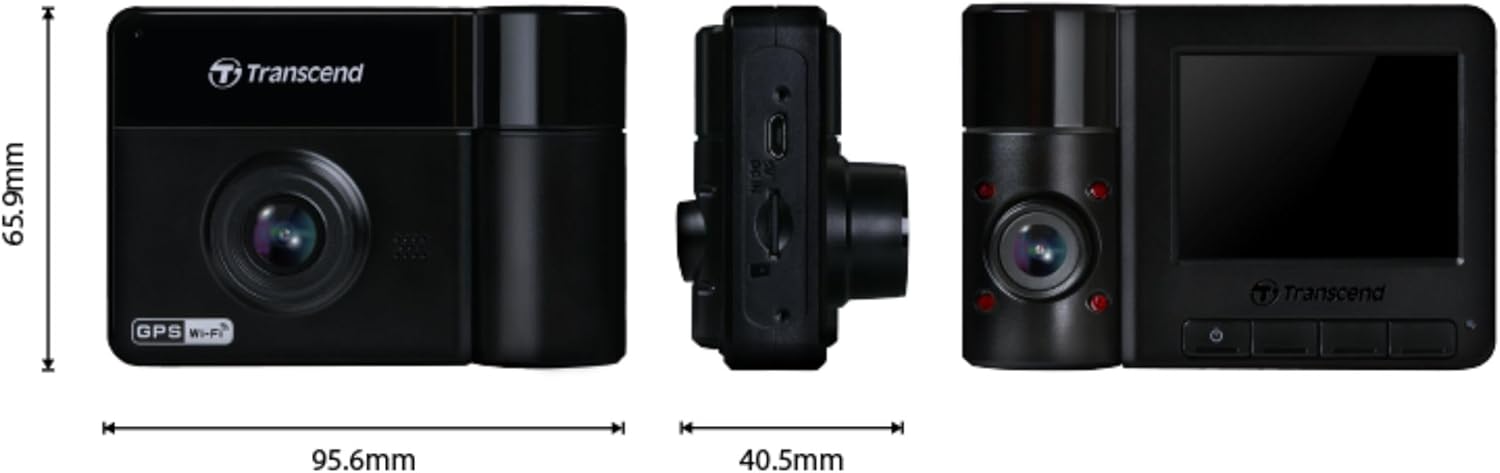
Image: Technical drawing showing the dimensions of the DrivePro 550 unit.
4. સ્થાપન
Follow these steps to properly install your DrivePro 550 in your vehicle.
૪.૨ ડેશ કેમેરા માઉન્ટ કરવો
- તમારા વિન્ડશિલ્ડ પર એવું સ્થાન પસંદ કરો જે તમારા વાહનને અવરોધે નહીં view of the road. The area behind the rearview mirror is often ideal.
- Clean the chosen area on the windshield thoroughly to ensure a strong suction.
- Attach the suction cup mount to the windshield and secure it by flipping the lever.
- Slide the DrivePro 550 onto the mount until it clicks into place. Adjust the camera angle to ensure both front and interior lenses have a clear view.

Image: The DrivePro 550 dash camera securely mounted on a car windshield.
૨.૧ માઇક્રોએસડી કાર્ડ દાખલ કરવું
- ખાતરી કરો કે ડેશ કેમેરા બંધ છે.
- ઉપકરણની બાજુમાં માઇક્રોએસડી કાર્ડ સ્લોટ શોધો.
- Insert the provided 64GB microSD card into the slot with the gold contacts facing the back of the camera until it clicks into place.
4.3 કનેક્ટિંગ પાવર
- Connect the car lighter power adapter or the hardwire power cable to the DC IN port on the dash camera.
- Plug the other end of the power adapter into your vehicle's 12V power outlet (cigarette lighter socket). If using the hardwire cable, follow professional installation guidelines.
- Route the power cable neatly along the windshield and dashboard to avoid obstructing your view or interfering with driving controls.
5. મૂળભૂત કામગીરી
5.1 પાવરિંગ ચાલુ/બંધ
- The DrivePro 550 will automatically power on and begin recording when your vehicle's engine starts and power is supplied.
- To manually power on/off, press and hold the power button.
૩.૨ રેકોર્ડિંગ મોડ્સ
- સતત રેકોર્ડિંગ: The camera records continuously in a loop. When the memory card is full, the oldest files ઓવરરાઈટ છે.
- ઇમરજન્સી રેકોર્ડિંગ: Activated automatically by the built-in G-sensor upon detecting an impact or sudden movement. These files are protected from being overwritten. You can also manually trigger emergency recording by pressing the designated button.

Image: Split-screen view showing simultaneous recording from the front and interior lenses.
5.3 Taking Snapshots
During recording, press the snapshot button to capture a still image of the current view. This can be useful for documenting incidents or scenic views.
6. અદ્યતન સુવિધાઓ
6.1 Wi-Fi Connectivity and DrivePro App
The DrivePro 550 features built-in Wi-Fi, allowing you to connect it to your smartphone or tablet via the Transcend DrivePro App. The app enables:
- રીઅલ-ટાઇમ લાઇવ view બંને કેમેરા ફીડ્સ.
- રેકોર્ડ કરેલા વીડિયોનું પ્લેબેક.
- વિડિઓ ડાઉનલોડ કરી રહ્યાં છીએ files directly to your mobile device.
- Adjusting camera settings.
Download the DrivePro App from the App Store (iOS) or Google Play Store (Android).

Image: Smartphone screen showing the Transcend DrivePro App interface, connected to the dash camera.
૫.૩ ઉન્નત નાઇટ વિઝન
The DrivePro 550 is designed for superior low-light performance:
- The front lens utilizes a Sony image sensor to capture high-resolution images with rich color, even in low light. It supports 1440P 2K QHD recording at 30fps for smooth and crisp footage.
- The rear lens is equipped with four infrared LEDs, significantly improving recording quality in dark interior environments.

Image: Visual comparison of video quality captured by the DrivePro 550 during daytime and nighttime conditions.
6.3 પાર્કિંગ મોડ
When enabled, Parking Mode activates recording when motion is detected, even when your vehicle is parked and the engine is off. This feature requires a continuous power supply to the dash camera (e.g., via the hardwire power cable).
6.4 Time-Lapse Recording
Time-lapse recording allows you to condense hours of footage into a shorter video, providing continuous surveillance without consuming excessive storage space.
6.5 Driver Assistance Systems (ADAS)
The DrivePro 550 includes several ADAS features to enhance driving safety:
- Head-up Display: Shows current speed and driver safety alerts.
- લેન ડિપાર્ચર વોર્નિંગ સિસ્ટમ (LDWS): જો તમારું વાહન તેની લેનમાંથી બહાર નીકળી જાય તો તમને ચેતવણી આપે છે.
- ફોરવર્ડ કોલિઝન વોર્નિંગ સિસ્ટમ (FCWS): Warns you if you are getting too close to the vehicle ahead.
- સ્પીડ એલાર્મ: Notifies you if your vehicle's speed exceeds a preset limit.
- Headlight Reminder: Automatically activates when the DrivePro detects poor lighting conditions.
- ડ્રાઈવર થાક ચેતવણી: Reminds the driver to rest after driving for a set period.
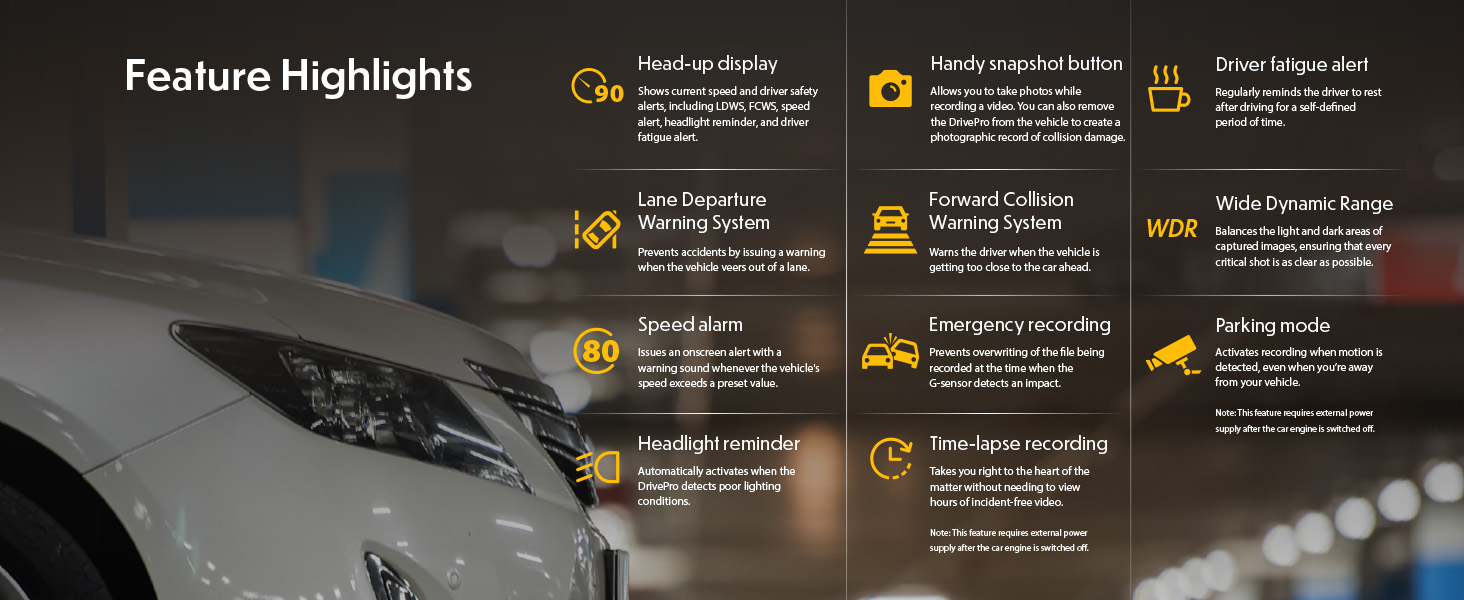
Image: Graphic illustrating the various feature highlights and ADAS functions of the DrivePro 550.
7. જાળવણી
7.1 Formatting the microSD Card
Regularly format the microSD card to ensure optimal performance and prevent data corruption. This can typically be done through the camera's menu settings. Formatting will erase all data on the card, so back up any important fileપ્રથમ.
૪.૧ કેમેરા સાફ કરવો
Use a soft, dry cloth to clean the camera body and screen. For lenses, use a specialized lens cleaning cloth and solution to avoid scratches. Do not use harsh chemicals or abrasive materials.
8. મુશ્કેલીનિવારણ
If you encounter issues with your DrivePro 550, refer to the following common problems and solutions:
- કેમેરા ચાલુ થતો નથી:
- Ensure the power cable is securely connected to both the camera and the vehicle's power outlet.
- Check if the vehicle's 12V power outlet is functioning.
- Camera is not recording:
- Verify that a microSD card is inserted correctly.
- Check if the microSD card is full; format it if necessary (after backing up important files).
- Ensure the recording function is enabled in the camera settings.
- નબળી વિડિઓ ગુણવત્તા:
- કેમેરાના લેન્સ સાફ કરો.
- Ensure the windshield area in front of the camera is clean.
- Check video resolution settings; ensure it's set to the desired quality (e.g., 1440P 2K QHD for front lens).
- Wi-Fi કનેક્શન સમસ્યાઓ:
- Ensure Wi-Fi is enabled on the camera and your mobile device.
- કેમેરા અને તમારા મોબાઇલ ઉપકરણ બંનેને ફરીથી શરૂ કરો.
- Ensure you are within range of the camera's Wi-Fi signal.
9. સ્પષ્ટીકરણો
| લક્ષણ | વર્ણન |
|---|---|
| બ્રાન્ડ | પાર |
| મોડેલનું નામ | ડ્રાઇવપ્રો 550 |
| મોડલ નંબર | TS-DP550A-64G |
| વાહન સેવાનો પ્રકાર | કાર |
| કનેક્ટિવિટી ટેકનોલોજી | ઇન્ફ્રારેડ, વાઇ-ફાઇ |
| વિડિઓ કેપ્ચર રિઝોલ્યુશન | Front: 1440P 2K QHD (30fps), Rear: 1080p (30fps) |
| સમાવાયેલ ઘટકો | Dash Camera, 64GB microSD Card, Car Mount, Car Lighter Adapter, Hardwire Power Cable |
| માઉન્ટિંગ પ્રકાર | Surface Mount (Suction Cup) |
| રંગ | કાળો |
| ક્ષેત્ર View | Front: 150 Degrees, Rear: 140 Degrees |
| સ્ક્રીન માપ | 2.4 ઇંચ |
| ઓપ્ટિકલ સેન્સર ટેકનોલોજી | Sony (Front Lens) |
| ફ્લેશ મેમરી પ્રકાર | માઇક્રોએસડી |
| વસ્તુનું વજન | 107 ગ્રામ |
| આઇટમના પરિમાણો (D x W x H) | ૧૨.૨" x ૧૪" x ૫૭.૨" |
10. વોરંટી અને સપોર્ટ
10.1 વોરંટી માહિતી
The Transcend DrivePro 550 Dash Camera comes with a 2 વર્ષની મર્યાદિત વોરંટી. Please retain your proof of purchase for warranty claims. For detailed terms and conditions, refer to the warranty card included in your package or visit the official Transcend webસાઇટ
10.2 ગ્રાહક સપોર્ટ
For further assistance, technical support, or to download the latest firmware updates and user manuals, please visit the official Transcend website or contact their customer service department. Contact information can typically be found on the Transcend webસાઇટ પર અથવા તમારા ઉત્પાદન પેકેજિંગમાં.