
1. ઉત્પાદન ઓવરview
The Waleaf GT 55-inch Gaming Desk is designed for an optimized gaming and computing experience. It features a spacious carbon fiber desktop, a sturdy T-shaped alloy steel frame, and integrated accessories for convenience and organization.

Image: The Waleaf GT 55-inch Gaming Desk showcasing a complete gaming setup with monitor, keyboard, mouse, and accessories.
Key features include a full-desk mouse pad surface, a gaming handle rack, a cup holder, and a headphone hook, all designed to enhance functionality and maintain a tidy workspace.
2. સલામતી માહિતી
- Always assemble and anchor the desk properly to prevent tipping.
- મહત્તમ વજન ભલામણ કરેલ ૨૨૦ પાઉન્ડ (૧૦૦ કિગ્રા) થી વધુ ન રાખો.
- ઉપયોગ કરતા પહેલા ખાતરી કરો કે બધા સ્ક્રૂ અને ફાસ્ટનર્સ સુરક્ષિત રીતે કડક છે.
- એસેમ્બલી દરમિયાન નાના ભાગોને બાળકોથી દૂર રાખો.
3. એસેમ્બલી અને સેટઅપ
Partial assembly is required for this desk. While assembly tools are not included, the design facilitates a straightforward setup process. It is recommended to carefully review all instructions before beginning assembly.

Image: Detailed dimensions of the Waleaf GT 55-inch Gaming Desk, including desktop size, height, and accessory measurements.
3.1 ઘટકો
શરૂ કરતા પહેલા, ખાતરી કરો કે બધા ઘટકો હાજર છે:
- Desktop sections
- T-shaped leg frames
- Adjustable stable feet
- Gaming handle rack
- કપ ધારક
- હેડફોન હૂક
- કેબલ મેનેજમેન્ટ ટ્રે
- ફાસ્ટનર્સ અને કનેક્ટર્સ
3.2 એસેમ્બલી પગલાં
- Attach the T-shaped leg frames to the desktop sections using the provided fasteners. Ensure the legs are oriented correctly for stability.
- Secure the adjustable stable feet to the bottom of the leg frames. These feet help level the desk on uneven surfaces.
- Install the gaming handle rack, cup holder, and headphone hook in your desired locations on the desk. These accessories are designed for easy attachment.
- Mount the cable management tray to the underside of the desk to organize power strips and cables.
- Once assembled, gently place the full-desk mouse pad on the desktop.
વિડિઓ: એક ઓવરview of the Waleaf Gaming Desk features, including its solid metal frame, easy assembly, carbon fiber desktop, full desk mouse pad, T-shaped legs, cable management tray, cup holder, and headphone hanger.
4. ઓપરેટિંગ સુવિધાઓ
The Waleaf GT Gaming Desk is equipped with several features to enhance your gaming and work environment.
4.1 Full-Desk Mouse Pad
The desk comes with a large, waterproof mouse pad that covers the entire desktop surface, providing ample space for mouse movement and protecting the desk surface. The carbon fiber desktop itself is corrosion resistant.

છબી: ક્લોઝ-અપ view highlighting the waterproof material of the full-desk mouse pad and the texture of the carbon fiber desktop.
4.2 Gaming Handle Rack
Utilize the gaming handle rack to store your game controllers, headphones, or even your phone, keeping them organized and within easy reach.

Image: The gaming handle rack shown with several game controllers and a pair of headphones, demonstrating its storage capacity.
4.3 Cup Holder and Headphone Hook
The integrated cup holder provides a secure place for your beverage, reducing the risk of spills. The headphone hook keeps your headphones conveniently stored and off the desk surface.

Image: A close-up of the headphone hook and cup holder accessories, showing their attachment points on the desk.
4.4 કેબલ મેનેજમેન્ટ
The desk includes a cable management tray and double wire holes to help keep your cables organized and out of sight, contributing to a cleaner and safer workspace.
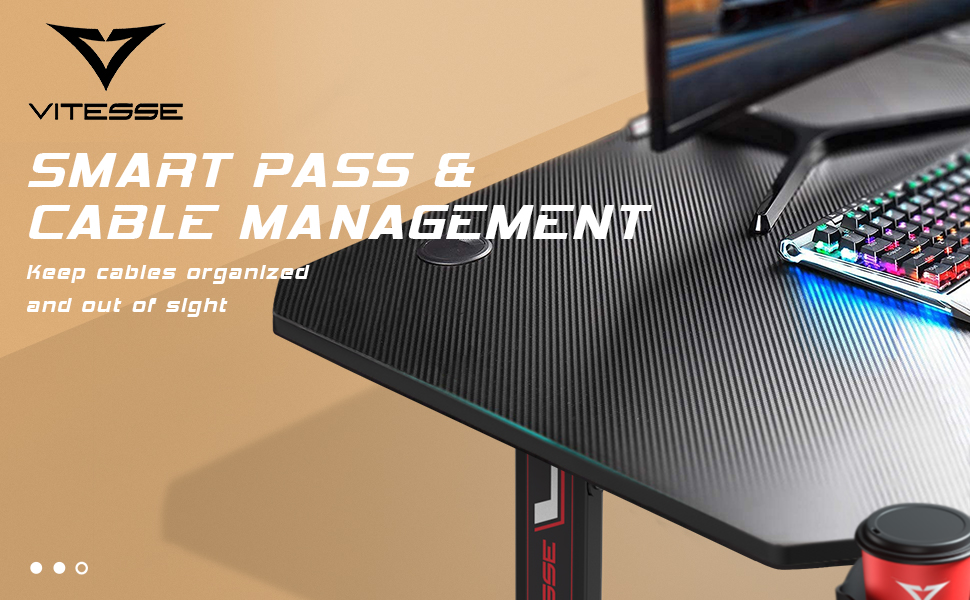
Image: Illustration of the cable management system, showing how wires can be routed through the desk's integrated holes and tray.
5. જાળવણી
To ensure the longevity and appearance of your Waleaf GT Gaming Desk, follow these maintenance guidelines:
- ડેસ્કટોપ સાફ કરવું: The carbon fiber desktop is corrosion resistant. Wipe the surface with a soft, damp કાપડ. ઘર્ષક ક્લીનર્સ અથવા કઠોર રસાયણો ટાળો જે પૂર્ણાહુતિને નુકસાન પહોંચાડી શકે છે.
- માઉસ પેડ સાફ કરવું: The full-desk mouse pad is waterproof. For spills, wipe immediately with a dry cloth. For general cleaning, use a mild soap solution and a soft cloth, then air dry.
- ફ્રેમ કેર: Periodically check all screws and connections to ensure they remain tight. Tighten any loose fasteners to maintain stability.
- વજન વિતરણ: Distribute weight evenly across the desktop. Avoid placing excessively heavy items on one side.
6. મુશ્કેલીનિવારણ
If you encounter any issues with your Waleaf GT Gaming Desk, consider the following common solutions:
- ડેસ્ક અસ્થિરતા/ધ્રુજારી:
- ખાતરી કરો કે બધા એસેમ્બલી સ્ક્રૂ સંપૂર્ણપણે કડક છે.
- Adjust the stable feet at the bottom of the legs to level the desk on uneven floors.
- એસેમ્બલી દરમિયાન મુશ્કેલી:
- Refer back to the assembly instructions and diagrams. Sometimes, a component may be oriented incorrectly.
- Do not force parts together. If a part does not fit, re-check the instructions and the part orientation.
- ક્ષતિગ્રસ્ત અથવા ખૂટતા ભાગો:
- If any parts are damaged or missing upon arrival, contact customer support immediately for assistance.
- Cup Holder Issues:
- Ensure the cup holder is securely attached. Avoid placing excessively heavy or oversized items in the cup holder to prevent damage.
7. સ્પષ્ટીકરણો
| લક્ષણ | વિગત |
|---|---|
| બ્રાન્ડ | વાલેફ |
| મોડલ નંબર | GT |
| ઉત્પાદનના પરિમાણો (D x W x H) | ૧૯.૩"ઊંડાઈ x ૧૬.૩"ઊંડાઈ x ૩૭"ઊંડાઈ (૪૯સેમીઊંડાઈ x ૪૧.૫સેમીઊંડાઈ x ૯૪સેમીઊંડાઈ) |
| વસ્તુનું વજન | 40 પાઉન્ડ (18.1 કિગ્રા) |
| મહત્તમ વજનની ભલામણ | 260 પાઉન્ડ (118 કિગ્રા) |
| રંગ | કાળો |
| શૈલી | ગેમિંગ |
| આધાર સામગ્રી | એલોય સ્ટીલ |
| ટોચની સામગ્રીનો પ્રકાર | Engineered Wood with Carbon Fiber Laminated Finish |
| ખાસ લક્ષણો | Cup holder, Full-desk mousepad surface, Gaming handle rack, Headphone hook, Cable management tray, Adjustable stable feet |
| એસેમ્બલી જરૂરી | Yes (Partial Assembly) |
| બધા એસેમ્બલી સાધનોનો સમાવેશ થાય છે | ના |
8. વોરંટી અને સપોર્ટ
8.1 વોરંટી માહિતી
The Waleaf GT Gaming Desk comes with a Limited Warranty, covering parts and labor for a period of 6 months from the date of purchase. This warranty covers manufacturing defects and material flaws under normal use.
8.2 ગ્રાહક સપોર્ટ
For any questions, concerns, or assistance with assembly, parts, or warranty claims, please contact Waleaf Customer Support. Refer to your purchase documentation for specific contact details.