
AUTOWIKI L: LX2592106; R: LX2593106
ઓટોવિકી ફોગ લાઇટ્સ એલampવપરાશકર્તા માર્ગદર્શિકા
Model: L: LX2592106; R: LX2593106 | Brand: AUTOWIKI
1. પરિચય

Figure 1: AUTOWIKI Fog Lights Lamps (Pair).
This manual provides detailed instructions for the installation, operation, and maintenance of your new AUTOWIKI Fog Lights Lamps. Designed as a direct OEM replacement, these fog lights enhance visibility and safety during adverse weather conditions.
1.1. સુસંગતતા
These fog lights are specifically designed for the following vehicle models:
- 2006-2010 Lexus IS250
- 2006-2010 Lexus IS350
The package includes a pair of fog lights: one for the left (driver side) and one for the right (passenger side).

Figure 2: Applicable Models - AUTOWIKI Fog Lights installed on a Lexus IS sedan, highlighting compatibility.
2. મુખ્ય લક્ષણો
- ✔Exact OEM Fit: Direct fitment for fog lights OEM lenses with no complex modifications.
- ✔Excellent Quality: Fully sealed, waterproof, dust, and corrosion resistant construction prevents moisture and dust from entering the housing, ensuring long-lasting performance.
- ✔તેજસ્વી રોશની: Includes one pair of 9006 12V 51W light bulbs (pre-installed) for enhanced visibility in foggy conditions.
- ✔સરળ સ્થાપન: ઝડપી અને સરળ સ્થાપન માટે રચાયેલ છે.
- ✔DOT/SAE Compliance: Thoroughly tested to meet federal and international standards, making the fog lamps fully street legal.
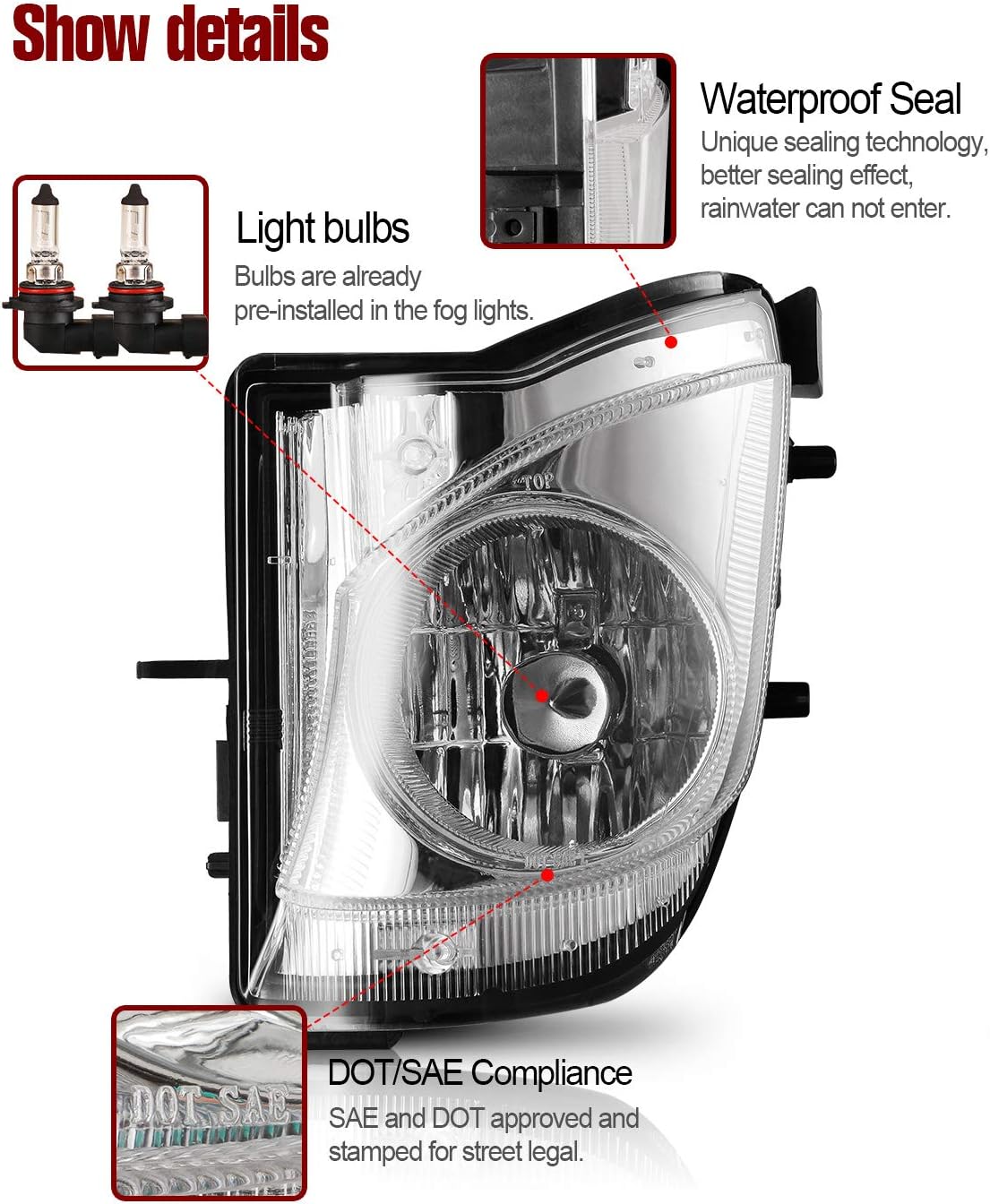
આકૃતિ 3: વિગતવાર view of the fog light highlighting pre-installed bulbs, waterproof sealing, and DOT/SAE compliance.
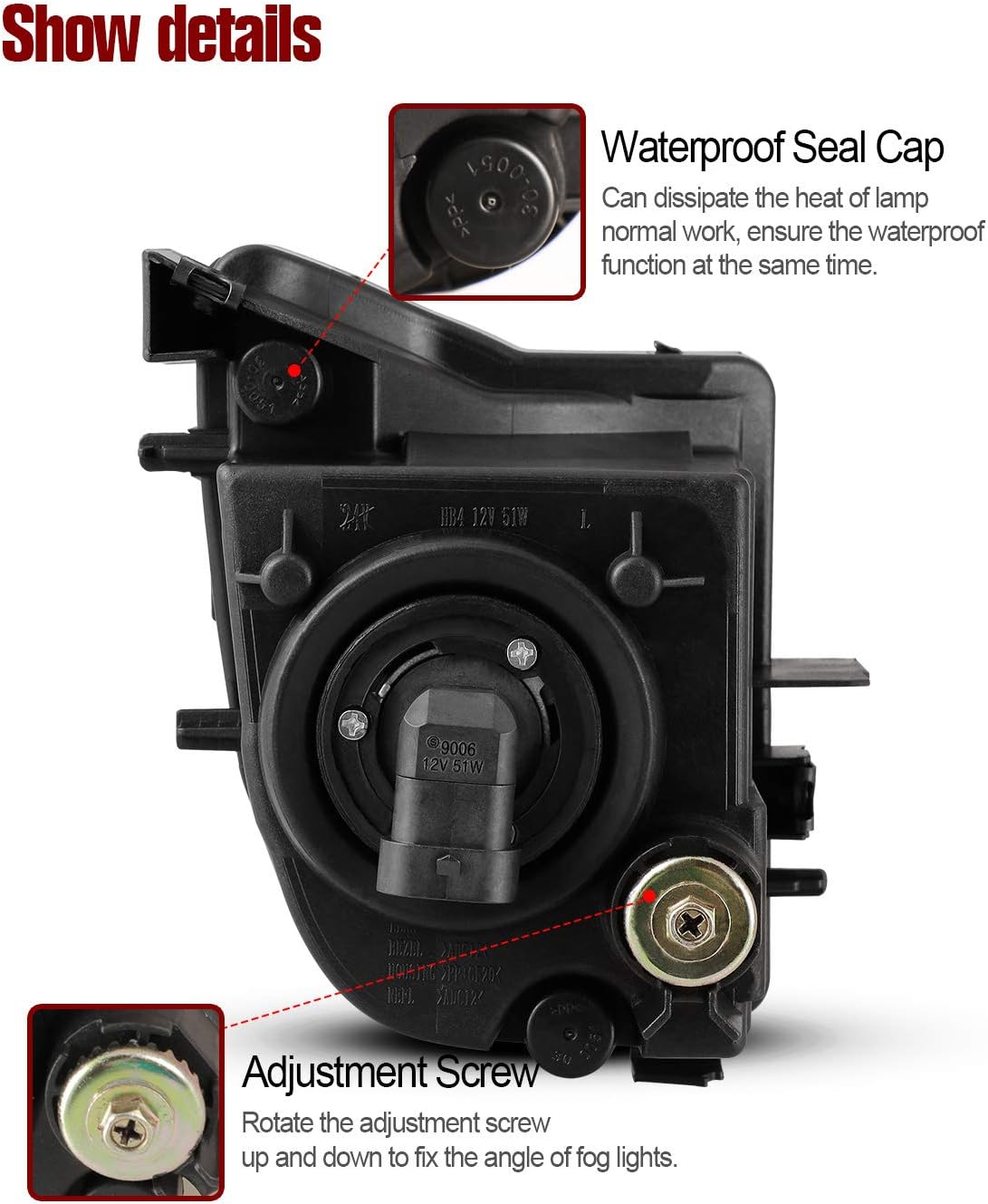
આકૃતિ 4: પાછળ view of the fog light, illustrating the waterproof seal cap and the adjustment screw for beam alignment.

Figure 5: The fog light's waterproof sealing, designed to prevent moisture and dust ingress.
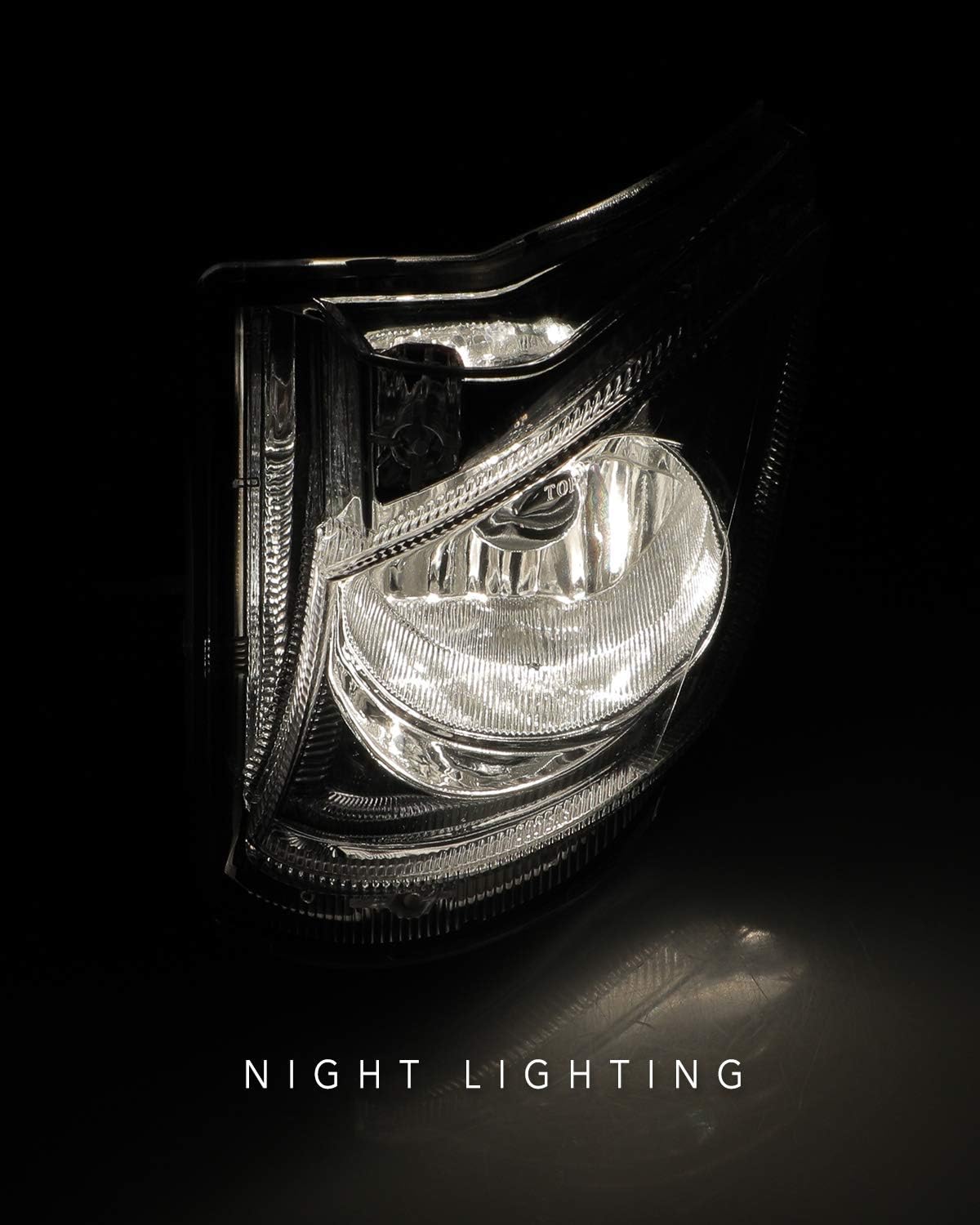
Figure 6: Night lighting performance of the AUTOWIKI Fog Light.
3. સ્થાપન માર્ગદર્શિકા
The AUTOWIKI Fog Lights are designed for easy installation. Please follow these steps carefully. It is recommended to have basic automotive knowledge or seek professional assistance if unsure.
3.1. જરૂરી સાધનો
- સ્ક્રુડ્રાઈવર (ફિલિપ્સ હેડ ભલામણ કરે છે)
- Gloves (optional, for handling)
3.2. સ્થાપન પગલાં
- Unpack and Prepare: Carefully unpack the fog lights assembly and gather the necessary tools. Ensure the vehicle's engine is off and cool before beginning.
- Remove Existing Fog Light (if applicable): Depending on your vehicle model, you may need to access the fog light housing from the front bumper or wheel well. Remove any screws or clips securing the old fog light. Disconnect the electrical connector.
- Install New Fog Light: Position the new AUTOWIKI fog light into the designated opening. Align the mounting points.
- સુરક્ષિત માઉન્ટિંગ સ્ક્રૂ: Use the provided screws (or original screws if compatible) to firmly secure the fog light in place. Tighten them with a screwdriver.
- ઇલેક્ટ્રિકલ વાયરિંગ કનેક્ટ કરો: Connect the fog light's electrical connector to the vehicle's wiring harness. Ensure a secure connection.
- પરીક્ષણ કાર્યક્ષમતા: Before reassembling any removed parts, turn on your vehicle's fog lights to ensure they illuminate correctly.
- બીમ ગોઠવો (જો જરૂરી હોય તો): If the fog light beam needs adjustment, locate the adjustment screw on the back of the fog light housing (refer to Figure 4). Rotate the screw with a screwdriver to adjust the light beam vertically.
- ફરીથી એસેમ્બલ કરો: Reinstall any bumper covers or other components that were removed during the installation process.
3.3. ઇન્સ્ટોલેશન વિડિઓ
Video 1: Official AUTOWIKI Fog Lights Installation Guide for 2006-2010 Lexus IS250/IS350. This video demonstrates the unpacking, mounting, and adjustment of the fog lights.
4. ઓપરેટિંગ સૂચનાઓ
Once installed, operating your AUTOWIKI Fog Lights is straightforward and typically controlled via your vehicle's existing light switch or stalk.
- Turn On Fog Lights: Locate your vehicle's fog light switch, usually found on the headlight stalk or dashboard. Activate the switch to turn on the fog lights. A corresponding indicator light on your dashboard may illuminate.
- Turn Off Fog Lights: Deactivate the fog light switch to turn them off.
નોંધ: Fog lights are designed for use in conditions of reduced visibility, such as fog, heavy rain, or snow. They should be turned off when visibility improves to avoid dazzling oncoming drivers.
5. જાળવણી અને સંભાળ
To ensure the longevity and optimal performance of your AUTOWIKI Fog Lights, follow these maintenance guidelines:
- નિયમિત સફાઈ: Clean the fog light lenses regularly with a soft cloth and mild automotive cleaning solution to remove dirt, dust, and road grime. Avoid abrasive cleaners that could scratch the lens.
- નુકસાન માટે તપાસ કરો: Periodically inspect the fog lights for any signs of damage, such as cracks in the lens, loose connections, or corrosion. Address any issues promptly.
- બલ્બ રિપ્લેસમેન્ટ: While the included bulbs are durable, they may eventually require replacement. If a bulb burns out, replace it with a compatible 9006 12V 51W bulb. Refer to your vehicle's service manual for specific bulb replacement procedures if needed.
- વાયરિંગ તપાસ: Ensure all wiring connections remain secure and free from corrosion.
6. મુશ્કેલીનિવારણ
If you encounter issues with your AUTOWIKI Fog Lights, refer to the table below for common problems and their solutions.
| સમસ્યા | સંભવિત કારણ | ઉકેલ |
|---|---|---|
| Fog lights do not turn on. |
|
|
| One fog light is not working. |
|
|
| મંદ અથવા ઝબકતી લાઇટ. |
|
|
| લેન્સની અંદર ભેજ. |
|
|
7. ઉત્પાદન સ્પષ્ટીકરણો
| વિશેષતા | વિગત |
|---|---|
| બ્રાન્ડ | ઓટોવિકી |
| મોડલ નંબર | L: LX2592106; R: LX2593106 |
| વાહન સેવાનો પ્રકાર | 2006-2010 Lexus IS250, 2006-2010 Lexus IS350 |
| ઉત્પાદન માટે વિશિષ્ટ ઉપયોગો | ફોગ લાઈટ્સ |
| વાટtage | 51 વોટ (પ્રતિ બલ્બ) |
| બલ્બનો પ્રકાર | 9006 12V 51W (pre-installed) |
| લેન્સનો રંગ | સાફ કરો |
| લેન્સ સામગ્રી | પ્લાસ્ટિક |
| ખાસ લક્ષણ | વોટરપ્રૂફ |
| સલામતી રેટિંગ | DOT Certified, SAE Compliance |
| વસ્તુનું વજન | ૦.૭૫ પાઉન્ડ (કુલ પેકેજ) |
| પેકેજ પરિમાણો | 12.88 x 7.84 x 7.31 ઇંચ |
| યુપીસી | 681013044672 |

Figure 7: Product dimensions for the AUTOWIKI Fog Light.
8. વોરંટી અને સપોર્ટ
AUTOWIKI products are manufactured to high-quality standards. For specific warranty information or technical support, please refer to the warranty card included with your product or visit the official AUTOWIKI webસાઇટ
તમે પણ મુલાકાત લઈ શકો છો AUTOWIKI Store on Amazon વધુ માહિતી અને સંપર્ક વિકલ્પો માટે.
Ask a question about this manual
Ask about setup, troubleshooting, compatibility, parts, safety, or missing instructions. Manuals+ will review the question and use this page’s manual context to help answer it.