
1. પરિચય
This manual provides essential information for the safe and efficient operation of your RAGGIE RGS 1500W 12V Solar Power Inverter. This device is designed to convert 12V DC electricity from batteries or solar panels into 220V AC electricity, allowing you to power standard household appliances from a DC power source. Please read this manual thoroughly before installation and use.
2. સલામતી માહિતી
ચેતવણી: આ સલામતી સૂચનાઓનું પાલન કરવામાં નિષ્ફળતા ઇલેક્ટ્રિક આંચકો, આગ, ગંભીર ઈજા અથવા મૃત્યુનું કારણ બની શકે છે.
- Ensure the inverter is installed in a well-ventilated, dry, and cool environment, away from direct sunlight, heat sources, and flammable materials.
- Do not expose the inverter to rain, moisture, or liquids.
- Connect the inverter only to a 12V DC power source. Connecting to a different voltage યુનિટને નુકસાન પહોંચાડી શકે છે.
- Always connect the battery terminals with correct polarity: positive (+) to positive, and negative (-) to negative. Reverse polarity will damage the unit.
- ઓવરહિટીંગ અને આર્કિંગ અટકાવવા માટે બધા જોડાણો ચુસ્ત અને સુરક્ષિત છે તેની ખાતરી કરો.
- ઇન્વર્ટર ખોલશો નહીં casing. અંદર કોઈ ઉપયોગ કરી શકાય તેવા ભાગો નથી. બધી સર્વિસિંગ લાયક કર્મચારીઓને સોંપો.
- Keep children away from the inverter and its connections.
- Always disconnect the DC power source before performing any maintenance or troubleshooting.
- ખાતરી કરો કે ઇન્વર્ટર યોગ્ય રીતે ગ્રાઉન્ડ થયેલ છે.
3. ઉત્પાદન ઓવરview
The RAGGIE RGS 1500W inverter features robust construction and essential ports for reliable power conversion.
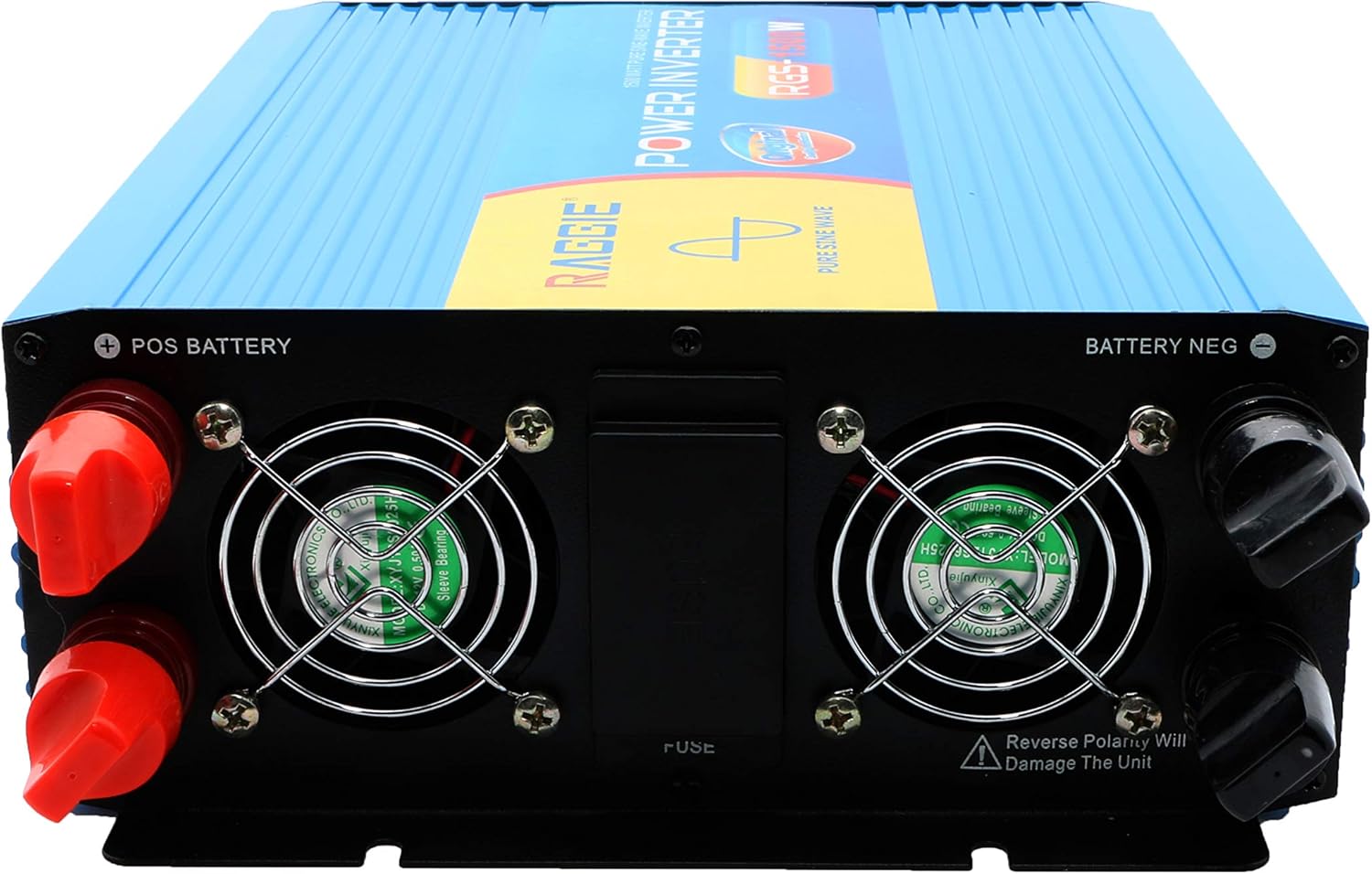
૩.૨ રીઅર પેનલ ઘટકો
The rear panel includes the DC input terminals for connecting to your 12V battery or solar array, along with cooling fans and a fuse compartment.
૩.૧ ફ્રન્ટ પેનલ ઘટકો
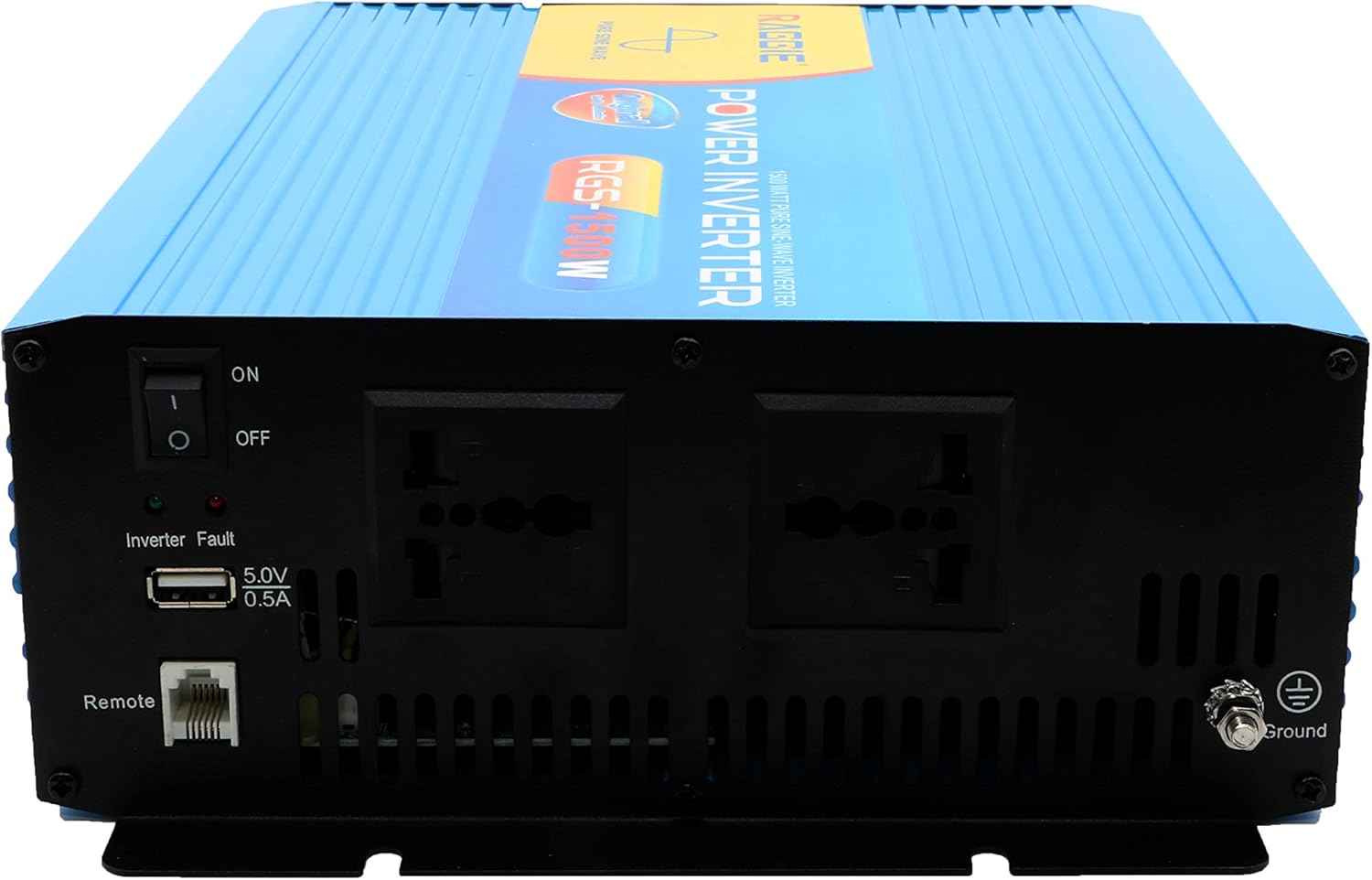
The front panel provides the AC output sockets for connecting your appliances, the main power switch, a USB charging port, and a remote control port.
4. સેટઅપ અને ઇન્સ્ટોલેશન
Follow these steps for proper installation of your inverter.
4.1 અનપેકિંગ અને નિરીક્ષણ
- Carefully remove the inverter from its packaging.
- Inspect the unit for any signs of damage during transit. If damage is found, do not proceed with installation and contact your supplier.
- ખાતરી કરો કે બધી એસેસરીઝ હાજર છે.
4.2 પ્લેસમેન્ટ
- Choose a location that is dry, cool, and well-ventilated.
- Avoid areas with direct sunlight, high temperatures, or excessive dust.
- Mount the inverter securely on a stable surface.
- Ensure there is adequate clearance around the cooling fans for proper airflow.
4.3 DC Input Connection (Battery/Solar)
IMPORTANT: Ensure the inverter's power switch is in the OFF position before making any connections.
- Use appropriate gauge cables for your 12V DC input. Refer to the specifications for recommended cable sizes.
- કનેક્ટ કરો લાલ (+) cable to the positive terminal of your 12V battery/solar array.
- ના બીજા છેડાને જોડો લાલ (+) cable to the positive terminal (POS BATTERY) on the inverter's rear panel.
- કનેક્ટ કરો કાળો (-) cable to the negative terminal of your 12V battery/solar array.
- ના બીજા છેડાને જોડો કાળો (-) cable to the negative terminal (BATTERY NEG) on the inverter's rear panel.
- ખાતરી કરો કે બધા જોડાણો ચુસ્ત અને સુરક્ષિત છે.
4.4 ગ્રાઉન્ડિંગ
For safety, the inverter must be properly grounded.
- Connect a grounding wire from the ground terminal on the inverter's front panel to a suitable earth ground point (e.g., vehicle chassis, ground rod).
4.5 AC Output Connection (Appliances)
- Plug your AC appliances directly into the AC output sockets on the inverter's front panel.
- કુલ વોટની ખાતરી કરોtage of all connected appliances does not exceed the inverter's continuous output power (1500W).
5. ઓપરેટિંગ સૂચનાઓ
5.1 Turning On the Inverter
- Ensure all DC and AC connections are correctly made and secure.
- Switch the main power switch on the inverter's front panel to the ON સ્થિતિ
- The inverter will typically emit a short beep and an indicator light will illuminate, indicating it is operational.
5.2 Turning Off the Inverter
- Disconnect all AC appliances from the inverter.
- Switch the main power switch on the inverter's front panel to the બંધ સ્થિતિ
5.3 યુએસબી ચાર્જિંગ પોર્ટ
- The inverter includes a 5.0V 0.5A USB port for charging small electronic devices.
- Plug your USB device into this port for charging.
6. જાળવણી
નિયમિત જાળવણી તમારા ઇન્વર્ટરની શ્રેષ્ઠ કામગીરી અને આયુષ્ય સુનિશ્ચિત કરે છે.
- સફાઈ: Periodically clean the exterior of the inverter with a dry, soft cloth. Ensure cooling vents are free from dust and debris. Do not use liquid cleaners.
- કનેક્શન તપાસ: Regularly inspect all DC and AC connections to ensure they remain tight and free from corrosion. Loose connections can cause overheating and power loss.
- ફ્યુઝ રિપ્લેસમેન્ટ: The inverter is equipped with internal fuses. If the inverter stops working and troubleshooting does not resolve the issue, the fuse may need replacement. This should only be performed by qualified personnel.
7. મુશ્કેલીનિવારણ
આ વિભાગ તમારા ઇન્વર્ટર સાથે તમને આવી શકે તેવી સામાન્ય સમસ્યાઓને સંબોધિત કરે છે.
| સમસ્યા | સંભવિત કારણ | ઉકેલ |
|---|---|---|
| No power output / Inverter not turning on | Loose DC connections ઓછી બેટરી વોલ્યુમtage ફૂંકાયેલું ફ્યુઝ ઇન્વર્ટર સ્વીચ ઓફ | Check and tighten DC cables રિચાર્જ કરો અથવા બેટરી બદલો Check and replace fuse (by qualified personnel) Turn inverter switch ON |
| ઓવરલોડ ચેતવણી / ઇન્વર્ટર બંધ થાય છે | કનેક્ટેડ લોડ 1500W કરતાં વધી ગયો છે Surge power too high | કુલ વોટ ઘટાડોtage of connected appliances Ensure appliance starting current is within inverter's peak capacity |
| Overheating warning / Inverter shuts down | નબળી વેન્ટિલેશન અતિશય આસપાસનું તાપમાન બ્લોક થયેલા કુલિંગ ફેન | Ensure adequate airflow around the inverter Move inverter to a cooler location Clean cooling fans and vents |
| ઓછી બેટરી વોલ્યુમtagઇ ચેતવણી | બેટરી ચાર્જ ઓછો છે | બેટરી રિચાર્જ કરો |
8. સ્પષ્ટીકરણો
| લક્ષણ | સ્પષ્ટીકરણ |
|---|---|
| બ્રાન્ડ | રેગી |
| મોડલ નંબર | RGS 1500W |
| સતત આઉટપુટ પાવર | 1500 વોટ્સ |
| ઇનપુટ વોલ્યુમtage | 12 વોલ્ટ ડીસી |
| આઉટપુટ વોલ્યુમtage | AC (Standard for region, typically 220V) |
| પાવર સ્ત્રોત | External (Battery/Solar) |
| ભલામણ કરેલ ઉપયોગો | Provide AC power from a DC source, operate AC devices using DC power. |
| પીક આઉટપુટ પાવર | 18000 Watts (Momentary Surge) |
| પ્રમાણપત્રો | UL, ETL, CE |
| તારીખ પ્રથમ ઉપલબ્ધ | જુલાઈ 9, 2019 |
9. વોરંટી અને સપોર્ટ
For warranty information or technical support, please refer to the documentation provided with your purchase or contact the manufacturer directly. Keep your purchase receipt as proof of purchase.