
1. પરિચય
The CEM DT-9516 is a professional True RMS Digital Multimeter designed for safe, reliable, and accurate electrical measurements. This compact and easy-to-use instrument is ideal for identifying and resolving issues in various electrical and electronic systems. It features auto-ranging capabilities and a 6000-count display, making it suitable for both professional and hobbyist applications.
2. સલામતી માહિતી
Read all safety information and operating instructions before using this meter.
આ ઉપકરણ નીચેના સલામતી ધોરણોનું પાલન કરે છે:
- EN61010-1 CAT IV 600V, CAT III 1000V
- 1000V input protection on all ranges
- 10A/1000V and 0.8A/1000V fuses protection on current ranges
સામાન્ય સલામતી સાવચેતીઓ:
- Always ensure the test leads are in good condition and properly connected.
- વોલ્યુમ માપવાનો પ્રયાસ કરશો નહીંtagનિર્દિષ્ટ મહત્તમ મર્યાદા કરતાં વધુ પ્રવાહો અથવા પ્રવાહો.
- લાઇવ સર્કિટ સાથે કામ કરતી વખતે સાવધાની રાખો.
- બેટરી અને ફ્યુઝને ફક્ત ઉલ્લેખિત પ્રકારો અને રેટિંગથી બદલો.
- જો મીટર ક્ષતિગ્રસ્ત લાગે અથવા કેસ ખુલ્લો હોય તો તેને ચલાવશો નહીં.
3. સેટઅપ અને પ્રારંભિક કામગીરી
3.1 બેટરી ઇન્સ્ટોલેશન
The CEM DT-9516 requires three (3) AAA batteries for operation. These are typically included with the device.
- મલ્ટિમીટરના પાછળના ભાગમાં બેટરી કમ્પાર્ટમેન્ટ કવર શોધો.
- બેટરી કમ્પાર્ટમેન્ટ ખોલવા માટે સ્ક્રુડ્રાઈવરનો ઉપયોગ કરો.
- Insert three AAA batteries, observing the correct polarity (+ and -) as indicated inside the compartment.
- બેટરી કમ્પાર્ટમેન્ટ કવર બદલો અને તેને સ્ક્રુ વડે સુરક્ષિત કરો.

Figure 1: CEM DT-9516 Multimeter with test leads, AAA batteries, and a protective carrying case.
૬.૨ કનેક્ટિંગ ટેસ્ટ લીડ્સ
Before taking any measurements, ensure the test leads are correctly connected to the multimeter.
- કનેક્ટ કરો લાલ તરફ દોરી જાય છે VΩHz%CAP input jack (positive input).
- કનેક્ટ કરો કાળો તરફ દોરી જાય છે COM input jack (common/negative input).
- For current measurements (mA, µA), connect the red lead to the mAµA ઇનપુટ જેક.
- For high current measurements (up to 10A), connect the red lead to the 10A ઇનપુટ જેક.

આકૃતિ 2: વિગતવાર view of the multimeter's input jacks and function switch, indicating where to connect test leads for various measurements.
4. ઓપરેટિંગ સૂચનાઓ
The DT-9516 features an intuitive interface with a large LCD display and a rotary function switch for selecting measurement modes.

આકૃતિ 3: ઓવરview of the CEM DT-9516 Multimeter's controls and display elements.
4.1 Function Switch and Auto Ranging
Turn the rotary switch to the desired measurement function. The DT-9516 is an auto-ranging multimeter, meaning it automatically selects the appropriate measurement range for the input signal, simplifying operation.

Figure 4: The multimeter's auto-ranging feature allows for intuitive operation without manual range selection.
૪.૧ માપન કાર્યો
The DT-9516 offers a wide range of measurement capabilities:
- ભાગtagઇ (એસી/ડીસી): Select the 'V' position on the rotary switch. The meter will automatically detect AC or DC voltage.
- વર્તમાન (AC/DC): Select the 'mAµA' or '10A' position. Ensure test leads are connected to the correct current input jacks.
- પ્રતિકાર (Ω): Select the 'Ω' position.
- Capacitance (CAP): Select the 'CAP' position.
- આવર્તન (Hz%): Select the 'Hz%' position.
- ડાયોડ ટેસ્ટ: Select the diode symbol position.
- સાતત્ય: Select the continuity symbol position. An audible tone indicates continuity.
- તાપમાન: Select the temperature symbol position. This function typically requires a K-type thermocouple (sold separately).
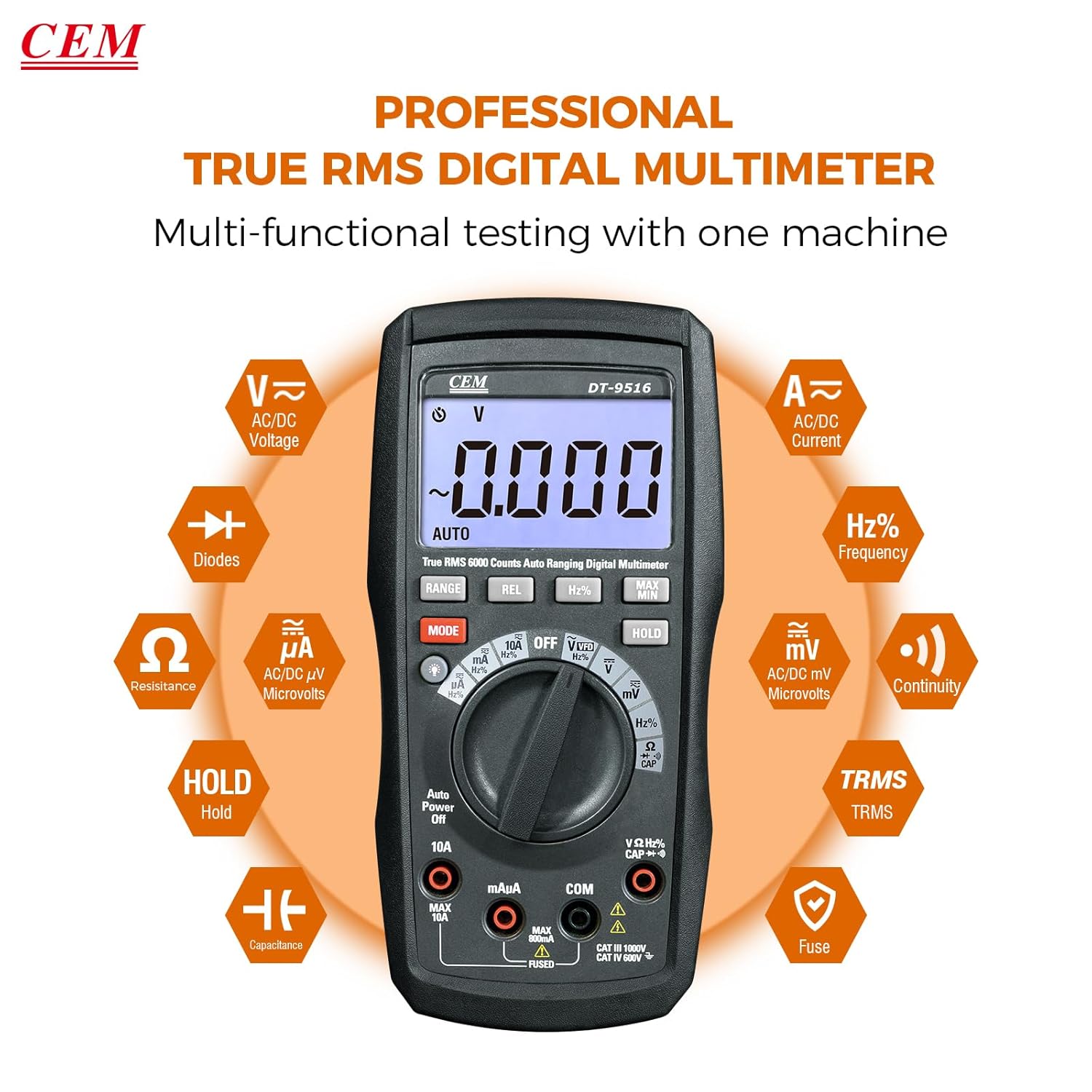
Figure 5: The multimeter's multi-functional testing capabilities are clearly illustrated.

Figure 6: The 6000-count display provides higher resolution and more accurate readings.
4.3 વિશેષ કાર્યો
- VFD કાર્ય: The Variable Frequency Drive (VFD) function utilizes a low-pass filter for accurate measurement of VFD signals. Select the 'VFD' position on the rotary switch.
- ડેટા હોલ્ડ (હોલ્ડ): દબાવો પકડી રાખો button to freeze the current measurement on the display. Press again to release. This is useful for recording readings in difficult-to-view સ્થાનો
- મહત્તમ/મિનિટ: દબાવો MAX/MIN button to record the maximum and minimum values during a measurement session.
- REL (Relative Measurement): દબાવો REL button to store the current reading as a reference value. Subsequent measurements will be displayed as a deviation from this reference.
- બેકલાઇટ: Press the backlight button (often integrated with another function or a dedicated button) to illuminate the display for better visibility in low-light conditions.

Figure 7: The VFD function enables precise measurement of variable frequency drive signals.

Figure 8: The Data Hold function allows users to lock and record measurement values with a single button press.

Figure 9: The high-definition LCD display ensures clear digital readings at a glance, even with multiple indicators.
5. જાળવણી
5.1 સફાઈ
જાહેરાત સાથે કેસ સાફ કરોamp કાપડ અને હળવા ડિટર્જન્ટનો ઉપયોગ કરો. ઘર્ષક અથવા દ્રાવકનો ઉપયોગ કરશો નહીં. ઇનપુટ ટર્મિનલ્સને ગંદકી અને ભેજથી મુક્ત રાખો.
5.2 બેટરી રિપ્લેસમેન્ટ
When the battery indicator appears on the display, replace the batteries as described in Section 3.1. Always use three new AAA batteries.
5.3 ફ્યુઝ રિપ્લેસમેન્ટ
If the current measurement functions cease to operate, the internal fuses may need replacement. Refer to the safety section for fuse specifications (10A/1000V and 0.8A/1000V). Fuse replacement should only be performed by qualified personnel.
Warning: Disconnect all test leads from the meter and any circuit before opening the case for battery or fuse replacement.
6. મુશ્કેલીનિવારણ
- કોઈ ડિસ્પ્લે નથી: બેટરી ઇન્સ્ટોલેશન અને ચાર્જ તપાસો. જો જરૂરી હોય તો બેટરી બદલો.
- ખોટા વાંચન:
- Ensure test leads are properly connected to the correct input jacks for the selected function.
- Verify the function switch is set to the appropriate measurement type.
- ક્ષતિગ્રસ્ત ટેસ્ટ લીડ્સ માટે તપાસો.
- For current measurements, check the internal fuses.
- "OL" or "OVERLOAD" on Display: The measured value exceeds the selected range. The auto-ranging feature should typically prevent this, but if it occurs, ensure the meter is capable of measuring the expected value.
7. સ્પષ્ટીકરણો
| લક્ષણ | વિગત |
|---|---|
| મોડલ નંબર | DT-9516 |
| ડિસ્પ્લે | ૨૦૦૦ કાઉન્ટ્સ એલસીડી |
| સલામતી શ્રેણી | CAT IV 600V, CAT III 1000V |
| ભાગtage માપન | AC/DC 1000V સુધી |
| વર્તમાન માપન | AC/DC up to 10A |
| પ્રતિકાર માપન | 60 MΩ સુધી |
| ક્ષમતા માપન | ૧૦૦µF સુધી |
| આવર્તન માપન | 10MHz સુધી |
| ડાયોડ ટેસ્ટ | હા |
| સાતત્ય પરીક્ષણ | Yes (with audible indicator) |
| ખાસ લક્ષણો | True RMS, Auto Ranging, VFD Function, Data Hold, MAX/MIN, Relative Measurement, Backlight |
| બેટરીઓ | 3 x AAA (શામેલ) |
| પેકેજ પરિમાણો | 20.6 x 13 x 7.9 સેમી |
| વજન | 654 ગ્રામ |
| ઉત્પાદક | Shenzhen Everbest Machinery Industry Co.,Ltd. |
| યુપીસી | 887327951600 |
8. વોરંટી અને સપોર્ટ
CEM products are manufactured to high-quality standards. For specific warranty terms and conditions, please refer to the warranty card included with your product or contact CEM customer support.
For technical assistance, troubleshooting, or service inquiries, please contact your local CEM distributor or visit the official CEM webઆધાર સંસાધનો માટે સાઇટ.