
1. પરિચય
Thank you for choosing the Philips Shaver S3134/51. This electric rotary shaver is designed for both wet and dry use, offering a comfortable and efficient shaving experience. Please read this user manual carefully before using the appliance and save it for future reference. This manual provides essential information on safe operation, setup, usage, maintenance, and troubleshooting.
2. મહત્વપૂર્ણ સલામતી માહિતી
To ensure safe operation and prevent injury, always follow these basic safety precautions:
- Unplug before use: This appliance is designed for cordless operation only. Always disconnect the shaver from the power outlet before use.
- જો ઉપકરણને નુકસાન થયું હોય તો તેનો ઉપયોગ કરશો નહીં.
- Keep the charging adapter dry. Do not immerse it in water or use it in wet conditions.
- આ ઉપકરણનો ઉપયોગ 8 વર્ષ અને તેથી વધુ ઉંમરના બાળકો અને ઓછી શારીરિક, સંવેદનાત્મક અથવા માનસિક ક્ષમતાઓ અથવા અનુભવ અને જ્ઞાનનો અભાવ ધરાવતી વ્યક્તિઓ દ્વારા કરી શકાય છે જો તેઓને ઉપકરણના સલામત રીતે ઉપયોગ કરવા અંગે દેખરેખ અથવા સૂચના આપવામાં આવી હોય અને તેમાં સામેલ જોખમોને સમજતા હોય. .
- બાળકોએ ઉપકરણ સાથે રમવું જોઈએ નહીં. દેખરેખ વિના બાળકો દ્વારા સફાઈ અને વપરાશકર્તા જાળવણી કરવામાં આવશે નહીં.
- Only use the original Philips charger provided with the appliance.
- રિચાર્જેબલ બેટરી બદલવા માટે ઉપકરણ ખોલશો નહીં.
3. પેકેજ સામગ્રી
The Philips Shaver S3134/51 package typically includes:
- Philips Shaver S3134/51
- ચાર્જિંગ એડેપ્ટર
- રક્ષણાત્મક કેપ
- સફાઈ બ્રશ
- વપરાશકર્તા માર્ગદર્શિકા
4. શરૂઆત કરવી (સેટઅપ)
4.1 શેવરને ચાર્જ કરવું
Before first use, or when the battery indicator shows low charge, fully charge your shaver. A full charge provides up to 60 minutes of cordless shaving time.
- ખાતરી કરો કે શેવર બંધ છે.
- Insert the small plug of the charging adapter into the shaver's charging socket.
- એડેપ્ટરને દિવાલના આઉટલેટમાં પ્લગ કરો.
- The battery indicator light will illuminate to show charging status. When fully charged, the light may turn solid or switch off, depending on the model.
- સંપૂર્ણ ચાર્જ થવામાં સામાન્ય રીતે લગભગ 1 કલાક લાગે છે.
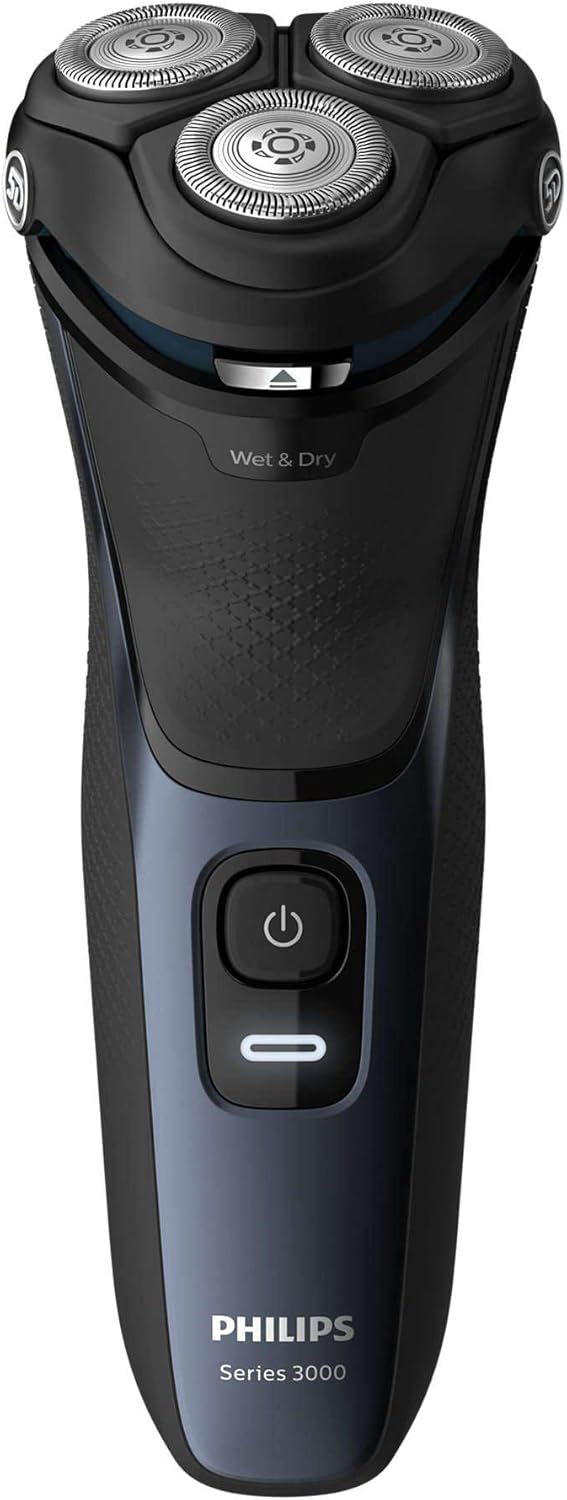
આકૃતિ 1: ફ્રન્ટ view of the Philips Shaver S3134/51, showing the power button and 'Wet & Dry' indicator.
૫. શેવરનું સંચાલન
5.1 પાવરિંગ ચાલુ/બંધ
- શેવર ચાલુ કરવા માટે, એકવાર પાવર બટન દબાવો.
- શેવર બંધ કરવા માટે, ફરીથી પાવર બટન દબાવો.
5.2 Wet Shaving
For a refreshing and comfortable shave, you can use the shaver with foam or gel.
- તમારા ચહેરાને ભીનો કરો અને શેવિંગ ફોમ અથવા જેલ લગાવો.
- શેવર ચાલુ કરો.
- Move the shaver in slow, circular motions over your skin.
- Rinse the shaving heads under running water during and after shaving to prevent clogging.
5.3 Dry Shaving
ઝડપી અને અનુકૂળ શેવિંગ માટે, શુષ્ક ત્વચા પર શેવરનો ઉપયોગ કરો.
- ખાતરી કરો કે તમારી ત્વચા સ્વચ્છ અને સૂકી છે.
- શેવર ચાલુ કરો.
- Move the shaver in slow, circular motions over your skin.
5.4 Using the Pop-Up Trimmer
ઇન્ટિગ્રેટેડ પોપ-અપ ટ્રીમર તમારી મૂછો અને સાઇડબર્ન જાળવવા માટે આદર્શ છે.
- Ensure the shaver is turned on.
- Slide the trimmer release button upwards to activate the trimmer.
- Hold the trimmer perpendicular to your skin and move it gently to trim desired areas.
- When finished, push the trimmer back down until it clicks into place.

આકૃતિ 2: બાજુ view of the Philips Shaver S3134/51 with the precision pop-up trimmer extended.
6. સફાઈ અને જાળવણી
Regular cleaning ensures optimal performance and extends the lifespan of your shaver.
6.1 દૈનિક સફાઈ
- After each use, turn off the shaver and unplug it from the charger.
- Open the shaving unit by pressing the release button (if applicable) or gently pulling the shaving head assembly upwards.
- શેવિંગ યુનિટને ગરમ વહેતા પાણીની નીચે સારી રીતે ધોઈ લો.
- Shake off excess water and leave the shaving unit open to air dry.
- શેવિંગ યુનિટ બંધ કરો.
૬.૨ ઊંડી સફાઈ (સાપ્તાહિક/માસિક)
વધુ સંપૂર્ણ સફાઈ માટે:
- Perform daily cleaning steps.
- શેવિંગ યુનિટમાંથી શેવિંગ હેડ દૂર કરો.
- Clean the individual cutters and guards with the provided cleaning brush. Do not clean more than one cutter and guard at a time, as they are matching sets.
- Rinse all parts under warm running water.
- ફરીથી એસેમ્બલ કરતા પહેલા બધા ભાગોને સંપૂર્ણપણે સૂકવવા દો.
૬.૩ શેવિંગ હેડ્સ બદલવું
For optimal shaving performance, it is recommended to replace the shaving heads every two years. Replacement heads can be purchased from authorized Philips retailers or the Philips website. Refer to your shaver's packaging or the Philips website for the correct replacement head type for model S3134/51.
7. મુશ્કેલીનિવારણ
| સમસ્યા | સંભવિત કારણ | ઉકેલ |
|---|---|---|
| શેવર ચાલુ થતું નથી. | બેટરી ખાલી છે. | શેવરને ઓછામાં ઓછા 1 કલાક માટે ચાર્જ કરો. |
| શેવર ચાર્જ કરતું નથી. | Adapter not properly connected or faulty. | Ensure the adapter is securely plugged into both the shaver and the wall outlet. Try a different outlet. If the issue persists, contact Philips support. |
| શેવિંગનું નબળું પ્રદર્શન. | શેવિંગ હેડ ગંદા અથવા ઘસાઈ ગયા છે. | Clean the shaving heads thoroughly. If performance does not improve, consider replacing the shaving heads. |
| શેવિંગ પછી ત્વચામાં બળતરા. | ખોટી શેવિંગ ટેકનિક અથવા સંવેદનશીલ ત્વચા. | Ensure you are using gentle, circular motions. Try wet shaving with foam or gel. Allow your skin to adapt to the new shaver. |
If you encounter problems not listed here, or if the suggested solutions do not resolve the issue, please contact Philips Customer Support.
8. સ્પષ્ટીકરણો
- મોડલ નંબર: S3134/51
- બ્રાન્ડ: ફિલિપ્સ
- પાવર સ્ત્રોત: બેટરી સંચાલિત (રિચાર્જેબલ લિથિયમ-આયન)
- બેટરી જીવન: 60 મિનિટ સુધી કોર્ડલેસ શેવિંગ
- ચાર્જિંગ સમય: Approximately 1 hour for a full charge
- શેવિંગ સિસ્ટમ: Rotary, 5D Pivot & Flex Heads
- બ્લેડ સામગ્રી: સ્ટેનલેસ સ્ટીલ
- ઉપયોગ: ભીનું અને સૂકું
- સમાવાયેલ ઘટકો: Shaver, Charger
- પરિમાણો (L x W x H): 2.79 x 24.64 x 16.51 સેમી
- વજન: 281 ગ્રામ
- રંગ: તોફાની વાદળી
9. વોરંટી અને સપોર્ટ
This Philips appliance comes with a standard manufacturer's warranty. Please refer to the warranty card included in your package or visit the official Philips webતમારા પ્રદેશ માટે વિગતવાર વોરંટી નિયમો અને શરતો માટે સાઇટ.
For product support, frequently asked questions, or to register your product, please visit the Philips support website or contact your local Philips customer service center. Contact information can typically be found on the Philips webસાઇટ અથવા તમારા ઉત્પાદન સાથે પૂરા પાડવામાં આવેલ દસ્તાવેજોમાં.
Supportનલાઇન સપોર્ટ: www.philips.com / આધાર