
1. પરિચય
Thank you for choosing the Awei A831BL Bluetooth In-Ear Headset. This manual provides essential information for the safe and efficient use of your device. Please read it carefully before use and retain it for future reference.
The Awei A831BL is a wireless in-ear headset designed for mobile phone use, offering up to 8 hours of continuous talk and music playback. It features pure, high-quality bass sound and is suitable for various activities.
2. પેકેજ સામગ્રી
કૃપા કરીને નીચેની વસ્તુઓ માટે પેકેજ તપાસો:
- Awei A831BL Bluetooth In-Ear Headset
- યુએસબી ચાર્જિંગ કેબલ
- કાનની ટીપ્સ (વિવિધ કદ)
- વપરાશકર્તા માર્ગદર્શિકા
3. ઉત્પાદન ઓવરview
Familiarize yourself with the components of your Awei A831BL headset.
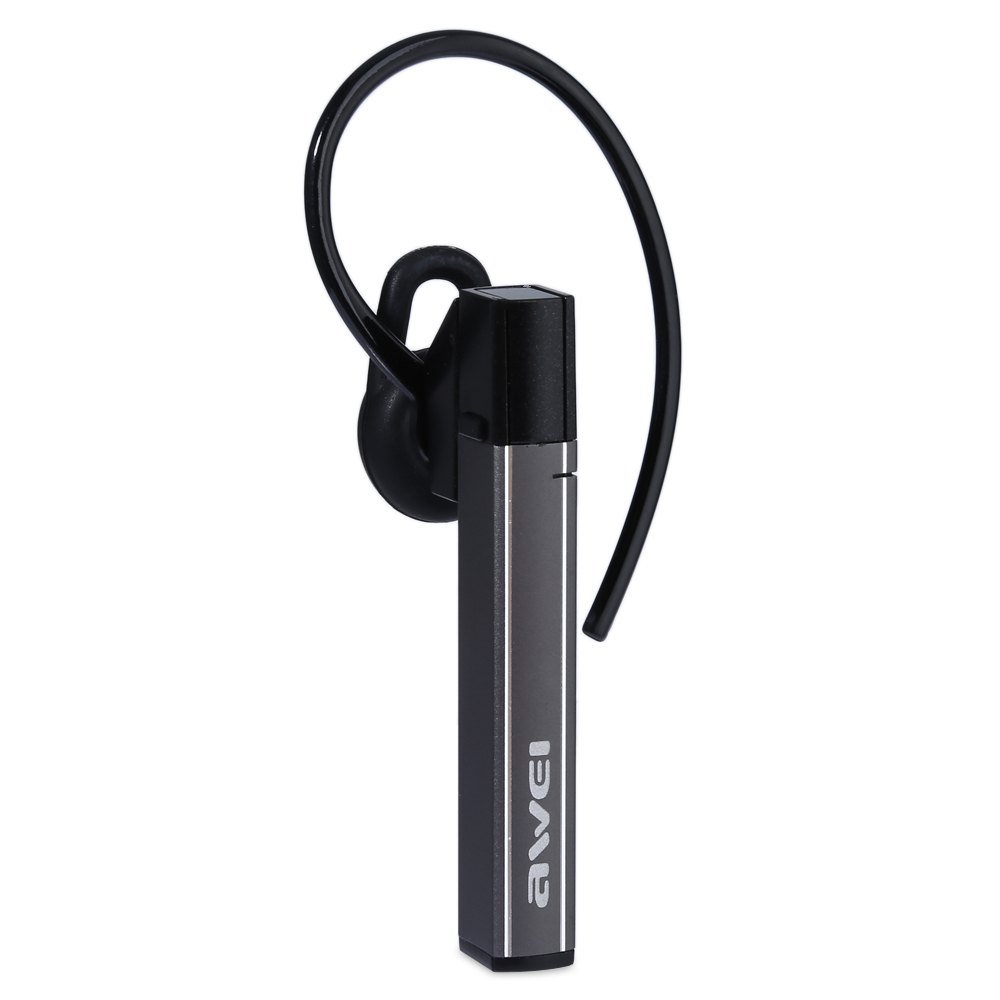
Image: The Awei A831BL Bluetooth In-Ear Headset in grey, showing the earbud design and inline controls.
The headset features an ergonomic in-ear design for comfortable wear, especially during activities. It includes an integrated microphone for hands-free calls and inline controls for managing audio and calls.
4. સેટઅપ
૩.૧ હેડસેટ ચાર્જ કરી રહ્યા છીએ
- Connect the USB charging cable to the charging port on the headset.
- USB કેબલના બીજા છેડાને USB પાવર એડેપ્ટર (શામેલ નથી) અથવા કમ્પ્યુટરના USB પોર્ટ સાથે કનેક્ટ કરો.
- The indicator light will illuminate (e.g., red) during charging.
- Once fully charged, the indicator light will change (e.g., turn blue or turn off).
A full charge provides up to 8 hours of talk or music playback time.
4.2 બ્લૂટૂથ પેરિંગ
- Ensure the headset is fully charged and turned off.
- Press and hold the Multi-function button (usually the center button on the inline control) for approximately 5-7 seconds until the indicator light flashes red and blue alternately, indicating pairing mode.
- On your mobile phone or Bluetooth-enabled device, enable Bluetooth and search for available devices.
- Select "Awei A831BL" from the list of found devices.
- જો પાસવર્ડ માટે પૂછવામાં આવે, તો "0000" (ચાર શૂન્ય) દાખલ કરો.
- Once successfully paired, the indicator light will flash blue slowly, and you may hear a confirmation tone.
જ્યારે ચાલુ થશે ત્યારે હેડસેટ આપમેળે છેલ્લા જોડીવાળા ઉપકરણ સાથે ફરીથી કનેક્ટ થવાનો પ્રયાસ કરશે.
5. ઓપરેટિંગ સૂચનાઓ
5.1 પાવર ચાલુ/બંધ
- પાવર ચાલુ: Press and hold the Multi-function button for about 3 seconds until the blue indicator light flashes.
- પાવર બંધ: Press and hold the Multi-function button for about 3-4 seconds until the red indicator light flashes briefly and then turns off.
5.2 સંગીત પ્લેબેક
- ચલાવો/થોભો: એકવાર મલ્ટિ-ફંક્શન બટન દબાવો.
- અવાજ વધારો: '+' બટન દબાવો.
- અવાજ ધીમો: '-' બટન દબાવો.
- આગળનો ટ્રેક: '+' બટન દબાવો અને પકડી રાખો.
- પાછલો ટ્રેક: '-' બટન દબાવો અને પકડી રાખો.
૫.૨ કોલ મેનેજમેન્ટ
- કૉલનો જવાબ આપો: Press the Multi-function button once when a call comes in.
- કૉલ સમાપ્ત કરો: કોલ દરમિયાન એકવાર મલ્ટી-ફંક્શન બટન દબાવો.
- કૉલ નકારો: Press and hold the Multi-function button for about 2 seconds when a call comes in.
- છેલ્લો નંબર ફરીથી ડાયલ કરો: મલ્ટી-ફંક્શન બટનને બે વાર દબાવો.
The integrated microphone allows for clear hands-free communication.
6. જાળવણી
- હેડસેટને નિયમિતપણે નરમ, સૂકા કપડાથી સાફ કરો.
- હેડસેટને અતિશય તાપમાન, ભેજ અથવા કાટ લાગતા પદાર્થોના સંપર્કમાં આવવાનું ટાળો.
- હેડસેટને ડિસએસેમ્બલ કરવાનો કે સુધારવાનો પ્રયાસ કરશો નહીં, કારણ કે આ વોરંટી રદ કરશે અને નુકસાન પહોંચાડી શકે છે.
- ઉપયોગમાં ન હોય ત્યારે હેડસેટને ઠંડી, સૂકી જગ્યાએ રાખો.
7. મુશ્કેલીનિવારણ
| સમસ્યા | ઉકેલ |
|---|---|
| હેડસેટ ચાલુ થતો નથી. | ખાતરી કરો કે હેડસેટ સંપૂર્ણપણે ચાર્જ થયેલ છે. તેને પાવર સ્ત્રોત સાથે કનેક્ટ કરો અને ફરી પ્રયાસ કરો. |
| ઉપકરણ સાથે જોડી બનાવી શકાતી નથી. | Ensure the headset is in pairing mode (flashing red and blue). Turn off and on your device's Bluetooth. Move closer to the device. Clear previous Bluetooth connections on your device. |
| કોઈ અવાજ નથી કે ઓછો અવાજ નથી. | Check the volume levels on both the headset and your connected device. Ensure the headset is properly connected. |
| નબળી કોલ ગુણવત્તા. | Ensure the microphone is not obstructed. Move to an area with less interference. Check your phone's signal strength. |
8. સ્પષ્ટીકરણો
| લક્ષણ | વિગત |
|---|---|
| બ્રાન્ડ | અવેઇ |
| મોડલ નંબર | A831BL |
| રંગ | ગ્રે |
| કનેક્ટિવિટી ટેકનોલોજી | વાયરલેસ (બ્લુટુથ) |
| હેડસેટનો પ્રકાર | ઇન-ઇયર |
| માઇક્રોફોન | હા |
| અવાજ રદ | ના |
| બેટરી જીવન | Up to 8 hours (talk/music) |
| ધ્વનિ લક્ષણો | Pure, high-quality bass sound |
| સામગ્રી | પ્લાસ્ટિક |
| સુસંગત ઉપકરણો | મોબાઈલ ફોન |
9. વોરંટી અને સપોર્ટ
Awei products are designed and manufactured to the highest quality standards. For warranty information and customer support, please refer to the warranty card included in your package or contact your local retailer. Keep your purchase receipt as proof of purchase.
For further assistance, please visit the official Awei webસાઇટ અથવા તેમના ગ્રાહક સેવા વિભાગનો સંપર્ક કરો.