
પરિચય
The Aula S6 Multi-Mode Wireless Gaming Headset is designed to provide a versatile audio experience for gaming and multimedia. This headset features three connection options: 2.4GHz wireless, Bluetooth 5.3, and a traditional 3.5mm wired connection. Its ultra-lightweight design, weighing only 180 grams, ensures comfort during extended use. The integrated microphone with smart noise reduction technology delivers clear communication, and the headset offers up to 22 hours of battery life.
પેકેજ સામગ્રી
કૃપા કરીને નીચેની વસ્તુઓ માટે બોક્સ ચેક કરો:
- 1 x Aula S6 Multi-Mode Wireless Gaming Headset
- 1 x 2.4GHz Wireless Connection Dongle
- 1 x Type-C to 3.5mm Audio Connection Cable (1.5 meters)
- 1 x USB Type-C ચાર્જિંગ કેબલ
- 1 x વપરાશકર્તા માર્ગદર્શિકા
ઉત્પાદન ઓવરview
Familiarize yourself with the headset's components and controls.
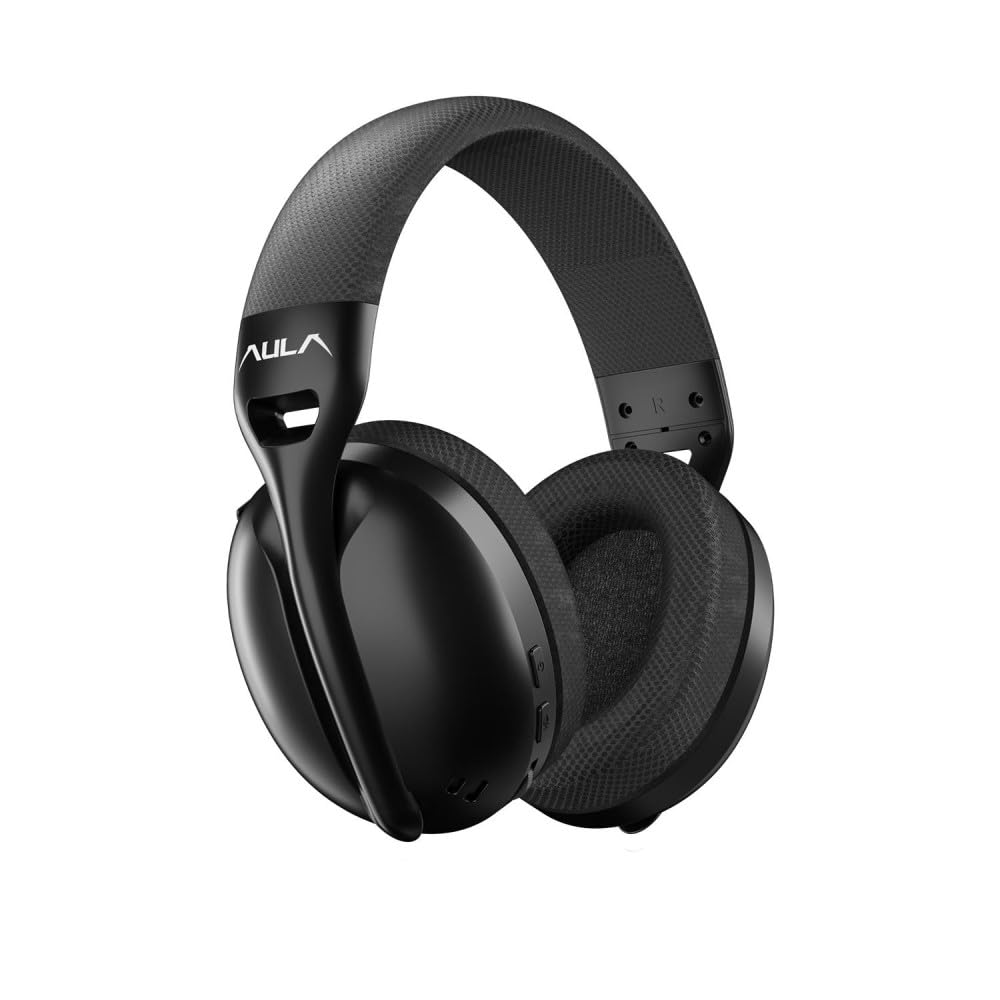
છબી: આગળ view of the Aula S6 Multi-Mode Wireless Gaming Headset. This image displays the overall design of the headset, highlighting its earcups and headband.
નિયંત્રણો અને બંદરો

છબી: તળિયે view of the Aula S6 headset. This image illustrates the location of the Type-C charging port, 3.5mm audio jack, volume wheel, and other control buttons on the earcups.
- પાવર બટન: Used to power the headset on/off and for pairing.
- મોડ સ્વિચ બટન: Toggles between Game Mode and Music Mode for optimized audio profiles.
- વોલ્યુમ વ્હીલ: ઓડિયો વોલ્યુમ સમાયોજિત કરે છે.
- મલ્ટી-ફંક્શન બટનો: For call management (accept/reject) and switching between Bluetooth and 2.4GHz connections.
- રિટ્રેક્ટેબલ માઇક્રોફોન: Mute by retracting into the earcup, unmute by extending.
- ટાઇપ-સી પોર્ટ: હેડસેટ ચાર્જ કરવા માટે.
- 3.5mm ઓડિયો જેક: For wired connection using the provided Type-C to 3.5mm cable.
સેટઅપ
હેડસેટ ચાર્જ કરી રહ્યું છે
Before first use, fully charge the headset. Connect the provided USB Type-C charging cable to the headset's Type-C port and the other end to a USB power source (e.g., computer, wall adapter). The LED indicator will show charging status and turn off when fully charged.
હેડસેટ કનેક્ટ કરી રહ્યું છે
The Aula S6 offers three connection methods:
1. 2.4GHz Wireless Connection (via Dongle)
- Insert the 2.4GHz wireless dongle into a USB port on your computer or compatible device.
- Power on the headset by pressing and holding the Power button.
- The headset should automatically connect to the dongle. The LED indicator will confirm a successful connection.
૩.૧.૨. બ્લૂટૂથ ૫.૦ કનેક્શન
- હેડસેટ પર પાવર.
- Press and hold the Power button until the LED indicator flashes rapidly, indicating pairing mode.
- તમારા ઉપકરણ (સ્માર્ટફોન, ટેબ્લેટ, લેપટોપ) પર, બ્લૂટૂથ સક્ષમ કરો અને ઉપલબ્ધ ઉપકરણો શોધો.
- Select "Aula S6" from the list of devices to pair. The LED indicator will show a solid light upon successful connection.
3. Wired 3.5mm Connection
- Connect the Type-C end of the provided audio cable to the headset's Type-C port.
- Connect the 3.5mm end of the cable to the audio jack of your device.
- The headset will operate in wired mode, bypassing wireless functions.
ઓપરેટિંગ સૂચનાઓ
પાવર ચાલુ/બંધ
- પાવર ચાલુ કરવા માટે: LED સૂચક પ્રકાશિત ન થાય ત્યાં સુધી પાવર બટનને લગભગ 3 સેકન્ડ સુધી દબાવી રાખો.
- પાવર ઓફ કરવા માટે: LED સૂચક બંધ ન થાય ત્યાં સુધી પાવર બટનને લગભગ 5 સેકન્ડ સુધી દબાવી રાખો.
Mode Switching (Game/Music)
Press the Mode Switch button to toggle between Game Mode and Music Mode. Each mode optimizes audio settings for its intended use.
માઇક્રોફોનનો ઉપયોગ

છબી: કોણીય view of the Aula S6 headset with its retractable microphone extended. This shows the microphone in its active position for communication.
- અનમ્યૂટ કરવા માટે: Extend the microphone from the earcup.
- મ્યૂટ કરવા માટે: Retract the microphone fully into the earcup.
The smart noise reduction technology helps minimize ambient noise for clearer voice transmission.
ક Callલ મેનેજમેન્ટ
When connected via Bluetooth or 2.4GHz wireless, use the multi-function buttons on the headset to manage calls:
- કૉલ સ્વીકારો: એકવાર મલ્ટી-ફંક્શન બટન દબાવો.
- કૉલ નકારો: મલ્ટિ-ફંક્શન બટનને 2 સેકન્ડ માટે દબાવી રાખો.
- કૉલ સમાપ્ત કરો: કોલ દરમિયાન મલ્ટી-ફંક્શન બટન એકવાર દબાવો.
વોલ્યુમ નિયંત્રણ
Rotate the Volume Wheel up or down to precisely adjust the audio output level.
મલ્ટિ-ડિવાઈસ કનેક્શન
The headset supports simultaneous wireless connection to two different devices. Use the multi-function buttons to switch between the connected devices as needed.
જાળવણી
To ensure the longevity and optimal performance of your Aula S6 headset, follow these maintenance guidelines:
- સફાઈ: હેડસેટ સાફ કરવા માટે નરમ, સૂકા કપડાનો ઉપયોગ કરો. કઠોર રસાયણો અથવા ઘર્ષક સામગ્રીનો ઉપયોગ કરવાનું ટાળો.
- સંગ્રહ: હેડસેટને સીધા સૂર્યપ્રકાશ અને અતિશય તાપમાનથી દૂર ઠંડી, સૂકી જગ્યાએ સંગ્રહિત કરો.
- ભેજ ટાળો: The headset is not waterproof. Keep it away from water and high humidity.
- કેબલ કેર: Handle cables gently. Avoid sharp bends or excessive pulling to prevent damage.
મુશ્કેલીનિવારણ
If you encounter issues with your Aula S6 headset, refer to the following common solutions:
- અવાજ નહીં/ઓછો અવાજ:
- Check the volume level on both the headset and your connected device.
- Ensure the headset is properly connected (wired, Bluetooth, or 2.4GHz dongle).
- ખાતરી કરો કે તમારા ઉપકરણના ધ્વનિ સેટિંગ્સમાં યોગ્ય ઓડિયો આઉટપુટ ઉપકરણ પસંદ થયેલ છે.
- માઇક્રોફોન કામ કરતું નથી:
- Ensure the microphone is extended and not muted.
- Check microphone input settings on your connected device.
- બીજી એપ્લિકેશન અથવા ઉપકરણ સાથે માઇક્રોફોનનું પરીક્ષણ કરો.
- કનેક્શન સમસ્યાઓ:
- બ્લૂટૂથ માટે: Ensure the headset is in pairing mode and within range. Forget the device on your phone and re-pair.
- 2.4GHz માટે: Ensure the dongle is securely plugged in and the headset is powered on. Try a different USB port.
- વાયર્ડ માટે: Ensure the 3.5mm cable is fully inserted into both the headset and the device.
- હેડસેટ ચાલુ નથી થઈ રહ્યો:
- Charge the headset for at least 30 minutes.
- Try a different charging cable and power source.
વિશિષ્ટતાઓ
| બ્રાન્ડ | AULA |
| મોડલ | S6 |
| કનેક્ટિવિટી | Bluetooth 5.3, 2.4GHz Wireless, 3.5mm Wired |
| ડ્રાઇવરનું કદ | 40 મીમી |
| અવબાધ | 120 ઓહ્મ |
| હેડફોન સંવેદનશીલતા | 120 ડીબી |
| માઇક્રોફોન સંવેદનશીલતા | -38 ± 2db |
| આવર્તન પ્રતિભાવ | 20Hz - 20kHz |
| વજન | 180 ગ્રામ |
| બેટરી જીવન | 22 કલાક સુધી |
| સામગ્રી | Breathable Fabric and ABS Plastic |
| સુસંગત ઉપકરણો | Mobile Phone, Laptop, Desktop Computer, Game Console, Tablet, Television |
વોરંટી અને આધાર
The Aula S6 Multi-Mode Wireless Gaming Headset comes with a 2-Year Aula Turkey Warranty.
For warranty claims, technical support, or further assistance, please contact your local Aula authorized dealer or visit the official Aula webઆધાર સંપર્ક માહિતી માટે સાઇટ.