
પરિચય
This manual provides essential information for the safe and efficient operation of your Dual MCR 4 Portable DAB+/FM Radio. This device offers both digital DAB+ and analog FM radio reception, ensuring a wide range of listening options. Its color TFT display enhances usability by showing station names and additional information. With intuitive controls, auxiliary input, and headphone jack, the MCR 4 is designed for versatile and enjoyable audio experiences.
સલામતી માહિતી
- ઉપકરણનો ઉપયોગ કરતા પહેલા બધી સૂચનાઓ કાળજીપૂર્વક વાંચો.
- ઉપકરણને પાણી, ભેજ અને ઊંચા તાપમાનથી દૂર રાખો.
- યુનિટને ડિસએસેમ્બલ કરવાનો કે તેમાં ફેરફાર કરવાનો પ્રયાસ કરશો નહીં. બધી સર્વિસિંગ લાયક કર્મચારીઓને સોંપો.
- Use only the provided power adapter or recommended battery types.
- ઓપરેશન દરમિયાન ઉપકરણની આસપાસ યોગ્ય વેન્ટિલેશનની ખાતરી કરો.
- સ્થાનિક નિયમો અનુસાર બેટરીનો જવાબદારીપૂર્વક નિકાલ કરો.
પેકેજ સામગ્રી
કૃપા કરીને તપાસો કે બધી વસ્તુઓ પેકેજમાં હાજર છે:
- Dual MCR 4 Main Unit
- પાવર એડેપ્ટર
- વપરાશકર્તા માર્ગદર્શિકા
ઉત્પાદન ઓવરview
The Dual MCR 4 features a compact design with intuitive controls for easy access to its functions. Key components include:
- Color TFT Display: સ્ટેશન માહિતી, સમય અને મેનુ વિકલ્પો બતાવે છે.
- રોટરી નોબ: For tuning, volume control, and menu navigation.
- Memory Buttons: To save and recall your favorite radio stations.
- ટેલિસ્કોપિક એન્ટેના: For optimal radio signal reception.
- Auxiliary Input (AUX-IN): Located at the back, for connecting external audio devices.
- હેડફોન જેક: Located at the back, for private listening.
- Mechanical On/Off Switch: Located at the back, for direct power control.
- Passive Membrane: Located at the back, contributing to exceptional sound quality.
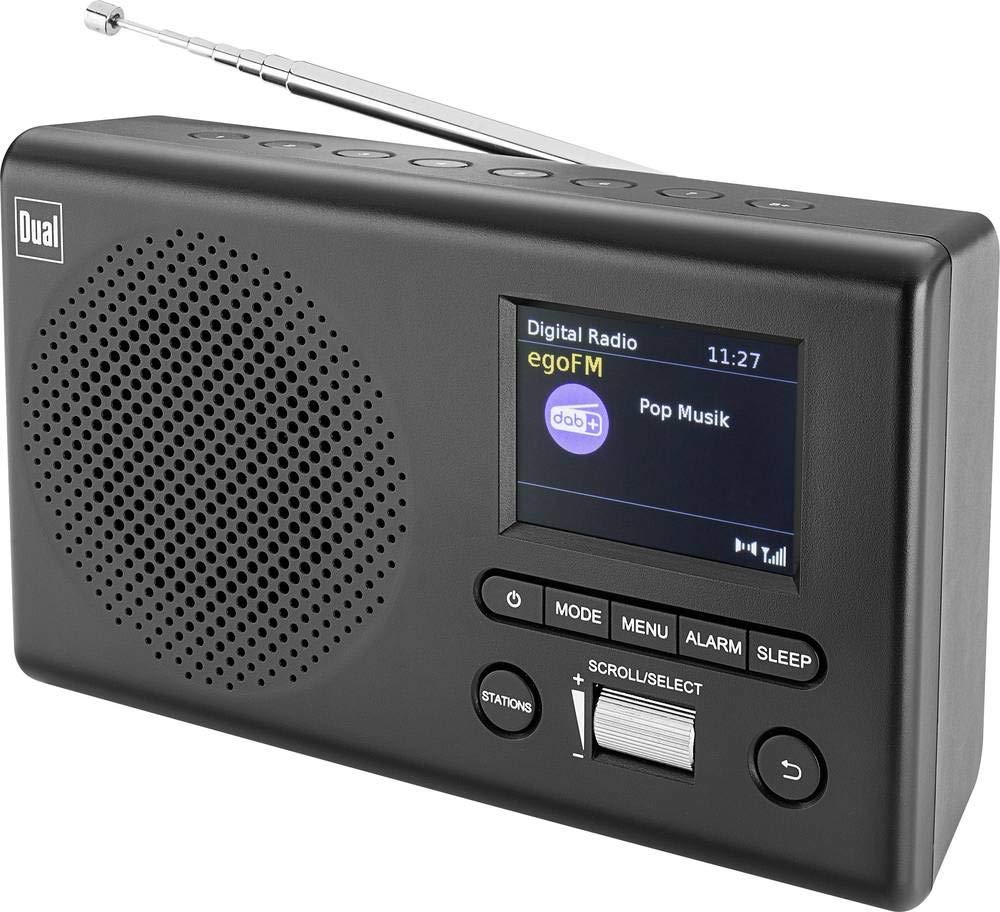
છબી: આગળ view of the Dual MCR 4 Portable DAB+/FM Radio, showing the color TFT display, rotary knob, and control buttons. The radio has a black and silver finish.
સેટઅપ
1. ઉપકરણને પાવરિંગ
The Dual MCR 4 can be powered by either the included AC power adapter or batteries, offering portability.
- AC એડેપ્ટરનો ઉપયોગ: Connect the power adapter to the DC IN port on the back of the radio and plug the other end into a standard wall outlet.
- બેટરીનો ઉપયોગ: Open the battery compartment on the bottom/back of the radio and insert the required batteries (type and quantity usually specified inside the compartment or in the full manual). Ensure correct polarity.
૬.૩. એન્ટેના ગોઠવણ
Extend the telescopic antenna fully for optimal reception of both DAB+ and FM radio signals. Adjust its position for the best signal quality.
3. Initial Power On and Station Scan
After connecting power, switch on the radio using the mechanical ON/OFF switch at the back. The radio will typically perform an automatic station scan upon first use, searching for available digital (DAB+) and analog (FM) radio stations. This process may take a few moments.
ઓપરેટિંગ સૂચનાઓ
1. મૂળભૂત કામગીરી
- પાવર ચાલુ/બંધ: Use the mechanical switch at the back. For standby, a dedicated button on the front might be available (refer to physical unit).
- વોલ્યુમ નિયંત્રણ: Rotate the main rotary knob to adjust the listening volume.
2. DAB+ Radio Mode
- Selecting DAB+ Mode: Press the MODE button (if available) or navigate through the menu using the rotary knob until DAB+ mode is selected.
- સ્ટેશન પસંદગી: After an automatic scan, use the rotary knob to scroll through the list of available DAB+ stations. Press the knob to confirm your selection.
- પ્રીસેટ્સ સાચવી રહ્યાં છે: Tune to your desired station. Press and hold a memory button (e.g., 1-5) until the display confirms the station is saved.
- રિસીલ્ડિંગ પ્રીસેટ્સનો: Briefly press the corresponding memory button to recall a saved station.
- માહિતી દર્શાવો: The color TFT display will show station name, program information (DLS), and potentially station logos or slideshows.
3. FM રેડિયો મોડ
- FM મોડ પસંદ કરી રહ્યા છીએ: Press the MODE button or navigate through the menu until FM mode is selected.
- મેન્યુઅલ ટ્યુનિંગ: Rotate the tuning knob to manually adjust the frequency.
- ઓટોમેટિક સ્કેન: Press and hold the tuning knob or a dedicated scan button to automatically search for the next available FM station.
- પ્રીસેટ્સ સાચવી રહ્યાં છે: Tune to your desired FM station. Press and hold a memory button until the display confirms the station is saved.
- રિસીલ્ડિંગ પ્રીસેટ્સનો: Briefly press the corresponding memory button to recall a saved station.
4. Auxiliary Input (AUX-IN)
Connect an external audio device (e.g., smartphone, MP3 player) to the AUX-IN port on the back of the radio using a 3.5mm audio cable. Select AUX mode on the radio to play audio from the connected device.
૭.૭. હેડફોનનો ઉપયોગ
For private listening, plug standard 3.5mm headphones into the headphone jack located on the back of the unit. The internal speaker will automatically mute.
જાળવણી
- સફાઈ: રેડિયોને નરમ, સૂકા કપડાથી સાફ કરો. ઘર્ષક ક્લીનર્સ અથવા સોલવન્ટનો ઉપયોગ કરશો નહીં.
- સંગ્રહ: If storing for an extended period, remove batteries and store the unit in a cool, dry place.
- એન્ટેના સંભાળ: નુકસાન અટકાવવા માટે ટેલિસ્કોપિક એન્ટેનાને હળવેથી હેન્ડલ કરો.
મુશ્કેલીનિવારણ
| સમસ્યા | શક્ય ઉકેલ |
|---|---|
| કોઈ શક્તિ નથી |
|
| નબળું રેડિયો રિસેપ્શન |
|
| સ્પીકર્સમાંથી અવાજ આવતો નથી |
|
વિશિષ્ટતાઓ
| બ્રાન્ડ | ડ્યુઅલ |
| મોડલ નંબર | 76074 |
| રંગ | કાળો, ચાંદી |
| ટ્યુનિંગ ટેકનોલોજી | DAB+, FM |
| કનેક્ટિવિટી ટેકનોલોજી | Auxiliary (AUX-IN) |
| ખાસ લક્ષણો | Portable, Color TFT Display |
| સુસંગત ઉપકરણો | Headphones, External Audio Devices (via AUX-IN) |
| પાવર સ્ત્રોત | Mains (AC Adapter), Battery Powered |
| સમાવાયેલ ઘટકો | Main Unit, Power Adapter, User Manual |
| ભલામણ કરેલ ઉપયોગ | સંગીત |
વોરંટી અને આધાર
For warranty information and technical support, please refer to the specific warranty card included with your product or contact Dual customer service. The included user manual provides detailed instructions and contact information.