
GLIDiC TW-5000s
GLIDiC Sound Air TW-5000s True Wireless Earbuds Instruction Manual
Model: TW-5000s
1. પરિચય
ખરીદી બદલ આભારasing the GLIDiC Sound Air TW-5000s True Wireless Earbuds. This manual provides essential information for the safe and effective use of your device. Please read it thoroughly before use and retain it for future reference.
2. સલામતી માહિતી
- ઇયરબડ્સ અથવા ચાર્જિંગ કેસને અતિશય તાપમાન, સીધા સૂર્યપ્રકાશ અથવા ઉચ્ચ ભેજના સંપર્કમાં ન લાવો.
- Avoid dropping, impacting, or disassembling the device. This may cause damage and void the warranty.
- Keep the device away from water and liquids. While sweatproof, immersion can cause damage.
- ફક્ત આપેલ ચાર્જિંગ કેબલ અથવા પ્રમાણિત સમકક્ષનો ઉપયોગ કરો.
- ઊંચા અવાજે લાંબા સમય સુધી સાંભળવાથી શ્રવણશક્તિને નુકસાન થઈ શકે છે. અવાજને સુરક્ષિત સ્તર પર સમાયોજિત કરો.
- Be aware of your surroundings when using earbuds, especially in traffic or hazardous environments.
3. પેકેજ સામગ્રી
ખાતરી કરો કે બધી વસ્તુઓ તમારા પેકેજમાં હાજર છે:
- GLIDiC Sound Air TW-5000s True Wireless Earbuds (Left and Right)
- ચાર્જિંગ કેસ
- USB Charging Cable (Type-A to Micro-USB)
- કાનની ટીપ્સના બહુવિધ કદ (S, M, L)
- સૂચના માર્ગદર્શિકા (આ દસ્તાવેજ)
4. ઉત્પાદન ઓવરview
Familiarize yourself with the components of your GLIDiC Sound Air TW-5000s earbuds and charging case.

Figure 4.1: GLIDiC Sound Air TW-5000s Earbuds and Charging Case. The image displays the black charging case with the GLIDiC logo on top, positioned next to the two black earbuds.
ઇયરબડના ઘટકો
- મલ્ટિફંક્શન બટન: Located on the outer surface of each earbud, used for playback control, call management, and voice assistant activation.
- એલઇડી સૂચક: Provides status information (pairing, charging, power).
- માઇક્રોફોન: For voice calls and voice assistant commands.
- ચાર્જિંગ સંપર્કો: Located on the underside of each earbud, for charging within the case.
- કાનની ટીપ: Silicone tip for in-ear comfort and sound isolation.
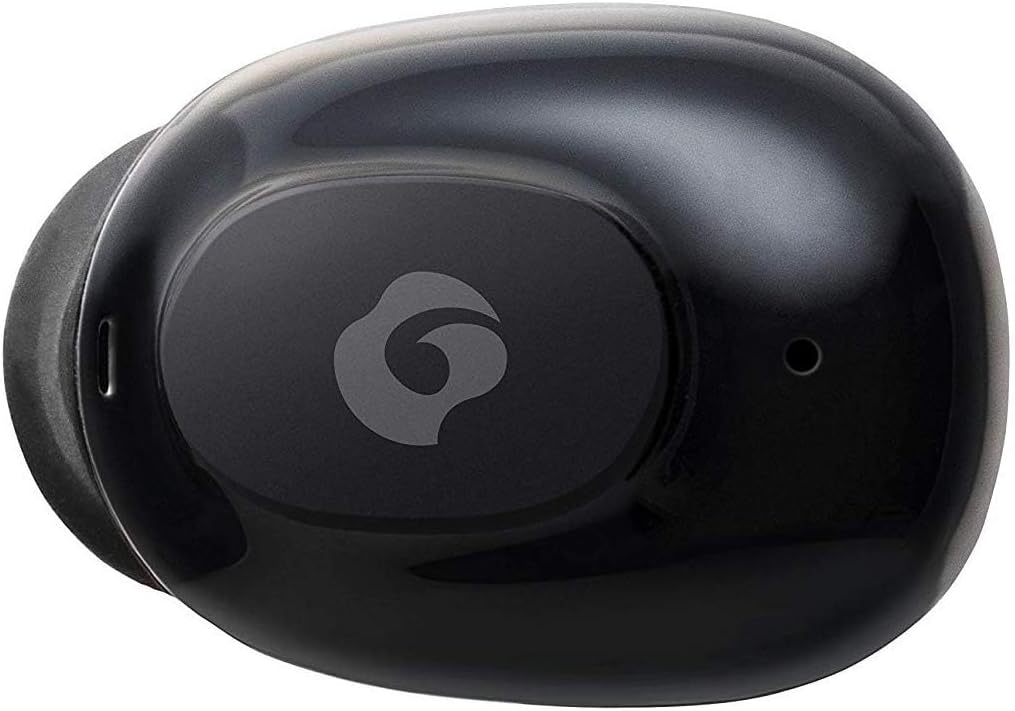
આકૃતિ 4.2: ક્લોઝ-અપ view of a single GLIDiC earbud, highlighting the multifunction button with the GLIDiC logo and the microphone opening.
ચાર્જિંગ કેસ ઘટકો
- ચાર્જિંગ પોર્ટ્સ: Internal contacts for earbuds, external port for case charging.
- કેસ એલઇડી સૂચક: Shows charging status of the case.
- ઢાંકણ: Protects earbuds and secures them during charging.
5. સેટઅપ
5.1 પ્રારંભિક ચાર્જિંગ
- Place both earbuds into the charging case. Ensure they are correctly seated, and the LED indicators on the earbuds illuminate.
- USB ચાર્જિંગ કેબલને કેસ પરના ચાર્જિંગ પોર્ટ સાથે કનેક્ટ કરો અને બીજા છેડાને USB પાવર સ્ત્રોત (દા.ત., કમ્પ્યુટર, વોલ એડેપ્ટર) માં પ્લગ કરો.
- The case LED indicator will show charging status. Allow approximately 2 hours for a full charge of both earbuds and the case.
- Once fully charged, disconnect the charging cable. The earbuds offer up to 60 days of standby time when stored in the fully charged case.
૩.૨ બ્લૂટૂથ ડિવાઇસ સાથે જોડી બનાવવી
- ખાતરી કરો કે ઇયરબડ્સ ચાર્જ થયા છે.
- Open the charging case. The earbuds will automatically enter pairing mode, and their LED indicators will flash.
- તમારા બ્લૂટૂથ-સક્ષમ ઉપકરણ (સ્માર્ટફોન, ટેબ્લેટ, વગેરે) પર, બ્લૂટૂથ સેટિંગ્સ પર જાઓ.
- માટે શોધો available devices. Select "GLIDiC TW-5000s" from the list.
- Once connected, the earbud LED indicators will stop flashing and may show a solid light or turn off, depending on the model. A voice prompt may also confirm the connection.
- જો જોડી બનાવવામાં નિષ્ફળ જાય, તો ઇયરબડ્સને કેસમાં પાછા મૂકો, ઢાંકણ બંધ કરો, થોડીવાર રાહ જુઓ અને પછી પગલાંઓનું પુનરાવર્તન કરો.
6. ઓપરેટિંગ સૂચનાઓ
6.1 પાવર ચાલુ/બંધ
- પાવર ચાલુ: Open the charging case, or press and hold the multifunction button on each earbud for approximately 3 seconds.
- પાવર બંધ: Place the earbuds back into the charging case and close the lid, or press and hold the multifunction button on each earbud for approximately 5 seconds.
6.2 સંગીત પ્લેબેક
- ચલાવો/થોભો: Press the multifunction button once on either earbud.
- આગળનો ટ્રેક: Double-press the multifunction button on the right earbud.
- પાછલો ટ્રેક: Double-press the multifunction button on the left earbud.
- અવાજ વધારો: Triple-press the multifunction button on the right earbud.
- અવાજ ધીમો: Triple-press the multifunction button on the left earbud.
૫.૨ કોલ મેનેજમેન્ટ
- જવાબ/કૉલ સમાપ્ત કરો: Press the multifunction button once on either earbud.
- કૉલ નકારો: Press and hold the multifunction button on either earbud for approximately 2 seconds.
Voice. Voice અવાજ સહાયક
- વ Voiceઇસ સહાયકને સક્રિય કરો: Press and hold the multifunction button on either earbud for approximately 2 seconds (when not on a call).
6.5 Multi-Communication Mode
The GLIDiC Sound Air TW-5000s features a multi-communication mode that allows select ambient sounds to be heard without compromising audio quality. This enhances user awareness and safety.
- Activate/Deactivate Multi-Communication Mode: Consult the specific instructions provided with your device, as activation methods can vary. Typically, this involves a specific press sequence on the multifunction button or an option within a companion app if available.
7. જાળવણી
7.1 સફાઈ
- ઇયરબડ્સ અને ચાર્જિંગ કેસને નરમ, સૂકા, લિન્ટ-ફ્રી કપડાથી સાફ કરો.
- ઘર્ષક ક્લીનર્સ, આલ્કોહોલ અથવા રાસાયણિક દ્રાવકોનો ઉપયોગ કરશો નહીં.
- Gently remove ear tips and clean them with mild soap and water if necessary. Ensure they are completely dry before reattaching.
- ઇયરબડ્સ અને કેસ બંને પર ચાર્જિંગ કોન્ટેક્ટ્સને કાળજીપૂર્વક સાફ કરવા માટે સૂકા કોટન સ્વેબનો ઉપયોગ કરો.
7.2 સંગ્રહ
- જ્યારે ઉપયોગમાં ન હોય, ત્યારે ઇયરબડ્સને સુરક્ષિત રાખવા અને ચાર્જ રહે તેની ખાતરી કરવા માટે તેમને ચાર્જિંગ કેસમાં રાખો.
- ઉપકરણને ઠંડી, સૂકી જગ્યાએ, સીધા સૂર્યપ્રકાશ અને અતિશય તાપમાનથી દૂર રાખો.
8. મુશ્કેલીનિવારણ
If you encounter issues with your GLIDiC Sound Air TW-5000s, refer to the following common problems and solutions:
| સમસ્યા | શક્ય ઉકેલ |
|---|---|
| ઇયરબડ્સ ચાલુ થતા નથી. | Ensure earbuds are charged. Place them in the charging case and connect the case to a power source. |
| ઇયરબડ્સ ડિવાઇસ સાથે જોડાતા નથી. |
|
| માત્ર એક ઇયરબડમાં અવાજ છે. |
|
| ચાર્જિંગ કેસ ચાર્જ થઈ રહ્યો નથી. |
|
| અવાજની ગુણવત્તા નબળી છે અથવા તૂટક તૂટક છે. |
|
9. સ્પષ્ટીકરણો
| લક્ષણ | વિગત |
|---|---|
| મોડેલનું નામ | TW-5000s |
| કનેક્ટિવિટી ટેકનોલોજી | વાયરલેસ (બ્લુટુથ) |
| બ્લૂટૂથ રેન્જ | 10 મીટર |
| આવર્તન શ્રેણી | ૨૦ હર્ટ્ઝ - ૨૦,૦૦૦ હર્ટ્ઝ |
| Battery Life (Carrying Case Standby) | 60 દિવસ સુધી |
| પાણી પ્રતિકાર સ્તર | પાણી પ્રતિરોધક (પરસેવો પ્રતિરોધક) |
| નિયંત્રણ પ્રકાર | Media Control, Touch, Voice |
| ખાસ લક્ષણો | Microphone Included, Noise Cancellation, Multi-communication mode |
| સામગ્રી | Plastic, TPE, and Silicone |
| Dimensions (Earbud) | 0.98 x 0.67 x 0.91 ઇંચ (અંદાજે) |
| વસ્તુનું વજન | ૧૨ ઔંસ (કુલ પેકેજ વજન) |
| યુપીસી | 811559030024 |
10. વોરંટી અને સપોર્ટ
GLIDiC products are designed for reliability and performance. For specific warranty details, please refer to the warranty card included with your purchase or visit the official GLIDiC website. If you require technical support or have questions not covered in this manual, please contact GLIDiC customer service through their official channels.
કૃપા કરીને વોરંટી દાવા માટે તમારી ખરીદીનો પુરાવો જાળવી રાખો.
Ask a question about this manual
Ask about setup, troubleshooting, compatibility, parts, safety, or missing instructions. Manuals+ will review the question and use this page’s manual context to help answer it.